
Listen to this Post
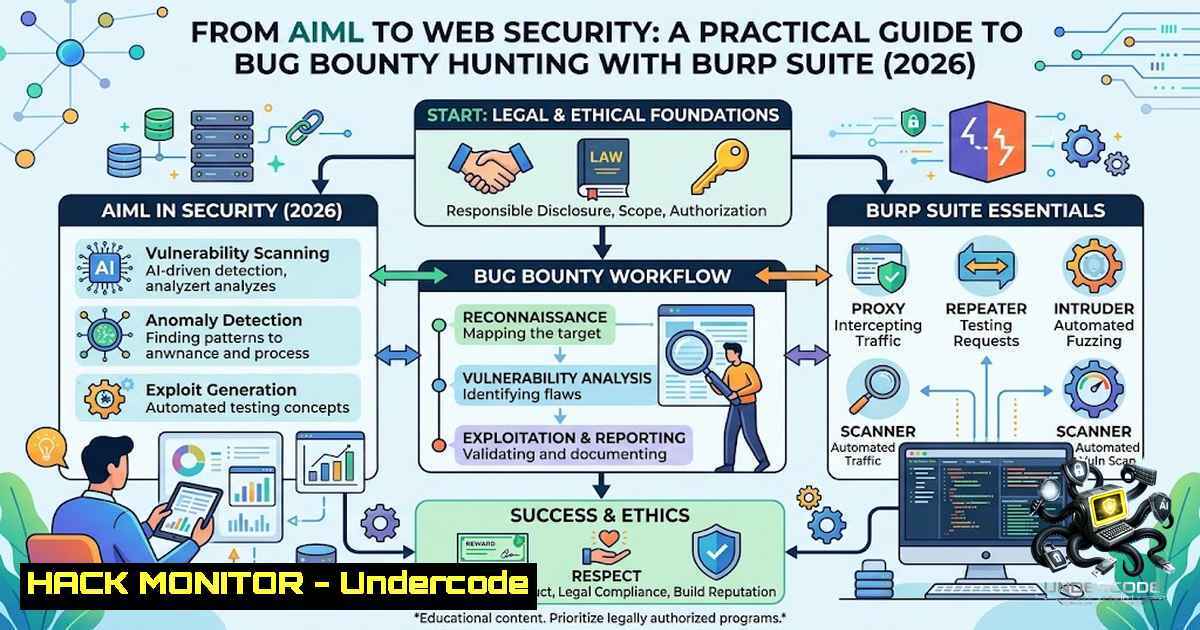
Introduction:
The convergence of Artificial Intelligence and Machine Learning (AIML) with cybersecurity is creating a new breed of professionals who understand both the power and the vulnerability of intelligent systems. As an AIML student, venturing into domains like web application security and bug bounty hunting is not just an exercise in upskilling—it is a strategic move to build a holistic technical perspective. The recent seminar on Bug Bounty & Burp Suite 101, conducted by Karthikeyan V, Founder & CEO of Cappricio Securities, highlights a growing trend: the need for technologists to look beyond their core domain. This article serves as a comprehensive guide for beginners and intermediate learners, covering the essentials of web application security, the bug bounty methodology, and a deep dive into using Burp Suite, the industry-standard tool for penetration testing.
Learning Objectives & Secrets:
- Objective 1: Master the HTTP Request-Response Cycle. Understand the fundamental building blocks of web communication. This includes dissecting request methods (GET, POST, PUT, DELETE), status codes (200, 404, 500), and critical headers like
Cookie,Authorization, andContent-Type. The secret tip is to use Burp Suite’s Proxy tab to intercept every request and response, turning your browser into a transparent debugging tool. -
Objective 2: Navigate the Bug Bounty Methodology. Learn the structured approach to vulnerability discovery, moving from passive reconnaissance to active exploitation. The secret tip is to focus on Business Logic Errors and Broken Access Control (BAC). OWASP has identified BAC as the top security risk for two consecutive years, making it a high-value target for bug bounty hunters.
-
Objective 3: Operate Burp Suite for Vulnerability Identification. Go beyond basic usage to leverage Burp’s advanced features like the Scanner, Repeater, and Intruder. The secret tip is to use the new AI-powered features in Burp Suite Professional (version 2025.2 and later) to filter out false positives and uncover complex vulnerabilities more efficiently.
You Should Know:
- Setting Up Your Web Security Lab: Installing and Configuring Burp Suite
Before you can start hunting, you need to set up your toolkit. Burp Suite is available in Community (free) and Professional (paid) editions. The 2026 releases have introduced significant improvements, including a new Discover tab, faster table navigation with a command palette, and smarter time-based SQL injection detection.
- Step 1: Download and Install. Download the installer for your operating system from the PortSwigger website. For Windows, run the
.exe; for Linux, use the `.sh` script; for macOS, use the `.dmg` file. - Step 2: Set up the Proxy. Burp Suite acts as a man-in-the-middle proxy. Configure your browser to use `127.0.0.1` on port `8080` as an HTTP/HTTPS proxy.
- Step 3: Install the CA Certificate. To intercept HTTPS traffic, you must install Burp’s CA certificate in your browser. Navigate to `http://burpsuite` in your browser while the proxy is active, download the certificate, and install it in your browser’s trusted root certificate store.
– Step 4: Explore the Interface. Familiarize yourself with the key tabs: Target (site map and scope), Proxy (intercept and history), Intruder (automated attacks), Repeater (manual request manipulation), and Scanner (automated vulnerability scanning).2. Mastering the Proxy: Intercepting and Modifying HTTP Traffic
The Proxy is the heart of Burp Suite. It allows you to pause, inspect, and modify every request and response between your browser and the web server. Understanding the HTTP request-response cycle is crucial here.
– Step 1: Intercept a Request. Ensure the “Intercept” button in the Proxy tab is set to “On”. Navigate to any website. The request will appear in the Proxy window.
– Step 2: Analyze the Request. Examine the request line (e.g., `GET /index.html HTTP/1.1), the headers (Host,User-Agent,Cookie), and the body (if any). Look for parameters that you can manipulate, such as `id=123` oruser=admin`. - Step 3: Modify and Forward. Change a parameter value (e.g., change `id=123` to
id=456) and click “Forward” to send the modified request to the server. Observe the response for changes. This is the foundation of testing for Insecure Direct Object References (IDOR) and other access control flaws. - Step 4: Use the History. All requests and responses are logged in the HTTP history. You can right-click on any item and send it to other tools like Repeater or Intruder for further analysis.
- Automated and Manual Scanning: Identifying OWASP Top 10 Vulnerabilities
Burp Scanner is a powerful Dynamic Application Security Testing (DAST) engine that can automatically crawl and audit web applications. In 2026, the scanner has become even smarter, with features like OAuth2 support for API scanning and enhanced false-positive reduction.
- Step 1: Define the Scope. In the Target tab, add the URL of your target application to the scope. This tells Burp which domains to scan and which to ignore.
- Step 2: Start a Scan. Right-click on a request in the Proxy history or a node in the site map and select “Scan”. Choose between a “Crawl and Audit” (full scan) or just an “Audit” (vulnerability check on known paths).
- Step 3: Review the Results. Burp Scanner will identify common vulnerabilities from the OWASP Top 10, including Broken Access Control, Injection (SQL, NoSQL, OS Command), Cryptographic Failures, and Security Misconfigurations.
- Step 4: Manual Verification. Never trust an automated scanner completely. Use Burp Repeater to manually verify each finding. For example, to test for SQL injection, send a request with a payload like `’ OR ‘1’=’1` to a parameter and observe the response for errors or unexpected behavior.
4. Advanced Exploitation: Using Intruder and Repeater
For more complex attacks, such as fuzzing for hidden parameters or brute-forcing login credentials, you need Burp Intruder. The 2026 versions have improved the user experience with a split request and response view.
- Step 1: Send to Intruder. Right-click on a request in the Proxy history and select “Send to Intruder”.
- Step 2: Configure Positions. In the Intruder tab, clear any default payload positions and add your own by highlighting a parameter value and clicking “Add §”. This defines where the automated payloads will be inserted.
- Step 3: Select a Payload Type. Go to the “Payloads” tab. Choose a payload type, such as a simple list of usernames or passwords, or a more complex brute-forcer. You can also use the Payload Processing rules to add prefixes, suffixes, or encode the payload.
- Step 4: Launch the Attack. Click “Start Attack”. Burp will send multiple requests, each with a different payload. Analyze the results by looking at the response length, status codes, and response times to identify successful injections or valid credentials.
5. API Security and Modern Authentication
Modern web applications are heavily API-driven. Burp Suite provides robust support for testing APIs, including the ability to import API definitions (OpenAPI/Swagger) and handle complex authentication flows like OAuth2.
- Step 1: Import API Definition. In the Target tab, you can import an OpenAPI/Swagger definition. This automatically populates the site map with all the API endpoints and their expected parameters.
- Step 2: Handle Authentication. Use Burp’s Session Handling Rules to manage complex authentication sequences. You can record a login sequence and have Burp automatically replay it to maintain a valid session during scans.
- Step 3: Test for API-Specific Flaws. Focus on vulnerabilities like Mass Assignment, Broken Object Level Authorization (BOLA), and Excessive Data Exposure. Use the Repeater to modify JSON payloads in API requests to test for these issues.
6. Leveraging Burp AI and Community Extensions
The 2026 editions of Burp Suite Professional have integrated AI to assist with vulnerability discovery and analysis. The Burp AI feature can help explain complex issues and even suggest potential exploits. Additionally, the BApp Store offers a vast ecosystem of extensions to enhance Burp’s capabilities.
- Step 1: Explore Burp AI (Professional Only). In the Scanner or Repeater, look for the AI-powered options. You can ask the AI to “explain” a vulnerability or provide context on a specific request.
- Step 2: Install a BApp Extension. Go to the “Extender” tab and click on “BApp Store”. Browse for useful extensions like Autorize (for access control testing), JWT Editor (for JSON Web Token manipulation), or Turbo Intruder (for high-speed fuzzing).
- Step 3: Write a BCheck. For custom vulnerability detection, you can write your own BChecks—simple scripts that run within Burp Scanner to detect specific patterns.
7. Reporting and Collaboration
The final step in any bug bounty or penetration test is reporting. Burp Suite Professional 2026 has introduced Organizer collections with secure sharing, making it easier to collaborate with team members.
- Step 1: Organize Your Findings. Use the Target > Site map to review all discovered issues. Right-click on an issue and select “Add to Organizer” to create a collection.
- Step 2: Generate a Report. Go to the Dashboard and select “Create report”. You can generate a professional report in HTML or XML format, including all the findings, evidence (requests/responses), and remediation advice.
- Step 3: Share Securely. Use the new collections feature to share your findings with team members or clients securely.
What Undercode Say:
- Key Takeaway 1: The bridge between AIML and cybersecurity is not just theoretical; it is a practical necessity. Understanding how web applications function at the HTTP level is a superpower for any AI/ML engineer, as it allows them to build more secure and resilient systems. The seminar by Cappricio Securities is a perfect example of how cross-domain learning can accelerate one’s career.
-
Key Takeaway 2: The 2026 landscape of web security is defined by the OWASP Top 10, with Broken Access Control and Security Misconfiguration being the most critical risks. Bug bounty hunters must move beyond automated scanners and develop a deep understanding of business logic to find high-impact vulnerabilities. Tools like Burp Suite are essential, but they are only as effective as the human using them. The integration of AI in Burp Suite is a game-changer, helping to reduce false positives and speed up the analysis. Furthermore, the open-source community, through platforms like GitHub, is continuously providing updated methodologies and tools, such as the “Full Bug Bounty Hunting Methodology 2026”. Aspiring security professionals should leverage these resources to stay ahead in the ever-evolving field of cybersecurity.
Prediction:
- +1: The integration of AI into penetration testing tools like Burp Suite will democratize cybersecurity, enabling a new generation of professionals from diverse backgrounds (like AIML) to contribute effectively to web security. This will lead to a more secure internet as vulnerabilities are found and patched faster.
- +1: The demand for professionals who can bridge the gap between development, AI, and security will skyrocket. As AI models become more integrated into web applications, the need for security experts who understand both domains will be critical.
- -1: The sophistication of cyberattacks will also increase, with attackers leveraging AI to automate vulnerability discovery and exploit chains. This will create an arms race between defenders and attackers, requiring constant upskilling and adaptation.
- +1: The bug bounty ecosystem will continue to grow, with more companies recognizing the value of crowdsourced security. Platforms like HackerOne and BugCrowd will see increased participation, leading to higher rewards for skilled hunters.
- -1: The complexity of modern web applications, especially those with microservices and API-driven architectures, will introduce new, unforeseen vulnerabilities. Security professionals will need to constantly update their knowledge of emerging threats like Server-Side Request Forgery (SSRF) and supply chain attacks.
▶️ Related Video (74% Match):
https://www.youtube.com/watch?v=1F0mEkfxlaM
🎯Let’s Practice For Free:
🎓 Live Courses & Certifications:
Join Undercode Academy for Verified Certifications
🚀 Request a Custom Project:
Secure, high-velocity infrastructure and disruptive technological engineering. Contact our engineering team for high-tier development and proprietary systems:
[email protected]
💎 Smart Architecture | 🛡️ Secure by Design | ⭐ Trusted by Thousands
IT/Security Reporter URL:
Reported By: https://lnkd.in/p/eWmVWu44 – Hackers Feeds
Extra Hub: Undercode MoN
Basic Verification: Pass ✅


