
Listen to this Post
Introduction
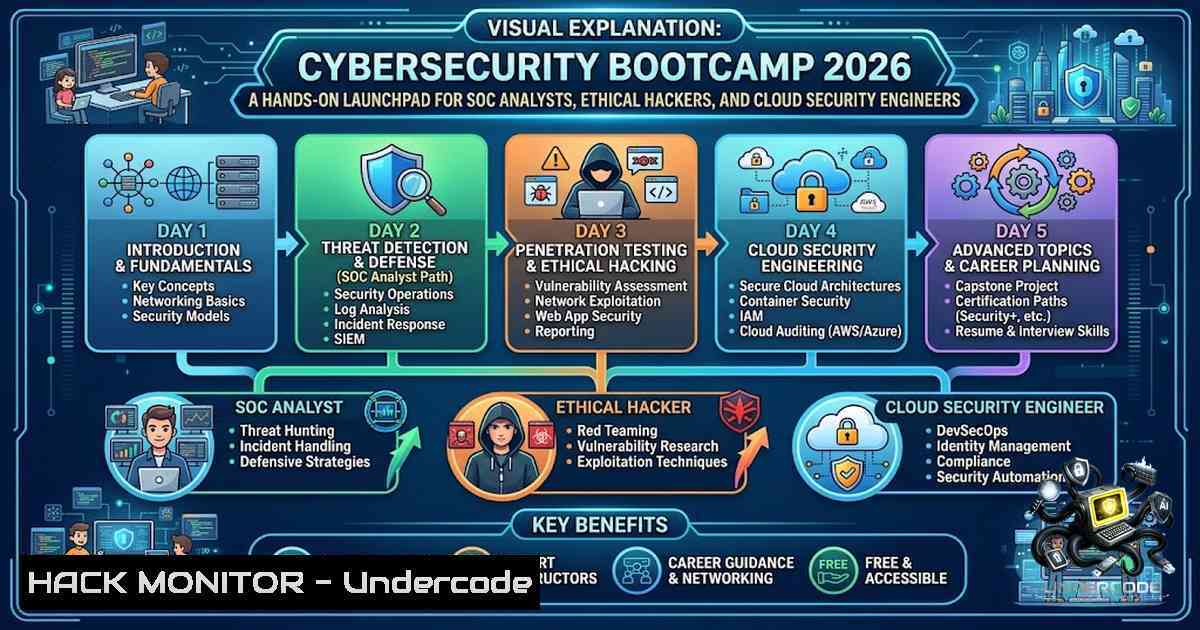
The cybersecurity skills gap continues to widen, with over 700,000 unfilled security positions in the United States alone and organisations across healthcare, finance, government, and retail actively hunting for professionals who can detect threats, secure cloud environments, and respond to incidents. The FREE 5‑Day Cybersecurity Bootcamp (September 16–20, 2026, 100% live online) addresses this urgency by compressing foundational SOC, ethical hacking, SIEM, and cloud security training into a single week. Designed around current U.S. hiring trends, the programme introduces practical security monitoring, vulnerability assessment, incident response, and AI‑powered security workflows—giving students, IT professionals, and career switchers a tangible on‑ramp to roles like SOC Analyst, Cybersecurity Analyst, and Security Engineer.
Learning Objectives & Secrets
- Objective 1 – Master Core Defensive Architectures – Grasp the CIA Triad, TCP/IP, DNS, HTTP/HTTPS, and foundational Linux/Windows security controls to speak the language of every security operations centre.
- Objective 2 Secret Tip – Weaponise SIEM Queries Early – Instead of passively watching dashboards, write your own Splunk Processing Language (SPL) and Kusto Query Language (KQL) searches from day one. For example, hunt for failed logins with `index=windows EventCode=4625 | stats count by Account_Name, Source_Network_Address | where count > 5` to spot brute‑force patterns before they escalate.
- Objective 3 Secret Tip – Combine Vulnerability Scanners with Manual Verification – Running `nmap -sV –script vuln 192.168.1.0/24 -oN vuln_scan.txt` gives you a raw list, but the real skill is correlating those findings with MITRE ATT&CK techniques and business context—turn every CVE into a prioritised remediation story.
You Should Know
- SIEM Deep Dive – Splunk & Microsoft Sentinel in Action
A Security Information and Event Management (SIEM) platform is the nerve centre of any SOC. This bootcamp dedicates a full day to Splunk and Microsoft Sentinel, moving beyond theory into live log analysis and incident detection.
Step‑by‑Step Guide – Detecting Lateral Movement with Splunk:
- Ingest Windows Event Logs – Ensure your Splunk forwarder sends Security.evtx to the indexer.
- Write a Hunting Search – Use `index=windows EventCode=4624 OR EventCode=4625 | stats count by Account_Name, Workstation_Name, Source_Network_Address | where count > 10` to isolate accounts with excessive authentication attempts.
- Enrich with Threat Intelligence – Run `index=risk | lookup high_risk_user.csv user as user OUTPUT hru_status | search hru_status=”active”` to flag known risky accounts.
- Build an Alert – Save the search as a real‑time alert with a threshold of
5 failures in 5 minutes.
For Microsoft Sentinel, create a Log Analytics workspace, enable Sentinel, connect the Azure Activity data connector, and write an analytics rule using KQL: SecurityEvent | where EventID == 4625 | summarize Count = count() by Account, SourceIP | where Count > 5. This rule triggers an incident automatically, demonstrating the power of cloud‑native SIEM.
- Ethical Hacking & Vulnerability Assessment – Nmap, Nessus, and OWASP Top 10
Day two shifts to the attacker’s mindset, covering Nmap for network discovery, Nessus for deep vulnerability scanning, and the OWASP Top 10 for web application security.
Step‑by‑Step Guide – Full Vulnerability Lifecycle:
- Network Discovery – Run `nmap -sn 192.168.1.0/24` to ping‑sweep the subnet and identify live hosts.
- Service Enumeration – Execute `nmap -sC -sV -p- -oA labscan 192.168.1.100` to perform a default script scan (
-sC), version detection (-sV), and scan all 65,535 ports (-p-), saving output in three formats. - Vulnerability Scripts – Launch `nmap -sV –script vuln 192.168.1.100 -oN nmap_vuln_scan.txt` to run the built‑in vulnerability detection scripts.
- Enterprise‑Grade Scanning with Nessus – After registering your installation (
nessuscli fetch --register), use `nessuscli import` to load a scan policy, then launch a Basic Network Scan via the web UI or REST API. - Web Application Testing – Configure Burp Suite as a proxy (listening on
127.0.0.1:8080), install FoxyProxy in your browser, intercept a login request, and modify parameters to test for IDOR (e.g., change `id=1` to `id=2` in/profile?id=1). Map every finding to the OWASP Top 10 categories—this transforms raw scan data into a structured penetration test report. -
Cloud Security Hardening – AWS & Azure CLI Commands
With organisations rapidly migrating to the cloud, securing AWS and Azure environments is non‑negotiable. Day four covers AWS Security, Azure Security, Identity & Access Management (IAM), and Multi‑Factor Authentication (MFA).
Step‑by‑Step Guide – Hardening an AWS Account:
- Enable MFA on the Root Account – Use `aws iam get-account-summary` to verify MFA status, then enforce it via an IAM policy.
- Activate GuardDuty – Run `aws guardduty create-detector –enable` to start continuous threat detection.
- Turn on CloudTrail – Execute `aws cloudtrail create-trail –1ame my-trail –s3-bucket-1ame my-bucket –is-multi-region-trail` to capture all API activity for audit.
- Enforce S3 Encryption – Apply `aws s3api put-bucket-encryption –bucket my-bucket –server-side-encryption-configuration ‘{“Rules”:[{“ApplyServerSideEncryptionByDefault”:{“SSEAlgorithm”:”AES256″}}]}’` to ensure data at rest is protected.
- Block Public S3 Access – Use
aws s3api put-public-access-block --bucket my-bucket --public-access-block-configuration BlockPublicAcls=true,IgnorePublicAcls=true,BlockPublicPolicy=true,RestrictPublicBuckets=true.
For Azure, install the Azure CLI and run `az network manager security-admin-config update –configuration-1ame “myConfig” –1etwork-manager-1ame “TestNetworkManager” –resource-group “rg1” –description “Hardened policy”` to enforce security admin rules across your virtual networks. Combine this with `Set-AzVMSecurityProfile -VM $VMConfig -SecurityType Standard` to mandate secure VM configurations.
4. Incident Response Lifecycle & Malware Analysis Basics
When a breach occurs, speed and method matter. The bootcamp teaches the Incident Response lifecycle—Preparation, Identification, Containment, Eradication, Recovery, and Lessons Learned—alongside malware analysis fundamentals.
Step‑by‑Step Guide – Triage a Suspicious Process:
- Isolate the Host – Use cloud security groups or on‑premises firewall rules to block outbound traffic from the affected system.
- Capture Memory & Disk – On Windows, use `dumpcap -i
-w capture.pcap` to record network traffic; on Linux, run tshark -i eth0 -w suspect.pcap. - Analyse Network Connections – Open the pcap in Wireshark and apply display filters like `ip.addr == 192.168.1.100` or `tcp.port == 4444` to spot command‑and‑control (C2) traffic.
- Check File Hashes – Compute the MD5/SHA‑256 of suspicious executables and cross‑reference with VirusTotal.
- Contain – Terminate the malicious process (
taskkill /PID <pid> /Fon Windows; `kill -9` on Linux) and remove persistence mechanisms (scheduled tasks, registry run keys, systemd services). -
AI for Cybersecurity – ChatGPT in Security Operations
Day five introduces AI‑powered security workflows, showing how large language models can accelerate log analysis, report generation, and even playbook creation.
Step‑by‑Step Guide – Using ChatGPT for SOC Triage:
- Paste a Raw Log Entry – Ask the model to “parse this Windows Event Log 4625 and extract the source IP, account name, and timestamp.”
- Generate a Splunk Query – “Write an SPL search that finds all failed logins from a specific source IP in the last 24 hours.”
- Draft an Incident Summary – Provide the model with your findings and request a one‑page executive summary for management, including impact assessment and recommended next steps.
- Always Validate – Treat AI output as a draft; verify every command and recommendation against your environment’s policies and known‑good baselines.
-
Career Roadmap – Resume Building, LinkedIn Optimisation & Interview Prep
Technical skills alone don’t land jobs. The bootcamp closes with resume building, LinkedIn optimisation, and mock interview preparation, tailored to U.S. hiring trends. Participants receive a course completion certificate and placement assistance, bridging the gap between training and employment.
What Undercode Say
- Key Takeaway 1 – This bootcamp is not a passive lecture series; it is a live, instructor‑led experience with hands‑on labs, real‑world attack demonstrations, and direct exposure to the tools (Splunk, Sentinel, Nmap, Nessus, Burp Suite, Wireshark) that employers demand. The five‑day structure forces rapid immersion, which is ideal for beginners and career changers who need to build confidence quickly.
- Key Takeaway 2 – The inclusion of AI for cybersecurity and ChatGPT for Security Operations is a forward‑looking differentiator. Security teams are already experimenting with LLMs for log summarisation and playbook generation; learning to integrate these tools ethically and effectively gives attendees a competitive edge in a crowded job market.
Prediction
- +1 – By Q4 2026, bootcamps like this will become the primary feeder for entry‑level SOC roles, as employers increasingly value hands‑on lab experience over theoretical certifications alone.
- +1 – The convergence of SIEM, cloud security, and AI in a single short‑course format will inspire similar free programmes from major cloud providers, democratising access to cybersecurity training across the U.S.
- -1 – The rapid pace (five days for five domains) risks superficial understanding; attendees must commit to self‑study and lab repetition post‑bootcamp to achieve job‑ready proficiency.
- -1 – Without a follow‑up mentorship or apprenticeship track, many participants may struggle to translate bootcamp projects into compelling interview stories—organisers should consider adding a 30‑day project sprint.
▶️ Related Video (74% Match):
🎯Let’s Practice For Free:
🎓 Live Courses & Certifications:
Join Undercode Academy for Verified Certifications
🚀 Request a Custom Project:
Secure, high-velocity infrastructure and disruptive technological engineering. Contact our engineering team for high-tier development and proprietary systems:
[email protected]
💎 Smart Architecture | 🛡️ Secure by Design | ⭐ Trusted by Thousands
IT/Security Reporter URL:
Reported By: https://lnkd.in/p/eT2zCCkD – Hackers Feeds
Extra Hub: Undercode MoN
Basic Verification: Pass ✅


