Listen to this Post
Introduction:
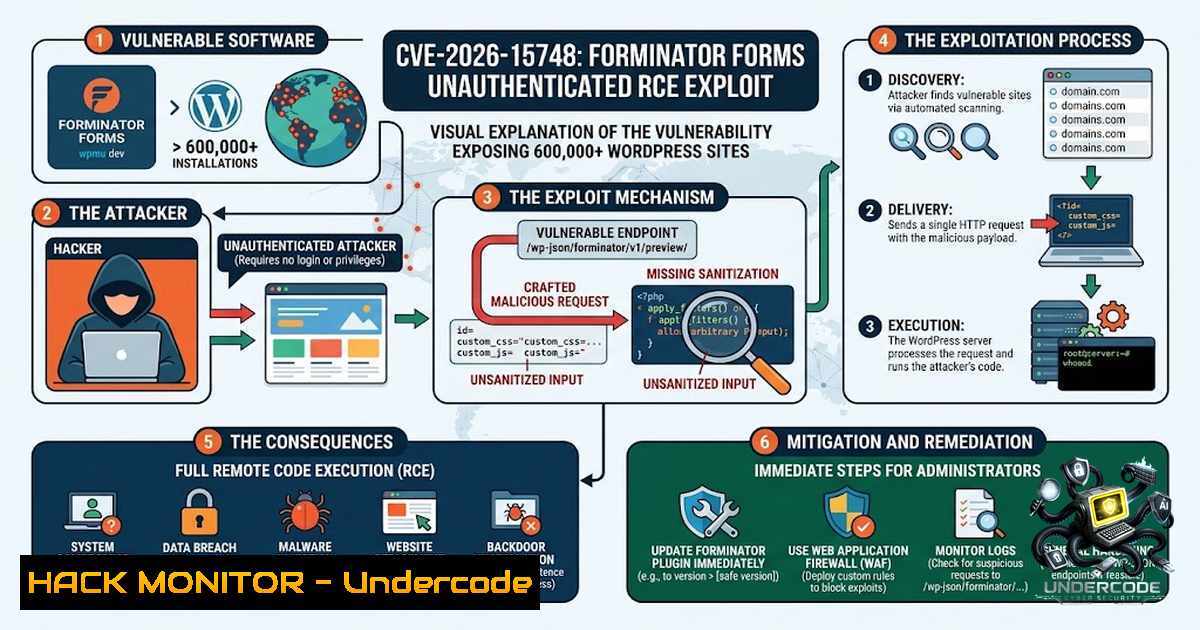
A critical vulnerability in the Forminator Forms plugin for WordPress (CVE-2026-15748) is actively threatening over 600,000 websites with unauthenticated remote code execution (RCE). The flaw, carrying a CVSS base score of 9.8 (Critical), resides in the `handle_file_upload` function, where insufficient file type validation allows attackers to bypass security controls and upload executable PHP files. Combined with a custom file storage configuration that removes default PHP execution protections, this vulnerability enables complete site takeover through a single crafted HTTP request.
Learning Objectives & Secrets:
- Objective 1: Understand the Attack Chain – Grasp how the combination of a blocklist bypass, forged Select field injection, and unprotected custom upload directories enables unauthenticated RCE.
-
Objective 2: Master Detection & Exploitation Testing (Secret Tip) – Learn to identify vulnerable plugin versions and test for exposure using non-destructive payloads, such as benign PHP info files, to validate security posture without causing damage.
-
Objective 3: Implement Hardening & Mitigation (Secret Tip) – Go beyond patching by deploying layered defenses: configure web server execution restrictions, implement WAF rules to block malicious MIME types, and audit upload directories for signs of prior compromise.
You Should Know:
1. Technical Deep Dive: How the Bypass Works
The vulnerability is not a simple file upload flaw—it is a multi-step chain of weaknesses that collectively enable unauthenticated RCE. The root cause lies in the `handle_file_upload` function’s dangerous-extension blocklist, which performs exact-key matching. Attackers bypass this by supplying pipe-alternative MIME type keys that the blocklist fails to catch. Simultaneously, the public form submission handler blindly trusts attacker-controlled upload field configuration injected via a forged Select field value. In default configurations, uploaded files land in a directory protected by an `.htaccess` file that prevents PHP execution. However, if a Custom File Upload Storage root has been configured, that protection is not applied—the `.htaccess` file is created “only when it is first needed, during a frontend request where the WordPress helper responsible for writing the `.htaccess` file is not loaded”. On such sites, simply requesting the uploaded file executes the attacker-controlled PHP code.
Step‑by‑step guide – Detection & Validation:
- Identify the plugin version – Check your WordPress installation: navigate to Plugins → Installed Plugins, locate Forminator Forms, and note the version number. Alternatively, use WP-CLI:
`wp plugin list –slug=forminator –field=version`
Versions ≤ 1.56.1 are vulnerable.
- Check for custom upload directory configuration – In the WordPress admin, go to Forminator → Settings → File Upload and verify whether a Custom File Upload Storage root has been set. If configured, the default `.htaccess` protection is absent.
-
Audit for signs of exploitation – Scan upload directories for unexpected `.php` files:
`find /path/to/wordpress/wp-content/uploads/forminator/ -1ame “.php” -type f`
Also check web server access logs for suspicious POST requests to form endpoints followed by GET requests to uploaded files.
- Test safely (authorized environments only) – Use a proof-of-concept script that uploads a benign PHP file (e.g.,
<?php phpinfo(); ?>) to confirm exposure without compromising the site. Never test on production systems without explicit written authorization.
2. Exploitation Prerequisites & Attack Surface
Successful exploitation requires that the targeted site has a form containing both a File Upload field and a Select field. This configuration is common across the plugin’s large install base, making the threat broadly relevant. The attack vector is network-based, requires no authentication or user interaction, and has no scope change—meaning a successful exploit compromises the entire WordPress instance. The impact is catastrophic: attackers can upload webshells, achieve remote code execution, and seize full control of the affected site.
Step‑by‑step guide – Attack Surface Reduction:
- Inventory all forms – List every Forminator form on your site:
`SELECT id, title FROM wp_forminator_forms WHERE status = ‘publish’;`
(Adjust table prefix as needed.)
- Identify risky forms – For each form, check whether it contains both a File Upload field and a Select field. If so, document it as a high-risk candidate.
-
Disable or restrict risky forms – If immediate patching is not possible, disable these forms or restrict them to authenticated users only via WordPress capabilities or a membership plugin.
-
Implement web application firewall (WAF) rules – Block requests containing suspicious MIME types or file extensions in upload fields. For example, in ModSecurity, add:
`SecRule FILES_TMP_CONTENT “@rx \.php” “id:100001,phase:2,deny,status:403,msg:’PHP upload blocked'”`
In Cloudflare, create a WAF rule to block file uploads with .php, .phtml, or similar extensions.
3. Patch Management & Version Remediation
The vulnerability was patched in version 1.56.2, released on July 31, 2026. All versions up to and including 1.56.1 are affected. Site administrators must treat this update as urgent. The plugin developer, WPMU DEV, has addressed the file type validation flaw in the patched release.
Step‑by‑step guide – Patching & Verification:
- Backup your site – Before any update, perform a full backup of files and database:
`wp db export backup.sql`
`tar -czf wp-backup.tar.gz /path/to/wordpress`
- Update the plugin – In the WordPress admin, go to Dashboard → Updates and update Forminator Forms to version 1.56.2 or later. Alternatively, use WP-CLI:
`wp plugin update forminator –version=1.56.2`
- Verify the update – Confirm the new version is active:
`wp plugin list –slug=forminator –field=version`
Expected output: `1.56.2` or higher.
- Post-patch audit – After updating, audit server logs and upload directories for signs of prior exploitation. Rotate all credentials and secrets if compromise is suspected.
4. Web Server Hardening & Execution Prevention
Even after patching, defense-in-depth requires additional layers of protection. Web server configuration can prevent PHP execution in upload directories, mitigating the impact of any future file upload vulnerabilities.
Step‑by‑step guide – Apache (.htaccess) Hardening:
- Navigate to the upload directory – Typically
/wp-content/uploads/forminator/. If a custom storage root is used, locate that directory. -
Create or edit `.htaccess` – Add the following rules to block PHP execution:
<Files .php>
Order Deny,Allow
Deny from all
</Files>
<Files .phtml>
Order Deny,Allow
Deny from all
</Files>
-
Test the configuration – Attempt to request a PHP file in the directory via browser or
curl. A `403 Forbidden` response indicates successful blocking.
Step‑by‑step guide – Nginx Hardening:
- Edit the server block configuration – Add a location block for the upload directory:
location ~ /wp-content/uploads/forminator/..(php|phtml)$ {
return 403;
}
2. Reload Nginx – Apply the changes:
`sudo nginx -t && sudo systemctl reload nginx`
- Verify – Test by requesting a PHP file in the directory; a `403` response confirms the rule is active.
5. Monitoring, Logging & Incident Response
Proactive monitoring is essential to detect exploitation attempts and respond swiftly. Key indicators include unusual POST requests to form endpoints, unexpected PHP files in upload directories, and outbound connections from the web server to external IPs.
Step‑by‑step guide – Log Analysis & Monitoring Setup:
- Enable detailed WordPress logging – Add to
wp-config.php:define('WP_DEBUG', true); define('WP_DEBUG_LOG', true); define('WP_DEBUG_DISPLAY', false);
Logs are written to `/wp-content/debug.log`.
- Monitor web server access logs – Use `grep` to filter for form submission POSTs followed by file requests:
`grep “POST /wp-json/forminator/” /var/log/nginx/access.log | awk ‘{print $1, $7}’` - Set up file integrity monitoring (FIM) – Use a tool like Tripwire or AIDE to detect new or modified `.php` files in upload directories:
`aide –check` (after initializing the database)
- Implement a Web Application Firewall (WAF) – Deploy a WAF (e.g., Wordfence, Cloudflare, or ModSecurity) to block malicious upload attempts in real time. Configure rules to detect and block suspicious MIME types and file extensions.
-
Establish an incident response plan – Define clear steps for containment, eradication, and recovery in the event of a confirmed breach. Include procedures for taking the site offline, restoring from a clean backup, and notifying stakeholders.
What Undercode Say:
-
Key Takeaway 1: CVE-2026-15748 is a critical unauthenticated RCE vulnerability affecting Forminator Forms versions ≤ 1.56.1, with a CVSS score of 9.8. The flaw combines a blocklist bypass via pipe-alternative MIME keys with a trusted attacker-controlled upload field configuration, enabling arbitrary PHP file uploads.
-
Key Takeaway 2: Default configurations provide partial protection via `.htaccess` in the upload directory, but this safeguard is not applied when a Custom File Upload Storage root is configured. On such sites, requesting the uploaded file executes the malicious PHP code, leading to complete site compromise.
Analysis: This vulnerability underscores a recurring theme in WordPress security: the danger of trusting user-supplied input in file upload functionalities. The bypass technique—leveraging pipe-alternative MIME type keys to defeat exact-key blocklists—is a subtle but powerful attack vector that demonstrates how seemingly minor validation gaps can have catastrophic consequences. The conditional nature of the default `.htaccess` protection adds another layer of risk: administrators who customize file storage locations may inadvertently disable critical security controls without realizing it. With over 600,000 active installations, the potential attack surface is massive. Organizations must prioritize patching to version 1.56.2, but should also implement defense-in-depth measures—WAF rules, web server hardening, and continuous monitoring—to mitigate the risk of similar flaws in the future. The disclosure of this vulnerability, alongside the separate authentication bypass in User Profile Builder (CVE-2026-15826), highlights the importance of maintaining an aggressive patch management cadence for all WordPress plugins.
Prediction:
- -1 The widespread adoption of Forminator Forms (600,000+ active installations) means that a significant portion of sites will remain unpatched for weeks or months, creating a prolonged window of exploitation risk.
-
-1 Public proof-of-concept exploits are already circulating, and automated scanning tools will rapidly weaponize this vulnerability, leading to a surge in mass exploitation attempts against WordPress sites.
-
-1 The conditional nature of the default protection (custom storage roots removing `.htaccess` safeguards) means many administrators are unknowingly exposed, as they may have configured custom upload paths without understanding the security implications.
-
+1 This incident will drive increased adoption of Web Application Firewalls (WAFs) and file integrity monitoring (FIM) solutions among WordPress site owners, improving overall security hygiene.
-
+1 The vulnerability’s detailed technical disclosure by Wordfence will serve as a valuable educational resource for the security community, raising awareness about the dangers of exact-key blocklists and the importance of layered validation in file upload functionalities.
-
-1 Attackers who successfully exploit this vulnerability can deploy webshells, install backdoors, and pivot to other sites on shared hosting environments, amplifying the damage beyond individual site compromise.
-
+1 The plugin developer’s swift response—patching within weeks of discovery—demonstrates the effectiveness of coordinated vulnerability disclosure and responsible security practices.
-
-1 Small businesses and individual site owners with limited security resources are disproportionately at risk, as they may lack the technical expertise to detect or remediate the flaw promptly.
▶️ Related Video (88% Match):
https://www.youtube.com/watch?v=8bgo-kkDK4E
🎯Let’s Practice For Free:
🎓 Live Courses & Certifications:
Join Undercode Academy for Verified Certifications
🚀 Request a Custom Project:
Secure, high-velocity infrastructure and disruptive technological engineering. Contact our engineering team for high-tier development and proprietary systems:
[email protected]
💎 Smart Architecture | 🛡️ Secure by Design | ⭐ Trusted by Thousands
IT/Security Reporter URL:
Reported By: https://lnkd.in/p/eHtRgaFc – Hackers Feeds
Extra Hub: Undercode MoN
Basic Verification: Pass ✅


