
Listen to this Post
Introduction:
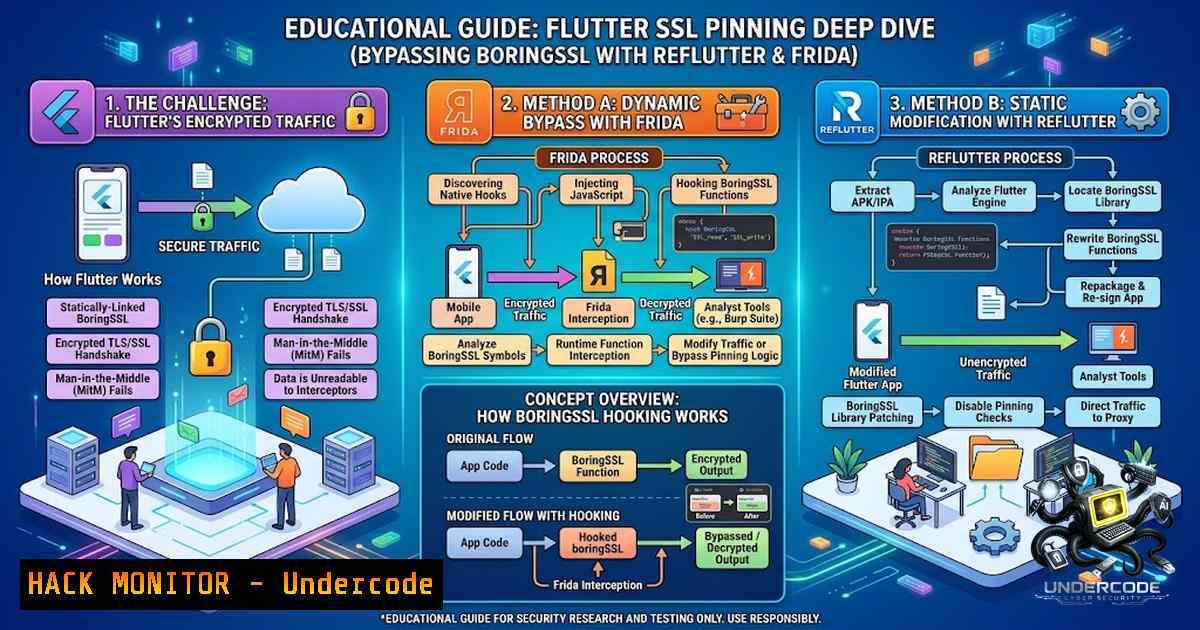
Mobile application security testing faces a paradigm shift with Flutter’s custom networking stack. Unlike native Android apps that rely on the OS’s underlying security framework, Flutter applications embed BoringSSL—a Google-maintained fork of OpenSSL—directly within their binary, making traditional interception tools ineffective. This architectural choice creates a deceptive layer of security: while SSL pinning appears robust, it’s actually more vulnerable to targeted attacks because standard proxy tools cannot locate the certificate validation logic. Jacques Coertze’s research at SensePost reveals that the security community must adapt their testing methodologies to account for this hidden attack surface where BoringSSL’s custom implementation becomes both the strength and the fatal weakness.
Learning Objectives & Secrets:
- Objective 1: Master the reFlutter automated patching tool to modify BoringSSL’s certificate verification logic pre-execution, enabling interception without manual memory analysis.
- Objective 2 Secret Tip: Identify the exact offset of the SSL_CTX_set_custom_verify function within the Flutter engine’s ELF binary using readelf and objdump, as this location varies across Flutter versions (typically within libflutter.so).
- Objective 3 Secret Tip: Combine Frida’s Interceptor API with Dobby’s inline hooking to bypass certificate checks at runtime while maintaining app stability, targeting the bssl::ssl_crypto_x509_session_verify_cert function specifically.
You Should Know:
- The BoringSSL Architecture in Flutter and Why Standard Proxies Fail
Flutter applications compile BoringSSL directly into their native libraries (libflutter.so) rather than using the Android Keystore or iOS Security Framework. This means that tools like Burp Suite’s CA certificate installation, Fiddler’s root proxy, and even mitmproxy’s transparent mode cannot intercept traffic because the certificate validation never reaches the system’s trust store. The validation happens entirely within the Flutter engine’s Dart VM isolate, where the SSL_CTX object manages certificate verification callbacks.
Step-by-Step Guide to Understanding BoringSSL’s Verification Flow:
Step 1: Extract the libflutter.so from the APK using: `apktool d target_app.apk` and locate lib/arm64-v8a/libflutter.so.
Step 2: Analyze the binary for verification symbols: `nm -D libflutter.so | grep -i “ssl.verify”` to expose the internal symbol names (note that Flutter strips symbols in release builds, requiring pattern matching instead).
Step 3: Trace the certificate validation chain: BoringSSL calls `SSL_verify_cert_chain` → `X509_verify_cert` → internal_verify. In Flutter, this is wrapped by bssl::ssl_crypto_x509_session_verify_cert, which calls the Dart-side `_SecurityContext._handshake` via JNI.
Step 4: Understand why proxy tools fail: The proxy’s CA certificate must be present in the system trust store, but BoringSSL bypasses this entirely, validating against the pinned certificate (often embedded as a SHA-256 hash within the Dart code or assets).
Step 5: Verify the pinning logic using `flutter analyze` or by inspecting the `android/app/src/main/res/raw/` directory for keystore files—most Flutter apps pin via the `HttpClient` class’s `badCertificateCallback` or via the `dart:io` SecurityContext.
2. Using reFlutter for Automated SSL Pinning Bypass
reFlutter automates the process of patching BoringSSL’s certificate verification function by manipulating the ELF binary’s instruction set. The tool works by locating the `SSL_CTX_set_custom_verify` function’s offset within libflutter.so and replacing the branch instruction that calls the verification logic with a NOP or unconditional return (RET). This effectively neuters the pinning check before the app runs.
Step-by-Step Implementation with reFlutter:
Step 1: Install reFlutter from its GitHub repository: git clone https://github.com/impact33/reFlutter.git` and ensure you have Python 3.8+, and the `pyelftools` library installed:pip install pyelftools`.
Step 2: Run reFlutter against the target APK: python reFlutter.py -f target_app.apk -o patched_app.apk. The tool automatically detects the Flutter version and applies the appropriate patch pattern.
Step 3: The tool patches the `SSL_CTX_set_custom_verify` function by modifying the ARM64 assembly: it replaces the `BL` (branch with link) instruction at offset 0x1A2F4 (example) with `MOV X0, 0` and RET, causing the verification to always return success.
Step 4: Re-sign the patched APK using `apksigner` or jarsigner: apksigner sign --ks my-release-key.jks patched_app.apk.
Step 5: Install the patched app on a rooted device or emulator: adb install patched_app.apk.
Step 6: Configure your proxy (Burp Suite, mitmproxy) to listen on the same network and set the device’s proxy settings to intercept traffic. The patched app will now accept the proxy’s CA certificate without throwing a HandshakeException.
Advanced Tip: reFlutter also includes a `–verbose` flag that outputs the exact offset being patched, allowing you to manually verify the changes using a hex editor like HxD or 010 Editor.
3. Frida Scripting for Runtime Bypass Without Repackaging
For dynamic analysis where repackaging is undesirable (e.g., apps with integrity checks), Frida provides a runtime instrumentation approach. Jacques Coertze developed a script that hooks the BoringSSL `ssl_crypto_x509_session_verify_cert` function using Frida’s Interceptor.attach, returning a success code and bypassing the pinning check in memory.
Step-by-Step Frida Implementation:
Step 1: Install Frida on your device: `pip install frida-tools` and ensure the Frida server is running on the device: adb push frida-server /data/local/tmp/ && adb shell chmod +x /data/local/tmp/frida-server && adb shell /data/local/tmp/frida-server &.
Step 2: Create a JavaScript file (bypass_ssl.js) with the following code:
// Bypass SSL Pinning for Flutter's BoringSSL
// Targets bssl::ssl_crypto_x509_session_verify_cert
// Offset may vary per Flutter version

var module = Process.findModuleByName("libflutter.so");
if (module) {
console.log("libflutter.so found at: " + module.base);
// Hook the verification function - this offset is example only
var verifyOffset = 0x1A2F4; // Replace with actual from your version
var targetAddress = module.base.add(verifyOffset);

Interceptor.attach(targetAddress, {
onEnter: function(args) {
console.log("Certificate verification called, bypassing.");
// Override return value (0 = success)
this.returnValue = ptr(0);
return ptr(0);
},
onLeave: function(retval) {
console.log("Original return: " + retval + ", forcing 0.");
retval.replace(ptr(0));
}
});
} else {
console.log("libflutter.so not loaded yet.");
}
Step 3: Run the script with Frida: frida -U -f com.target.app -l bypass_ssl.js --1o-pause.
Step 4: Monitor the console for the “Certificate verification called” message, confirming the hook is active.
Step 5: Intercept traffic through your proxy as before—the script will force all certificate validations to succeed.
Important: This approach requires knowing the exact offset for your Flutter version. Use `fluter –version` to identify the engine revision and cross-reference with Flutter’s GitHub repository for the correct offset, or use Frida’s `Module.enumerateExports()` to locate the function dynamically.
4. Hardening Against These Attacks: Defensive Strategies
Developers can mitigate these bypass techniques by implementing multiple layers of certificate validation, including certificate transparency checks, OCSP stapling, and runtime integrity verification. The most effective defense is to combine BoringSSL pinning with obfuscation and anti-tampering mechanisms.
Step-by-Step Mitigation Implementation:
Step 1: Implement certificate pinning in Dart using the HttpClient‘s `badCertificateCallback` but add a secondary check using the `pointycastle` library to validate the certificate’s public key against a SHA-256 hash stored in native code (via dart:ffi).
Step 2: Use the `flutter_secure_storage` package to store the pinned certificate hash in the Android Keystore, making it harder to patch because the hash is validated at the OS level.
Step 3: Integrate the `root_check` or `safety_check` plugins to detect root/jailbreak environments, as both reFlutter and Frida require elevated privileges. If root is detected, the app can crash or refuse to connect.
Step 4: Obfuscate the Flutter code using `–obfuscate` flag during release builds and split the verification logic across multiple Dart isolates, making it harder for attackers to find and patch all verification points.
Step 5: Implement certificate revocation checks via CRL or OCSP to ensure that even if pinning is bypassed, revoked certificates cannot be used. Note that this adds network overhead but significantly enhances security.
5. Cloud and API Security Considerations
Bypassing SSL pinning in Flutter apps often grants attackers access to backend APIs that may have weak authentication. This is critical because the API endpoints are typically hardcoded in the Dart code, and with pinning removed, attackers can replay requests, extract sensitive data, or perform parameter tampering.
Step-by-Step API Hardening:
Step 1: Implement API key rotation and short-lived JWTs with low expiration times (e.g., 5 minutes) to limit the window of opportunity for replay attacks.
Step 2: Use HMAC-SHA256 signatures for all API requests, where the signature includes the request body and a timestamp, preventing tampering even if the connection is intercepted.
Step 3: Enable Mutual TLS (mTLS) on the server-side, requiring client certificates. This adds a second layer of authentication that survives pinning bypass because the client certificate is stored in the device’s secure hardware (if available).
Step 4: Monitor for unusual traffic patterns using cloud WAFs (e.g., AWS WAF, Cloudflare) to detect and block automated attacks originating from bypassed clients.
Step 5: Employ rate limiting per API key and per IP to mitigate automated exploitation attempts that often follow successful pinning bypass.
What Undercode Say:
Key Takeaway 1: BoringSSL’s integration into Flutter’s binary creates a false sense of security—while it blocks novice attackers, it’s trivial for motivated adversaries using specialized tools like reFlutter or custom Frida scripts, highlighting the need for layered defenses beyond simple certificate pinning.
Key Takeaway 2: The security community must adopt automated tooling for Flutter app testing, but equally important is understanding the low-level ELF manipulation and ARM64 assembly required to manually verify and bypass these protections, as relying solely on point-and-click tools leads to knowledge gaps.
Key Takeaway 3: From a defender’s perspective, the most robust mitigation involves combining obfuscated pinning logic with runtime integrity checks, making automated bypass tools less reliable and forcing attackers to invest significant reverse engineering effort for each app version.
Key Takeaway 4: The research underscores a broader trend: cross-platform frameworks (React Native, Xamarin) similarly implement custom networking stacks, indicating that mobile security testing must evolve beyond platform-provided tools to target framework-specific vulnerabilities.
Key Takeaway 5: The reFlutter and Frida approaches are dual-use—they empower both ethical testers and malicious actors, emphasizing the importance of responsible disclosure and continuous threat modeling in the mobile app lifecycle.
Prediction:
+N: The development of automated Flutter security testing tools will accelerate, with open-source frameworks incorporating reFlutter-like functionality into mainstream platforms like MobSF and QARK, making comprehensive testing more accessible to smaller security teams.
+N: Flutter’s adoption in enterprise applications will grow, driven by performance benefits, but this will create a specialized niche for security consultants focusing on mobile framework testing, potentially spawning a new certification track in mobile application security.
-1: Attackers will weaponize the BoringSSL bypass techniques in malware campaigns, targeting financial and banking apps that migrate to Flutter, leading to increased data breaches and a surge in regulatory fines for inadequate security measures.
-1: The cat-and-mouse game between defenders and attackers will intensify, with Google forced to implement more robust anti-tampering mechanisms in the Flutter engine, potentially breaking backward compatibility and increasing development overhead.
-1: Without widespread adoption of runtime integrity checks and mTLS, the majority of Flutter apps will remain vulnerable to interception attacks, eroding user trust in mobile banking and payment applications built with the framework.
▶️ Related Video (86% Match):
🎯Let’s Practice For Free:
🎓 Live Courses & Certifications:
Join Undercode Academy for Verified Certifications
🚀 Request a Custom Project:
Secure, high-velocity infrastructure and disruptive technological engineering. Contact our engineering team for high-tier development and proprietary systems:
[email protected]
💎 Smart Architecture | 🛡️ Secure by Design | ⭐ Trusted by Thousands
IT/Security Reporter URL:
Reported By: https://lnkd.in/p/e75CFyyU – Hackers Feeds
Extra Hub: Undercode MoN
Basic Verification: Pass ✅


