
Listen to this Post
Introduction:
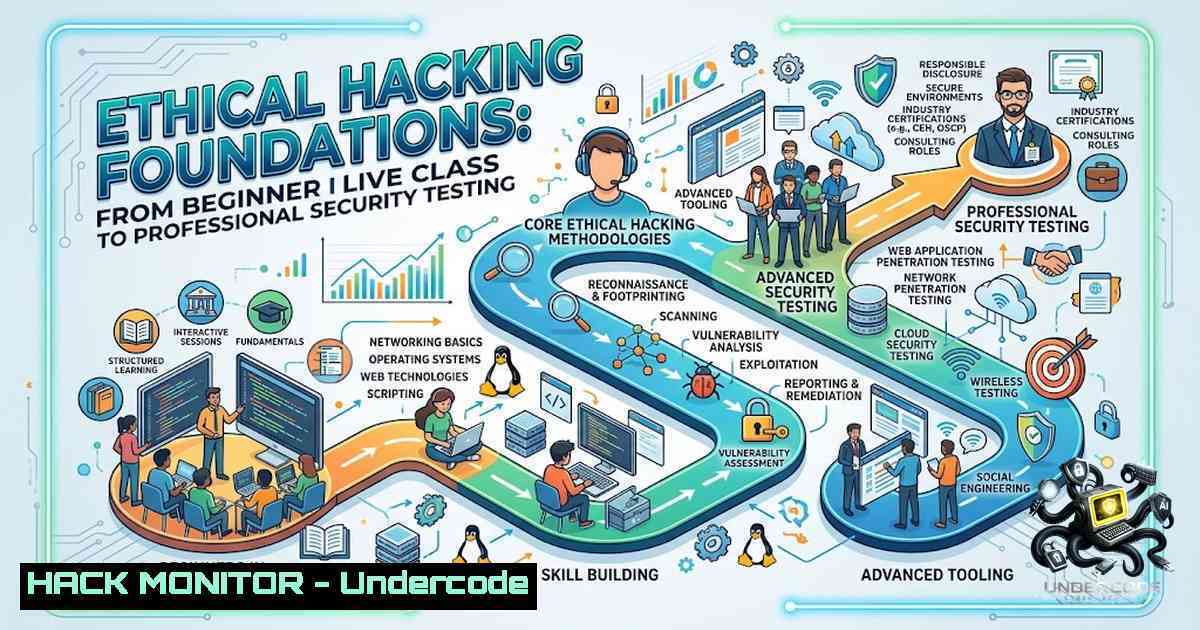
Ethical hacking has evolved from a niche technical curiosity into a cornerstone of modern cybersecurity strategy. The discipline requires a structured methodology encompassing reconnaissance, scanning, enumeration, vulnerability analysis, exploitation, and comprehensive reporting—all conducted within strictly defined legal and ethical boundaries. As organizations increasingly recognize that proactive security testing is essential to defending against sophisticated threats, the demand for trained ethical hackers continues to grow across every sector of the global economy.
Learning Objectives & Secrets:
- Objective 1: Master the complete penetration testing lifecycle—from information gathering and reconnaissance through scanning, enumeration, vulnerability identification, exploitation, and final reporting. Understanding this full cycle ensures no critical phase is overlooked during security assessments.
- Objective 2 Secret Tip: Beyond identifying vulnerabilities, focus on validation and evidence collection. A finding without proper validation and documented proof is merely a suspicion. Learn to use tools like `nuclei` for template-based vulnerability scanning and `sqlmap` for automated SQL injection detection, but always verify results manually before including them in reports.
- Objective 3 Secret Tip: Develop proficiency in both offensive and defensive perspectives. Understanding how attacks are executed makes you significantly better at implementing effective mitigations. Practice with deliberately vulnerable environments and learn to think like both attacker and defender simultaneously.
You Should Know:
- Setting Up Your Ethical Hacking Lab with Kali Linux
Kali Linux remains the industry-standard platform for security testing, pre-loaded with hundreds of tools for every phase of penetration testing. For beginners, the most effective approach is running Kali in a virtual machine to maintain isolation from your host system.
Step-by-step guide:
Install Kali Linux in VirtualBox:
 Download Kali Linux ISO from official website
 Create new VM in VirtualBox (allocate at least 4GB RAM, 2 CPU cores, 40GB storage)
 Boot from ISO and follow standard installation
 After installation, update the system:
sudo apt update && sudo apt full-upgrade -y
Install essential reconnaissance tools:
 Install SpiderFoot for OSINT automation
sudo apt install spiderfoot -y
spiderfoot -h  View help options

Install theHarvester for passive intelligence gathering
sudo apt install theHarvester -y
theHarvester -d example.com -l 500 -b google

Install AutoRecon for automated network enumeration
sudo apt install autorecon -y
Install vulnerability scanning tools:
 Install nuclei for template-based scanning
sudo apt install nuclei -y
nuclei -u http://target.com -t cves/

Install SQLmap for SQL injection testing
sudo apt install sqlmap -y
sqlmap -u "http://target.com/page?id=1" --batch
2. Information Gathering and Reconnaissance Methodology
Reconnaissance is the foundation of any successful penetration test. This phase involves collecting as much information as possible about the target before attempting any active scanning or exploitation.
Step-by-step guide:
Passive reconnaissance (no direct contact with target):
 DNS enumeration with dig
dig example.com A +short
dig example.com MX +short
dig example.com NS +short

WHOIS lookup for domain registration information
whois example.com

Subdomain enumeration with subfinder
subfinder -d example.com -o subdomains.txt
Active reconnaissance (direct interaction with target systems):
 Network discovery with nmap
nmap -sn 192.168.1.0/24  Ping sweep for live hosts
nmap -sS -sV -p- 192.168.1.100  SYN stealth scan with version detection

Web reconnaissance with finalrecon
finalrecon -u http://target.com --full

HTTP header analysis with curl
curl -I http://target.com
curl -s http://target.com | head -1 50  View page source
Windows alternative (using PowerShell):
 Basic network reconnaissance
Test-Connection -ComputerName target.com -Count 4
Resolve-DnsName target.com
Invoke-WebRequest -Uri http://target.com -Method Head
- Web Application Security Testing: SQL Injection and XSS
Web application vulnerabilities remain among the most common and dangerous security flaws. SQL injection and Cross-Site Scripting (XSS) are consistently ranked in the OWASP Top 10 and require dedicated attention in any security testing program.
Step-by-step guide:
SQL injection testing with SQLmap:
 Basic SQL injection detection
sqlmap -u "http://target.com/product?id=123" --batch

Advanced scanning with database enumeration
sqlmap -u "http://target.com/product?id=123" --dbs --batch
sqlmap -u "http://target.com/product?id=123" -D database_name --tables

Bypass WAF protections
sqlmap -u "http://target.com/product?id=123" --tamper=space2comment --randomize
Manual SQL injection testing:
 Test for basic injection points
http://target.com/product?id=123' OR '1'='1
http://target.com/product?id=123' UNION SELECT null,version(),null--

For Windows/IIS environments
http://target.com/product?id=123' UNION SELECT null,@@version,null--
XSS testing and mitigation:
 Test for reflected XSS
http://target.com/search?q=<script>alert('XSS')</script>
http://target.com/search?q=<img src=x onerror=alert('XSS')>

Content Security Policy implementation (Apache)
Header set Content-Security-Policy "default-src 'self'; script-src 'self' 'unsafe-inline'; object-src 'none'"

Set X-XSS-Protection header
Header set X-XSS-Protection "1; mode=block"

Set HttpOnly and Secure flags on cookies
Header always edit Set-Cookie (.) "$1; HttpOnly; Secure"
Windows/IIS mitigation:
 Add custom headers in IIS via PowerShell
Set-WebConfigurationProperty -Filter "system.webServer/httpProtocol/customHeaders" -1ame "." -Value @{name='X-XSS-Protection';value='1; mode=block'}
4. Vulnerability Assessment and Analysis
Vulnerability assessment goes beyond simply running automated scanners. It requires critical analysis to distinguish between true vulnerabilities and false positives, and to understand the business impact of each finding.
Step-by-step guide:
Comprehensive vulnerability scanning:
 Install and run OpenVAS (Greenbone Vulnerability Management)
sudo apt install openvas -y
sudo gvm-setup  Initial setup (may take significant time)
sudo gvm-start
 Access web interface at https://localhost:9392

Run targeted scans with nuclei
nuclei -u http://target.com -t cves/ -severity high,critical
nuclei -u http://target.com -t misconfiguration/ -t exposures/

WordPress vulnerability scanning with wpscan
wpscan --url http://target.com --enumerate vp,vt,u
Manual vulnerability verification:
 Check for directory listing vulnerabilities
curl -I http://target.com/images/
 If returns 200 OK with directory listing, this is a finding

Test for default credentials
 Common admin panels: /admin, /wp-admin, /administrator
 Test with common username/password combinations

SSL/TLS analysis with testssl.sh
git clone https://github.com/drwetter/testssl.sh.git
cd testssl.sh
./testssl.sh https://target.com
Windows vulnerability assessment:
 Run Microsoft Baseline Security Analyzer (MBSA)
mbsacli /target 192.168.1.100 /n os+iis+sql+1assword

Check for missing patches
Get-HotFix | Select-Object -Property HotFixID,InstalledOn
5. Digital Forensics Fundamentals
Digital forensics is a critical component of the security testing lifecycle, particularly when validating findings and gathering evidence for reports. Understanding forensic basics ensures your testing is defensible and professional.
Step-by-step guide:
Creating forensic disk images (Linux):
 Create a bit-for-bit disk image with dd
sudo dd if=/dev/sda of=evidence.dd bs=4096 conv=noerror,sync status=progress

Verify image integrity with hash
sha256sum evidence.dd
md5sum evidence.dd

Create E01 forensic image format (with ewf-tools)
sudo apt install ewf-tools -y
ewfacquire /dev/sda  Interactive E01 image creation
File system forensics with The Sleuth Kit:
 Install The Sleuth Kit
sudo apt install sleuthkit -y

Analyze disk image
mmls evidence.dd  List partitions
fsstat evidence.dd  File system metadata
fls -r evidence.dd  List all files including deleted
istat evidence.dd 12345  Inode information
icat evidence.dd 12345 > extracted_file  Extract file by inode
Memory forensics with Volatility (Linux):
 Install Volatility
sudo apt install volatility -y

Identify image profile
volatility -f memory.dump imageinfo

Analyze processes
volatility -f memory.dump --profile=Win10x64 pslist
volatility -f memory.dump --profile=Win10x64 pstree

Check for network connections
volatility -f memory.dump --profile=Win10x64 netscan
Windows forensics commands:
 Collect system information
systeminfo > system_info.txt

List running processes
Get-Process | Export-Csv -Path processes.csv

Check event logs
Get-WinEvent -LogName Security -MaxEvents 100 | Export-Csv -Path security_logs.csv

Collect network connections
netstat -anob > network_connections.txt
6. Security Reporting and Evidence Validation
The final phase of any security assessment is producing a comprehensive, professional report. This document must clearly communicate findings, risks, and recommendations to both technical and non-technical stakeholders.
Step-by-step guide:
Evidence collection and validation:
 Capture proof of concept for each finding
 For SQL injection: Save sqlmap output and screenshots
sqlmap -u "http://target.com/product?id=123" --batch --output-dir=./evidence/sqli

For XSS: Save browser console output and screenshots
 Use browser developer tools to capture the attack

For each finding, document:
 - Vulnerability description
 - Affected systems/URLs
 - Steps to reproduce
 - Proof of concept (screenshots, command output, logs)
 - Business impact assessment
 - Remediation recommendations
Report structure:
1. Executive Summary
- Overview of testing scope
- High-level findings summary
- Risk rating summary

<ol>
<li>Methodology</li>
</ol>

- Tools and techniques used
- Testing approach

<ol>
<li>Detailed Findings</li>
</ol>

- Each vulnerability with:
 Description
 Technical details
 Proof of concept
 Impact assessment
 Remediation steps

<ol>
<li>Appendix</li>
</ol>

- Complete tool output
- Screenshots
- Additional technical details
What Undercode Say:
- Key Takeaway 1: Ethical hacking is not just about finding vulnerabilities—it’s about understanding systems from an attacker’s perspective while maintaining professional responsibility and ethical boundaries. The complete process includes identification, analysis, validation, evidence collection, and responsible reporting.
-
Key Takeaway 2: Hands-on practice with industry-standard tools like Kali Linux, SQLmap, nmap, and forensic toolkits is essential for developing practical skills. Theoretical knowledge must be reinforced through structured lab exercises and real-world scenarios.
Analysis:
The journey from cybersecurity enthusiast to competent ethical hacker requires structured learning across multiple domains: networking, operating systems, web technologies, and security tools. The foundational skills covered in beginner programs—reconnaissance, scanning, vulnerability assessment, and basic exploitation—provide the essential building blocks for more advanced study. However, the field demands continuous learning; new vulnerabilities, attack vectors, and defense mechanisms emerge constantly. The most successful security professionals maintain a mindset of perpetual curiosity and disciplined practice, regularly participating in capture-the-flag (CTF) competitions, bug bounty programs, and continuing education. The emphasis on responsible reporting and evidence validation distinguishes professional ethical hacking from casual security testing, ensuring that findings are actionable, defensible, and valuable to organizations.
Prediction:
- +1 The ethical hacking and cybersecurity training market will continue expanding significantly through 2027, driven by increasing regulatory requirements and the growing frequency of cyberattacks across all industries.
- +1 Hands-on, practical training programs that emphasize real-world scenarios and tool proficiency will increasingly replace purely theoretical cybersecurity education as employers prioritize demonstrable skills over certifications alone.
- -1 The rapid advancement of AI-powered attack tools will require ethical hackers to continuously update their skills and adopt AI-assisted defense strategies to remain effective against increasingly sophisticated threats.
- +1 Integration of digital forensics training into standard ethical hacking curricula will become essential as organizations demand professionals who can both identify vulnerabilities and properly document evidence for potential legal proceedings.
- -1 The shortage of qualified cybersecurity professionals will persist, creating ongoing opportunities for trained ethical hackers but also leaving many organizations vulnerable due to understaffed security teams.
▶️ Related Video (86% Match):
🎯Let’s Practice For Free:
🎓 Live Courses & Certifications:
Join Undercode Academy for Verified Certifications
🚀 Request a Custom Project:
Secure, high-velocity infrastructure and disruptive technological engineering. Contact our engineering team for high-tier development and proprietary systems:
[email protected]
💎 Smart Architecture | 🛡️ Secure by Design | ⭐ Trusted by Thousands
IT/Security Reporter URL:
Reported By: https://lnkd.in/p/ef6Gu4Qb – Hackers Feeds
Extra Hub: Undercode MoN
Basic Verification: Pass ✅


