Listen to this Post
Introduction
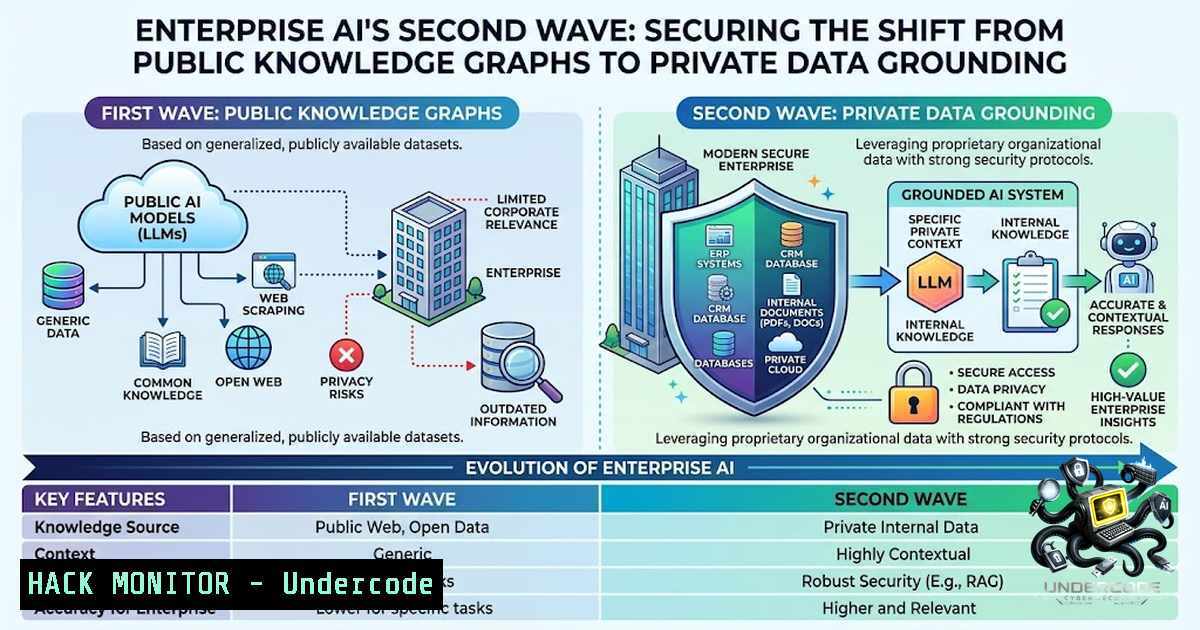
The enterprise AI landscape is undergoing a fundamental architectural shift. For the past two years, organizations have predominantly used large language models as sophisticated search engines—querying public internet data and accepting responses with a healthy dose of skepticism due to persistent hallucination risks. Today, tools like Google’s NotebookLM and Microsoft 365 Copilot are redefining this paradigm by grounding AI responses exclusively in an organization’s own trusted data repositories: meeting transcripts, emails, documents, spreadsheets, and team collaboration channels. This transition from broad-spectrum retrieval to permissioned, source-specific grounding introduces new security vectors that demand rigorous architectural planning—particularly around access control preservation, vector database security, and identity-aware retrieval.
Learning Objectives
- Understand the architectural differences between public-facing AI and enterprise-grounded AI systems, including Retrieval-Augmented Generation (RAG) pipelines
- Master the security configuration of NotebookLM Enterprise and Microsoft 365 Copilot, including Model Armor and Zero Trust deployment frameworks
- Implement permission-aware vector database strategies to prevent data leakage and unauthorized access across organizational boundaries
You Should Know
- NotebookLM Enterprise: Deploying Permissioned AI with Google Cloud’s Model Armor
NotebookLM Enterprise represents Google’s answer to secure, organization-specific AI grounding. Unlike the consumer version, the enterprise offering operates within a Google Cloud project and supports integration with third-party identity providers, including Microsoft Entra ID, enabling organizations without Google Workspace to leverage governance controls. As of February 2025, NotebookLM and NotebookLM Plus are core Google Workspace services with enterprise-grade data protection.
The critical security control for NotebookLM Enterprise is Model Armor—a Google Cloud service that proactively screens prompts and responses to protect against prompt injection, data exfiltration, and responsible AI violations. Enabling Model Armor requires specific IAM roles:
– `roles/discoveryengine.agentspaceAdmin` (Gemini Enterprise Admin) to enable the service
– `roles/modelarmor.admin` to create Model Armor templates
– `roles/modelarmor.user` to call Model Armor APIs
Step‑by‑Step: Configuring Model Armor for NotebookLM Enterprise
- Create a Model Armor template with enforcement type set to “Inspect and block” (default) or “Inspect only” depending on your risk tolerance
- Map regions correctly: Model Armor templates must use the same multi-region as your NotebookLM Enterprise deployment—US or EU
- Avoid Cloud Logging in the Model Armor template, as this can expose sensitive data to users with the `roles/logging.privateLogViewer` role. Instead, route logs to BigQuery with stricter access controls
- Configure audit logs for Data Access to analyze screening verdicts
- Apply the template to NotebookLM Enterprise via the Google Cloud console or REST API:
curl -X PATCH \
-H "Authorization: Bearer $(gcloud auth print-access-token)" \
-H "Content-Type: application/json" \
"https://ENDPOINT_LOCATION-discoveryengine.googleapis.com/v1alpha/projects/PROJECT_NUMBER/locations/LOCATION/notebooks/NOTEBOOK_ID" \
-d '{"modelArmorConfig": {"template": "projects/PROJECT_ID/locations/LOCATION/templates/TEMPLATE_NAME"}}'
For organizations requiring programmatic notebook management, Google Cloud’s Discovery Engine API (currently in developer preview) supports REST endpoints for creating and managing notebooks:
curl -X POST \
-H "Authorization: Bearer $(gcloud auth print-access-token)" \
-H "Content-Type: application/json" \
"https://ENDPOINT_LOCATION-discoveryengine.googleapis.com/v1alpha/projects/PROJECT_NUMBER/locations/LOCATION/notebooks"
- Microsoft 365 Copilot: Grounding Data Through Microsoft Graph with Zero Trust Enforcement
Microsoft 365 Copilot operates on a fundamentally different architectural principle: it does not introduce new data access mechanisms but instead inherits the existing permissions of the authenticated user through Microsoft Graph. The common misconception that Copilot “sees everything” is incorrect—it can only access content the user is already authorized to view. However, this model amplifies existing data security gaps: if a user can technically access overshared content, Copilot can surface it.
Microsoft recommends applying seven layers of Zero Trust protection before deploying Copilot licenses:
| Step | Protection Layer | Zero Trust Principle |
|||-|
| 1 | Data protection | Verify explicitly, least privilege |
| 2 | Identity and access | Verify explicitly, least privilege |
| 3 | App Protection policies | Least privilege, assume breach |
| 4 | Device management | Verify explicitly |
| 5 | Threat protection | Assume breach |
| 6 | Secure Teams collaboration | Verify explicitly, least privilege |
| 7 | Minimum user permissions | Least privilege |
Step‑by‑Step: Securing Microsoft 365 Copilot Deployment
- Remediate oversharing using SharePoint Advanced Management (included with Copilot licenses) to identify high-risk sites and files
- Apply sensitivity labels through Microsoft Purview to protect sensitive data from Copilot processing
- Create Conditional Access policies targeting the Enterprise Copilot Platform service principal (App ID:
fb8d773d-7ef8-4ec0-a117-179f88add510)
Using Microsoft Graph PowerShell SDK:
 Create service principal for Copilot
New-MgServicePrincipal -AppId fb8d773d-7ef8-4ec0-a117-179f88add510

Create Conditional Access policy (report-only mode recommended initially)
New-MgIdentityConditionalAccessPolicy -DisplayName "Copilot MFA Required" `
-State "enabledForReportingButNotEnforced"
- Audit Copilot interactions using Microsoft Purview’s Data Security Posture Management (DSPM) as a centralized hub for assessing Copilot-related data risk
- Configure Copilot Control System governance capabilities focusing on data security, AI security, and compliance
The Copilot Control System framework provides integrated controls that address amplified risks related to data security, compliance, and governance when deploying AI agents at scale.
3. Permission Collapse: The Critical RAG Security Antipattern
The most consequential security failure in enterprise RAG deployments is permission collapse—when a vector database indexes documents without preserving source-system access controls, effectively making every document available to every user who can query the system. Symptoms include users discovering information in RAG responses they would not have been able to find through direct search, and high-sensitivity content leaking into general queries.
Remediation Strategy: Permission-Aware Retrieval
- Capture permissions as metadata on each vector chunk during ingestion, preserving source-system entitlements
- Filter at retrieval time based on the querying user’s identity and permissions—not after retrieval
- Use vector database metadata fields or relational database joins to enforce access control before context is passed to the LLM
- Implement per-1amespace or per-collection API keys rather than a single shared key across the organization
For vector databases like Pinecone, Chroma, or Qdrant, this translates to:
 Example: Permission-aware retrieval with metadata filtering
results = vector_store.similarity_search(
query=user_query,
filter={"allowed_groups": {"$in": user_groups}, "sensitivity_level": {"$lte": user_clearance}}
)
 Only chunks matching both semantic similarity AND permission filters are returned
- Data Curation: Why “More Context” Is a Security Liability
Organizations often embed every document they can access, operating under the assumption that more context improves answer quality. This creates an index saturated with outdated drafts, superseded policies, confidential material indexed by accident, and personal notes never meant to be searchable. The result: RAG responses citing superseded documents as current, personal information appearing in general queries, and an index that outgrows the organization’s ability to reason about its contents.
Remediation: Deliberate Corpus Curation
- Define explicit eligibility policies for each source system: document types, metadata requirements, freshness rules, and exclusion patterns
- Review and prune the corpus periodically—a smaller, cleaner index produces better answers and is easier to secure
- Implement ingestion allowlists that specify which source systems can write to the vector database
- Stop using naive hashing for deduplication—attackers can pad payloads with invisible characters to evade detection
-
Provenance as a Security Control: Mandatory Citation in Enterprise AI
When RAG systems return synthesized answers without surfacing which chunks were used or how they were weighted, users cannot verify claims and reviewers cannot audit decisions. This creates a black box where incorrect answers cannot be traced to their source, and compliance teams cannot reconstruct why the system produced specific outputs.
Remediation: Citation as a First-Class Feature
- Link every factual claim in the response to the specific chunk that supported it
- Make citations visible and clickable in the user interface
- Log retrieval provenance—which chunks were retrieved, their permission metadata, and their relevance scores—for audit and incident response
- Implement interactive citation verification, allowing users to drill down into source documents
NotebookLM’s architecture natively supports source attribution, with each response citing specific uploaded sources. Microsoft 365 Copilot similarly grounds responses in user-permissioned content from SharePoint, OneDrive, and Teams.
What Undercode Say
- Enterprise AI is transitioning from “public knowledge” to “private data” grounding. This shift requires organizations to treat AI systems as extensions of their existing data governance frameworks, not as standalone tools that operate in isolation. The security perimeter now extends to vector databases, embedding pipelines, and retrieval filters.
-
Zero Trust principles are non-1egotiable for AI deployment. Both Google and Microsoft have made this explicit—Model Armor for NotebookLM and the seven-layer Zero Trust framework for Copilot demonstrate that AI security cannot be an afterthought. Organizations must validate every access request, enforce least privilege, and assume breach in their AI architectures.
The convergence of AI with enterprise data creates an asymmetric risk profile: the same system that makes knowledge workers exponentially more productive can also exponentially amplify data exposure if misconfigured. The most dangerous assumption is that existing Microsoft 365 or Google Workspace security controls automatically extend to AI layers—they don’t. Permission collapse in vector databases, overshared content surfaced by Copilot, and insufficient prompt filtering are real, observed failure modes in production deployments. Organizations must conduct pre-deployment security reviews that specifically address RAG pipeline vulnerabilities, not just general infrastructure security.
Prediction
- +1 The integration of AI with enterprise data will drive a new category of security tools focused specifically on AI data governance, including vector database firewalls, prompt injection detection, and AI-specific Data Loss Prevention (DLP) solutions. This market will mature rapidly through 2027.
-
+1 NotebookLM and Microsoft 365 Copilot will increasingly adopt mutual authentication and federated identity standards, enabling organizations to deploy both tools simultaneously with consistent access control policies across Google Cloud and Microsoft 365 environments.
-
-1 The 2026–2027 period will see a wave of high-profile data breaches resulting from permission collapse in enterprise RAG deployments, as organizations rush to deploy AI without implementing permission-aware vector databases. These incidents will mirror the early cloud misconfiguration breaches of 2018–2020.
-
+1 Regulatory frameworks will evolve to mandate AI provenance and audit logging, making citation and traceability not just a best practice but a compliance requirement. Organizations that implement citation-first architectures now will have a competitive advantage in regulated industries.
-
-1 The complexity of securing enterprise AI will outpace the availability of skilled security professionals, creating a talent gap that will leave many organizations exposed. Automated security validation tools for RAG pipelines will become essential to bridge this gap.
-
+1 Open-source tooling for permission-aware vector databases will mature significantly, with frameworks like those from Google Cloud’s Model Armor and Microsoft’s Purview setting standards that third-party vendors will adopt, ultimately making secure AI deployment more accessible to mid-market organizations.
▶️ Related Video (78% Match):
https://www.youtube.com/watch?v=1AdX7W_eq0E
🎯Let’s Practice For Free:
🎓 Live Courses & Certifications:
Join Undercode Academy for Verified Certifications
🚀 Request a Custom Project:
Secure, high-velocity infrastructure and disruptive technological engineering. Contact our engineering team for high-tier development and proprietary systems:
[email protected]
💎 Smart Architecture | 🛡️ Secure by Design | ⭐ Trusted by Thousands
IT/Security Reporter URL:
Reported By: I Think – Hackers Feeds
Extra Hub: Undercode MoN
Basic Verification: Pass ✅


