Listen to this Post
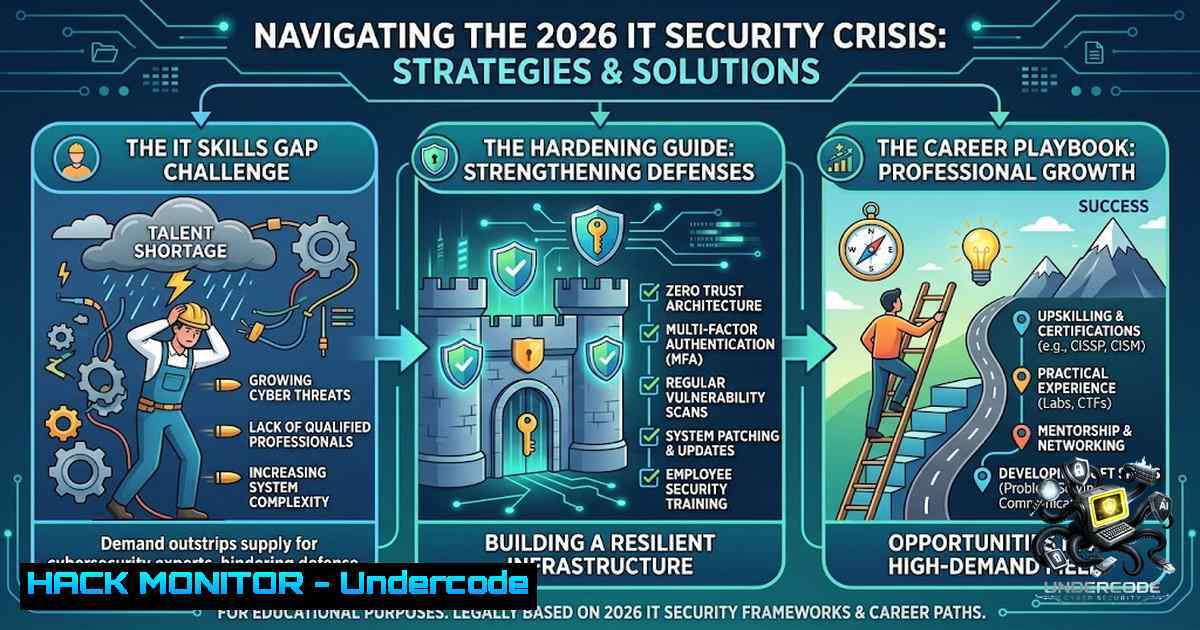
Introduction:
The 2026 IT hiring landscape is undergoing a seismic shift, driven by the relentless integration of Artificial Intelligence and an escalating threat landscape. As highlighted by the latest CIO and Reveal surveys, AI and Cybersecurity are now tied as the most difficult roles to fill, with organizations struggling to find talent that can both operationalize AI at scale and defend against AI-powered attacks. This demand is translating into massive hiring drives across India, with companies urgently seeking professionals skilled in everything from full-stack development to cloud and security engineering. For IT professionals and job seekers in 2026, mastering the technical fundamentals of system hardening, cloud security, and DevSecOps is no longer optional—it is the baseline for career survival and growth.
Learning Objectives:
- Master the essential Linux and Windows security hardening commands to reduce system attack surfaces in production environments.
- Understand and implement the OWASP API Security Top 10 mitigations to protect modern application backends.
- Build a foundational DevSecOps pipeline integrating automated security scanning for code, containers, and infrastructure.
- Identify key cloud security misconfigurations and apply multi-cloud hardening best practices for AWS and Azure.
You Should Know:
- Linux Server Hardening: The First Line of Defense
Every internet-facing Linux server starts with a default configuration that is far too permissive, handing attackers a wide attack surface. Hardening is not a one-time task but a repeatable process that closes the gap between “it works” and “it’s defensible in an audit”.
Step‑by‑step guide:
- Patch and Update: Start by ensuring your system is up-to-date to eliminate known vulnerabilities.
Debian/Ubuntu
sudo apt update && sudo apt upgrade -y
RHEL/CentOS/Alma/Rocky
sudo dnf update -y
Enable automatic security updates to maintain this baseline.
- Harden SSH Access: SSH is the single most attacked service. Edit `/etc/ssh/sshd_config` to disable root login and password authentication, enforcing key-based access only.
PermitRootLogin no
PasswordAuthentication no
PubkeyAuthentication yes
AllowUsers deploy ops
Generate and deploy your key before disabling passwords to avoid locking yourself out:
ssh-keygen -t ed25519 -C "deploy@yourorg"
ssh-copy-id -i ~/.ssh/id_ed25519.pub deploy@server-ip
Validate the config and restart the service:
sudo sshd -t && sudo systemctl restart sshd. - Enforce a Default-Deny Firewall: Start from a deny-all stance and explicitly allow only necessary traffic.
UFW (Ubuntu)
sudo ufw default deny incoming
sudo ufw default allow outgoing
sudo ufw allow OpenSSH
sudo ufw enable
Firewalld (RHEL)
sudo firewall-cmd --set-default-zone=drop
sudo firewall-cmd --permanent --add-service=ssh
sudo firewall-cmd --reload
This ensures your server only accepts traffic it explicitly expects.
- Remove Unnecessary Services: Reduce the attack surface by disabling and removing legacy or unused services.
sudo systemctl disable --1ow cups avahi-daemon
sudo apt purge telnet rsh-client xinetd -y
2. Windows Security Auditing with PowerShell
For Windows environments, PowerShell is an essential tool for both administrators and attackers. Proactive auditing is key to detecting brute-force attacks and misconfigurations before they lead to a breach.
Step‑by‑step guide:
- Enable Logon Auditing: First, ensure that logon failure auditing is active via Group Policy (Computer Configuration > Windows Settings > Security Settings > Advanced Audit Policy > Audit Logon – Success, Failure).
- Parse Security Event Logs: Use PowerShell to query the Security log for failed logon attempts (Event ID 4625) over the last 24 hours.
$events = Get-WinEvent -FilterHashtable @{LogName='Security';Id=4625;StartTime=(Get-Date).AddHours(-24)} | Select-Object TimeCreated, Message - Extract and Analyze Threats: Extract the source IP and username from the events, then group by source IP to identify brute-force patterns (e.g., 10 or more failures from a single IP).
$failedLogons = $events | ForEach-Object {
if ($<em>.Message -match "(?s)Account For Which Logon Failed:.Account Name:\s+(\S+).Source Network Address:\s+(\S+)") {
[bash]@{ Time = $</em>.TimeCreated; Username = $matches[bash]; SourceIP = $matches[bash] }
}
}
$grouped = $failedLogons | Group-Object SourceIP | Where-Object { $<em>.Count -ge 10 }
$grouped | ForEach-Object { Write-Output "Potential brute-force from $($</em>.Name) with $($_.Count) attempts" }
3. Securing Modern APIs Against OWASP Top 10
Unlike traditional web apps, APIs expose business logic directly, making them a prime target. The OWASP API Security Top 10 remains the industry standard for classifying these risks in 2026.
Step‑by‑step guide for key mitigations:
- Mitigate Broken Object Level Authorization (BOLA – API1): Never use sequential, predictable IDs. Implement UUIDs and enforce backend ownership checks on every request.
- Harden Authentication (API2): Implement OAuth2/OIDC with short-lived tokens and enforce refresh token rotation. Perform JWT signature verification at the edge for low-latency validation.
- Prevent Excessive Data Exposure (API3): Use Data Transfer Objects (DTOs) with strict field allow-lists to prevent mass assignment attacks that could leak sensitive properties like
isAdmin. - Implement Rate Limiting (API4): Apply granular rate limiting and throttling by IP or API Key to protect against resource exhaustion and denial-of-service attacks.
4. Building a DevSecOps Pipeline for CI/CD Security
In 2026, a single security scanner is insufficient for a modern pipeline. A layered approach is required to catch vulnerabilities at different stages of the software delivery lifecycle.
Step‑by‑step guide:
- Secrets Detection: Integrate tools like TruffleHog or Gitleaks to block hardcoded secrets (e.g., AWS keys, API tokens) from ever reaching a remote branch.
- Static Analysis (SAST): Use Semgrep or SonarQube to scan source code for injection flaws, broken authentication, and other code-level vulnerabilities at pull request time.
- Infrastructure as Code (IaC) Scanning: Before applying Terraform or CloudFormation, run Checkov to catch misconfigurations like open S3 buckets or overly permissive security groups.
- Container Scanning: Integrate Trivy to scan container images and dependency lock files for known CVEs (Common Vulnerabilities and Exposures) before a build is promoted to production.
5. Cloud Security Hardening for AWS and Azure
With the rapid adoption of multi-cloud strategies, maintaining consistent security postures across AWS and Azure is critical.
Step‑by‑step guide:
- Identity and Access Management (IAM): Federate all cloud identities to a single Identity Provider (IdP) and enforce Multi-Factor Authentication (MFA) for all users.
- Policy as Code: Express core security guardrails (e.g., “no public S3 buckets”) as policy-as-code, not console settings, to ensure consistent enforcement across all environments.
- Encryption: Require customer-managed encryption keys (CMK) for data at rest across every cloud provider.
- Network Segmentation: Harden network controls by using AWS Systems Manager Session Manager instead of opening SSH/RDP ports to the internet.
What Undercode Say:
- The Hybrid Talent is King: The most challenging roles to fill are hybrid positions that bundle AI skills with deep domain expertise in security or development. Pure specialists are easier to find; T-shaped professionals who can bridge the gap between AI, security, and business logic are rare and highly valued.
- Shift-Left is Non-1egotiable: The cost of fixing a vulnerability at the commit stage is exponentially lower than fixing it post-deployment. Integrating security tools directly into the CI/CD pipeline is no longer a “nice-to-have” but a fundamental requirement for modern IT teams.
Analysis:
The 2026 job market is paradoxical. While entry-level IT hiring has fallen due to automation, demand for specialized skills in AI, cloud, and cybersecurity has surged, with companies willing to pay significantly higher premiums. This means that for job seekers, simply having a degree is not enough. The professionals who will secure the top roles are those who have invested in practical, hands-on skills—scripting in Python and PowerShell, hardening Linux servers, understanding API vulnerabilities, and integrating security into DevOps workflows. The hiring focus has shifted decisively towards skills-first, with 65% of IT leaders reporting difficulty finding skilled professionals. For those who upskill, the opportunities in hubs like Pune, Bengaluru, and Hyderabad are vast and lucrative.
Prediction:
- +1 The integration of AI into security operations (AI-SecOps) will create a new wave of specialized roles, making cybersecurity analysts who can leverage AI for threat hunting some of the most sought-after professionals in the next 3-5 years.
- +1 The demand for DevSecOps engineers will continue to rise as supply chain attacks become the 1 threat, forcing organizations to prioritize security automation in their CI/CD pipelines.
- -1 The rapid pace of AI adoption will continue to widen the skills gap, leaving many organizations vulnerable to attacks due to a shortage of qualified personnel, unless significant investment is made in internal upskilling programs.
- -1 Automation will further depress demand for purely entry-level coding roles, putting pressure on new graduates to differentiate themselves with advanced certifications and practical project experience in cloud and security.
▶️ Related Video (80% Match):
🎯Let’s Practice For Free:
🎓 Live Courses & Certifications:
Join Undercode Academy for Verified Certifications
🚀 Request a Custom Project:
Secure, high-velocity infrastructure and disruptive technological engineering. Contact our engineering team for high-tier development and proprietary systems:
[email protected]
💎 Smart Architecture | 🛡️ Secure by Design | ⭐ Trusted by Thousands
IT/Security Reporter URL:
Reported By: Kajal Sawant – Hackers Feeds
Extra Hub: Undercode MoN
Basic Verification: Pass ✅


