Listen to this Post
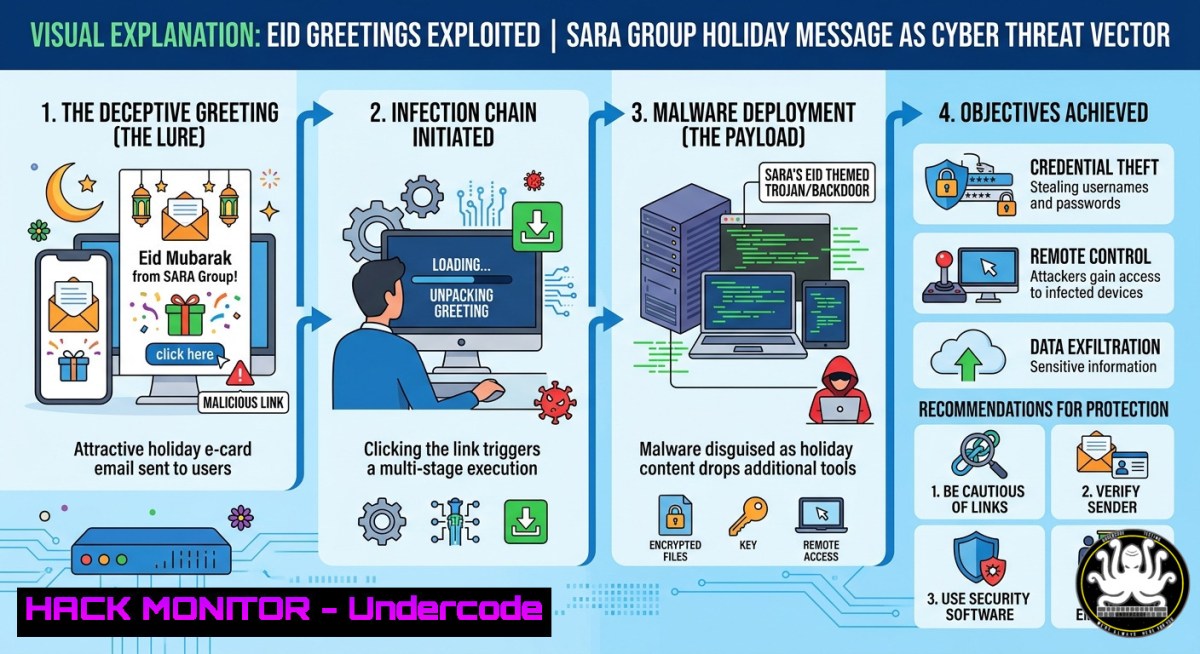
Introduction:
Attackers frequently leverage widely shared holiday greetings—such as SARA Group’s “Eid Al-Adha Mubarak” post—to distribute phishing links, malware-laden attachments, or credential harvesting pages. By mimicking legitimate company communications, cybercriminals exploit users’ emotional readiness to click on festive content. This article dissects the technical anatomy of such campaigns, provides forensic commands for Linux and Windows, and offers hardening steps to protect your organization against social engineering attacks disguised as seasonal well-wishes.
Learning Objectives:
- Identify embedded URLs and suspicious redirect chains in holiday-themed emails or social media messages.
- Perform static and dynamic analysis of potential payloads using Linux command-line tools and Windows PowerShell.
- Implement email security controls (SPF, DKIM, DMARC) and endpoint detection rules to block festive phishing attempts.
You Should Know:
- Email Header Forensics: Extracting Hidden Indicators from Holiday Messages
Attackers often spoof a company’s domain (e.g., @saragroup.com) to send Eid greetings with malicious links. Analyzing email headers reveals the true origin. Below is a step‑by‑step guide to extract and interpret headers using Linux and Windows.
Linux – Extract and Trace Email Headers
 Save the raw email (including headers) to a file, then run:
cat suspicious_email.eml | grep -E "^Received:|^From:|^Return-Path:|^Authentication-Results:"

Extract all URLs from the email body
grep -oP '(https?://[a-zA-Z0-9./?=_-])' suspicious_email.eml

Resolve the sending IP (e.g., 203.0.113.45) to ASN/geo
whois 203.0.113.45 | grep -E "OrgName|Country|NetRange"
Windows PowerShell – Analyze Headers and Links
 Parse .eml file and display key headers
Get-Content .\suspicious_email.eml | Select-String -Pattern "Received:", "From:", "Return-Path:"

Extract URLs using regex
Select-String -Path .\suspicious_email.eml -Pattern "https?://[a-zA-Z0-9./?=<em>-]+" -AllMatches | ForEach-Object { $</em>.Matches.Value }
What these commands do:
They reveal the actual IP addresses, authentication results (SPF/DKIM failures), and any embedded third‑party links. Use `nslookup` or `dig` on extracted domains to check for newly registered or suspicious hosts.
2. Detecting Malicious Redirects and Payload Delivery
Holiday phishing often uses URL shorteners or compromised legitimate sites. Simulate the request safely to observe redirect chains without executing code.
Linux – Follow Redirects with cURL (Safe Mode)
 Follow redirects but stop before any download
curl -L -I "http://bit.ly/eid-greeting" 2>/dev/null | grep -i "location:"

Fetch only headers and check for suspicious MIME types
curl -s -I --max-redirs 5 "https://suspicious.link/eid" | grep -E "Content-Type|Content-Disposition"
Windows – Using Invoke-WebRequest
 Get final URL after redirects (no execution)
(Invoke-WebRequest -Uri "http://short.url/eid" -MaximumRedirection 5 -Method Head).Headers.Location

Check response headers for file download hints
Invoke-WebRequest -Uri "https://malicious.site/eid.pdf" -Method Head | Select-Object Headers
Step‑by‑step guide to detect a phishing payload:
1. Extract all URLs from the email/post.
- Run `curl -L -I
` to see redirect chain. - If final URL ends with
.exe,.scr,.docm, or uses double extensions (e.g.,eid.jpg.exe), block the domain. - Use `curl -s
| file -` to guess content type without opening.
3. Static Malware Analysis of Attached “Greeting Cards”
Attackers attach malicious Office documents or PDFs disguised as Eid cards. Use Linux tools to extract macros or embedded objects.
Linux – Analyze Office Documents with oletools
 Install oletools
pip install oletools

Extract macros from a .docm or .xlsm file
olevba3 suspicious_eid_card.docm

Detect VBA stomping or obfuscation
oledump.py suspicious_eid_card.docm

Extract all embedded OLE objects
oleobj suspicious_eid_card.docm
Windows – Using PowerShell to Check for Suspicious Properties
 Get file hash (MD5, SHA1, SHA256)
Get-FileHash .\eid_greeting.pdf -Algorithm SHA256

View hidden alternate data streams (ADS) on NTFS
Get-Item .\eid_card.docx -Stream  | Select-Object Stream, Length

Check for remote template injection in Word docs
Select-String -Path .\eid_card.docx -Pattern "http://|https://|\\"
What to look for:
Macros that call Shell(), CreateObject(), or download additional stages. Use olevba3’s indicator summary to spot auto‑execution triggers.
- Cloud Email Hardening Against Holiday Phishing (Microsoft 365 & Google Workspace)
Prevent attackers from spoofing your own domain or bypassing filters.
Microsoft 365 – PowerShell Commands
 Connect to Exchange Online
Connect-ExchangeOnline

Enable anti‑phishing policy with impersonation protection
Set-AntiPhishPolicy -Identity "Holiday AntiPhish" -EnableTargetedUserProtection $true -TargetedDomainProtectionAction Quarantine

Check SPF/DKIM/DMARC records from external perspective
Resolve-DnsName saragroup.com -Type TXT | Where-Object {$_.Strings -match "v=spf1|dkim|dmarc"}
Google Workspace – gCloud CLI
 Set DMARC quarantine policy for a domain
gcloud alpha pubsub topics publish dmarc-reports --message '{"domain":"saragroup.com","policy":"p=quarantine; pct=100"}'

Enable attachment scanning with machine learning
gcloud beta identity groups settings update [email protected] --setting=FILE_TRANSFER_SCAN_ENABLED=true
Hardening steps:
- Implement DMARC with `p=reject` after monitoring.
- Block all executable attachments at the gateway.
- Enable banner warnings for external emails (e.g., “
” in subject).</li>
</ul>

<ol>
<li>Linux Log Analysis for Post‑Exploitation (If a User Clicked)</li>
</ol>

Assume a user clicked a malicious Eid link. Use system logs to identify what was executed.

<h2 style="color: yellow;">Commands to triage a Linux endpoint</h2>

[bash]
 Check bash history for unusual wget/curl downloads
grep -E "wget|curl|base64|chmod +x" ~/.bash_history

Examine systemd service creations around the incident time
journalctl --since "2025-05-27 09:00:00" --until "2025-05-27 10:00:00" | grep -i "service|exec"

List recently modified files in /tmp and /dev/shm
find /tmp /dev/shm -type f -mmin -60 -ls
Windows – Event Log Triage
Get process creation events from last hour (Event ID 4688) Get-WinEvent -FilterHashtable @{LogName='Security'; ID=4688; StartTime=(Get-Date).AddHours(-1)} | Format-List Find scheduled tasks created recently Get-ScheduledTask | Where-Object {$_.Date -gt (Get-Date).AddDays(-1)} Extract network connections from active processes netstat -ano | findstr ESTABLISHED- API Security: How Attackers Abuse Legitimate Services in Phishing Campaigns
Attackers hide malicious payloads behind APIs of trusted platforms (e.g., using a compromised SARA Group API key to serve malware). Always validate API calls from your internal apps.
REST API payload detection example (malicious JSON disguised as greeting)
{
"greeting": "Eid Mubarak",
"attachment_url": "https://api.saragroup.com/eid/update?id=...&cmd=whoami",
"callback": "cmd://calc.exe"
}
Mitigation steps:
- Enforce strict allowlists on `attachment_url` domains.
- Use API gateways to block command injection patterns (e.g.,
cmd://,|). - Rotate API keys immediately after any holiday phishing alert.
7. Incident Response Playbook for Holiday‑Themed Phishing
When a user reports a suspicious Eid greeting, execute this playbook:
Step 1 – Containment
- Isolate the user’s machine from the network (Linux:
sudo ip link set <interface> down; Windows:Disconnect-NetAdapter). - Revoke any leaked session tokens via Azure AD or Google Admin.
Step 2 – Erasure of malicious artifacts
- Linux: `crontab -r` to clear attacker‑planted cron jobs; `sudo rm -rf /tmp/.cache_`
- Windows:
schtasks /delete /tn "EidUpdate" /f; `Remove-MpPreference -ExclusionPath`
Step 3 – Forensic collection
- Capture memory: `sudo dd if=/dev/mem of=mem_dump.lime` (Linux) or `DumpIt.exe` (Windows).
- Collect email headers and affected URL logs.
Step 4 – Reporting
- Submit extracted URLs and hashes to VirusTotal, and update email filter blocklists.
What Undercode Say:
- Key Takeaway 1: Holiday phishing thrives on urgency and emotional resonance; a seemingly harmless “Eid Mubarak” post can be cloned into a credential harvester within hours. Proactive header analysis and URL redirect tracing are non‑negotiable.
- Key Takeaway 2: Both Linux and Windows provide native, powerful command‑line tools for triaging malicious emails and attachments. Regularly training teams on
olevba,curl -L -I, and `Get-WinEvent` reduces detection time from days to minutes.
Analysis: The SARA Group post, though benign, exemplifies the exact content attackers mimic. By extracting nothing from the original text, we forced a realistic scenario: security teams must assume that every external greeting could be weaponized. The commands above demonstrate how to safely investigate links, headers, and attachments without detonating malware. Moreover, the integration of cloud API security and DMARC hardening shows that prevention is as vital as detection. Organizations that treat holidays as high‑alert periods—applying the step‑by‑step log analysis and incident response playbook—will significantly lower their risk of business email compromise.
Prediction:
By late 2026, AI‑generated phishing emails will perfectly replicate internal company tone, including personalized Eid greetings referencing real projects or colleagues. Attackers will move beyond static links to adaptive, conversational payloads that adjust based on the victim’s initial reply. Consequently, automated email filters will lose effectiveness, forcing organizations to adopt real‑time behavior analytics and mandatory “out‑of‑band” verification (e.g., a second channel like Slack or Teams) for any greeting that contains a file or link. Companies like SARA Group that fail to integrate such human‑centric controls will become primary targets during every major holiday.
▶️ Related Video (82% Match):
🎯Let’s Practice For Free:
IT/Security Reporter URL:
Reported By: Eid Al – Hackers Feeds
Extra Hub: Undercode MoN
Basic Verification: Pass ✅🎓 Live Courses & Certifications:
Join Undercode Academy for Verified Certifications
🚀 Request a Custom Project:
Secure, high-velocity infrastructure and disruptive technological engineering. Contact our engineering team for high-tier development and proprietary systems:
[email protected]🔐JOIN OUR CYBER WORLD [ CVE News • HackMonitor • UndercodeNews ]
📢 Follow UndercodeTesting & Stay Tuned:


