Listen to this Post
Introduction:
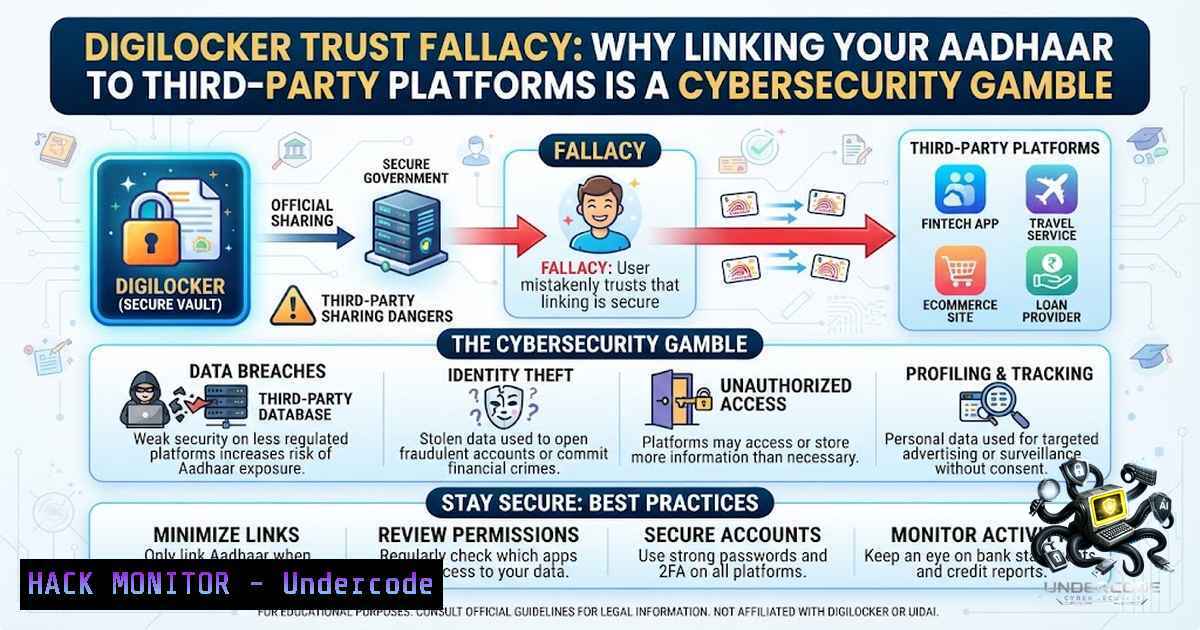
The digital identity landscape is undergoing a seismic shift as government-backed platforms like DigiLocker evolve from simple document repositories into centralized “trust layers” for authentication. While the promise of seamless verification and paperless governance sounds appealing, cybersecurity researchers are raising red flags about the inherent risks of linking sensitive Aadhaar credentials to third-party platforms. As Akshay aptly points out, the UI gimmick of “adding trust and credibility” by connecting your DigiLocker to professional networks is functionally equivalent to linking your social media accounts with Aadhaar—just repackaged for a tech-savvy audience. This article dissects the technical vulnerabilities, API security flaws, and privacy implications that make such integrations a dangerous proposition for most users.
Learning Objectives:
- Understand the OAuth 2.0 and PKCE-based authentication architecture underlying DigiLocker and its API ecosystem
- Identify critical vulnerabilities in SIM-based OTP authentication and API access control mechanisms
- Learn practical commands and techniques to audit API security, monitor token exposure, and mitigate identity theft risks
- Evaluate the privacy implications of linking Aadhaar-enabled digital lockers to third-party services
You Should Know:
- The OAuth 2.0 Illusion: When “Secure” Protocols Hide Systemic Risks
DigiLocker’s API ecosystem relies on the OAuth 2.0 protocol with PKCE (Proof Key for Code Exchange) for authorization. This is the same industry-standard framework used by Google, Facebook, and major financial institutions. The platform implements HMAC-based API authentication, digital signatures, and encrypted storage to protect documents. A formal verification study using the Tamarin Prover confirmed that DigiLocker’s protocol design satisfies key security properties—including token secrecy, authorization code uniqueness, PKCE binding, and document integrity—under ideal assumptions.
However, the same study revealed a critical caveat: controlled credential-leak scenarios demonstrate that compromise of sensitive values such as API keys or `digilockerids` can lead to exploitable attack traces. This means that while the cryptographic protocol is sound, the implementation and operational security surrounding credential management remain significant weak points.
Step‑by‑Step Guide: Auditing OAuth 2.0 Token Security
Linux/macOS Commands for Token Inspection:
 Decode a JWT access token to inspect claims (requires jq)
echo "YOUR_JWT_TOKEN" | cut -d. -f2 | base64 -d 2>/dev/null | jq .

Check token expiration and scope
curl -X GET "https://api.digilocker.gov.in/oauth2/1/tokeninfo?access_token=YOUR_TOKEN" \
-H "Content-Type: application/json"

Monitor for unauthorized token reuse in logs
sudo journalctl -u nginx | grep -i "oauth|token|authorization" | tail -50
Windows PowerShell Equivalent:
 Decode JWT (base64url to base64 conversion)
$token = "YOUR_JWT_TOKEN"
$payload = $token.Split('.')[bash]
$payload = $payload.Replace('-', '+').Replace('_', '/')
while ($payload.Length % 4) { $payload += '=' }
[System.Text.Encoding]::UTF8.GetString([System.Convert]::FromBase64String($payload)) | ConvertFrom-Json | Format-List
What This Does: The first command decodes the JSON Web Token (JWT) used in DigiLocker’s OAuth flow, revealing the user ID, expiration time, and scope of access. The second command queries the token info endpoint to verify if the token is still valid. The third monitors server logs for suspicious token usage patterns—critical for detecting API key leaks or session hijacking attempts.
- The SIM Card Authentication Vulnerability: A Design Flaw at Scale
DigiLocker’s authentication mechanism relies heavily on OTPs sent to mobile numbers linked to Aadhaar. This creates a single point of failure that attackers have already exploited. In a documented incident, a recycled SIM card assigned to a new user allowed that individual to access the previous owner’s Aadhaar details through DigiLocker. The platform’s inability to delink Aadhaar from an account once associated raises significant concerns about data security and constitutes a direct violation of the Digital Personal Data Protection (DPDP) Act.
Step‑by‑Step Guide: SIM-Based Authentication Hardening
For End Users (Mitigation):
- Enable additional verification layers where available—biometric authentication or hardware security keys provide stronger protection than OTP alone.
- Monitor your mobile number’s active status with your telecom provider. If your SIM is inactive for an extended period, request immediate delinking from all Aadhaar-linked services.
- Regularly audit your DigiLocker account for unknown documents or unexpected activity. The platform logs all consent actions.
For Security Analysts (Testing OTP Interception Risks):
 Check for exposed OTP endpoints in API documentation (ethical testing only)
nmap -p 443 --script http-enum api.digilocker.gov.in

Test for OTP replay vulnerabilities using Burp Suite CLI
java -jar burp.jar --project-file=otp_test.burp --url=https://api.digilocker.gov.in/oauth2/1/verify-otp

Monitor SIM swap fraud indicators (Linux log analysis)
grep -i "sim|swap|port" /var/log/auth.log | awk '{print $1, $2, $3, $9, $10}'
What This Does: The first command scans for exposed API endpoints that might indicate misconfigured OTP validation services. The second initiates a controlled OTP replay test (requires Burp Suite Professional) to check if the same OTP can be reused. The third analyzes system authentication logs for patterns consistent with SIM swap attacks—where an attacker convinces a telecom provider to transfer a victim’s number to a new SIM.
- API Access Control Failures: When Billions of Documents Hang by a Thread
A critical vulnerability in DigiLocker’s API could have allowed unauthorized access to over 3 billion documents. The core issue was a failure to implement effective authentication and authorization procedures for document access. Attackers could exploit certain API endpoints to gain access to documents without proper credentials by manipulating API requests.
Step‑by‑Step Guide: API Security Auditing
Testing for Improper Access Control (Authorized Pentesting Only):
 Enumerate API endpoints using ffuf (requires wordlist)
ffuf -u https://api.digilocker.gov.in/FUZZ -w /usr/share/wordlists/dirb/common.txt -mc 200,403,401

Test for IDOR (Insecure Direct Object Reference) by modifying document IDs
curl -X GET "https://api.digilocker.gov.in/v1/documents/{DOCUMENT_ID}" \
-H "Authorization: Bearer YOUR_TOKEN" \
-H "X-API-Key: YOUR_API_KEY"

Check for missing rate limiting (potential for brute force)
for i in {1..100}; do
curl -s -o /dev/null -w "%{http_code}\n" "https://api.digilocker.gov.in/v1/user/verify?adhaar=XXXXXXXXXX$i"
done | sort | uniq -c
API Request Interception (Burp Suite):
- Configure Burp Suite as a proxy between your application and DigiLocker’s API.
- Intercept API requests that fetch documents—look for parameters like
docId,userId, orfileId. - Modify these parameters to reference other users’ documents and observe if the server returns data without re-authenticating.
- Check if the API validates the scope of the OAuth token against the requested resource.
What This Does: The ffuf command discovers hidden API endpoints that might lack proper authentication controls. The second command tests for IDOR vulnerabilities by attempting to access documents with incrementing or predictable IDs. The third checks for rate limiting—if the API returns HTTP 200 for all requests without throttling, it’s vulnerable to automated scraping attacks.
4. The Delinkage Dilemma: Once Linked, Forever Exposed
A fundamental privacy concern with DigiLocker is the inability to delink Aadhaar from an account once associated. This creates a permanent digital footprint that cannot be erased. When third-party platforms request DigiLocker access, they gain persistent visibility into your documents unless you explicitly revoke the OAuth token. However, many users forget to revoke access after verification, leaving their digital identity exposed indefinitely.
Step‑by‑Step Guide: Revoking Third-Party Access
Revoke OAuth Token via API:
 Revoke access token (requires client credentials)
curl -X POST "https://api.digilocker.gov.in/oauth2/1/revoke" \
-H "Content-Type: application/x-www-form-urlencoded" \
-d "token=YOUR_ACCESS_TOKEN&token_type_hint=access_token"

List all active OAuth sessions for your account
curl -X GET "https://api.digilocker.gov.in/v1/sessions" \
-H "Authorization: Bearer YOUR_TOKEN"

Force logout from all devices
curl -X POST "https://api.digilocker.gov.in/v1/logout" \
-H "Authorization: Bearer YOUR_TOKEN"
Manual Revocation Steps:
- Log in to your DigiLocker account via the official web portal or mobile app.
- Navigate to “Settings” → “Connected Apps” or “Authorized Applications.”
- Review the list of third-party platforms with active access.
- Click “Revoke” or “Remove Access” for any applications you no longer use.
- For platforms like LinkedIn that requested access, also revoke permissions from within that platform’s settings.
What This Does: The first API call revokes the OAuth access token, immediately cutting off the third-party application’s ability to fetch documents. The second lists all active sessions, helping you identify unauthorized access. The third terminates all active sessions across devices—a crucial step if you suspect your account has been compromised.
- AI-Enabled Threats: The New Frontier in Aadhaar Fraud
Cybercriminals are now leveraging AI to orchestrate sophisticated identity theft schemes targeting Aadhaar-linked platforms. In one recent case, an AI-enabled Aadhaar fraud racket was busted where attackers illegally altered Aadhaar-linked mobile numbers using Common Service Centre (CSC) kits and exploited OTP authentication to access platforms such as DigiLocker and banking services. The attackers used CSC’s Aadhaar update kits to modify Aadhaar data without authorization, representing a major security risk.
Step‑by‑Step Guide: Detecting AI-Enabled Fraud
Log Analysis for Anomalous Patterns:
 Monitor for multiple failed OTP attempts (potential brute force)
grep "OTP_FAILED" /var/log/digilocker/access.log | awk '{print $1}' | sort | uniq -c | sort -1r

Detect unusual geographic access patterns
grep -E "[0-9]+.[0-9]+.[0-9]+.[0-9]+" /var/log/digilocker/access.log | \
while read ip; do geoiplookup $ip; done | sort | uniq -c | sort -1r

Identify API calls from non-standard user agents (potential automated scripts)
grep -v -E "Mozilla|Chrome|Safari|Firefox" /var/log/digilocker/access.log | \
awk '{print $12}' | sort | uniq -c | sort -1r
Windows Event Log Analysis:
 Check for suspicious authentication events
Get-WinEvent -LogName Security | Where-Object { $<em>.Id -in 4624,4625 } | `
Select-Object TimeCreated, Id, @{N='User';E={$_.Properties[bash].Value}}, `
@{N='IP';E={$</em>.Properties[bash].Value}} | Format-Table -AutoSize

Monitor for privileged account misuse
Get-WinEvent -LogName Security | Where-Object { $<em>.Id -eq 4672 } | `
Select-Object TimeCreated, @{N='User';E={$</em>.Properties[bash].Value}}
What This Does: The first command identifies IP addresses with multiple failed OTP attempts—a hallmark of brute-force or AI-assisted credential stuffing attacks. The second maps IP addresses to geographic locations, flagging access from unexpected regions. The third detects automated scripts by identifying non-browser user agents. The PowerShell commands perform similar analysis on Windows systems, focusing on authentication and privilege escalation events.
What Undercode Say:
- Trust is Not a Technical Protocol – Just because DigiLocker uses OAuth 2.0 with PKCE doesn’t mean your data is safe. The weakest link is always the human factor—users who don’t understand what they’re consenting to and attackers who exploit that ignorance.
-
Consent is Not Permanent – Most users don’t realize they can (and should) revoke third-party access after verification. The “set it and forget it” mentality leaves digital identities exposed for years.
-
SIM-Based Authentication is Obsolete – Relying on mobile OTPs for high-stakes identity verification is a design flaw that the DPDP Act explicitly aims to address. The inability to delink Aadhaar from DigiLocker compounds this vulnerability.
Analysis: Akshay’s critique cuts to the heart of India’s digital identity paradox. The government positions DigiLocker as a “trust layer” connecting citizens with ministries and departments, yet the platform’s security assumptions—SIM-based OTP, irreversible Aadhaar linkage, and opaque API access controls—create a threat surface that most users cannot reasonably defend against. The formal verification study confirming protocol security “under ideal assumptions” is cold comfort when credential leaks, SIM swaps, and AI-enabled fraud are daily realities. For the vast majority of users who don’t require DigiLocker integration for their professional or personal lives, the risk-reward calculus heavily favors abstention.
Prediction:
-1 Increased Regulatory Scrutiny – The DPDP Act’s enforcement will force DigiLocker to implement true “right to be forgotten” mechanisms, including the ability to delink Aadhaar and permanently delete user data. Platforms that fail to comply will face significant penalties.
-1 Rise of SIM-Swap Attacks – As DigiLocker becomes more integrated with financial services and professional networks, attackers will increasingly target the mobile OTP channel. Expect a surge in SIM swap and port-out fraud cases targeting Aadhaar-linked accounts.
+1 Formal Verification Adoption – The success of Tamarin-based formal verification for DigiLocker’s protocol will encourage other e-governance platforms to adopt similar rigorous security modeling, potentially raising the bar for digital identity security across the public sector.
-1 Third-Party Integration Backlash – High-profile data breaches involving DigiLocker-linked platforms will trigger a public backlash against mandatory DigiLocker verification for professional services, forcing platforms to offer alternative verification methods.
+1 AI-Powered Defense Mechanisms – MeitY’s announced AI-based eKYC and global credential verification features could, if properly implemented, detect and block fraudulent access attempts before they succeed. However, this will require significant investment in threat intelligence and real-time monitoring capabilities.
-1 Permanent Digital Footprint Concerns – The inability to fully delete DigiLocker accounts will become a major privacy concern, particularly for users who want to opt out of India’s digital identity ecosystem entirely. This could lead to constitutional challenges regarding the right to privacy.
+1 API Security Standards Evolution – The documented API vulnerabilities will drive the development of more stringent API security standards for government platforms, including mandatory rate limiting, enhanced logging, and regular third-party security audits.
-1 User Trust Erosion – As awareness of DigiLocker’s vulnerabilities spreads, user trust in the platform will erode, undermining the government’s Digital India initiative and potentially slowing adoption of other digital governance services.
▶️ Related Video (80% Match):
🎯Let’s Practice For Free:
🎓 Live Courses & Certifications:
Join Undercode Academy for Verified Certifications
🚀 Request a Custom Project:
Secure, high-velocity infrastructure and disruptive technological engineering. Contact our engineering team for high-tier development and proprietary systems:
[email protected]
💎 Smart Architecture | 🛡️ Secure by Design | ⭐ Trusted by Thousands
IT/Security Reporter URL:
Reported By: Csakshay Just – Hackers Feeds
Extra Hub: Undercode MoN
Basic Verification: Pass ✅


