Listen to this Post
Introduction:
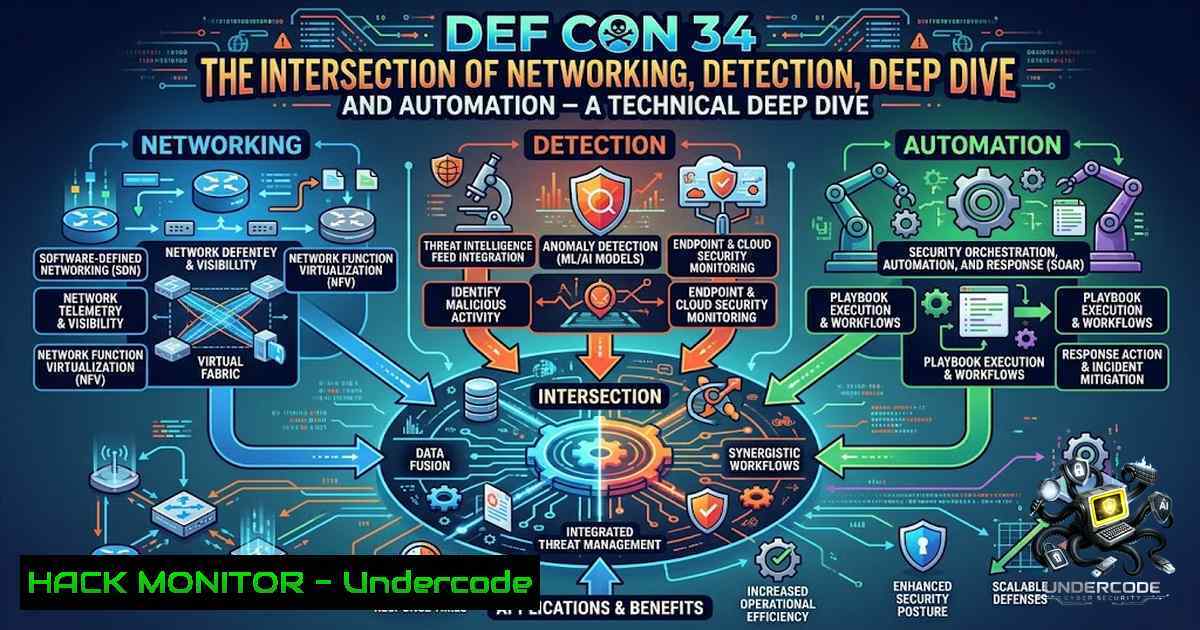
DEF CON 34, held from August 6–9, 2026, in Las Vegas, brought together tens of thousands of security practitioners across 38 specialized villages spanning AI, cloud, hardware, and network security. The conference marked a significant paradigm shift where artificial intelligence evolved from a hacking assistant to an autonomous actor capable of independently identifying vulnerabilities and executing attacks. For security professionals, the key takeaway is clear: the future of network defense lies at the intersection of deep packet analysis, AI-driven anomaly detection, and automated response—a convergence that was prominently showcased in the Packet Hacking Village’s Scapy + AI workshop and the Capture The Packet competition.
Learning Objectives:
- Understand how to leverage Scapy for packet crafting, sniffing, and building custom network analysis pipelines.
- Learn to implement AI-powered anomaly detection using machine learning models (Isolation Forest, Autoencoders) to baseline normal traffic and flag outliers.
- Master Wireshark for deep packet inspection, threat hunting, and CTF-style packet analysis challenges.
- Acquire practical Linux and Windows commands for network monitoring, packet capture, and security operations.
You Should Know:
- Scapy: The Foundation for Custom Packet Analysis and AI Integration
Scapy is a Python-based interactive packet manipulation program capable of forging, decoding, sending, and capturing packets across hundreds of protocols. Unlike fixed-function tools, Scapy provides granular control, making it ideal for building custom network detection systems, fuzzing, and integrating with machine learning pipelines.
Step-by-Step Guide: Setting Up Scapy for Packet Sniffing and Feature Extraction
1. Installation (Linux/macOS):
sudo apt-get update && sudo apt-get install -y python3-scapy libpcap-dev  Debian/Ubuntu
pip install scapy pandas numpy scikit-learn joblib tqdm
On Windows, install Npcap from npcap.com, then run:
pip install scapy pandas numpy scikit-learn
2. Launch Scapy Interactive Shell (requires root/administrator privileges):
sudo scapy
Or run as a Python script:
from scapy.all import
3. Sniff Live Traffic and Extract Features:
from scapy.all import sniff, IP, TCP, UDP

def packet_callback(packet):
if IP in packet:
features = {
'src': packet[bash].src,
'dst': packet[bash].dst,
'proto': packet[bash].proto,
'len': len(packet),
'ttl': packet[bash].ttl
}
print(features)

sniff(prn=packet_callback, count=100)  Capture 100 packets
4. Craft and Send Custom Probe Packets:
 SYN scan packet
syn_packet = IP(dst="192.168.1.100")/TCP(dport=80, flags="S")
response = sr1(syn_packet, timeout=2)
if response and TCP in response and response[bash].flags & 0x12:
print("Port 80 is open")
- Read and Parse PCAP Files for Offline Analysis:
packets = rdpcap("capture.pcap")
for pkt in packets:
if IP in pkt:
print(f"{pkt[bash].src} -> {pkt[bash].dst} : {pkt[bash].proto}")
Scapy’s ability to extract features like packet length, protocol number, and inter-arrival time makes it an ideal data source for machine learning models.
- Building an AI-Powered Network Anomaly Detector with Scapy and Scikit-Learn
The Packet Hacking Village workshop demonstrated how to pair Scapy with an AI agent that baselines normal traffic and flags anomalies. This approach uses unsupervised learning—specifically Isolation Forest—to detect outliers based on statistical features.
Step-by-Step Guide: Implementing an AI Anomaly Detection Pipeline
1. Install Dependencies:
pip install streamlit scapy pandas scikit-learn
2. Feature Extraction from PCAP (packet_features.py):
from scapy.all import rdpcap, IP, TCP, UDP
import pandas as pd

def extract_features(pcap_file):
packets = rdpcap(pcap_file)
features = []
for pkt in packets:
if IP in pkt:
features.append({
'length': len(pkt),
'proto': pkt[bash].proto,
'ttl': pkt[bash].ttl,
'src': pkt[bash].src,
'dst': pkt[bash].dst
})
return pd.DataFrame(features)
3. Train Isolation Forest Model:
from sklearn.ensemble import IsolationForest
import pandas as pd

df = extract_features('baseline.pcap')
X = df[['length', 'proto', 'ttl']]

model = IsolationForest(contamination=0.05, random_state=42)
model.fit(X)

Save model
import joblib
joblib.dump(model, 'anomaly_model.pkl')
4. Real-Time Anomaly Detection:
from scapy.all import sniff, IP
import joblib
import numpy as np

model = joblib.load('anomaly_model.pkl')

def detect_anomaly(packet):
if IP in packet:
features = np.array([[len(packet), packet[bash].proto, packet[bash].ttl]])
prediction = model.predict(features)
if prediction[bash] == -1:  Anomaly
print(f"[bash] Anomalous packet: {packet.summary()}")

sniff(prn=detect_anomaly, iface="eth0")
5. Deploy with Streamlit Dashboard (PCAP AI Analyzer):
Clone and run the open-source PCAP AI Analyzer:
git clone https://github.com/TriniViking/pcap-ai-analyzer.git
cd pcap-ai-analyzer
python -m venv pcap-env
source pcap-env/bin/activate  Windows: pcap-env\Scripts\activate
pip install streamlit scapy pandas scikit-learn
streamlit run pcap_ai_analyzer.py
Upload a PCAP file to view protocol distribution, top talkers, port scan warnings, and Isolation Forest-flagged anomalies.
This approach mirrors the DEF CON 34 workshop, enabling security analysts to build lightweight, cost-effective anomaly detection systems without heavy deep learning dependencies.
3. Wireshark Mastery: Capture The Packet Competition Techniques
The Capture The Packet competition at DEF CON 34 required participants to analyze PCAPs using Wireshark, with top 10 finishers demonstrating exceptional packet analysis skills. Wireshark remains the industry standard for deep packet inspection, protocol analysis, and threat hunting.
Step-by-Step Guide: Essential Wireshark Techniques for CTF and Threat Hunting
1. Capture Traffic with Filters (Linux/Windows):
 Linux - capture on interface eth0, port 443 only
sudo tshark -i eth0 -f "port 443" -w capture.pcap

Windows (PowerShell as Admin)
& "C:\Program Files\Wireshark\tshark.exe" -i Ethernet0 -f "port 443" -w capture.pcap
2. Essential Display Filters:
– `ip.src == 192.168.1.100` – Filter by source IP
– `tcp.port == 80` – Filter by TCP port
– `http.request.method == “GET”` – Filter HTTP GET requests
– `tcp.flags.syn == 1 && tcp.flags.ack == 0` – Identify SYN scan attempts
– `dns.qry.name contains “malware”` – Detect可疑 DNS queries
– `tcp.stream eq 0` – Follow a specific TCP stream
3. Follow TCP Streams to Reconstruct Conversations:
- Right-click on a packet → Follow → TCP Stream
- Extract plaintext credentials, files, or malicious payloads
4. Export Objects (HTTP, SMB, TFTP):
- File → Export Objects → HTTP – Extract files transferred over HTTP
5. Detect Port Scans with Wireshark Statistics:
- Statistics → Flow Graph – Visualize connection patterns
- Statistics → Conversations – Identify top talkers
- Look for numerous SYN packets to multiple ports from a single source
6. Command-Line Analysis with TShark (Linux/Windows):
 List all unique source IPs
tshark -r capture.pcap -T fields -e ip.src | sort | uniq

Count HTTP requests by method
tshark -r capture.pcap -Y "http.request" -T fields -e http.request.method | sort | uniq -c

Extract DNS queries
tshark -r capture.pcap -Y "dns" -T fields -e dns.qry.name
7. Custom Wireshark Dissectors for Proprietary Protocols:
Wireshark supports Lua-based dissectors for analyzing custom or unknown protocols, a skill highlighted in advanced CTF challenges.
- Linux and Windows Commands for Network Security Operations
DEF CON’s Packet Hacking Village emphasized foundational Linux skills as critical for any security practitioner. Below are essential commands for network monitoring, packet capture, and security operations.
Linux Commands:
 Packet capture with tcpdump
sudo tcpdump -i eth0 -w capture.pcap -s 0

Capture and filter in real-time
sudo tcpdump -i eth0 port 443 -c 100

View active network connections
ss -tulpn

Monitor network traffic with iftop
sudo iftop -i eth0

Analyze PCAP with tcpdump
tcpdump -r capture.pcap -1

Network mapping with nmap
nmap -sS -p- 192.168.1.0/24

Detect ARP spoofing
arp-scan --local

Monitor system logs for security events
sudo tail -f /var/log/auth.log | grep "Failed password"
Windows Commands (PowerShell):
 Capture network traffic with netsh
netsh trace start capture=yes provider=Microsoft-Windows-Kernel-1etwork tracefile=C:\capture.etl

Stop capture
netsh trace stop

View active connections
netstat -ano

Find processes listening on port
Get-1etTCPConnection -LocalPort 443

Test connectivity with advanced parameters
Test-1etConnection google.com -Port 443

Enable Windows Firewall logging
New-Item -Path "C:\Windows\System32\LogFiles\Firewall\pfirewall.log" -ItemType File
netsh advfirewall set allprofiles logging filename C:\Windows\System32\LogFiles\Firewall\pfirewall.log
- Agentic AI in Offensive Security: The New Frontier
DEF CON 34’s AI Village CTF required participants to build AI agents that could independently analyze problems, select attack vectors, and capture flags without human intervention. The SK Shieldus EQST team secured 5th place globally out of 200 teams by optimizing agents to prioritize targets based on difficulty and point value.
Step-by-Step Guide: Simulating an Agentic AI Penetration Testing Loop
1. Environment Setup:
pip install openai requests beautifulsoup4
2. Tool Wrapper Functions:
import subprocess
import requests

def scan_port(ip, port):
result = subprocess.run(["nmap", "-p", str(port), ip], capture_output=True, text=True)
return result.stdout

def fetch_url(url):
try:
response = requests.get(url, timeout=5)
return response.text
except Exception as e:
return str(e)
3. Agent Logic with LLM API:
import openai

tools = {
"scan_port": scan_port,
"fetch_url": fetch_url
}

system_prompt = """You are an automated pentest agent. Your goal is to find the flag.
You have access to these tools: scan_port(ip, port), fetch_url(url).
Analyze the output of each tool and decide the next action."""

def agent_loop(target, max_iterations=10):
context = f"Target: {target}. Find open ports and retrieve the flag."
for _ in range(max_iterations):
response = openai.ChatCompletion.create(
model="gpt-4",
messages=[
{"role": "system", "content": system_prompt},
{"role": "user", "content": context}
]
)
action = response.choices[bash].message.content
 Parse and execute action...
This agentic approach represents a fundamental shift in how security testing will be conducted, with AI agents augmenting or replacing manual reconnaissance and exploitation.
- Cloud Hardening and API Security: Lessons from DEF CON 34
DEF CON 34 also highlighted cloud and API security risks, including “GhostJacking” demonstrations where blocked firewall logs and telemetry were used to poison AI agents into executing attacker instructions across platforms like Cloudflare, Datadog, and Sentry.
Step-by-Step Guide: API Security Hardening
1. Implement Least Privilege for API Keys:
- Use short-lived credentials (max 1-hour validity)
- Restrict API keys to specific IP ranges
- Implement scope-based access controls
2. Monitor API Traffic with Wireshark/Scapy:
from scapy.all import sniff, IP, TCP

def api_monitor(packet):
if TCP in packet and (packet[bash].dport == 443 or packet[bash].sport == 443):
 Log API endpoints and payloads
print(f"API traffic: {packet[bash].src} -> {packet[bash].dst}")

sniff(prn=api_monitor, filter="tcp port 443")
3. Cloud Security Posture Management (CSPM):
- Enable cloud-1ative threat detection (AWS GuardDuty, Azure Defender)
- Configure VPC flow logs and export to SIEM
- Implement service control policies (SCPs) for organizational guardrails
4. Zero Trust Network Access (ZTNA):
- Authenticate and authorize every request
- Micro-segment workloads to limit lateral movement
- Continuously validate device posture
7. Post-Quantum Security and Cryptographic Implementation
Post-quantum security moved from theoretical discussion to implementation realities at DEF CON 34, with research examining practical attacks against post-quantum cryptography implementations.
Step-by-Step Guide: Cryptographic Hardening
1. Audit Cryptographic Implementations:
- Use only NIST-approved post-quantum algorithms (CRYSTALS-Kyber, CRYSTALS-Dilithium)
- Avoid custom crypto implementations
- Regularly update cryptographic libraries
2. Linux/Windows Commands for Crypto Auditing:
 Check SSL/TLS configurations
openssl s_client -connect example.com:443 -tls1_3

Test cipher suites
nmap --script ssl-enum-ciphers -p 443 example.com
What Undercode Say:
- Key Takeaway 1: The convergence of networking, detection, and automation is no longer aspirational—it is the operational reality. Security professionals must develop proficiency across packet analysis (Scapy/Wireshark), AI/ML anomaly detection, and automated response workflows.
-
Key Takeaway 2: Agentic AI is transforming both offensive and defensive security. While AI agents can autonomously identify vulnerabilities and execute attacks, they also introduce new risks when autonomy outruns control mechanisms. Defenders must build AI-hardened detection systems that can identify and respond to AI-generated threats.
Analysis: The DEF CON 34 experience underscores a critical shift in cybersecurity education and practice. The traditional silos between network engineering, security operations, and software development are dissolving. The most effective security practitioners will be those who can bridge these domains—writing Python scripts with Scapy to capture and analyze traffic, training ML models to detect anomalies, and using Wireshark to deep-dive into suspicious packets. The NSF CyberCorps Scholarship for Service program, which enabled attendance at DEF CON, represents a strategic investment in developing this multidisciplinary workforce. For students and professionals alike, the message is clear: build home labs, experiment with Scapy and AI, participate in CTFs, and continuously expand your technical toolkit across the entire security stack.
Prediction:
- +1 The integration of AI with packet analysis tools like Scapy will democratize network security monitoring, enabling smaller organizations to deploy sophisticated anomaly detection without expensive commercial solutions.
-
+1 Agentic AI will accelerate vulnerability discovery and patch development, potentially reducing the average time from vulnerability disclosure to exploit from days to hours.
-
-1 The same agentic AI capabilities will be weaponized by threat actors, leading to a surge in automated, AI-driven attacks that can adapt in real-time to defensive measures.
-
-1 As AI agents gain autonomy, the risk of “GhostJacking” and telemetry poisoning will grow, requiring fundamental redesigns of logging, monitoring, and alerting pipelines.
-
+1 The CyberCorps Scholarship for Service and similar programs will produce a new generation of security professionals who are equally comfortable with Python, packet analysis, and AI—closing the talent gap in government cybersecurity.
▶️ Related Video (78% Match):
https://www.youtube.com/watch?v=4Fr_jhFMPas
🎯Let’s Practice For Free:
🎓 Live Courses & Certifications:
Join Undercode Academy for Verified Certifications
🚀 Request a Custom Project:
Secure, high-velocity infrastructure and disruptive technological engineering. Contact our engineering team for high-tier development and proprietary systems:
[email protected]
💎 Smart Architecture | 🛡️ Secure by Design | ⭐ Trusted by Thousands
IT/Security Reporter URL:
Reported By: https://lnkd.in/p/es4nj5zG – Hackers Feeds
Extra Hub: Undercode MoN
Basic Verification: Pass ✅


