Listen to this Post
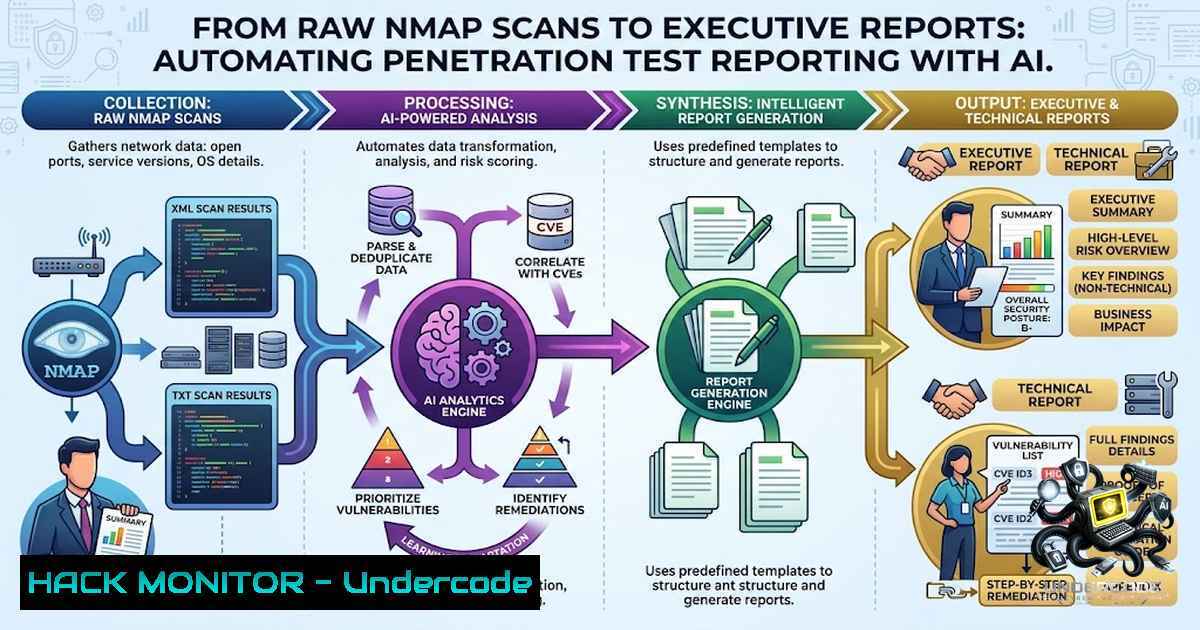
Introduction:
The gap between raw technical scan data and actionable business intelligence has long been a bottleneck in penetration testing engagements. Security professionals spend countless hours translating Nmap XML outputs, Nessus findings, and vulnerability scanner results into polished executive summaries that non-technical stakeholders can understand and act upon. With the emergence of Generative AI and LLM-powered automation frameworks, this traditionally manual and labor-intensive process is being revolutionized. Tools leveraging Claude AI, RAG architectures, and MCP (Model Context Protocol) now enable security teams to transform raw diagnostics into structured, prioritized remediation advice and financial risk assessments in minutes rather than days.
Learning Objectives:
- Understand the end-to-end workflow for converting raw network scan data into executive-ready security reports using AI-assisted automation
- Learn practical implementation steps with verified Linux/Windows commands for Nmap scanning, XML parsing, and AI-powered report generation
- Master the configuration and usage of open-source tools including VulnReport, VAPT Report Generator, and AI-penetration testing frameworks
You Should Know:
1. The AI-Powered Pentest Reporting Pipeline
The modern approach to penetration testing reporting follows a structured pipeline: raw scan output → data normalization → AI analysis → structured report generation. Raw scan outputs from tools like Nmap, Nessus, Nuclei, and Burp Suite contain valuable data but are incomprehensible to non-technical stakeholders. The pipeline begins with uploading network scan diagnostics to an LLM such as Claude AI, which then extracts business loss impact, generates financial risk scenarios, and produces structured remediation advice.
Several open-source frameworks now automate this entire workflow. VulnReport, for instance, accepts CVE IDs or raw Nmap/Nessus scan output and instantly generates professional reports with severity ratings, technical analysis, attack scenarios, and remediation steps. The VAPT Report Generator ingests outputs from multiple scanners (Nmap, Nessus, Nuclei, Burp, ZAP, Acunetix), normalizes findings into a unified model, applies CVSS v3.1 scoring, and renders polished reports in PDF, Word, HTML, or Excel. For full automation, frameworks like AutoPentester—an LLM agent-based system—complete the entire pentest lifecycle from information gathering to report generation with minimal human intervention.
Step‑by‑step guide:
Step 1: Run an Nmap scan with XML output
 Basic Nmap scan with service detection, output to XML
nmap -sV -sC -oX scan_results.xml <target-ip>

Full port scan with version detection
nmap -p- -sV -oX full_scan.xml <target-ip>

Scan with specific NSE scripts
nmap -sV --script=vuln -oX vuln_scan.xml <target-ip>
Step 2: Parse and structure the XML output
 Using Python to parse Nmap XML
python3 -c "
import xml.etree.ElementTree as ET
tree = ET.parse('scan_results.xml')
root = tree.getroot()
for host in root.findall('host'):
for port in host.findall('ports/port'):
print(f\"Port {port.get('portid')}/{port.get('protocol')} - {port.find('service').get('name')}\")
"
Step 3: Feed the output to an AI report generator
 Using VulnReport (requires Anthropic API key)
export ANTHROPIC_API_KEY="your-api-key"
python app.py
 Then paste raw Nmap output into the web interface

Using VAPT Report Generator
vaptreport scan_results.xml -o report.pdf --client "Client Name"
Step 4: Generate the executive summary with Claude AI
Create a structured prompt for Claude:
You are a senior penetration tester. Analyze the following Nmap scan results and generate:
1. Executive Summary (non-technical, business impact focused)
2. Risk Assessment (CVSS scores, severity ratings)
3. Technical Findings (vulnerabilities discovered)
4. Remediation Recommendations (prioritized by risk)
5. Financial Impact Analysis (potential business loss scenarios)

[Paste Nmap output here]
2. Setting Up the Automation Environment
To build a robust AI-powered reporting pipeline, you need to configure the right environment and tools. Most frameworks run on Kali Linux (preferred) or Ubuntu 20.04+ with Python 3.8+, minimum 8GB RAM, and administrative privileges.
Installation commands:
 Clone and install VulnReport
git clone https://github.com/9xm-shivam/vulnreport-ai.git
cd vulnreport-ai
python -m venv venv
source venv/bin/activate  Linux/macOS
 venv\Scripts\activate  Windows
pip install -r requirements.txt

Set Anthropic API key
export ANTHROPIC_API_KEY="your-api-key"

Run the application
python app.py
For the VAPT Report Generator:
git clone https://github.com/usmanzia-ux/vapt-report-generator.git
cd vapt-report-generator
pip install -e .
 For PDF support
pip install -e ".[bash]"
 For Word (.docx) support
pip install -e ".[bash]"

Run the interactive wizard
vaptreport
For enterprise-scale automation with AI-Pentest-Automation framework:
git clone https://github.com/ubercylon8/ai-pentest-automation.git
cd ai-pentest-automation
chmod +x scripts/install_tools.sh
./scripts/install_tools.sh
pip install -r requirements.txt
cp .env.example .env
 Edit .env with your API keys
export CLAUDE_API_KEY="your-claude-api-key"
export SHODAN_API_KEY="your-shodan-api-key"

Run the automated pentest
python -m ai_pentest run my_project_scope.json
Windows-specific configuration:
 PowerShell
$env:ANTHROPIC_API_KEY="your-key-here"

Command Prompt
set ANTHROPIC_API_KEY=your-key-here
3. Risk Classification and Business Impact Mapping
One of the critical functions of AI-powered reporting is translating technical findings into business impact assessments. Tools like the Security Automation Tools script automatically classify open ports by risk level—Critical, High, Medium, or Low—and provide specific remediation recommendations.
Sample risk classification database:
| Risk Level | Examples | Business Impact |
||-|–|
| CRITICAL | FTP, Telnet, rexec, shell, login | Direct exploitation vector; data breach within hours |
| HIGH | MySQL, PostgreSQL, SMTP, SMB, VNC | Significant exposure; credential theft possible |
| MEDIUM | SSH, HTTP, DNS, SNMP, Tomcat | Manageable but needs proper configuration |
| LOW | HTTPS | Generally fine with standard security practices |
Automated risk classification script:
!/usr/bin/env python3
 nmap_security_audit.py - Automates Nmap scanning with risk classification

import subprocess
import xml.etree.ElementTree as ET
import datetime

RISK_DB = {
'ftp': 'CRITICAL',
'telnet': 'CRITICAL',
'rexec': 'CRITICAL',
'mysql': 'HIGH',
'postgresql': 'HIGH',
'smb': 'HIGH',
'ssh': 'MEDIUM',
'http': 'MEDIUM',
'https': 'LOW'
}

def scan_target(target):
result = subprocess.run(
['nmap', '-sV', '-oX', '-', target],
capture_output=True, text=True
)
return result.stdout

def parse_and_classify(xml_output):
root = ET.fromstring(xml_output)
findings = []
for host in root.findall('host'):
for port in host.findall('ports/port'):
service = port.find('service')
if service is not None:
service_name = service.get('name', '').lower()
risk = RISK_DB.get(service_name, 'MEDIUM')
findings.append({
'port': port.get('portid'),
'protocol': port.get('protocol'),
'service': service_name,
'risk': risk
})
return findings

if <strong>name</strong> == '<strong>main</strong>':
target = input("Enter target IP: ")
print(f"[] Scanning {target}...")
xml_data = scan_target(target)
findings = parse_and_classify(xml_data)

print("\n" + "="60)
print("SECURITY AUDIT RESULTS")
print(f"Target: {target}")
print(f"Scan completed: {datetime.datetime.now()}")
print("="60)

for f in findings:
print(f"[{f['risk']}] Port {f['port']}/{f['protocol']} - {f['service']}")
4. Structured Report Generation with AI
The core of modern pentest reporting is structured, consistent output that can be automatically generated and customized for different audiences. Tools like OWASP VISTO generate comprehensive security reports summarizing findings, categorizing vulnerabilities, and providing prioritized remediation steps. The RAG-based Pentest Report Generator uses ChromaDB for vector storage and LLM integration to produce detailed reports with executive summaries, methodology, findings, risk analysis, technical details, and remediation roadmaps.
Example Claude API integration for report generation:
import anthropic
import json

def generate_pentest_report(scan_data, target_info):
client = anthropic.Anthropic(api_key="your-api-key")

prompt = f"""
You are a senior penetration tester. Generate a structured security report in JSON format with the following sections:
- executive_summary: Non-technical overview for business stakeholders
- severity_summary: Breakdown by Critical/High/Medium/Low
- findings: Array of findings with description, CVSS score, and evidence
- remediation: Prioritized action items
- financial_impact: Estimated business loss scenarios

Target: {target_info}
Scan Results: {scan_data}
"""

response = client.messages.create(
model="claude-3-sonnet-20241022",
max_tokens=4000,
messages=[{"role": "user", "content": prompt}]
)
return json.loads(response.content[bash].text)

Usage
report = generate_pentest_report(nmap_xml_data, "Production Web Server")
print(json.dumps(report, indent=2))
5. CI/CD Integration and Continuous Security Reporting
For organizations with mature DevSecOps practices, AI-powered pentest reporting can be integrated directly into CI/CD pipelines. The Penetration Testing Claude Skill provides GitHub Actions workflows that automatically run security assessments on pull requests and generate reports. This enables continuous security validation and immediate feedback to developers.
GitHub Actions workflow (.github/workflows/security.yml):
name: Security Scan
on:
pull_request:
branches: [bash]
jobs:
pentest:
runs-on: ubuntu-latest
steps:
- uses: actions/checkout@v4
- name: Run Security Assessment
env:
ANTHROPIC_API_KEY: ${{ secrets.ANTHROPIC_API_KEY }}
run: |
python -m handlers.sast_analyzer \
--scope changed_files \
--output findings.json
- name: Generate Report
run: |
python -m handlers.report_generator \
--input findings.json \
--format html \
--output security_report.html
- name: Upload Report
uses: actions/upload-artifact@v4
with:
name: security-report
path: security_report.html
What Undercode Say:
- Key Takeaway 1: The gap between raw technical scan data and business-ready executive summaries is being closed by AI-powered automation tools that can process Nmap, Nessus, and other scanner outputs in minutes rather than days. This represents a fundamental shift in how penetration testing engagements are delivered.
-
Key Takeaway 2: Open-source frameworks like VulnReport, VAPT Report Generator, and AutoPentester provide accessible, production-ready solutions for automating the entire pentest lifecycle—from reconnaissance to report generation—with minimal human intervention. Security teams no longer need to build these capabilities from scratch.
Analysis: The convergence of LLM technology with traditional penetration testing tools is creating a new paradigm for security assessments. Claude AI’s semantic understanding capabilities enable context-aware vulnerability detection and false positive filtering that goes far beyond simple pattern matching. The emergence of agentic frameworks like PentestGPT and AutoPentester demonstrates that autonomous security testing—where AI agents drive the entire engagement from reconnaissance to reporting—is becoming a reality. However, this automation comes with important considerations: data sovereignty concerns when using public LLM services, the need for human oversight of dangerous actions, and the importance of validating AI-generated findings. The most effective approach combines AI automation for efficiency with human expertise for validation and complex decision-making.
Prediction:
- +1 AI-powered pentest reporting will become the industry standard within 18-24 months, reducing report generation time by 80-90% and enabling security teams to deliver more engagements with the same headcount.
-
+1 The integration of RAG architectures with local LLMs will address data sovereignty concerns, making AI-powered pentesting viable for government and highly regulated industries.
-
-1 Over-reliance on AI-generated reports without human validation may lead to missed vulnerabilities or false positives being accepted as truth, necessitating robust quality assurance processes.
-
+1 Agentic frameworks that autonomously drive the full pentest kill chain will democratize security testing, enabling organizations with limited security resources to conduct regular, comprehensive assessments.
-
-1 The attack surface of AI-powered pentesting tools themselves—including API key exposure, prompt injection, and model manipulation—will become a new vector for adversaries to exploit.
-
+1 Continuous security reporting integrated into CI/CD pipelines will shift security left, enabling developers to receive immediate, contextualized vulnerability feedback during the development process.
▶️ Related Video (82% Match):
https://www.youtube.com/watch?v=2IYoRUCWARk
🎯Let’s Practice For Free:
🎓 Live Courses & Certifications:
Join Undercode Academy for Verified Certifications
🚀 Request a Custom Project:
Secure, high-velocity infrastructure and disruptive technological engineering. Contact our engineering team for high-tier development and proprietary systems:
[email protected]
💎 Smart Architecture | 🛡️ Secure by Design | ⭐ Trusted by Thousands
IT/Security Reporter URL:
Reported By: https://lnkd.in/p/egzfPb4z – Hackers Feeds
Extra Hub: Undercode MoN
Basic Verification: Pass ✅


