Listen to this Post
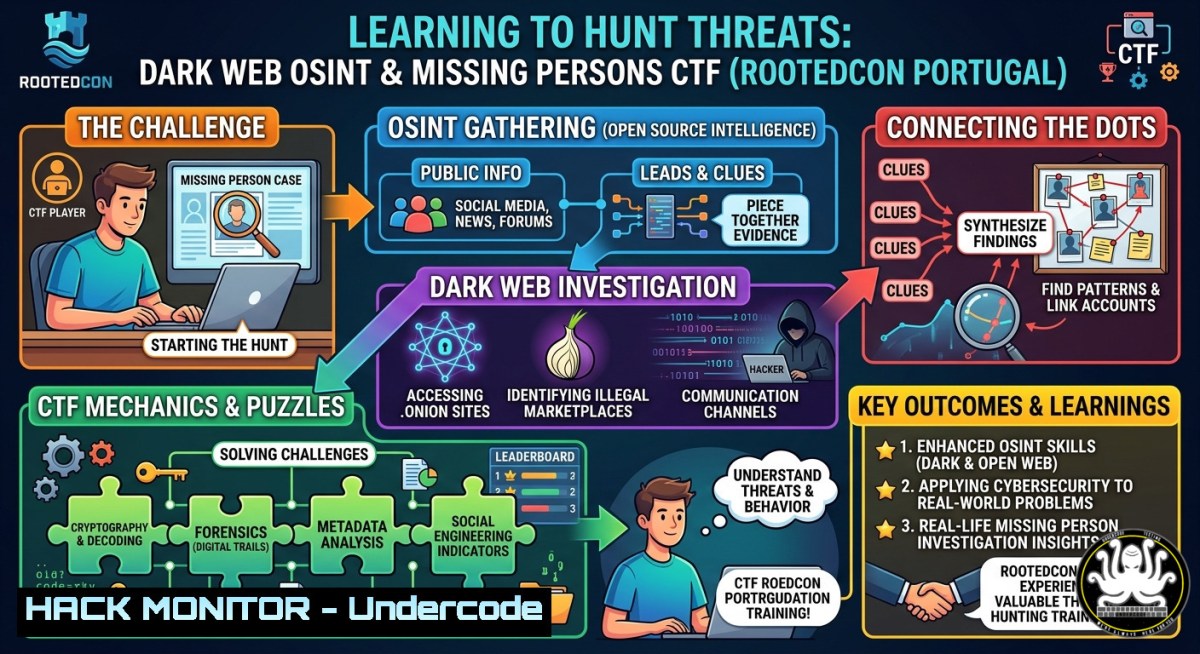
Introduction:
Open Source Intelligence (OSINT) has evolved from casual social media searches into a disciplined cybersecurity discipline used in criminal investigations, threat hunting, and missing person recovery. At RootedCON Portugal, experts demonstrated how dedicated virtual machines, dark web research techniques, and reproducible operating systems like NixOS can empower investigators to find actionable intelligence—even locating a real missing person just two days after the search began.
Learning Objectives:
- Master OSINT investigations on both clearnet and dark web using purpose-built virtual machines with hardened configurations.
- Apply CTF-style problem solving to real-world missing persons searches, including geolocation, metadata analysis, and cross-platform footprinting.
- Build reproducible, forensically sound operating systems with NixOS to ensure consistency across investigations and eliminate configuration drift.
You Should Know:
- Setting Up a Secure OSINT Virtual Machine for Dark Web Research
A dedicated VM isolates your investigative traces and protects your host system from malicious .onion sites or unintended downloads. Start with VirtualBox or VMware, then install a security-focused distribution like Whonix (which forces all traffic through Tor) or Tails (amnesiac and persistent storage optional). For clearnet investigations, a hardened Ubuntu or Kali Linux works well.
Step-by-step guide:
- Download VirtualBox and the Whonix Gateway + Workstation OVA files.
- Import both appliances (File > Import Appliance). Set network to NAT for the Gateway, Internal Network for the Workstation.
- Launch Gateway first, then Workstation. Verify Tor connection: `curl –socks5-hostname 127.0.0.1:9050 https://check.torproject.org/api/ip`
4. Install OSINT tools inside the Workstation:
sudo apt update && sudo apt install -y theharvester recon-ng exiftool tor torsocks
git clone https://github.com/sherlock-project/sherlock.git && cd sherlock && python3 -m pip install -r requirements.txt
5. Take a clean snapshot before any investigation to allow rollback to a known state.
2. Clearnet OSINT: Harvesting Emails, Subdomains, and Social Accounts
Passive reconnaissance across search engines, DNS records, and social platforms helps build a target’s digital footprint. Use theHarvester to gather emails and subdomains, Sherlock to check username availability across hundreds of sites, and Google dorks for hidden directories.Linux commands:
 Email and subdomain harvesting
theHarvester -d example.com -b google,bing,linkedin -l 500

 Username enumeration
python3 sherlock/sherlock.py username_to_check

 Google dorks via command line (requires a browser user-agent)
curl -A "Mozilla/5.0" "https://www.google.com/search?q=site:example.com+ext:pdf+confidential"
Windows PowerShell alternative:
Invoke-WebRequest -Uri "https://api.github.com/users/target" | Select-Object -ExpandProperty Content
Remember to respect target scope and legal boundaries; CTFs and authorized exercises are the only safe playgrounds for these techniques.
3. Dark Web Investigation: Accessing .onion Sites Without Leaving Traces
The dark web hosts both legitimate anonymous services and criminal marketplaces. Investigators must access these .onion domains without exposing their identity or infecting their environment. Use a dedicated VM (Whonix or Tails) and route all traffic through Tor. Never use the dark web from a host that contains personal credentials.Step-by-step access:
1. From your Whonix Workstation terminal, start Tor if not already running: `sudo systemctl start tor`
- Obtain a list of known .onion search engines (e.g., Ahmia.fi) via clearnet first.
- Browse using Tor Browser (pre-installed in Whonix). Verify no DNS leaks: `torsocks curl https://ipleak.net/json/`
- To script interactions with .onion sites (e.g., checking if a site is up):
torsocks curl --socks5-hostname 127.0.0.1:9050 -x socks5h://127.0.0.1:9050 http://expyuzz4wqqyqhjn.onion
- Never download executable files from unknown .onion sites without sandboxing (e.g., with Firejail).
4. Missing Persons CTF: Geolocation and Metadata Forensics
In the RootedCON CTF, participants helped Portuguese police locate a missing person by piecing together social media posts, image metadata, and public records. Two critical techniques emerged: extracting GPS coordinates from photos and correlating timestamps across platforms.
Extracting image metadata (Linux/macOS):
exiftool -GPSPosition -CreateDate -Make -Model suspect_photo.jpg
If GPS coordinates are present (e.g., “40 deg 26′ 46.02″ N, 3 deg 41′ 38.51″ W”), convert to decimal and paste into Google Maps or OpenStreetMap.
Reverse image search automation:
 Using curl with Google Reverse Image API (deprecated, now use custom scripts or TinEye CLI)
 Alternative: use `googleimagesearch` python library
pip install google_images_search
Windows users: Use PowerShell to download and compare image hashes with known missing person photos:
Get-FileHash -Algorithm SHA256 .\found_image.jpg; .\reference_image.jpg
For the CTF, one team reportedly found a geotagged Instagram photo taken two days before the disappearance, narrowing the search radius to a 5km area.
5. NixOS: Building Reproducible Security Environments
NixOS treats your entire operating system configuration as code. This guarantees that your OSINT VM, CTF toolset, or forensic workstation can be replicated exactly on any machine—essential for evidence handling and collaborative investigations. The third day of RootedCON featured a talk on how to use NixOS to create reproducible pentesting boxes.
Basic NixOS configuration for an OSINT workspace (`/etc/nixos/configuration.nix`):
{ config, pkgs, ... }:
{
environment.systemPackages = with pkgs; [
tor
torsocks
exiftool
theharvester
recon-ng
wireshark-cli
];
services.tor.enable = true;
networking.firewall.allowedTCPPorts = [ 9050 8118 ];
}
After editing, apply: `sudo nixos-rebuild switch`
For a non‑OSIXOS setup (any Linux distro), use `nix-shell -p tor exiftool` to spawn a temporary environment with those tools without affecting your host.
Why this matters: At RootedCON, the speaker demonstrated how a misconfigured VM cost an investigator three hours of lost work. With NixOS, rebuilding the exact environment takes less than five minutes.
- Emergency WiFi Recovery: Travel Routers and Ad‑Hoc Networks
Minutes before the CTF, the venue’s WiFi failed. The team salvaged the event using a travel router (a GL.iNet device) and an ad‑hoc access point. This is a critical skill for on‑site CTFs, red team exercises, or incident response in remote locations.
Using a travel router (hardware solution):
- Connect the router to any available internet source (hotel Ethernet, phone tethering).
- Configure the router’s SSID and WPA2 password via its web interface (usually 192.168.8.1).
- Power it via USB battery pack. In the CTF, Gabriela’s router saved the day within minutes.
Software access point on Linux (hostapd + dnsmasq):
sudo apt install hostapd dnsmasq
 Edit /etc/hostapd/hostapd.conf
interface=wlan0
ssid=CTF_Rescue
hw_mode=g
channel=6
wpa=2
wpa_passphrase=SecurePass123
 Edit /etc/dnsmasq.conf
interface=wlan0
dhcp-range=192.168.50.10,192.168.50.100,255.255.255.0,12h
Start services: `sudo systemctl start hostapd dnsmasq` and enable IP forwarding.
Windows Mobile Hotspot (quickest):
Open Settings > Network & Internet > Mobile Hotspot, toggle “Share my internet connection with other devices,” then click “Edit” to set SSID and password. No commands required—but for automation, use `netsh wlan set hostednetwork mode=allow ssid=CTFNet key=pass123` (older drivers only).
7. CTF Network Troubleshooting: Capturing and Analyzing Dropouts
When the main WiFi failed, the team had to diagnose why. Using Wireshark and tcpdump, they identified a rogue DHCP server and a saturated access point. This forensic networking skill is invaluable for both CTF infrastructure and real‑world incident response.
Capture traffic before the dropout:
sudo tcpdump -i eth0 -c 1000 -w capture.pcap
Analyze with Wireshark: Look for excessive retransmissions, duplicate ACKs, or DHCP offers from unauthorized IPs.
Check system logs for WiFi interface flapping:
journalctl -u NetworkManager | grep -i "lost carrier"
dmesg | grep -i "wlan0: deauthenticating"
Mitigation strategy: Set up a backup router with a different channel and 5GHz band. For the CTF, after identifying channel 6 as overcrowded, they switched to channel 11 and restored connectivity in under 10 minutes.
What Undercode Say:
- Key Takeaway 1: Real‑world OSINT is not just about tools; it’s about operational security, legal boundaries, and teamwork. The combination of a purpose‑built VM, Tor routing, and metadata extraction directly led to locating a real missing person within 48 hours of their disappearance.
- Key Takeaway 2: Reproducible infrastructure (NixOS) and emergency hardware (travel routers) are not “nice‑to‑haves” but mission‑critical components. When the venue’s WiFi died, the team’s ability to improvise an ad‑hoc network saved an entire CTF involving law enforcement.
Analysis (approx. 10 lines): This post from RootedCON Portugal highlights a growing trend in cybersecurity education: moving beyond theoretical lectures to hands‑on, operationally realistic scenarios. The integration of a missing persons CTF with actual police data bridges the gap between blue‑team defense and investigative OSINT, a skill set increasingly demanded by both private sector threat intelligence units and public safety agencies. The emphasis on dark web research using disposable VMs reflects the industry’s recognition that anonymity is a double‑edged sword—investigators must master it without being compromised. Furthermore, the NixOS talk signals a shift toward infrastructure‑as‑code in security forensics, ensuring that evidence collection processes are auditable and repeatable. Finally, the WiFi rescue anecdote serves as a reminder that soft skills—quick thinking, hardware familiarity, and collaboration—remain as valuable as any command‑line wizardry. As CTFs and bootcamps evolve, they are increasingly simulating the chaotic, resource‑constrained environments of real incident response.
Prediction:
In the next 12–24 months, law enforcement agencies and corporate SOCs will begin adopting “reproducible OSINT environments” based on NixOS or similar declarative systems as standard operating procedure. Simultaneously, CTFs focused on missing persons and human trafficking will become mainstream, serving both as training tools and as genuine force multipliers for active investigations. The reliance on travel routers and ad‑hoc networking will also grow, with cybersecurity conferences and incident response teams incorporating “network‑fail” drills into their curricula. Expect to see open‑source projects emerge that package entire OSINT VMs with one‑click reproducibility, lowering the barrier for smaller police departments and NGOs.
▶️ Related Video (76% Match):
🎯Let’s Practice For Free:
IT/Security Reporter URL:
Reported By: Jaime E – Hackers Feeds
Extra Hub: Undercode MoN
Basic Verification: Pass ✅


