Listen to this Post
Introduction:
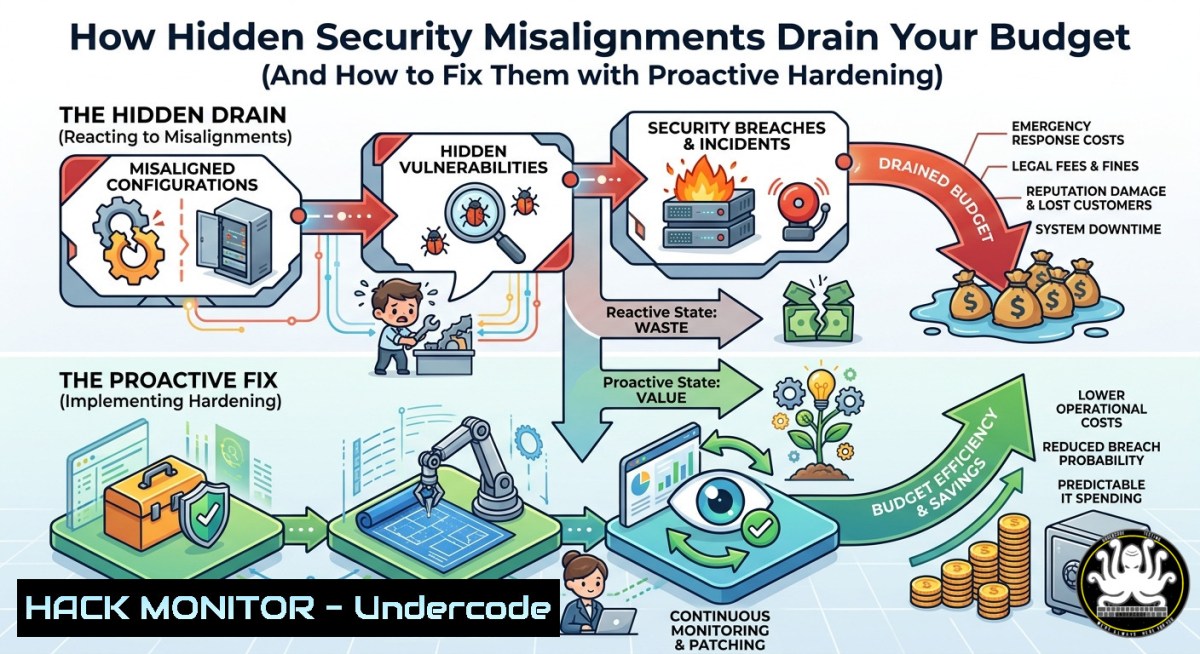
Just as a commercial vehicle can appear road-ready while hidden wheel misalignments silently waste fuel and tire life, your IT infrastructure may seem compliant on the surface while configuration drifts and overlooked vulnerabilities leak resources, expose data, and inflate operational costs. In cybersecurity, the difference between “looking secure” and being truly hardened often lies in subtle misalignments – a firewall rule allowing unnecessary ports, an IAM role with excessive permissions, or an unpatched container registry. This article translates the lessons from fleet alignment into actionable security practices, showing you how to detect, measure, and remediate hidden configuration gaps using command-line tools, cloud hardening techniques, and AI-driven monitoring.
Learning Objectives:
- Identify and quantify “security drag” caused by misaligned system configurations, analogous to increased rolling resistance from wheel misalignment.
- Apply Linux and Windows commands to audit firewall rules, privilege assignments, and service exposures that silently increase risk and cost.
- Implement scheduled alignment checks using automation (Ansible, PowerShell DSC) and AI anomaly detection to prevent budget erosion before breaches occur.
You Should Know:
- Measuring Your Security Rolling Resistance: Audit & Baseline Commands
In fleet management, a slight wheel misalignment increases rolling resistance, forcing engines to work harder. In cybersecurity, misconfigured security controls force your detection and response systems to work harder – generating false positives, slowing throughput, and increasing cloud spend. Start by measuring your current “security drag” using these commands.
Linux – Firewall & Open Port Audit
 Check for redundant or overly permissive iptables rules
sudo iptables -L -n -v --line-numbers

Identify listening ports and associated services (potential hidden exposures)
sudo ss -tulpn | grep LISTEN

Audit file permissions that deviate from secure baseline (e.g., world-writable critical files)
sudo find /etc /var -type f -perm -0002 -ls 2>/dev/null
Windows – PowerShell Security Drag Assessment
 Check Windows Firewall rules with allow any/any (hidden misalignment)
Get-NetFirewallRule | Where-Object {$<em>.Action -eq 'Allow' -and $</em>.Direction -eq 'Inbound' -and $_.Protocol -eq 'Any'}

List services running as SYSTEM with startup type Auto (potential privilege creep)
Get-Service | Where-Object {$<em>.StartType -eq 'Automatic' -and $</em>.Status -eq 'Running'} | Select Name, DisplayName, StartType

Audit local group memberships for excessive admin rights
Get-LocalGroupMember -Group "Administrators"
Step‑by‑step guide:
- Run the above commands weekly on critical servers to establish a baseline.
- Compare outputs against a known-hardened configuration template (e.g., CIS benchmarks).
- Any deviation exceeding 5% (similar to the 8% fuel savings threshold) triggers a remediation ticket.
- Use `diff` or `Compare-Object` to automate detection of new misalignments.
-
Proactive Scheduling: Treat Security Like an Oil Change
Most fleets wait for steering pull or uneven tire wear before checking alignment. Likewise, most organizations wait for a breach alert or failed audit before reviewing security posture. By then, budget has already leaked. Implement a scheduled, preventative “security alignment” process.
Linux – Cron-based CIS Compliance Check
 Schedule weekly audit using Lynis or OpenSCAP
sudo crontab -e
 Add: 0 2   1 /usr/bin/lynis audit system --quick --report-file /var/log/lynis_weekly.log

Auto-remediate common misalignments (e.g., remove world-writable crontab)
sudo chmod 640 /etc/crontab
Windows – Task Scheduler + PowerShell Desired State Configuration
 Create a scheduled task for security alignment
$Action = New-ScheduledTaskAction -Execute "PowerShell.exe" -Argument "-File C:\Scripts\SecurityAlign.ps1"
$Trigger = New-ScheduledTaskTrigger -Weekly -DaysOfWeek Monday -At 2am
Register-ScheduledTask -TaskName "SecurityAlignment" -Action $Action -Trigger $Trigger -User "SYSTEM"

Sample SecurityAlign.ps1 – reverts firewall drift
Set-NetFirewallRule -DisplayGroup "Remote Desktop" -Action Block -ErrorAction SilentlyContinue
Step‑by‑step guide:
- Document a “security alignment interval” based on your risk profile (e.g., weekly for production, monthly for dev).
- Automate non-destructive alignment checks (read-only mode).
- Escalate any deviation that persists across two consecutive scans for manual review – this mirrors the fleet’s 8% fuel saving detection.
- Cloud Hardening: The AWS & Azure Analogy to Laser Precision Alignment
The Colorado fleet used precision laser technology to achieve 8% fuel savings and 18% longer tire life. In cloud security, Infrastructure as Code (IaC) scanners and policy-as-code tools (e.g., Checkov, Terrascan) serve as your laser alignment for IAM roles, security groups, and storage ACLs.
AWS CLI – Detect Overly Permissive Roles (Hidden Misalignment)
 List IAM roles with administrator access (excessive privilege)
aws iam list-roles --query "Roles[?contains(AssumeRolePolicyDocument, '')].[bash]" --output table

Check S3 buckets with public write ACL (costly data leak waiting)
aws s3api get-bucket-acl --bucket YOURBUCKET --query "Grants[?Grantee.URI=='http://acs.amazonaws.com/groups/global/AllUsers']"
Azure CLI – Network Security Group Drift
 Find NSG rules allowing inbound ''
az network nsg rule list --nsg-name YOURNSG --resource-group YOURRG --query "[?access=='Allow' && direction=='Inbound' && sourceAddressPrefix=='']"
Step‑by‑step guide:
- Run these scans as pre-commit hooks in your CI/CD pipeline to prevent misaligned infrastructure from deploying.
- Use `aws configservice` or `Azure Policy` to auto-remediate common drifts (e.g., detach public IPs from non-approved resources).
- Track “cloud drag” metrics – e.g., percentage of unused EBS volumes or idle load balancers – and report monthly to finance.
4. API Security: The Modern Steering Wheel Correction
Drivers spend extra energy correcting steering when wheels are misaligned. Similarly, poorly secured APIs force developers to write compensating logic, increase latency, and inflate compute costs. Hidden misalignments in API rate limiting, authentication, and input validation are silent budget killers.
REST API Hardening Commands (cURL & Python)
 Test for missing rate limiting (costly DoS exposure)
for i in {1..100}; do curl -s -o /dev/null -w "%{http_code}\n" https://api.example.com/v1/data; done | sort | uniq -c

Check for JWT misalignment (e.g., none algorithm)
curl -H "Authorization: Bearer eyJhbGciOiJub25lIiwidHlwIjoiSldUIn0.eyJ1c2VyIjoiYWRtaW4ifQ." https://api.example.com/admin
Python Script for API Security Alignment
import requests
import time
 Detect hidden misalignment – inconsistent response times indicate different backends
urls = ["https://api.example.com/health", "https://api.example.com/metrics"]
for url in urls:
start = time.time()
r = requests.get(url, headers={"X-API-Key": "test"})
latency = time.time() - start
if latency > 0.5:
print(f"Misalignment detected: {url} latency {latency:.2f}s")
Step‑by‑step guide:
- Integrate API security tests into your CI pipeline using tools like Postman/Newman or ZAP.
- Implement structured logging for API errors – sudden spikes in 429 (rate limit) or 401 (auth) indicate misalignment.
- Schedule monthly API fuzzing to find hidden input validation gaps before attackers do.
- Vulnerability Exploitation & Mitigation: From Inefficiency to Breach
Hidden misalignments don’t just waste money – they create pathways for compromise. A misaligned wheel causes tire blowouts; a misaligned security control (e.g., missing patch or default credential) causes a breach. Here’s how to exploit (ethically) and mitigate.
Linux – Test for sudo misalignment (CVE-2021-3156)
 Check vulnerable sudo version
sudo --version
 Exploit simulation (do not run on production)
 sudoedit -s '\' `perl -e 'print "A" x 10000'`
 Mitigation: update sudo package
sudo apt update && sudo apt upgrade sudo -y  Debian/Ubuntu
Windows – Mitigate PrintNightmare-style misalignments
 Check if Point and Print restrictions are misaligned (allow arbitrary driver install)
Get-ItemProperty -Path "HKLM:\SOFTWARE\Policies\Microsoft\Windows NT\Printers\PointAndPrint" -Name "NoWarningNoElevationOnInstall" -ErrorAction SilentlyContinue

Mitigate: restrict driver installation
Set-ItemProperty -Path "HKLM:\SOFTWARE\Policies\Microsoft\Windows NT\Printers\PointAndPrint" -Name "NoWarningNoElevationOnInstall" -Value 0 -Type DWord
Step‑by‑step guide:
- Maintain a vulnerability alignment dashboard showing time since last patch per critical system (goal <14 days).
- After any major CVE disclosure, run a “wheel alignment check” – compare current configs against hardened baseline.
- Use tools like `OpenVAS` or `Nessus` to automate discovery of misaligned security controls.
What Undercode Say:
– Hidden security misalignments – from firewall rule creep to overly permissive IAM – silently increase operational costs by 8–20%, mirroring the fleet industry’s fuel and tire waste. Most teams wait for an incident (steering pull/uneven wear) before auditing, but by then budget has already leaked.
– Proactive, scheduled alignment using automation (cron, CI/CD, policy-as-code) transforms security from reactive cost center to efficiency driver. Treating security posture reviews like oil changes – preemptive and data-driven – reduces cloud spend, extends tooling life, and prevents breach-related downtime.
Prediction:
Within 24 months, AI-driven “security alignment agents” will continuously monitor configuration drift and autonomously remediate minor misalignments without human intervention, much like modern fleets use telematics to adjust tire pressure in real time. Organizations that adopt scheduled, measurable alignment practices today will achieve 15–25% lower security operational costs compared to peers who wait for compliance failures or breaches. The convergence of observability data (logs, metrics, traces) with automated remediation will turn hidden inefficiencies into visible, predictable budget line items – and the companies that ignore this will find their margins quietly eroded, one misaligned rule at a time.
▶️ Related Video (78% Match):
🎯Let’s Practice For Free:
IT/Security Reporter URL:
Reported By: Denverdiesel Mobilealignment – Hackers Feeds
Extra Hub: Undercode MoN
Basic Verification: Pass ✅


