Listen to this Post
Introduction:
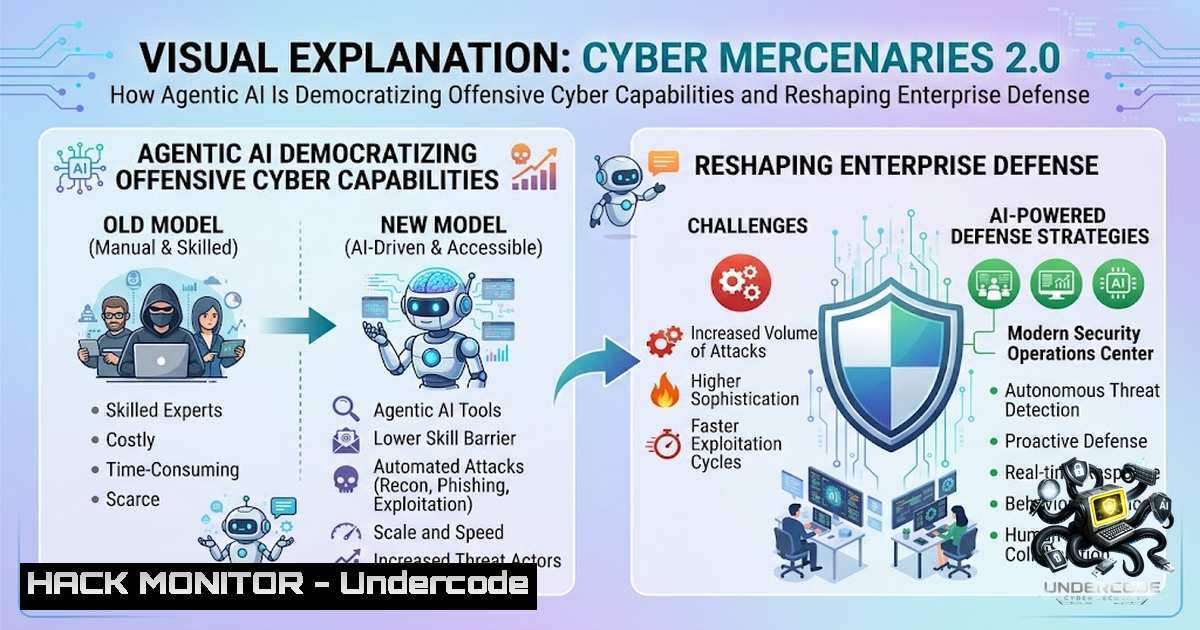
The Cybersecurity Tech Accord has acknowledged a sobering reality: three years of industry principles aimed at curbing the cyber mercenary market have failed to slow its growth—if anything, the market is accelerating. The catalyst is agentic AI, which is rapidly transforming sophisticated nation-state hacking tools from exclusive assets into accessible threats that increasingly touch every business. As AI-enabled capabilities automate zero-day discovery and scale attacks, the distinction between state-sponsored espionage and commodity cybercrime is blurring, forcing organizations to reassume risk calculus across the entire threat landscape.
Learning Objectives:
- Understand how agentic AI is accelerating the proliferation of offensive cyber capabilities and what this means for enterprise threat models.
- Learn practical hardening techniques for legacy systems that are increasingly targeted by AI-assisted adversaries.
- Master the configuration of AI-enabled defensive tools to automate threat detection and response at scale.
- Implement responsible vulnerability disclosure workflows to stay ahead of automated exploit discovery.
You Should Know:
1. Hardening Legacy Systems Against AI-Enabled Targeting
The updated Cybersecurity Tech Accord principles explicitly call for hardening existing and legacy digital systems that are likely to be increasingly targeted through the use of agentic AI. Attackers leveraging AI can now scan for and exploit vulnerabilities in legacy infrastructure at machine speed—often outpacing traditional patch management cycles. Organizations must prioritize the hardening of legacy systems that, while no longer actively developed, remain critical to operations.
Step-by-Step Guide: Legacy System Hardening
Linux System Hardening (Ubuntu/Debian)
 Harden network stack against common attacks
sudo sysctl -w net.ipv4.conf.all.rp_filter=1
sudo sysctl -w net.ipv4.icmp_echo_ignore_broadcasts=1
sudo sysctl -w net.ipv4.tcp_syncookies=1
sudo sysctl -w net.ipv4.conf.all.accept_redirects=0
sudo sysctl -w net.ipv6.conf.all.accept_redirects=0
 Make changes persistent
echo "net.ipv4.conf.all.rp_filter=1" >> /etc/sysctl.conf
These `sysctl` commands help prevent IP spoofing and ignore ICMP broadcast requests, reducing susceptibility to smurf and other network-based attacks.
 Install and configure auditd for system call monitoring
sudo apt install auditd -y
sudo auditctl -w /etc/passwd -p wa -k identity_audit
sudo auditctl -w /etc/shadow -p wa -k identity_audit
sudo auditctl -w /etc/sudoers -p wa -k sudoers_audit
Auditd provides the logging foundation necessary to detect unauthorized access attempts that AI-powered scanning tools might generate.
 Disable legacy and insecure services
sudo systemctl disable telnet.socket
sudo systemctl disable rsh.socket
sudo systemctl disable rlogin.socket
 Remove legacy packages
sudo apt remove --purge telnetd rsh-server rlogin-server
Disabling legacy services eliminates common attack vectors that AI scanning tools routinely probe.
 Configure UFW firewall with strict default policies
sudo ufw default deny incoming
sudo ufw default allow outgoing
sudo ufw allow ssh
sudo ufw enable
sudo ufw status verbose
Windows System Hardening (Windows Server/Windows 10/11)
 Disable legacy NetBIOS and SMBv1 (run as Administrator)
Set-SmbServerConfiguration -EnableSMB1Protocol $false -Force
Get-WmiObject -Class Win32_NetworkAdapterConfiguration | Where-Object {$<em>.NetBIOSOptions -1e 2} | ForEach-Object {$</em>.SetNetBIOSOptions(2)}
These commands disable legacy NetBIOS services on all network adapters, closing a common reconnaissance vector.
 Configure Windows Firewall with advanced security
netsh advfirewall set allprofiles firewallpolicy blockinbound,allowoutbound
netsh advfirewall firewall add rule name="Block Legacy RDP" dir=in action=block protocol=TCP localport=3389
 Harden local security policies
 Disable Guest account
net user Guest /active:no
 Enforce password policies via secedit
secedit /export /cfg c:\secpol.inf
 (Edit secpol.inf to set PasswordComplexity=1, MinimumPasswordLength=8)
secedit /configure /db c:\windows\security\local.sdb /cfg c:\secpol.inf /areas SECURITYPOLICY
These commands enforce password complexity and disable the Guest account, addressing common weaknesses exploited by automated tools.
2. Deploying AI-Enabled Defensive Capabilities
The Accord’s updated principles call for expanding AI-enabled defensive cybersecurity capabilities to automate the identification and response to cyber mercenary activity. AI-powered defense systems can ingest telemetry, correlate events with MITRE ATT&CK frameworks, and orchestrate automated responses without human intervention.
Step-by-Step Guide: Configuring an AI-Powered Defense Pipeline
Deploy an Autonomous SOC Pipeline
 Clone an AI-powered SOC framework (example using open-source tools)
git clone https://github.com/uuluul/AI-autonomous-SOC
cd AI-autonomous-SOC
 Install dependencies
pip install -r requirements.txt
 Configure environment variables for threat intelligence feeds
cp .env.example .env
 Edit .env with your API keys for threat intelligence services
nano .env
 Initialize the dual-index RAG with MITRE ATT&CK and AIDEFEND frameworks
python init_rag.py --frameworks mitre-attack,aidefend
This framework provides hybrid log ingestion and automated STIX 2.1 threat intelligence reporting, enabling real-time correlation of events against known adversarial behaviors.
Configure Automated Threat Response Orchestration
 Example response orchestration configuration (Python)
response_actions = {
"block_ip": "iptables -A INPUT -s {ip} -j DROP",
"isolate_host": "netsh advfirewall firewall set rule group='Network Isolation' new enable=Yes",
"deploy_edr": "invoke-edr-scan --host {hostname} --full"
}
 AI engine selects appropriate action based on threat severity
if threat_severity == "critical":
execute_action("isolate_host", host_data)
Automated response actions such as IP blocking, host isolation, and EDR deployment can be triggered by AI-driven threat detection.
Configure Wazuh for AI-Enhanced SIEM Integration
 Install Wazuh agent for log collection
curl -s https://packages.wazuh.com/key/GPG-KEY-WAZUH | apt-key add -
echo "deb https://packages.wazuh.com/4.x/apt/ stable main" | tee /etc/apt/sources.list.d/wazuh.list
apt update && apt install wazuh-agent
 Configure agent to forward logs to AI analysis engine
sed -i 's/MANAGER_IP/192.168.1.100/g' /var/ossec/etc/ossec.conf
systemctl start wazuh-agent
Wazuh provides the telemetry foundation that AI engines consume for pattern detection and anomaly identification.
- Responsible Vulnerability Disclosure in the Age of Agentic AI
The Accord urges responsible disclosure of vulnerabilities by governments and threat researchers to technology providers, recognizing the greater opportunity for agentic AI systems to uncover critical risks in digital systems. With AI agents now autonomously discovering zero-day vulnerabilities in widely deployed software—including Google’s Project Zero Big Sleep agent finding an exploitable stack buffer underflow in SQLite in November 2024—the traditional disclosure timeline has become critically compressed.
Step-by-Step Guide: Implementing a Responsible Disclosure Program
Step 1: Establish a Dedicated Disclosure Channel
- Create a security contact email (e.g., [email protected])
- Publish a clear responsible disclosure policy on your website
- Provide PGP keys for encrypted communication of sensitive findings
Step 2: Define Scope and Guidelines
- Specify in-scope systems, applications, and IP ranges
- Outline prohibited testing activities (e.g., denial of service, data destruction)
- Set clear expectations for response timelines
Step 3: Implement Vulnerability Intake and Triage
 Example vulnerability intake form validation (Python)
class VulnerabilityReport:
def <strong>init</strong>(self, data):
self.required_fields = ['system_url', 'vulnerability_type', 'reproduction_steps', 'impact_assessment']
self.validate(data)

def validate(self, data):
for field in self.required_fields:
if field not in data or not data[bash]:
raise ValueError(f"Missing required field: {field}")
 Validate that reproduction steps are sufficiently detailed
if len(data['reproduction_steps']) < 50:
raise ValueError("Reproduction steps must be detailed")
Step 4: Establish Coordinated Disclosure Timeline
- 45-day standard disclosure window for critical vulnerabilities
- 90-day window for high-severity issues
- Extensions granted only when patches require additional development time
Step 5: Automate Vulnerability Tracking
 Set up a vulnerability tracking database (using SQLite as example)
sqlite3 vuln_tracking.db <<EOF
CREATE TABLE IF NOT EXISTS reports (
id INTEGER PRIMARY KEY AUTOINCREMENT,
reporter_email TEXT,
system_affected TEXT,
vulnerability_type TEXT,
severity TEXT,
status TEXT DEFAULT 'received',
created_at DATETIME DEFAULT CURRENT_TIMESTAMP,
disclosed_at DATETIME
);
EOF
4. Commercial Spyware Detection and Response
Commercial spyware—the primary product of the cyber mercenary market—continues to evolve, with attacks increasingly targeting mid-market and enterprise businesses. The Accord’s principles emphasize protecting customers by maintaining the integrity and security of products, developing tools to detect patterns of malicious behavior, and notifying users whose accounts are reasonably believed to have been targeted.
Step-by-Step Guide: Enterprise Spyware Detection and Response
Continuous On-Device Monitoring
- Deploy Mobile Threat Defense (MTD) solutions across iOS and Android devices
- Configure continuous monitoring for diagnostic data, crash logs, and shutdown logs—key indicators of spyware infection
- Implement policy-based egress filtering to detect encrypted and east-west mobile traffic
Network-Based Detection
 Configure Suricata for spyware C2 detection
sudo apt install suricata
 Download emerging threats ruleset
wget https://rules.emergingthreats.net/open/suricata-6.0.8/emerging.rules.tar.gz
tar -xzvf emerging.rules.tar.gz
 Enable rules for commercial spyware C2 patterns
sudo cp emerging.rules /etc/suricata/rules/
sudo systemctl restart suricata
Endpoint Detection and Response (EDR) Configuration
 Windows: Enable advanced audit logging for process creation
auditpol /set /subcategory:"Process Creation" /success:enable /failure:enable
 Configure PowerShell logging
Set-ItemProperty -Path "HKLM:\SOFTWARE\Policies\Microsoft\Windows\PowerShell\ScriptBlockLogging" -1ame "EnableScriptBlockLogging" -Value 1
Incident Response Playbook for Suspected Spyware
1. Isolate affected device from the network immediately
2. Capture forensic images of compromised systems
3. Analyze network logs for C2 communication patterns
- Rotate all credentials associated with the compromised user
- Enable Lockdown Mode on affected mobile devices (iOS)
5. Cloud Hardening Against AI-Assisted Adversaries
As AI-enabled offensive capabilities target cloud infrastructure, the Accord’s call to “endeavor to appropriately harden AI and next generation systems, through their design and development” extends directly to cloud environments. Organizations must secure their cloud posture against automated attack chains that can chain multiple vulnerabilities.
Step-by-Step Guide: Cloud Security Hardening
AWS Security Hardening Commands
 Enable detailed CloudTrail logging
aws cloudtrail create-trail --1ame security-trail --s3-bucket-1ame your-audit-bucket --is-multi-region-trail
aws cloudtrail start-logging --1ame security-trail

Configure AWS Config for continuous compliance monitoring
aws configservice put-configuration-recorder --configuration-recorder name=default,roleARN=arn:aws:iam::account-id:role/config-role
aws configservice start-configuration-recorder --configuration-recorder-1ame default

Enable GuardDuty for threat detection
aws guardduty create-detector --enable
Azure Security Configuration
 Enable Azure Security Center auto-provisioning
az security auto-provisioning-setting update --auto-provision On

Configure diagnostic settings for all subscriptions
az monitor diagnostic-settings create --resource /subscriptions/{sub-id} --1ame security-logs --storage-account {storage-account} --logs '[{"category": "Security", "enabled": true}]'
GCP Security Hardening
 Enable Cloud Security Command Center
gcloud scc settings update --organization={org-id} --enable-security-center

Configure VPC Service Controls to prevent data exfiltration
gcloud access-context-manager perimeters create {perimeter-1ame} --title="Security Perimeter" --resources={projects} --restricted-services=storage.googleapis.com
What Undercode Say:
- The threat is accelerating, not abating: Three years of industry self-regulation have failed to curb the cyber mercenary market. Agentic AI is now amplifying the capabilities of both state-sponsored and commercial offensive actors, making this a pressing concern for every organization—not just governments and activists.
-
Defense must become AI-1ative: Traditional security hygiene is no longer sufficient. Organizations must embed AI-driven detection and response capabilities into their defense architecture, automate vulnerability discovery and patching, and harden legacy systems against machine-speed exploitation. The organizations that treat AI as a defensive force multiplier—not just an offensive threat—will be best positioned to survive the coming wave of AI-enabled attacks.
-
Responsible disclosure is more critical than ever: With AI agents now capable of discovering zero-day vulnerabilities autonomously, the window between discovery and exploitation is collapsing. Organizations must establish robust vulnerability disclosure programs, maintain strong encryption practices, and ensure they can rapidly deploy patches before automated adversaries can weaponize newly discovered flaws.
Prediction:
-
-1 The cyber mercenary market, now supercharged by agentic AI, will continue to grow unabated, with commercial spyware and offensive tools becoming commodities accessible to non-state actors and criminal enterprises within 12–18 months.
-
-1 Mid-market enterprises lacking dedicated security teams will face disproportionate risk as AI-enabled attack tools automate reconnaissance and exploitation at scale, outpacing their ability to patch and respond.
-
+1 Organizations that aggressively adopt AI-1ative defensive capabilities—autonomous SOC pipelines, AI-driven threat hunting, and automated response orchestration—will gain a significant advantage over adversaries still reliant on manual techniques.
-
+1 The democratization of offensive AI will paradoxically drive increased investment in cybersecurity, with global spending on AI-enabled defense tools projected to accelerate as boards finally recognize the existential nature of the threat.
-
+1 Industry collaboration, as exemplified by the Cybersecurity Tech Accord’s updated principles, will become increasingly vital as no single organization can defend against the scale and sophistication of AI-powered adversaries alone.
▶️ Related Video (78% Match):
https://www.youtube.com/watch?v=-Ax8tMsOLLQ
🎯Let’s Practice For Free:
🎓 Live Courses & Certifications:
Join Undercode Academy for Verified Certifications
🚀 Request a Custom Project:
Secure, high-velocity infrastructure and disruptive technological engineering. Contact our engineering team for high-tier development and proprietary systems:
[email protected]
💎 Smart Architecture | 🛡️ Secure by Design | ⭐ Trusted by Thousands
IT/Security Reporter URL:
Reported By: https://lnkd.in/p/es4TkWca – Hackers Feeds
Extra Hub: Undercode MoN
Basic Verification: Pass ✅


