Listen to this Post
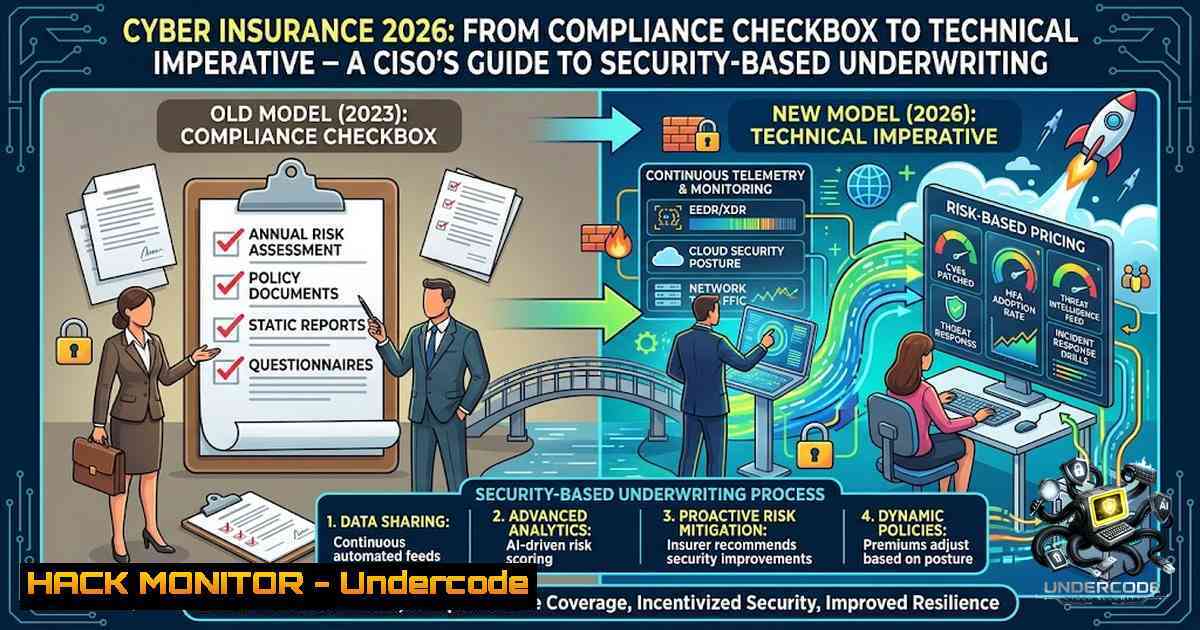
Introduction:
The cyber insurance market has undergone a fundamental transformation. What was once a simple compliance exercise—checking a box to obtain coverage—has evolved into a rigorous technical validation of an organization’s security posture. Insurers are no longer asking if you have security controls; they are demanding proof that multifactor authentication, endpoint detection and response (EDR), immutable backups, and incident response capabilities actually work in practice. As AI-driven threats accelerate and ransomware remains the dominant business continuity risk, cyber insurance has become a critical component of enterprise risk management—and a powerful forcing function for security maturity.
Learning Objectives:
- Understand the evolving technical requirements for cyber insurance underwriting in 2026, including mandatory security controls and evidence-based validation
- Master the system hardening commands and configurations needed to meet insurer expectations across Linux and Windows environments
- Learn how to align security programs with NIST CSF 2.0 and other frameworks used by insurers to assess risk
- Develop a practical incident response and claims preparation strategy to maximize coverage and minimize denial risk
- Identify emerging threats—AI-powered attacks, supply chain vulnerabilities, and ransomware—and how they impact insurance eligibility and premiums
You Should Know:
1. The New Underwriting Baseline: Non-1egotiable Technical Controls
Cyber insurance carriers have moved beyond generic questionnaires. In 2025 and 2026, requirements most frequently called out include phishing-resistant MFA across all user accounts and critical systems, 24/7 EDR with active response capabilities, incident response readiness with proof of testing (tabletop exercises), third-party risk oversight, and mailbox-level email security capable of detecting social engineering and business email compromise (BEC) attacks.
Multi-factor authentication, particularly for remote access, privileged accounts, and cloud services, has become a standard expectation rather than a differentiator. Insurers want to see immutable or offline backups with routine testing of restoration processes. Privileged access management (PAM) and cloud security monitoring with baseline configurations are now baseline requirements.
Step-by-Step Guide: Implementing the Underwriting Baseline
Step 1: Deploy Phishing-Resistant MFA
- Microsoft Entra ID (Azure AD): Enforce MFA for all users via Conditional Access policies
PowerShell: Enable MFA for all users Install-Module -1ame MSOnline Connect-MsolService $users = Get-MsolUser -All | Where-Object {$_.StrongAuthenticationMethods -eq $null} foreach ($user in $users) { $auth = New-Object -TypeName Microsoft.Online.Administration.StrongAuthenticationRequirement $auth.RelyingParty = "" $auth.State = "Enabled" Set-MsolUser -UserPrincipalName $user.UserPrincipalName -StrongAuthenticationRequirements $auth } - Linux with FreeIPA or SSSD: Configure OAuth2/OIDC-based MFA for SSH and sudo access
Step 2: Deploy and Validate EDR
- Windows: Deploy Microsoft Defender for Endpoint or third-party EDR (CrowdStrike, SentinelOne)
Verify EDR is running and reporting Get-Service -1ame "Sense" | Where-Object {$_.Status -eq "Running"} Get-MpComputerStatus | Select-Object AntivirusEnabled, RealTimeProtectionEnabled - Linux: Install and configure EDR agent (e.g., CrowdStrike Falcon, SentinelOne)
Check EDR service status
sudo systemctl status falcon-sensor
sudo ps aux | grep -i "falcon|sentinel|defender"
Step 3: Implement Immutable Backups
- Windows Server: Configure Azure Backup with soft-delete and immutable vault settings
Enable soft-delete for Azure Recovery Services vault
Set-AzRecoveryServicesVaultProperty -VaultId $vault.ID -SoftDeleteFeatureState Enable
- Linux: Implement immutable backups using tools like BorgBackup with append-only mode or cloud-1ative object storage with WORM (Write Once Read Many) policies
BorgBackup with append-only mode (prevents deletion/encryption by attackers)
borg init --encryption=repokey-blake2 /backup/repo
borg config /backup/repo append_only 1
Test restore
borg extract /backup/repo::archive-1ame --destination /restore-test
- Aligning with NIST CSF 2.0: The Framework Insurers Trust
The National Institute of Standards and Technology Cybersecurity Framework (NIST CSF) 2.0 is the most widely referenced cybersecurity framework in the United States for cyber insurance underwriting. CSF 2.0 organizes cybersecurity outcomes into six functions—Govern, Identify, Protect, Detect, Respond, and Recover—across 22 categories and 106 subcategories. Insurers use this framework as a baseline for vendor questionnaires, board-level reporting, and security program maturity evaluation.
Step-by-Step Guide: Conducting a NIST CSF 2.0 Self-Assessment for Insurance
Step 1: Map Your Controls to CSF Functions
- Identify: Asset and data inventory, risk assessment, supply chain risk management
Linux: Inventory listening services and open ports
sudo ss -tulpn | grep LISTEN
sudo nmap -sS -p- localhost
Windows: Inventory installed software and services
Get-WmiObject -Class Win32_Product | Select-Object Name, Version, Vendor
Get-Service | Where-Object {$_.Status -eq "Running"}
Step 2: Assess Protect Controls
- Verify identity management, access control, data security, and platform protection
Linux: Check password policies and account lockout
sudo cat /etc/login.defs | grep -E "PASS_MAX_DAYS|PASS_MIN_DAYS|PASS_WARN_AGE"
sudo pam_tally2 --user root
Windows: Check account lockout policies
net accounts
Get-ADDefaultDomainPasswordPolicy
Step 3: Validate Detect and Respond Capabilities
- Ensure continuous monitoring, anomaly detection, and incident response plans are tested
- Conduct a tabletop exercise and document lessons learned—insurers require proof of testing
Step 4: Document Recovery Procedures
- Test backup restoration and business continuity plans quarterly
Linux: Test backup restoration (dry run)
sudo rsync -avn --dry-run /backup/ /restore-test/
3. System Hardening Commands That Insurers Look For
Insurers increasingly expect to see evidence of system hardening aligned with benchmarks like CIS Controls® Implementation Group 1 (IG1), which maps directly to common cyber insurance underwriting questions. Below are verified hardening commands for both Linux and Windows environments.
Linux Hardening (Ubuntu/RHEL-based)
 1. Update and patch all packages
sudo apt update && sudo apt upgrade -y  Debian/Ubuntu
sudo yum update -y  RHEL/CentOS

<ol>
<li>Configure UFW firewall (Ubuntu)
sudo ufw default deny incoming
sudo ufw default allow outgoing
sudo ufw allow ssh
sudo ufw enable
sudo ufw status verbose</p></li>
<li><p>Harden SSH configuration
sudo sed -i 's/PermitRootLogin prohibit-password/PermitRootLogin no/' /etc/ssh/sshd_config
sudo sed -i 's/PasswordAuthentication yes/PasswordAuthentication no/' /etc/ssh/sshd_config
sudo systemctl restart sshd</p></li>
<li><p>Kernel and network hardening via sysctl
cat << 'EOF' | sudo tee /etc/sysctl.d/99-security.conf
net.ipv4.ip_forward=0
net.ipv4.conf.all.rp_filter=1
net.ipv4.conf.default.rp_filter=1
net.ipv4.tcp_syncookies=1
net.ipv4.tcp_rfc1337=1
net.ipv4.conf.all.accept_redirects=0
net.ipv4.conf.default.accept_redirects=0
net.ipv4.conf.all.secure_redirects=0
net.ipv4.conf.default.secure_redirects=0
net.ipv4.conf.all.send_redirects=0
net.ipv4.conf.default.send_redirects=0
net.ipv6.conf.all.disable_ipv6=1
net.ipv6.conf.default.disable_ipv6=1
EOF
sudo sysctl -p /etc/sysctl.d/99-security.conf</p></li>
<li><p>Harden PAM (Pluggable Authentication Modules) for password policies
sudo apt install libpam-cracklib -y  Ubuntu
sudo sed -i 's/password requisite pam_cracklib.so/password requisite pam_cracklib.so retry=3 minlen=12 difok=3 ucredit=-1 lcredit=-1 dcredit=-1 ocredit=-1/' /etc/pam.d/common-password</p></li>
<li><p>Enable and configure auditd for logging
sudo apt install auditd -y
sudo auditctl -e 1
sudo systemctl enable auditd
sudo systemctl start auditd</p></li>
<li><p>Run Lynis security audit (open-source)
sudo apt install lynis -y
sudo lynis audit system
Windows Hardening (PowerShell)
 1. Enable Windows Defender and real-time protection
Set-MpPreference -DisableRealtimeMonitoring $false
Set-MpPreference -DisableBehaviorMonitoring $false
Set-MpPreference -DisableBlockAtFirstSeen $false
Set-MpPreference -DisableIOAVProtection $false

<ol>
<li>Configure Windows Firewall
Set-1etFirewallProfile -Profile Domain,Public,Private -Enabled True
Set-1etFirewallProfile -Profile Domain,Public,Private -DefaultInboundAction Block
Set-1etFirewallProfile -Profile Domain,Public,Private -DefaultOutboundAction Allow</p></li>
<li><p>Disable unnecessary services
Set-Service -1ame "RemoteRegistry" -StartupType Disabled
Set-Service -1ame "RemoteAccess" -StartupType Disabled
Set-Service -1ame "Telnet" -StartupType Disabled</p></li>
<li><p>Enforce strong password and lockout policies
Set-ADDefaultDomainPasswordPolicy -Identity "domain.local" -MinPasswordLength 12 -ComplexityEnabled $true -LockoutThreshold 5 -LockoutDuration "00:30:00" -LockoutObservationWindow "00:30:00"</p></li>
<li><p>Enable Windows auditing
auditpol /set /subcategory:"Logon" /success:enable /failure:enable
auditpol /set /subcategory:"Privilege Use" /success:enable /failure:enable
auditpol /set /subcategory:"Account Management" /success:enable /failure:enable</p></li>
<li><p>Apply CIS benchmarks via PowerShell (using OS-hardening scripts)
Reference: https://github.com/Ripper1004/CyberPatriot-Security-Script
powershell -ExecutionPolicy Bypass -File .\secure_windows.ps1
- The Cyber Insurance Claims Process: Technical Investigation and Forensics
Understanding the claims process is essential for maximizing coverage. When a cyber incident occurs, the claims process follows a structured technical path:
- Step 1 – Report Immediately: Notify the insurer within the policy’s specified timeframe (often 24-48 hours)
- Step 2 – Forensic Investigation: A digital forensics firm is engaged to determine exactly what happened, how the attacker gained access, what data was accessed or exfiltrated, and when the breach began
- Step 3 – Containment: Isolate affected systems and preserve evidence
- Step 4 – Claims Submission: Provide forensic reports, cost invoices, and loss estimates for insurer review
Step-by-Step Guide: Preparing for a Cyber Insurance Claim
Step 1: Preserve Evidence Immediately
 Linux: Capture memory and disk images for forensic analysis
sudo dd if=/dev/sda of=/forensics/disk_image.dd bs=4M status=progress
sudo cat /var/log/auth.log > /forensics/auth.log
sudo cat /var/log/syslog > /forensics/syslog
sudo last -F > /forensics/last_logins.txt
 Windows: Capture event logs and system information
wevtutil epl System C:\forensics\System.evtx
wevtutil epl Security C:\forensics\Security.evtx
wevtutil epl Application C:\forensics\Application.evtx
systeminfo > C:\forensics\systeminfo.txt
Step 2: Document All Remediation Activities
- Record every action taken during containment and recovery, including timestamps, commands executed, and personnel involved
- Insurers will scrutinize this documentation during claims review
Step 3: Engage Approved Forensic Firm
- Most policies require using an insurer-approved forensics vendor
- The forensic report forms the technical foundation of your claim
5. AI-Driven Cyber Threats: What Insurers Are Watching
The growing use of artificial intelligence is enabling more sophisticated phishing, social engineering, malware, and automated cyberattacks. Attackers are deploying AI-fuelled malware creation tools and adaptive command and control servers. Defenders must deploy “counter-AI” systems to detect and block these threats at machine speed.
Step-by-Step Guide: Defending Against AI-Enabled Threats
Step 1: Deploy AI-Powered Security Analytics
- Implement SIEM or XDR platforms with machine learning-based anomaly detection
- AI-empowered intrusion detection systems and automated incident response platforms are at the forefront of contemporary cyber defense
Step 2: Audit AI API Security
 Linux: Audit all outbound API calls from AI services
sudo tcpdump -i any -l 'host api.openai.com or host api.anthropic.com'
sudo journalctl -u ai-service -f
Step 3: Implement Identity and Credential Protection
- Put ID and credential protection at the center of your strategy to manage AI-driven phishing attacks
- Deploy phishing-resistant MFA (FIDO2/WebAuthn) across all privileged accounts
Step 4: Monitor for AI-Specific Exclusions in Policies
- Insurers are adding new exclusions around AI incidents, nation-state activity, and supply chain events
- Review policy language carefully—some policies may not cover losses from AI-generated attacks
What Undercode Say:
- Key Takeaway 1: Cyber insurance is no longer a standalone product—it is a technical validation of your entire security program. Organizations that treat insurance as a compliance checkbox will face skyrocketing premiums or outright denial of coverage. The market is transitioning to “Cyber Insurance 3.0,” which relies on continuous telemetry, maturity scoring, and real-time assurance instead of static compliance reports. Only 6–35% of assessments measure technical maturity, with most focusing on documentation—this gap is closing rapidly.
-
Key Takeaway 2: The technical requirements are non-1egotiable and expanding. Phishing-resistant MFA, 24/7 EDR, immutable backups, and incident response testing are now baseline expectations. Organizations that proactively implement these controls will see flat renewals or slight premium decreases. Those that delay face a challenging market where “2026 is going to separate those that have a differentiated approach to underwriting and managing cyber risk and those that don’t”.
Prediction:
-
+1 Cyber insurance will increasingly serve as a de facto security standard, driving widespread adoption of essential controls like MFA and EDR across SMBs that previously lacked the budget or expertise. This will meaningfully raise the global security baseline and reduce ransomware success rates over the next 3–5 years.
-
-1 The rise of AI-generated attacks will outpace the insurance industry’s ability to model risk accurately. Insurers will respond with broader exclusions and higher premiums for AI-exposed sectors, potentially leaving many organizations underinsured against the very threats they fear most.
-
+1 Integration of real-time security telemetry with underwriting processes will create a virtuous cycle: organizations that maintain strong security postures will be rewarded with lower premiums, creating financial incentives for continuous improvement rather than point-in-time compliance.
-
-1 Supply chain and systemic cyber risk remain largely unmodeled by the insurance industry. A major cloud provider outage or widespread vulnerability exploitation could trigger correlated losses that exceed industry capacity, leading to market retrenchment and reduced coverage availability.
-
+1 The convergence of cyber insurance with frameworks like NIST CSF 2.0 will accelerate board-level cybersecurity governance. CISOs will gain stronger leverage to secure security budgets, as insurance requirements provide a clear, quantifiable business case for investment in protective technologies.
▶️ Related Video (76% Match):
https://www.youtube.com/watch?v=aUPwwIffq8M
🎯Let’s Practice For Free:
🎓 Live Courses & Certifications:
Join Undercode Academy for Verified Certifications
🚀 Request a Custom Project:
Secure, high-velocity infrastructure and disruptive technological engineering. Contact our engineering team for high-tier development and proprietary systems:
[email protected]
💎 Smart Architecture | 🛡️ Secure by Design | ⭐ Trusted by Thousands
IT/Security Reporter URL:
Reported By: Https: – Hackers Feeds
Extra Hub: Undercode MoN
Basic Verification: Pass ✅


