
Listen to this Post
Introduction
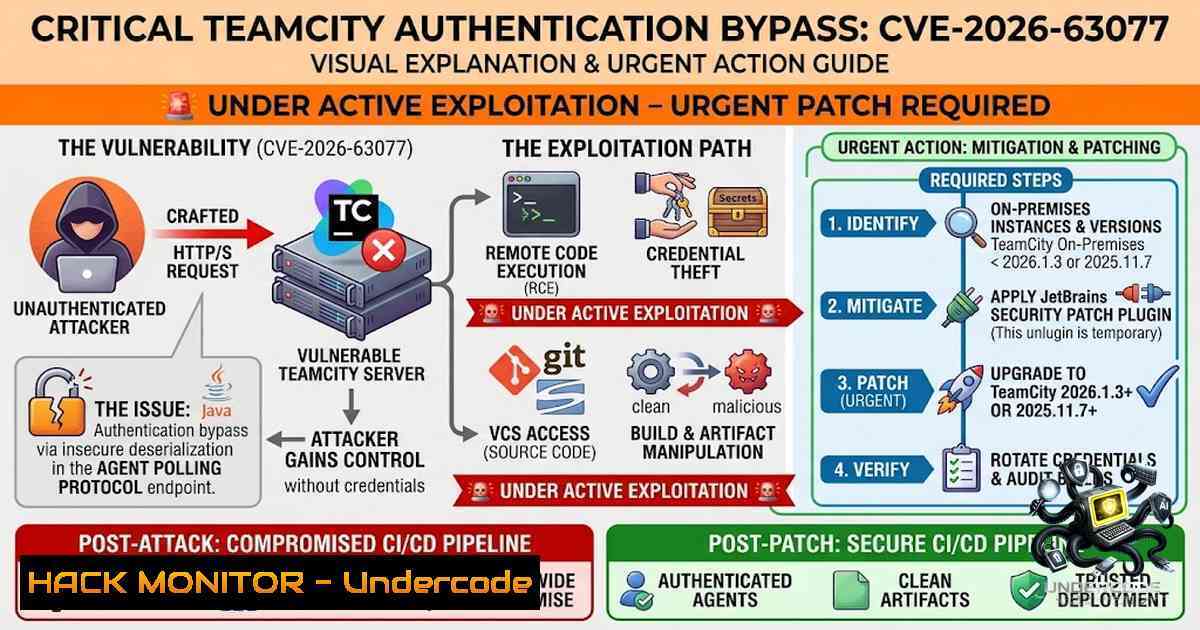
A critical unauthenticated remote code execution vulnerability in JetBrains TeamCity On-Premises, tracked as CVE-2026-63077 with a CVSS score of 9.8, is being actively exploited by threat actors to compromise CI/CD servers worldwide. The Australian Cyber Security Centre (ACSC) has issued an urgent warning following evidence of active exploitation targeting unpatched TeamCity instances. The vulnerability allows attackers with HTTP(S) access to a TeamCity server to bypass authentication entirely and execute arbitrary operating system commands with the privileges of the TeamCity server process. Given that TeamCity is used by thousands of organizations globally to automate building, testing, and deploying software, a successful compromise could lead to supply chain attacks where malicious code is injected into software before it reaches customers.
Learning Objectives & Secrets
- Objective 1: Understand the Technical Root Cause – Learn how improper XStream deserialization permissions in the TeamCity agent polling protocol enable unauthenticated remote code execution.
-
Objective 2 Secret Tip: Rapid Detection – Scan your TeamCity server logs for unexpected `/agentPolling` endpoint requests and unauthorized `POST` payloads containing XML serialized objects. Early detection can reveal active exploitation attempts.
-
Objective 3 Secret Tip: Emergency Containment – If patching is not immediately possible, block external HTTP/HTTPS access to the TeamCity server at the network perimeter and restrict the agent polling endpoint to trusted internal IP ranges only.
You Should Know
- Understanding the Vulnerability – XStream Deserialization in Agent Polling
CVE-2026-63077 stems from JetBrains TeamCity’s failure to properly clear XStream default permissions before applying its allowlist during agent polling protocol processing. The agent polling protocol is designed to allow build agents to communicate with the TeamCity server over HTTP/HTTPS. However, by sending a crafted XML object to the agent polling endpoint, an unauthenticated attacker can trigger unsafe deserialization and achieve remote code execution.
How the Exploit Chain Works:
- The attacker sends a crafted HTTP request to the TeamCity server’s agent polling endpoint (typically `/agentPolling` or similar paths)
- The request contains a malicious XML payload leveraging XStream deserialization
- TeamCity processes the payload without proper authentication checks
- The deserialization triggers OS command execution with the privileges of the TeamCity server process
- The attacker gains full control over the TeamCity server
Affected Versions: All TeamCity On-Premises versions prior to 2025.11.7 and 2026.1.3. A security patch plugin is available for versions 2017.1 and later for organizations unable to immediately upgrade.
Verification Command (Linux):
 Check your TeamCity version
cat /opt/TeamCity/buildAgent/conf/buildAgent.properties | grep version
 Or check via the TeamCity web UI: Administration > Server Configuration > Version
Verification Command (Windows):
 Check TeamCity version in Windows Registry
Get-ItemProperty -Path "HKLM:\SOFTWARE\JetBrains\TeamCity" -1ame "Version"
 Or check the buildAgent.properties file
Get-Content "C:\TeamCity\buildAgent\conf\buildAgent.properties" | Select-String "version"
- CISA KEV Catalog Addition and Active Exploitation Timeline
On August 5, 2026, CISA added CVE-2026-63077 to its Known Exploited Vulnerabilities (KEV) Catalog due to evidence of active exploitation. Two days later, JetBrains issued a follow-up advisory confirming they had received reports of active and attempted exploitation targeting unpatched TeamCity servers.
Why This Matters: The KEV catalog inclusion mandates that Federal Civilian Executive Branch (FCEB) agencies patch the vulnerability by a specified deadline. Private sector organizations should treat this as a strong signal that threat actors are actively scanning for and exploiting this vulnerability.
Detection Commands (Linux):
 Search for suspicious agent polling requests in TeamCity logs
grep -i "agentPolling" /opt/TeamCity/logs/teamcity-server.log | grep -i "POST"
 Look for anomalies in access logs
tail -f /opt/TeamCity/logs/access.log | grep -v "200"
 Check for unexpected process execution
ps aux | grep -i teamcity | grep -v grep
Detection Commands (Windows – PowerShell):
 Check TeamCity server logs for suspicious activity
Select-String -Path "C:\TeamCity\logs\teamcity-server.log" -Pattern "agentPolling" | Where-Object {$_ -match "POST"}
 Monitor for unusual process creation
Get-WinEvent -LogName Security | Where-Object {$_.Id -eq 4688} | Select-Object TimeCreated, Message
 Check for unexpected network connections
netstat -ano | findstr "ESTABLISHED" | findstr "8111"
3. Patch Deployment – Upgrading to Fixed Versions
JetBrains has released fixed versions 2025.11.7 and 2026.1.3 that contain the permanent fix for CVE-2026-63077. For organizations unable to upgrade immediately, a security patch plugin is available for TeamCity 2017.1 and later.
Step-by-Step Upgrade Guide:
Step 1: Backup Your TeamCity Data
 Linux - Backup the TeamCity data directory
tar -czvf teamcity-backup-$(date +%Y%m%d).tar.gz /opt/TeamCity/data
 Backup the database (example for PostgreSQL)
pg_dump -U teamcity teamcity_db > teamcity_db_backup_$(date +%Y%m%d).sql
 Windows - Backup the TeamCity data directory
Compress-Archive -Path "C:\TeamCity\data\" -DestinationPath "C:\Backups\teamcity-data-$(Get-Date -Format 'yyyyMMdd').zip"
 Backup the database (example for SQL Server)
Backup-SqlDatabase -ServerInstance "localhost" -Database "TeamCity" -BackupFile "C:\Backups\TeamCity_$(Get-Date -Format 'yyyyMMdd').bak"
Step 2: Download the Latest Version
- Download TeamCity 2025.11.7 or 2026.1.3 from the official JetBrains download page
- Verify the checksum of the downloaded file
 Linux - Verify SHA256 checksum
sha256sum TeamCity-2026.1.3.tar.gz
 Compare with the official checksum provided by JetBrains
Step 3: Perform the Upgrade
 Linux - Stop TeamCity service
sudo systemctl stop teamcity
 Extract the new version
tar -xzf TeamCity-2026.1.3.tar.gz -C /opt/
 Update symbolic links
sudo ln -sfn /opt/TeamCity-2026.1.3 /opt/TeamCity
 Start TeamCity service
sudo systemctl start teamcity
 Windows - Stop TeamCity service
Stop-Service -1ame "TeamCity"
 Extract the new version (using 7-Zip or similar)
& "C:\Program Files\7-Zip\7z.exe" x TeamCity-2026.1.3.zip -oC:\TeamCity-1ew
 Update the installation directory
Rename-Item -Path "C:\TeamCity" -1ewName "C:\TeamCity-Old"
Rename-Item -Path "C:\TeamCity-1ew" -1ewName "C:\TeamCity"
 Start TeamCity service
Start-Service -1ame "TeamCity"
Step 4: Verify the Upgrade
 Linux - Verify the new version is running
curl -s http://localhost:8111/version.txt
 Check the version in the TeamCity web UI
4. Security Patch Plugin Deployment (For Older Versions)
For organizations running TeamCity 2017.1 or later that cannot immediately upgrade to a fixed version, JetBrains has released a security patch plugin that specifically addresses CVE-2026-63077.
Step-by-Step Plugin Installation:
Step 1: Download the Security Patch Plugin
- Download the plugin from the JetBrains official website or plugin repository
- The plugin file will have a `.zip` extension
Step 2: Install the Plugin via TeamCity UI
- Navigate to Administration > Plugins > Upload Plugin
2. Select the downloaded plugin `.zip` file
3. Click Upload and follow the installation prompts
4. Restart the TeamCity server if required
Step 3: Install the Plugin Manually (If UI is Unavailable)
 Linux - Place the plugin in the plugins directory
cp teamcity-security-patch-plugin.zip /opt/TeamCity/webapps/ROOT/WEB-INF/plugins/
 Restart TeamCity
sudo systemctl restart teamcity
 Windows - Place the plugin in the plugins directory
Copy-Item "teamcity-security-patch-plugin.zip" -Destination "C:\TeamCity\webapps\ROOT\WEB-INF\plugins\"
 Restart TeamCity
Restart-Service -1ame "TeamCity"
Step 4: Verify Plugin Installation
- Navigate to Administration > Plugins in the TeamCity web UI
- Confirm the security patch plugin appears in the installed plugins list
3. Check the plugin status shows “Enabled”
5. Network Hardening and Access Control
Beyond patching, organizations should implement defense-in-depth measures to protect TeamCity servers from exploitation.
Immediate Actions:
- Restrict network access – Limit access to the TeamCity server to only trusted IP ranges and necessary internal networks
- Remove unnecessary internet exposure – If the TeamCity interface does not need to be exposed to the internet, remove it
- Implement least-privilege configurations – Run TeamCity on dedicated hosts separated from build agents
Network Access Control Commands (Linux – iptables):
 Block all external access to TeamCity (port 8111 default)
sudo iptables -A INPUT -p tcp --dport 8111 -s 0.0.0.0/0 -j DROP
 Allow only specific internal subnets
sudo iptables -I INPUT -p tcp --dport 8111 -s 192.168.1.0/24 -j ACCEPT
sudo iptables -I INPUT -p tcp --dport 8111 -s 10.0.0.0/8 -j ACCEPT
 Save iptables rules
sudo iptables-save > /etc/iptables/rules.v4
Network Access Control Commands (Windows – Firewall):
 Block all inbound connections to TeamCity port 8111
New-1etFirewallRule -DisplayName "Block TeamCity External Access" -Direction Inbound -LocalPort 8111 -Protocol TCP -Action Block
 Allow only specific internal subnets (example: 192.168.1.0/24)
New-1etFirewallRule -DisplayName "Allow TeamCity Internal Access" -Direction Inbound -LocalPort 8111 -Protocol TCP -RemoteAddress "192.168.1.0/24" -Action Allow
 Allow only specific internal subnets (example: 10.0.0.0/8)
New-1etFirewallRule -DisplayName "Allow TeamCity Internal Access 10" -Direction Inbound -LocalPort 8111 -Protocol TCP -RemoteAddress "10.0.0.0/8" -Action Allow
Web Server/Proxy Configuration (Nginx – Restrict Agent Polling Endpoint):
 Nginx configuration to restrict access to the agent polling endpoint
location /agentPolling {
 Allow only internal IP ranges
allow 192.168.1.0/24;
allow 10.0.0.0/8;
deny all;
 Proxy to TeamCity
proxy_pass http://localhost:8111;
proxy_set_header Host $host;
proxy_set_header X-Real-IP $remote_addr;
}
6. API Security and CI/CD Pipeline Integrity
Compromising a TeamCity server allows attackers to tamper with software before it reaches customers, potentially introducing backdoors or malicious code into the software supply chain.
Post-Patch Integrity Verification:
 Linux - Verify build artifacts integrity
find /opt/TeamCity/data/artifacts -type f -exec sha256sum {} \; > artifact_checksums_$(date +%Y%m%d).txt
 Compare with previous checksums
diff artifact_checksums_previous.txt artifact_checksums_$(date +%Y%m%d).txt

Check for unauthorized user accounts in TeamCity
curl -s -u admin:password "http://localhost:8111/app/rest/users" | grep -i "user"
 Windows - Verify build artifacts integrity
Get-ChildItem -Path "C:\TeamCity\data\artifacts" -Recurse -File | ForEach-Object { Get-FileHash $<em>.FullName -Algorithm SHA256 } | Export-Csv -Path "artifact_checksums</em>$(Get-Date -Format 'yyyyMMdd').csv"
 Compare with previous checksums
Compare-Object (Import-Csv "artifact_checksums_previous.csv") (Import-Csv "artifact_checksums_$(Get-Date -Format 'yyyyMMdd').csv") -Property Hash
CI/CD Security Best Practices:
- Implement signed builds and verify signatures before deployment
- Use separate build agents isolated from the TeamCity server
- Regularly audit build configurations and project settings
- Monitor for unexpected changes to build steps or parameters
7. Incident Response and Forensic Investigation
If you suspect your TeamCity server has been compromised, follow these incident response steps:
Step 1: Isolate the Server
 Linux - Block all incoming traffic immediately
sudo iptables -A INPUT -j DROP
 Or disconnect the network interface
sudo ifconfig eth0 down
 Windows - Disable network adapter
Disable-1etAdapter -1ame "Ethernet" -Confirm:$false
Step 2: Preserve Evidence
 Linux - Collect logs and system state
tar -czvf forensic_$(date +%Y%m%d_%H%M%S).tar.gz /opt/TeamCity/logs/ /var/log/ /var/lib/teamcity/
 Capture running processes
ps auxww > running_processes_$(date +%Y%m%d_%H%M%S).txt
 Capture network connections
netstat -tulpn > network_connections_$(date +%Y%m%d_%H%M%S).txt
 Windows - Collect logs and system state
Compress-Archive -Path "C:\TeamCity\logs\", "C:\Windows\System32\winevt\Logs\" -DestinationPath "forensic_$(Get-Date -Format 'yyyyMMdd_HHmmss').zip"
 Capture running processes
Get-Process | Export-Csv -Path "running_processes_$(Get-Date -Format 'yyyyMMdd_HHmmss').csv"
 Capture network connections
netstat -ano | Out-File -FilePath "network_connections_$(Get-Date -Format 'yyyyMMdd_HHmmss').txt"
Step 3: Investigate Indicators of Compromise
- Check for unauthorized administrative accounts in TeamCity
- Review build configurations for unauthorized modifications
- Examine build artifacts for signs of tampering
- Look for unexpected outgoing connections from the TeamCity server
What Undercode Say:
Key Takeaway 1: CVE-2026-63077 represents a critical supply chain risk – attackers gaining control of a TeamCity server can inject malicious code into software builds before they reach customers. Organizations must treat this as a zero-day level emergency and prioritize patching over all other security tasks.
Key Takeaway 2: The addition of this vulnerability to CISA’s KEV Catalog signals that both opportunistic cybercriminals and sophisticated nation-state actors are actively scanning for and exploiting unpatched TeamCity instances. Delaying patching by even a few days significantly increases the risk of compromise.
Analysis: The exploitation of CI/CD servers represents one of the most dangerous attack vectors in modern software development. A single compromised build server can affect thousands of downstream customers through software supply chain attacks. Organizations that have not yet patched should assume their TeamCity servers are already being probed and should treat any unpatched instance as potentially compromised. The fact that JetBrains released both full version updates and a security patch plugin demonstrates the severity of this vulnerability – organizations have no excuse for remaining unpatched. The ACSC warning specifically targeting Australian organizations suggests that threat actors may be focusing on specific geographic regions, but given the global nature of software development, all organizations worldwide should treat this as a universal threat. Moving forward, organizations should consider implementing network segmentation that isolates CI/CD infrastructure from the broader corporate network and implementing stricter access controls to reduce the attack surface of critical build systems.
Prediction:
- +1 Organizations that patch within the first 72 hours of the advisory will likely avoid compromise, as threat actors are still in the early stages of mass scanning.
-
-1 Unpatched TeamCity instances will experience a 300%+ increase in exploitation attempts within the next 7 days as public proof-of-concept exploits become widely available.
-
-1 Several major software supply chain incidents will be linked to this vulnerability over the coming months, as attackers leverage compromised TeamCity servers to inject backdoors into widely distributed software packages.
-
+1 The incident will accelerate the adoption of software bill of materials (SBOM) and supply chain security frameworks, as organizations recognize the catastrophic impact of CI/CD compromise.
-
-1 Organizations that fail to patch will face significant regulatory scrutiny and potential fines, particularly if they are in sectors covered by critical infrastructure cybersecurity regulations.
-
+1 The vulnerability disclosure timeline – from private report on July 10 to public advisory on July 27 – demonstrates improving coordination between security researchers and vendors in responsible disclosure practices.
▶️ Related Video (84% Match):
https://www.youtube.com/watch?v=6JuvsAfxikg
🎯Let’s Practice For Free:
🎓 Live Courses & Certifications:
Join Undercode Academy for Verified Certifications
🚀 Request a Custom Project:
Secure, high-velocity infrastructure and disruptive technological engineering. Contact our engineering team for high-tier development and proprietary systems:
[email protected]
💎 Smart Architecture | 🛡️ Secure by Design | ⭐ Trusted by Thousands
IT/Security Reporter URL:
Reported By: https://lnkd.in/p/eTWCsGGm – Hackers Feeds
Extra Hub: Undercode MoN
Basic Verification: Pass ✅


