
Listen to this Post
Introduction:
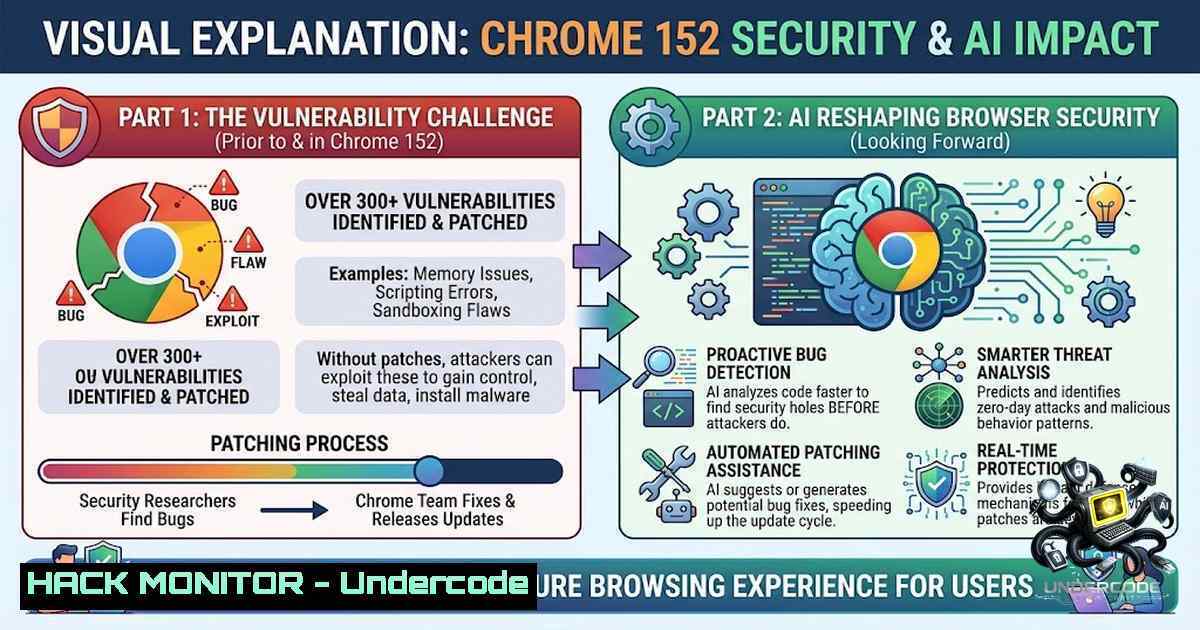
Google’s release of Chrome 152 marks a watershed moment in browser security, patching 327 vulnerabilities with an unprecedented 299 flaws discovered through internal AI-driven analysis. This massive update highlights how machine learning is accelerating vulnerability discovery while maintaining the critical role of human researchers in identifying high-impact threats. For enterprise IT teams and MSPs, this reinforces the urgent need for automated patch management and layered endpoint defenses as the browser attack surface continues to expand.
Learning Objectives & Secrets:
- Objective 1 – Master Automated Patch Deployment: Learn to prioritize and deploy Chrome 152 across Windows, Linux, and macOS environments using enterprise tools like PDQ, WSUS, or Google’s own GPO templates to mitigate critical use-after-free and type-confusion vulnerabilities.
- Objective 2 Secret Tips – Leverage AI Detection Outputs: While AI tools now generate vulnerability reports at scale, human analysts must still validate findings—use the chromium bug tracker to filter AI-discovered issues and cross-reference with real-world exploitability indicators like CVSS score and public proof-of-concept availability.
- Objective 3 Secret Tips – Implement Browser Hardening: Apply Chrome enterprise policies to disable unsafe features like WebAssembly (if not required), enable Site Isolation, and enforce HTTPS-First mode; use the `–disable-features=SomeFeature` command-line switch for temporary testing on legacy systems.
You Should Know:
1. Enterprise-Wide Chrome Update Strategy
The Chrome 152 update requires immediate action across all managed endpoints. This section provides a step‑by‑step guide for deploying the patch using standard enterprise tools and verifying its successful installation. Begin by identifying all Chrome installations in your environment, then schedule a phased rollout to minimize disruption while prioritizing internet-facing systems.
Linux (Debian/Ubuntu):
 Update apt repository and install latest Chrome
wget -q -O - https://dl.google.com/linux/linux_signing_key.pub | sudo apt-key add -
sudo sh -c 'echo "deb [arch=amd64] http://dl.google.com/linux/chrome/deb/ stable main" >> /etc/apt/sources.list.d/google-chrome.list'
sudo apt update && sudo apt upgrade google-chrome-stable -y
 Verify version
google-chrome --version
 Expected output: Google Chrome 152.x.x.x
Windows (PowerShell with Winget):
 Check current version
(Get-Item "C:\Program Files\Google\Chrome\Application\chrome.exe").VersionInfo.FileVersion
 Update using winget (available in Windows 10/11)
winget upgrade Google.Chrome --silent --accept-package-agreements
 Or deploy via Group Policy with the .msi from Google's admin console
 After update, verify via registry
Get-ItemProperty -Path "HKLM:\SOFTWARE\WOW6432Node\Google\Update\Clients{8A69D345-D564-463C-AFF1-A69D9E530F96}" | Select-Object pv
Automated Deployment with PDQ Inventory/Deploy:
- Create a dynamic collection of devices with Chrome < 152.0.x.x.
- Deploy the Google Chrome MSI with the `REBOOT=ReallySuppress` parameter to avoid unwanted restarts.
- Schedule regular heartbeat scans to confirm compliance.
2. Mitigating Critical Use-After-Free Vulnerabilities
Chrome 152 addresses 10 critical issues, many of which are use-after-free (UAF) flaws in components like Angle, Aura, and Views. These vulnerabilities can lead to remote code execution if an attacker successfully triggers a memory corruption condition. To protect your organization, implement the following hardening and monitoring steps.
Enable Site Isolation (Enterprise Policy):
Set `SitePerProcess` and `IsolateOrigins` policies to force each site into its own renderer process, limiting the impact of a UAF exploit.
Windows Group Policy Path:
– `Computer Configuration > Administrative Templates > Google Chrome > Renderer > Enable Site Isolation for every site` = Enabled.
Linux/ChromeOS Configuration File:
- Edit
/etc/opt/chrome/policies/managed/isolate.json:{ "SitePerProcess": true, "IsolateOrigins": "https://.example.com,https://.google.com" }
Monitor for Crashes and Memory Corruption:
Use Windows Event Log or Linux `dmesg` to detect abnormal chrome process terminations.
– Windows Event Log Query (PowerShell):
Get-WinEvent -LogName Application | Where-Object { $<em>.ProviderName -eq "Chrome" -and $</em>.Id -in 1000, 1001 } | Select-Object TimeCreated, Message
– Linux Journald:
sudo journalctl -u chrome -f --since "1 hour ago" | grep -i "memory|crash|uaf"
3. AI-Driven Vulnerability Detection and Its Implications
The fact that 91% of the patched vulnerabilities were discovered internally using AI signals a paradigm shift. However, AI tools often generate high false-positive rates and lack context. Security teams should integrate AI output into their triage workflows but maintain human oversight.
Practical Workflow for AI-Detected Bugs:
- Step 1: Pull the list of AI-discovered CVE IDs from Google’s Chrome Security Bulletin.
- Step 2: Use NVD or Exploit-DB to check for public exploits or proof-of-concepts.
- Step 3: Prioritize patching based on CVSS score and exposure of vulnerable components (e.g., Chromecast if you have Cast devices, SafeBrowsing if you rely on it).
- Step 4: If you develop Chrome extensions, test them against Chrome 152 to ensure API changes (often associated with security fixes) do not break functionality.
API Security Tip:
Chrome extensions leveraging the `webRequest` or `declarativeNetRequest` APIs may see changed behavior due to updates in the networking stack. Use the following command to inspect network request logs:
 Linux - capture Chrome network logs
google-chrome --log-1et-log=/tmp/netlog.json --1et-log-capture-mode=full
On Windows, add `–enable-logging –v=1` to the shortcut target.
4. Leveraging Bug Bounty Insights for Proactive Defense
CVE-2026-79282, with a $25,000 bounty, was discovered by an external researcher. This highlights the importance of internal bug bounty programs or third-party penetration testing. Use the following steps to emulate researcher techniques for hardening.
Fuzzing and Input Validation:
Use `libFuzzer` or `AFL` on Chrome’s `blink` rendering engine to test for new issues before they are weaponized.
– Example Fuzzing Command (requires source build):
./out/fuzz/fuzzer_name --jobs=4 --workers=4 /path/to/corpus
HTTP Security Headers:
To mitigate exploitation via cross-origin attacks, ensure your web applications enforce strict headers:
Content-Security-Policy: default-src 'self'; script-src 'strict-dynamic'
X-Frame-Options: DENY
X-Content-Type-Options: nosniff
5. Continuous Monitoring and Log Aggregation
With patch velocity increasing, your SOC/NOC must adapt. Implement continuous monitoring of Chrome versions and exploit attempts.
Windows Sysmon Configuration for Chrome Events:
Add a rule to monitor process creation with Chrome as parent and suspicious child processes (e.g., cmd.exe, powershell.exe).
<Sysmon>
<EventFiltering>
<ProcessCreate onmatch="include">
<ParentImage condition="end with">chrome.exe</ParentImage>
<Image condition="end with">cmd.exe</Image>
</ProcessCreate>
</EventFiltering>
</Sysmon>
Linux AuditD Rule:
auditctl -w /usr/bin/google-chrome -p x -k chrome_exec
ausearch -k chrome_exec --format human | tail -20
6. Cloud and Virtual Desktop Hardening
For VDI environments (Citrix, VMware Horizon), apply Chrome policies via OMA-URI or configuration profiles. Block outdated protocols and enforce extension blacklists.
Cloud Security (GWS / Chrome Browser Cloud Management):
1. Log into Google Admin console.
2. Navigate to Devices > Chrome > Settings.
3. Set Minimum browser version to 152.x.x.
- Enable Auto-update and set rollback period to 0 days.
- Deploy URL blocking for known malicious sites reported by SafeBrowsing.
What Undercode Say:
- Key Takeaway 1: The use of AI in vulnerability discovery is a force multiplier, but it does not eliminate the need for human validation. The 327 patches in Chrome 152 are a testament to automation’s capacity, yet critical flaws often bypass algorithmic detection because they require complex user interactions.
- Key Takeaway 2: Enterprises must treat browser updates as a zero-day response event. With over 2,000 CVEs patched in Chrome this year alone, reliance on manual patching is obsolete. Automation, coupled with proactive endpoint detection and response (EDR) integration, is non-1egotiable.
Analysis:
The scale of this release signals that Google’s internal AI tools are maturing, likely employing fuzzing and symbolic execution at scale. However, the $25,000 bounty for an external finding proves that adversarial thinking remains a human domain. For IT leaders, the real challenge is not just deploying the patch but updating inventory management, incident response playbooks, and security awareness training to account for AI-driven vulnerability velocity. The trend indicates that by 2027, AI will discover >95% of browser flaws, shifting researcher focus to exploit chain composition and business logic bugs. Organizations should start planning for shorter patch cycles (weekly) and invest in AI-assisted security orchestration to keep pace.
Prediction:
- +1 Browser vendors will adopt continuous delivery for security updates, reducing patch batch sizes and making AI triage a standard CI/CD step.
- +1 Bug bounty programs will evolve to reward researchers who validate AI-discovered flaws, creating a hybrid human-AI vulnerability marketplace.
- -1 Smaller enterprises without dedicated IT staff will struggle to keep up with the accelerated patching tempo, leading to a wider security gap between large and small organizations.
- -1 The rise of AI-discovered vulnerabilities may inadvertently train offensive AI models, potentially lowering the barrier to entry for automated exploit generation.
▶️ Related Video (84% Match):
🎯Let’s Practice For Free:
🎓 Live Courses & Certifications:
Join Undercode Academy for Verified Certifications
🚀 Request a Custom Project:
Secure, high-velocity infrastructure and disruptive technological engineering. Contact our engineering team for high-tier development and proprietary systems:
[email protected]
💎 Smart Architecture | 🛡️ Secure by Design | ⭐ Trusted by Thousands
IT/Security Reporter URL:
Reported By: https://lnkd.in/p/ezf3bZxu – Hackers Feeds
Extra Hub: Undercode MoN
Basic Verification: Pass ✅


