Listen to this Post
Introduction:
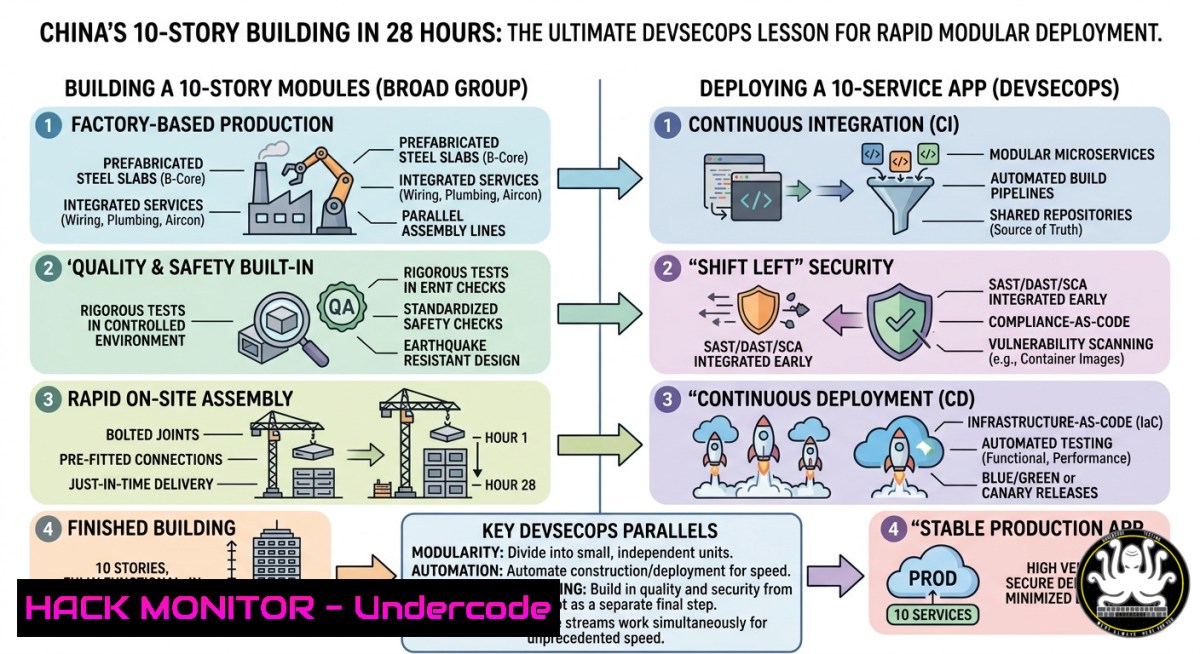
In a stunning display of speed and modular efficiency, Broad Group erected a 10-story stainless steel building in Changsha, China, in just 28 hours and 45 minutes. While this feat showcases physical construction innovation, it offers a powerful cybersecurity and IT analogy: the need for rapid, modular, and secure deployment pipelines. Just as prefabricated units with pre-installed electrical and water connections enable ultra-fast assembly, modern DevSecOps practices rely on containerized workloads, infrastructure-as-code, and automated security validation to accelerate deployment without compromising integrity.
Learning Objectives:
- Understand how modular construction principles translate to secure, scalable IT infrastructure deployment.
- Learn Linux and Windows commands for rapid environment provisioning and security hardening.
- Master containerization, CI/CD pipeline security, and cloud hardening techniques inspired by assembly-line efficiency.
You Should Know:
- Modular Infrastructure as Code (IaC): Building Blocks Like Prefab Steel Units
The Broad Group’s success hinges on factory-made modules (12.19m × 2.44m × 3m) that snap together on-site. In cybersecurity and IT, Infrastructure as Code (IaC) provides the same benefit: reusable, version-controlled modules that deploy entire stacks with pre-configured security controls.
Step‑by‑step guide to IaC security using Terraform (Linux/macOS/Windows WSL):
1. Install Terraform (Linux):
wget -O- https://apt.releases.hashicorp.com/gpg | gpg --dearmor | sudo tee /usr/share/keyrings/hashicorp-archive-keyring.gpg
echo "deb [signed-by=/usr/share/keyrings/hashicorp-archive-keyring.gpg] https://apt.releases.hashicorp.com $(lsb_release -cs) main" | sudo tee /etc/apt/sources.list.d/hashicorp.list
sudo apt update && sudo apt install terraform
2. Create a modular security group module (`modules/security_group/main.tf`):
resource "aws_security_group" "web_sg" {
name = var.sg_name
description = "Modular security group with predefined rules"
vpc_id = var.vpc_id

dynamic "ingress" {
for_each = var.allowed_ports
content {
from_port = ingress.value
to_port = ingress.value
protocol = "tcp"
cidr_blocks = ["0.0.0.0/0"]
}
}
egress {
from_port = 0
to_port = 0
protocol = "-1"
cidr_blocks = ["0.0.0.0/0"]
}
}
3. Validate and deploy securely:
terraform fmt -recursive  Enforce consistent formatting
terraform validate  Check syntax and logic
terraform plan -out=tfplan  Generate execution plan
terraform apply tfplan  Deploy modular infrastructure
4. Windows PowerShell equivalent using AWS Tools:
Install-Module -Name AWS.Tools.EC2 -Force
$sgParams = @{
GroupName = "ModularWebSG"
Description = "Pre-fabricated security rules"
VpcId = "vpc-12345"
}
$sg = New-EC2SecurityGroup @sgParams
Grant-EC2SecurityGroupIngress -GroupId $sg.GroupId -IpProtocol tcp -FromPort 80 -ToPort 80 -CidrIp "0.0.0.0/0"
- Containerization: Your Digital Prefab Units (Docker & Podman)
Just as each building block comes with pre-installed windows, balconies, and electrical connections, containers bundle applications with all dependencies. This ensures consistent security policies across environments.
Step‑by‑step secure container build and runtime hardening:
1. Create a hardened Dockerfile (Linux):
FROM alpine:3.19 AS builder
RUN apk add --no-cache --update openssl && \
addgroup -g 1000 -S appuser && adduser -S -u 1000 -G appuser appuser

FROM scratch
COPY --from=builder /etc/ssl/certs/ca-certificates.crt /etc/ssl/certs/
COPY --from=builder /etc/passwd /etc/passwd
USER appuser
COPY --chown=appuser:appuser ./app /app
EXPOSE 8080
ENTRYPOINT ["/app"]
2. Build and scan for vulnerabilities:
docker build -t secure-module:latest .
docker scan secure-module:latest  Snyk-powered vulnerability scan
trivy image secure-module:latest  Alternative: Aqua Trivy
- Run with strict security options (Linux namespaces and seccomp):
docker run -d --name prefab_app \
--cap-drop=ALL --cap-add=NET_BIND_SERVICE \
--read-only --tmpfs /tmp:rw,noexec,nosuid,size=100m \
--security-opt=no-new-privileges:true \
-p 8080:8080 secure-module:latest
4. Windows container equivalent (PowerShell as Admin):
docker run -d --name windows_module --isolation=hyperv `
--security-opt="credentialspec=file://gmsa.json" `
-p 8080:8080 windowssecure:latest
- CI/CD Pipeline Security: Tightening the Bolts Between Modules
The final step of Broad Group’s construction involves tightening bolts and connecting electricity/water. In DevOps, this corresponds to automated security checks in your pipeline—ensuring each module (microservice) connects securely.
Step‑by‑step pipeline hardening with GitLab CI (Linux runner):
1. .gitlab-ci.yml with security stages:
stages:
- lint
- security_scan
- build
- integration_test
- deploy

variables:
DOCKER_DRIVER: overlay2
SAST_ANALYZER_IMAGE: "registry.gitlab.com/security-products/sast:latest"

secrets-detection:
stage: security_scan
script:
- apt-get update && apt-get install -y git
- git secrets --scan
only:
- merge_requests

sast:
stage: security_scan
image: $SAST_ANALYZER_IMAGE
script:
- /analyzer run
artifacts:
reports:
sast: gl-sast-report.json

dependency-scanning:
stage: security_scan
script:
- npm install -g yarn
- yarn install
- yarn audit --json > npm-audit.json
- npx snyk test --json > snyk.json
- Run a local pre‑commit hook for API key leaks (Linux/macOS):
Install git-secrets
git clone https://github.com/awslabs/git-secrets.git
cd git-secrets && sudo make install
git secrets --install
git secrets --register-aws  Add AWS key patterns
git secrets --add '["']?[A-Za-z0-9+/]{40}["']?'  Generic API key
3. Windows PowerShell CI automation using Azure DevOps:
 In azure-pipelines.yml
- task: PowerShell@2
inputs:
targetType: 'inline'
script: |
Invoke-ScriptAnalyzer -Path ./ -Recurse -Severity Warning -ErrorAction Stop
$scan = Invoke-WebRequest -Uri "https://api.securityscanner.com/scan"
- Cloud Hardening: Securing the Electrical and Water Connections
Each modular apartment connects to central utilities. Similarly, cloud resources must be securely integrated with identity and access management (IAM), network policies, and encryption.
Step‑by‑step cloud hardening (AWS example):
- Enforce encryption in transit and at rest (Linux CLI with AWS CLI):
Enable default encryption on S3 bucket aws s3api put-bucket-encryption --bucket my-secure-modules \ --server-side-encryption-configuration '{ "Rules": [ {"ApplyServerSideEncryptionByDefault": {"SSEAlgorithm": "AES256"}} ] }' Require TLS 1.2+ for all API calls aws configure set s3.disable_ssl false aws configure set s3.use_dual_stack_endpoint true -
Implement least privilege IAM (create a role for modular services):
{
"Version": "2012-10-17",
"Statement": [
{
"Effect": "Deny",
"Action": "",
"Resource": "",
"Condition": {
"BoolIfExists": {"aws:MultiFactorAuthPresent": "false"}
}
},
{
"Effect": "Allow",
"Action": ["s3:GetObject", "dynamodb:Query"],
"Resource": ["arn:aws:s3:::module-assets/", "arn:aws:dynamodb:us-east-1:123456789012:table/Modules"]
}
]
}
3. Windows Azure CLI equivalent:
az storage account update --name mystorageaccount --https-only true
az role assignment create --assignee "module-service-principal" `
--role "Reader" --scope "/subscriptions/{sub}/resourceGroups/modules-rg/providers/Microsoft.Storage/storageAccounts/mystorageaccount"
5. API Security: Guarding the Inter-Module Communication
Just as electrical connections must be fireproof and water-tight, APIs require authentication, rate limiting, and input validation.
Step‑by‑step API gateway hardening (Kong + Linux):
1. Install Kong API gateway:
curl -Ls https://get.konghq.com/quickstart | bash
sudo docker run -d --name kong-database -p 5432:5432 -e "POSTGRES_USER=kong" -e "POSTGRES_DB=kong" postgres:13
sudo docker run -d --name kong --link kong-database -e "KONG_DATABASE=postgres" -e "KONG_PG_HOST=kong-database" -p 8000:8000 -p 8443:8443 kong:latest
2. Enable rate limiting and JWT authentication:
curl -i -X POST http://localhost:8001/services/modular-api/plugins \
--data "name=rate-limiting" --data "config.minute=100" --data "config.policy=local"

curl -i -X POST http://localhost:8001/services/modular-api/plugins \
--data "name=jwt" --data "config.secret_is_base64=false"
- Validate API input with OpenAPI schema (Python script):
from openapi_core import create_spec
from jsonschema import validate</li>
</ol>

schema = {
"type": "object",
"properties": {
"module_id": {"type": "string", "pattern": "^MOD-[A-Z0-9]{6}$"},
"connections": {"type": "array", "maxItems": 10}
},
"required": ["module_id"]
}
validate(instance=request_json, schema=schema)
6. Vulnerability Exploitation & Mitigation: Unauthorized Module Insertion
What if an attacker inserts a malicious “module” into your assembly line? Similar to counterfeit building components, supply chain attacks compromise software dependencies.
Step‑by‑step supply chain defense with Sigstore (Linux):
1. Sign container images with Cosign:
cosign generate-key-pair
cosign sign --key cosign.key secure-module:latest
cosign verify --key cosign.pub secure-module:latest
2. Check SBOM (Software Bill of Materials):
syft packages docker:secure-module:latest -o spdx-json > sbom.json
grype sbom.json --fail-on high  Vulnerability scanner for SBOM
3. Windows equivalent using PowerShell and Trivy:
trivy image --severity HIGH,CRITICAL --ignore-unfixed secure-module:latest
What Undercode Say:
- Modular speed demands modular security – Broad Group’s 28‑hour building is inspiring, but in IT, rapid deployment without automated security gates leads to technical debt and breaches. Every “prefab” code module must be scanned, signed, and tested.
- Connections are the weakest link – Just as electrical and water hookups require rigorous testing, API endpoints, IAM roles, and network policies need continuous validation. Use infrastructure as code to enforce these connections consistently across all environments.
Prediction:
The construction industry’s shift toward modular, factory‑built components will mirror the evolution of cybersecurity platforms. By 2027, expect “security prefab” marketplaces where organizations download hardened, attestation‑signed container images and infrastructure modules with embedded runtime policies. However, this will also attract supply‑chain attacks targeting the prefab repositories themselves. Future defense will rely on zero‑trust assembly lines where every component is verified before “tightening the bolts” – a direct digital twin of Broad Group’s physical process, but with cryptographic signatures replacing torque wrenches.
▶️ Related Video (80% Match):
🎯Let’s Practice For Free:
IT/Security Reporter URL:
Reported By: Christine Raibaldi – Hackers Feeds
Extra Hub: Undercode MoN
Basic Verification: Pass ✅🔐JOIN OUR CYBER WORLD [ CVE News • HackMonitor • UndercodeNews ]
📢 Follow UndercodeTesting & Stay Tuned:


