Listen to this Post
Introduction
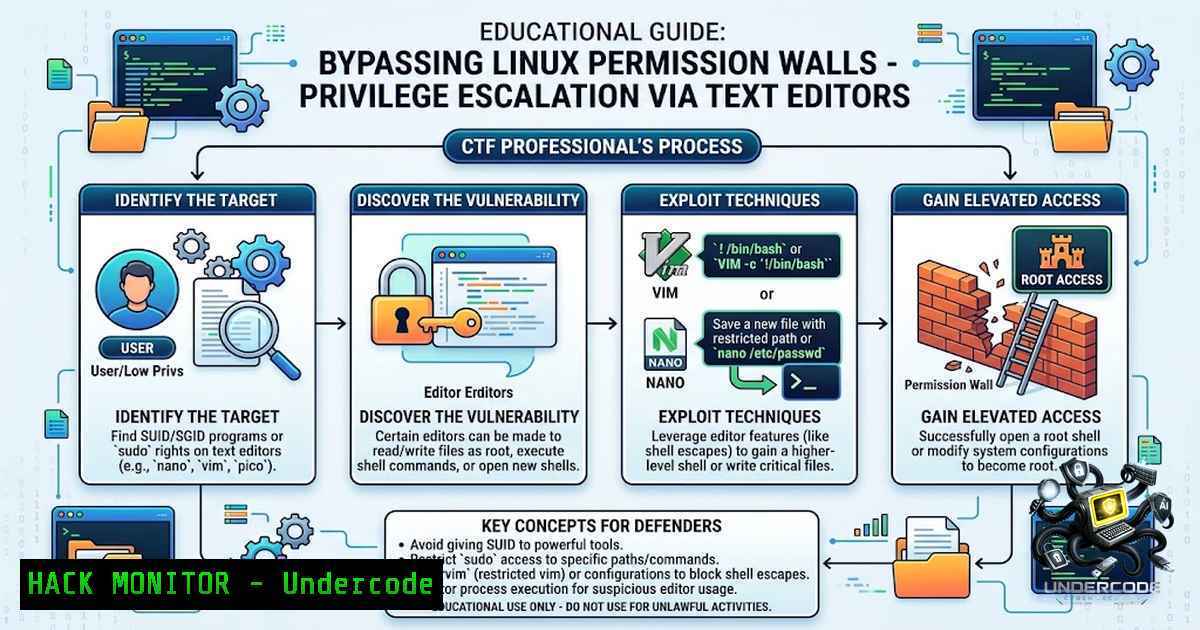
In the world of Capture The Flag (CTF) competitions and real-world penetration testing, encountering a “Permission Denied” error is often the beginning of a strategic challenge rather than a dead end. When standard file access methods fail, understanding the interplay between Linux file permissions, sudo privileges, and text editor functionalities becomes a critical skill for ethical hackers. This article explores how seemingly minor misconfigurations in Linux systems—specifically regarding sudoers file entries and editor capabilities—can be leveraged to bypass restrictions and access sensitive files, transforming a frustrating error into a successful privilege escalation vector.
Learning Objectives & Secrets
- Objective 1: Mastering Privilege Auditing – Learn to use `sudo -l` effectively to enumerate allowed commands and identify misconfigured sudo entries that grant elevated access to text editors or other binaries.
- Objective 2 Secret Tip: Exploiting Editor File Reading – Discover how built-in editor features like Nano’s `Ctrl+R` can read files outside the editor’s normal scope, bypassing shell-level restrictions without executing a full shell.
- Objective 3 Secret Tip: Sudoers File Manipulation – Understand how gaining write access to `/etc/sudoers` via a privileged editor can permanently alter system permissions, providing persistent elevated access if handled correctly.
You Should Know
- Auditing Sudo Privileges: The First Step to Exploitation
Before attempting any bypass, a thorough audit of your current permissions is essential. The `sudo -l` command lists all binaries and commands the current user is authorized to execute with root privileges. This enumeration phase is critical because many system administrators inadvertently grant overly permissive sudo access to common utilities like text editors, package managers, or scripting interpreters.
Step-by-Step Guide:
1. Open your terminal and execute: `sudo -l`
- Review the output carefully for entries that include `NOPASSWD` or allow specific binaries. Look for text editors like
nano,vim,vi, ored. - Note any editor with sudo access—this will be your entry point.
- If you find an entry like
(ALL) /bin/nano, you have a viable attack path.
Command Examples:
 List your current sudo privileges
sudo -l

Example output showing dangerous configuration
User bob may run the following commands on this host:
(ALL) NOPASSWD: /bin/nano
- Leveraging GNU Nano: The Ctrl+R File Reading Exploit
When you have sudo access to GNU Nano, you can bypass file permission restrictions by using the editor’s internal file reading function. This technique exploits Nano’s ability to read any file that the process (running as root) has access to, effectively circumventing the shell-level permissions that would normally block your access.
Step-by-Step Guide:
1. Launch Nano with sudo: `sudo /bin/nano`
- Once the editor interface opens, press `Ctrl+R` (or
^R) to activate the “Read File” function. - Instead of typing a filename, enter the path to the restricted file, e.g., `./flag.txt` or
/root/flag.txt. - Press Enter, and Nano will read and insert the content of the restricted file directly into the editor buffer.
- The flag or sensitive data is now visible on your screen without ever needing to `cat` the file.
Alternative Methods:
- If Vim is available, you can use `:r! cat /path/to/file` to read external commands.
- If using
sudo -e, you may have extended capabilities for editing protected files.
3. Advanced Exploitation: Modifying Sudoers for Persistence
Beyond simply reading flags, having sudo access to Nano (or any text editor) allows you to edit critical system files like /etc/sudoers. This can be used to grant yourself permanent root privileges or add additional users to the sudo group.
Step-by-Step Guide:
1. Launch Nano with sudo: `sudo /bin/nano /etc/sudoers`
- Add a new entry at the end of the file: `youruser ALL=(ALL) NOPASSWD: ALL`
3. Save the file (Ctrl+O) and exit (Ctrl+X).
- Test your new privileges: `sudo su -` should now drop you into a root shell without requiring a password.
- Warning: Always verify the syntax before saving, as errors in `/etc/sudoers` can lock you out of sudo entirely. If you’re unsure, use `visudo` instead of editing directly.
Code Snippet:
 /etc/sudoers modification example
yourusername ALL=(ALL) NOPASSWD: ALL
4. Windows Equivalents: Elevation Techniques Across OS
While this article focuses on Linux, similar concepts exist in Windows environments. Understanding cross-platform techniques enhances your versatility as a security professional.
Windows Attack Vectors:
- PowerShell with Elevated Privileges: Use `Start-Process powershell -Verb RunAs` to launch an elevated shell.
- Registry Editing: Permissions on certain registry keys can be manipulated if you have local admin access.
- Binary Substitution: Placing malicious executables in directories that are in the PATH before system directories can lead to privilege escalation.
Windows Command Example:
 Attempt to read a restricted file using PowerShell
Get-Content C:\Windows\System32\config\SAM -ErrorAction SilentlyContinue
5. Mitigation and Defensive Strategies
For system administrators, understanding these attack vectors is equally important. Proper configuration and monitoring can prevent such techniques from succeeding.
Defensive Checklist:
- Restrict Sudo Commands: Never grant `NOPASSWD` access to editors or interpreters. Use the `NOEXEC` tag to prevent execution of subprocesses.
- Implement AppArmor/SELinux: These mandatory access control systems can restrict what even root processes can do.
- Monitor Sudo Logs: Regular review of `/var/log/auth.log` and `sudo` logs can reveal suspicious usage patterns.
- Use visudo: Always use `visudo` to edit `/etc/sudoers` to prevent syntax errors that could break sudo functionality.
Example Secure Configuration:
 Secure sudoers entry: Allow nano but prevent shell escapes
bob ALL=(ALL) NOEXEC: /bin/nano
6. CTF Toolkit: Essential Commands for Permission Bypass
Building a versatile toolkit is key to success in CTF environments. The following commands and techniques are essential additions to any penetration tester’s repertoire.
Linux Command Reference:
 Check sudo privileges
sudo -l

Find files with SUID bit set
find / -perm -4000 -type f 2>/dev/null

Check for writable system files
find / -writable -type f 2>/dev/null | grep -v /proc/

Test file permissions
ls -la /path/to/target

Use Python to spawn a shell if other methods fail
sudo python -c 'import pty;pty.spawn("/bin/bash")'
Nano Editor Shortcuts for CTF:
– `Ctrl+R` : Read a file into the current buffer
– `Ctrl+W` : Search for text
– `Ctrl+O` : Save the current file
– `Ctrl+X` : Exit the editor
7. Real-World Application: Case Study Analysis
In recent penetration testing engagements, misconfigured sudo privileges to text editors have been a recurring finding. One notable case involved a production server where developers were granted `sudo /bin/nano` access to quickly edit configuration files. An attacker with low-privilege access exploited this to read the `/etc/shadow` file, extract password hashes, and subsequently crack weak passwords.
Lessons Learned:
- Always follow the principle of least privilege.
- Use dedicated tools like `visudo` for managing sudoers file.
- Implement regular security audits to detect such configurations.
- Educate system administrators about the risks associated with overly permissive sudo rules.
What Undercode Say
Key Takeaway 1: The simplicity of the “Permission Denied” bypass using GNU Nano highlights a crucial security principle: privilege escalation often comes from overlooking basic system functionalities. Text editors are powerful tools that, when misconfigured with sudo access, become potent attack vectors. This is not just a CTF trick but a real-world vulnerability that administrators must address by implementing strict sudo rules and regular audits.
Key Takeaway 2: The step-by-step methodology—auditing privileges, exploiting editor capabilities, and understanding the underlying system mechanics—is a transferrable skill applicable across various penetration testing scenarios. Whether dealing with Linux, Windows, or cloud environments, the core approach remains consistent: enumerate, exploit, and escalate. For CTF players, mastering these techniques provides a significant competitive advantage, while for professionals, they form the foundation of robust security assessments.
Analysis: The technique showcased in this article underscores the importance of understanding the security implications of every tool and configuration in a system. It’s easy to overlook text editors as benign tools, but they can be the key to unlocking an entire system. This serves as a reminder that security is not just about firewalls and antivirus software but about the intricate details of permissions and configurations that can be exploited. The ability to think creatively and leverage built-in functionalities distinguishes a skilled penetration tester from a novice. Furthermore, the defensive side—recognizing and mitigating these risks—is equally critical, emphasizing the need for continuous learning and adaptation in the ever-evolving field of cybersecurity.
Prediction
- +1 Increased Focus on Sudoer File Audits: Organizations will increasingly implement automated tools to audit sudoers files and detect overly permissive configurations, leading to a reduction in easily exploitable misconfigurations in production environments.
- +1 Integration of Editor Exploits in CTF Training: CTF platforms and cybersecurity training programs will continue to incorporate these types of challenges, recognizing their educational value in teaching fundamental Linux privilege escalation concepts.
- -1 Persisting Misconfigurations in Legacy Systems: Despite increased awareness, many legacy systems and poorly maintained servers will continue to harbor similar vulnerabilities, providing attack vectors for malicious actors.
- +1 Development of Hardened Text Editors: Security-focused distributions and enterprises may develop or adopt hardened versions of text editors that restrict file reading capabilities when running with elevated privileges.
- -1 Rise in Automated Attack Tools: Malicious actors will increasingly incorporate automated scanning and exploitation scripts that detect and exploit sudo editor misconfigurations, raising the stakes for proactive defense measures.
- +1 Enhanced Administrative Training: System administrators will receive more comprehensive training on the security implications of sudo configurations, leading to better baseline security postures.
▶️ Related Video (80% Match):
🎯Let’s Practice For Free:
🎓 Live Courses & Certifications:
Join Undercode Academy for Verified Certifications
🚀 Request a Custom Project:
Secure, high-velocity infrastructure and disruptive technological engineering. Contact our engineering team for high-tier development and proprietary systems:
[email protected]
💎 Smart Architecture | 🛡️ Secure by Design | ⭐ Trusted by Thousands
IT/Security Reporter URL:
Reported By: https://lnkd.in/p/epDPnZSM – Hackers Feeds
Extra Hub: Undercode MoN
Basic Verification: Pass ✅


