Listen to this Post
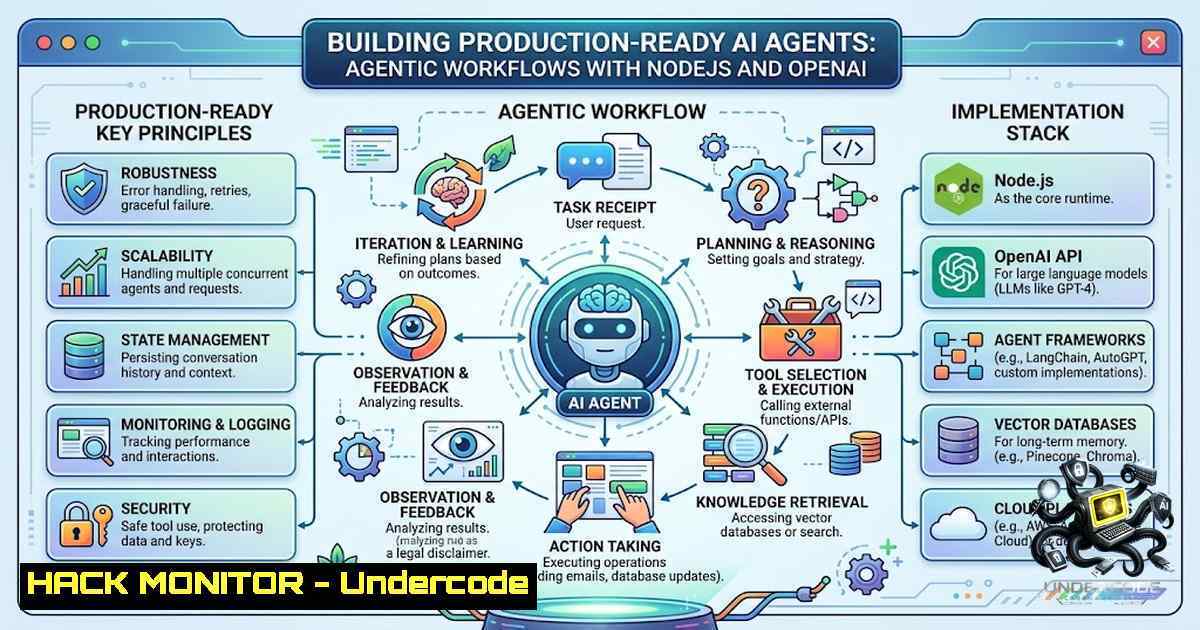
Introduction:
The rise of agentic AI workflows marks a fundamental shift in how developers build intelligent applications. Unlike traditional request-response models, AI agents maintain conversational state, remember context across interactions, and can autonomously decide when to call external tools to accomplish tasks. Major League Hacking’s Global Hack Week: Agents brought together thousands of developers to explore these capabilities, with participants building everything from command-line agents with conversational memory to multimodal agents capable of vision and tool calling. As organizations increasingly deploy AI agents in production, understanding both the implementation patterns and the security implications becomes critical.
Learning Objectives & Secrets:
- Objective 1: Build an Interactive CLI Agent with Node.js and OpenAI API — Connect a Node.js application to the OpenAI API and create a command-line agent that processes user input and returns intelligent responses in real-time.
-
Objective 2 Secret: Implement Temporary Conversation Memory — The secret to natural conversations lies in maintaining message history. By accumulating each user message and assistant response in an array, you preserve context across interactions without needing external databases. Use the `messages` array pattern where each turn appends `{ role: “user”, content: input }` and `{ role: “assistant”, content: response }` to maintain continuity.
-
Objective 3 Secret: Design Agent Instructions for Desired Persona — The `instructions` field is your agent’s personality and behavioral guardrail. Well-crafted instructions define not just what the agent does, but what it explicitly cannot do. Keep system prompts focused and unambiguous about permitted and forbidden actions. This becomes your first line of defense against prompt injection.
You Should Know:
- Building Your First AI Agent with Node.js and OpenAI
The foundational pattern for any AI agent involves three core components: the brain (LLM), instructions (system prompt), and memory (conversation history). Here’s how to build one step by step:
Step 1: Project Setup
mkdir my-ai-agent && cd my-ai-agent
npm init -y
npm install openai dotenv
Step 2: Environment Configuration
Create a `.env` file to store your API key securely — never hardcode keys in source code:
echo "OPENAI_API_KEY=your_api_key_here" > .env
echo ".env" >> .gitignore
Linux/macOS:
export OPENAI_API_KEY="your-api-key-here"
Windows (CMD):
setx OPENAI_API_KEY "your-api-key-here"
Note: New CMD windows must be opened for the variable to take effect.
Step 3: Basic Agent Implementation
Create `agent.js`:
import { config } from 'dotenv';
import OpenAI from 'openai';
config();

const openai = new OpenAI({ apiKey: process.env.OPENAI_API_KEY });

const instructions = <code>You are a helpful coding assistant.
You provide clear, concise explanations with code examples when appropriate.
You never execute code or access external systems.</code>;

async function chat(userInput, history = []) {
const messages = [
{ role: 'system', content: instructions },
...history,
{ role: 'user', content: userInput }
];

const response = await openai.chat.completions.create({
model: 'gpt-4o-mini',
messages: messages,
temperature: 0.7
});

return response.choices[bash].message;
}
2. Implementing Conversational Memory and State Management
The key to stateful agents is preserving conversation context across interactions. Here are three implementation strategies:
In-Memory Session Storage (Simple):
const sessions = new Map();

function getOrCreateSession(sessionId) {
if (!sessions.has(sessionId)) {
sessions.set(sessionId, []);
}
return sessions.get(sessionId);
}

async function chatWithMemory(sessionId, userInput) {
const history = getOrCreateSession(sessionId);
const response = await chat(userInput, history);
history.push({ role: 'user', content: userInput });
history.push({ role: 'assistant', content: response.content });
return response.content;
}
Persistent Memory with SQLite (Production-Ready):
For production agents that need to remember users across sessions, implement persistent storage. The OpenAI Agents JS SDK supports sessions with SQLite, PostgreSQL, and MySQL through Drizzle ORM:
npm install @stackone/openai-agents-js-sessions drizzle-orm sqlite3
import { InMemorySession } from '@stackone/openai-agents-js-sessions';
// Or use SQLiteSession, PostgresSession, MySQLSession for persistence
const session = new InMemorySession();
await session.save(sessionId, messages);
const loaded = await session.load(sessionId);
Advanced: Long-Term Memory with Vector Search
For agents that need to recall facts across entirely separate conversations, implement vector-based memory. Libraries like `@lsby/ai-memory` provide long-term memory with PGlite/pgvector, allowing agents to remember, forget, and reorganize experiences across sessions:
import { 带记忆的智能体, 记忆等级 } from '@lsby/ai-memory';

const agent = new 带记忆的智能体({
storage: { mode: 'file', path: './data/agent-memory' },
vectorModel: { type: 'none' }
});

await agent.batchInjectMemory([{
content: 'User prefers concise Chinese responses.',
keywords: ['user', 'preference'],
tags: ['preference'],
score: 80,
level: 记忆等级.一级,
createdAt: new Date()
}]);
- Tool Calling: Giving Agents the Ability to Act
The most powerful agentic capability is tool calling — letting the model decide when and how to use external functions. Here’s how to implement a weather tool:
const tools = [{
type: 'function',
function: {
name: 'get_weather',
description: 'Get current weather for a location',
parameters: {
type: 'object',
properties: {
location: { type: 'string', description: 'City name' }
},
required: ['location']
}
}
}];

async function getWeather(location) {
// Call actual weather API here
return <code>Weather in ${location}: 22°C, Sunny</code>;
}

async function chatWithTools(userInput) {
const response = await openai.chat.completions.create({
model: 'gpt-4o-mini',
messages: [{ role: 'user', content: userInput }],
tools: tools,
tool_choice: 'auto'
});

const toolCalls = response.choices[bash].message.tool_calls;
if (toolCalls) {
for (const call of toolCalls) {
if (call.function.name === 'get_weather') {
const args = JSON.parse(call.function.arguments);
const result = await getWeather(args.location);
// Feed result back to model
}
}
}
}
4. Securing AI Agents Against Prompt Injection
Prompt injection remains the OWASP LLM Top 10’s 1 risk (LLM01). Attackers manipulate system instructions using control terms like “ignore,” “override,” or “system prompt”. The most effective 2026 defense architecture assumes the model layer alone will fail and contains the blast radius around it.
Defense-in-Depth Strategy:
Layer 1: Input-Side Filtering — Run a smaller classifier model (fine-tuned DeBERTa or distilled Llama 3.2) as a pre-filter that flags injection-shaped content before the main model sees it.
Layer 2: Capability Minimization — The single highest-leverage defense in 2026 is limiting what tools the agent can access. An agent that can only call three read-only tools cannot exfiltrate data even if fully compromised.
Layer 3: Dual-LLM Architecture — A privileged model never sees raw user content, only structured summaries from a quarantined model.
Layer 4: Output Validation — Treat model output as untrusted. Apply rigorous sanitization and Content Security Policy (CSP) on all model output.
Implementation Example:
// Pre-filter for prompt injection patterns
function detectPromptInjection(input) {
const suspiciousPatterns = [
/ignore (all )?previous instructions/i,
/override (the )?system prompt/i,
/you are now (a )?new assistant/i,
/forget (everything|all previous)/i
];
return suspiciousPatterns.some(pattern => pattern.test(input));
}

// Validate before processing
function validateInput(input) {
if (detectPromptInjection(input)) {
throw new Error('Input rejected: potential prompt injection detected');
}
return input;
}
5. API Key Security Best Practices
Never expose OpenAI API keys in client-side code or commit them to repositories. Follow these practices:
- Use environment variables exclusively for API keys
- Use different API keys for development and production environments
- Restrict file permissions: `chmod 600 .env.local`
– Implement key rotation — periodically delete old keys and create new ones - Enable multi-factor authentication (MFA) on your OpenAI account
- Never share API keys with anyone
OpenAI Agents SDK (Production Framework)
For building production-grade multi-agent workflows, use the OpenAI Agents SDK:
npm install @openai/agents zod
import { Agent, run } from '@openai/agents';

const agent = new Agent({
name: 'Assistant',
instructions: 'You are a helpful assistant.',
});

const result = await run(agent, 'Write a haiku about recursion.');
console.log(result.finalOutput);
The SDK supports sandbox agents with filesystem workspaces, realtime agents for low-latency voice interactions, guardrails for input/output validation, and built-in tracing for debugging workflows.
What Ekaterina Ekaterinicheva Say:
“Spent an incredible week deep-diving into AI systems at MLH’s Global Hack Week: Agents! The interactive format—live coding directly alongside speakers—made it stand out. Building in real time and seeing different approaches to agentic workflows was invaluable. I implemented command-line agents using Node.js and the OpenAI API, and designed conversational memory logic so agents retain context across user interactions.”
- Key Takeaway 1: The live coding format accelerated learning by exposing multiple approaches to the same problem — a reminder that AI agent development is still an emerging discipline with evolving best practices.
-
Key Takeaway 2: Conversation memory is the differentiator between a chatbot and an agent. The ability to retain context transforms isolated interactions into coherent, goal-oriented conversations.
What Undercode Say:
-
Building AI agents requires mastering three pillars: LLM integration, state management, and security hardening. The MLH hack week demonstrated that hands-on implementation beats theory every time.
-
The shift from stateless APIs to stateful agents introduces new security challenges. Prompt injection isn’t theoretical — it’s the 1 OWASP LLM risk for a reason. Every production agent needs defense-in-depth.
-
Tool calling elevates agents from conversationalists to actors. However, with great power comes great responsibility — capability minimization at the tool layer is the most effective security control.
-
The Node.js ecosystem offers mature solutions for every layer of agent development, from `@openai/agents` SDK to persistent memory libraries. The 2026 stack is production-ready.
-
MLH Global Hack Week: Agents (August 7–13, 2026) represents a growing trend: hands-on, community-driven AI education that bridges theory and practice.
Prediction:
-
+1 The democratization of AI agent development through events like MLH Global Hack Week will accelerate innovation, with more developers building specialized agents for vertical domains (healthcare, legal, education) by late 2026.
-
+1 Persistent memory frameworks will become the industry standard, enabling agents that truly learn from past interactions rather than starting fresh each session.
-
-1 Prompt injection attacks will intensify as more agents gain tool access. Organizations that fail to implement defense-in-depth architectures will face data breaches and unauthorized actions.
-
-1 The complexity of securing multi-agent workflows will create a skills gap, with demand for AI security specialists outpacing supply through 2027.
-
+1 The OpenAI Agents SDK’s provider-agnostic design will foster interoperability, allowing agents to work across multiple LLM providers and reducing vendor lock-in.
-
-1 API key mismanagement will remain a top attack vector as developers rush to deploy agents. The pattern of committing keys to public repositories persists despite clear warnings.
▶️ Related Video (80% Match):
https://www.youtube.com/watch?v=15_pppse4fY
🎯Let’s Practice For Free:
🎓 Live Courses & Certifications:
Join Undercode Academy for Verified Certifications
🚀 Request a Custom Project:
Secure, high-velocity infrastructure and disruptive technological engineering. Contact our engineering team for high-tier development and proprietary systems:
[email protected]
💎 Smart Architecture | 🛡️ Secure by Design | ⭐ Trusted by Thousands
IT/Security Reporter URL:
Reported By: https://lnkd.in/p/e-XFvw8e – Hackers Feeds
Extra Hub: Undercode MoN
Basic Verification: Pass ✅


