
Listen to this Post
Introduction:
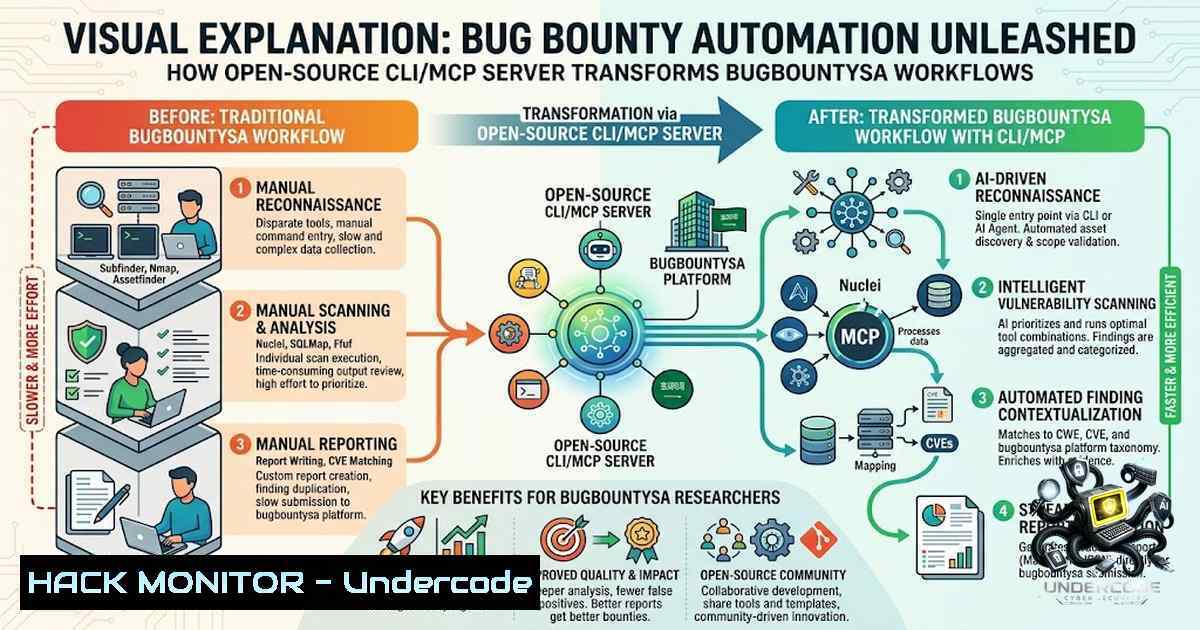
The cybersecurity industry is witnessing a paradigm shift as manual bug bounty processes increasingly give way to automation and AI-driven workflows. Ahmed Mhdi’s recent open-source release of a CLI/MCP server for bugbounty.sa represents a significant leap forward, enabling researchers to interface directly with bug bounty programs, scope definitions, reports, and follow-ups from their terminal. This innovation not only accelerates the reconnaissance phase but also seamlessly integrates with AI agents, allowing for unprecedented efficiency in vulnerability discovery and management.
Learning Objectives & Secrets:
- Objective 1: Streamline Program Management via Command Line – Eliminate the need for a web interface by learning how to list, filter, and select active bug bounty programs directly from your terminal using the new CLI tool.
-
Objective 2 (Secret Tip): AI-Powered Report Generation – Leverage the MCP server to feed program data into AI models (e.g., Claude) that can automatically summarize scope, suggest attack vectors, and even draft preliminary vulnerability reports based on discovered anomalies.
-
Objective 3 (Secret Tip): Automated Scope Monitoring and Alerts – Configure the CLI to continuously monitor scope changes and new endpoints, triggering real-time alerts that allow you to pivot your testing strategy faster than competitors.
You Should Know:
1. MCP Server Architecture and AI Integration
The Model Context Protocol (MCP) server acts as a bridge between the bugbounty.sa API and your local environment, enabling AI agents to consume and act on program data programmatically. This setup reduces cognitive load and allows for autonomous agent-driven reconnaissance.
Step-by-step guide to configure the MCP server with AI agents:
1. Clone the Repository:
`git clone https://github.com/ahmedmhdi/bbsa-mcp` (replace with actual repo link from the post)
`cd bbsa-mcp`
2. Install Dependencies:
For Linux/macOS:
`pip install -r requirements.txt`
For Windows (using PowerShell):
`python -m pip install -r requirements.txt`
3. Set Up API Authentication:
Obtain your bugbounty.sa API key from your account settings.
Export it as an environment variable:
`export BBSA_API_KEY=”your_api_key_here”` (Linux/macOS)
For Windows Command
`set BBSA_API_KEY=your_api_key_here`
For PowerShell:
`$env:BBSA_API_KEY=”your_api_key_here”`
4. Start the MCP Server:
`python mcp_server.py` – This exposes endpoints that AI agents (like Claude) can call to fetch program details, scope, and existing reports.
5. Connect Claude or Other AI:
Configure your AI client to point to `http://localhost:8080` (or the specified port) and use the MCP functions to query “active programs,” “scope by program ID,” or “recent reports.”
Example AI prompt: “Fetch the scope for program ID 42 and suggest five subdomain enumeration techniques specific to the listed domains.”
2. CLI Usage for Rapid Program Enumeration
The CLI tool provides a set of commands that mirror the core functionalities of the bugbounty.sa platform, drastically reducing the time spent on administrative tasks.
Step-by-step CLI workflow:
1. List All Available Programs:
`bbsa-cli list-programs` – Displays a table with program names, IDs, bounty ranges, and status (active/closed).
2. Filter by Program Type or Technology:
`bbsa-cli list-programs –filter “tech:React,API”` – Quickly narrow down to programs that use specific technologies, helping you focus on your strongest skill sets.
3. View Detailed Scope for a Specific Program:
`bbsa-cli scope –program-id 123` – Outputs all in-scope domains, IP ranges, and excluded endpoints. Use `–format json` to pipe into other tools like `jq` for parsing.
4. Retrieve Existing Reports and Follow-ups:
`bbsa-cli get-reports –program-id 123 –status “open”` – Lists open reports with their current status, making it easy to prioritize unresolved issues or identify previously reported patterns.
5. Download and Sync Scope for Automated Scanning:
`bbsa-cli sync-scope –program-id 123 –output scope.txt` – Saves the scope to a file that can be fed directly into tools like Amass, Sublist3r, or Nmap.
Example integration:
`cat scope.txt | subfinder -dL – | httpx -silent` – Rapidly discovers live subdomains.
3. Automated Report Management and Follow-ups
Managing reports and follow-ups is often a bottleneck in bug bounty; this tool automates the tracking and notification process.
Step-by-step guide to automating reports:
1. Create a New Report Template:
`bbsa-cli create-report –program-id 123 –title “XSS on login endpoint” –severity “High”` – Generates a draft report.
2. Attach Logs or Proof of Concept:
`bbsa-cli attach-file –report-id 456 –file ./poc.py` – Uploads a Python proof-of-concept script directly from your terminal.
3. Automated Follow-up on Pending Reports:
Schedule a cron job (Linux) or Task Scheduler (Windows) to run:
`bbsa-cli check-followups –program-id 123 –days 7` – Lists all reports that haven’t been updated in a week.
For Linux cron: `0 9 /usr/local/bin/bbsa-cli check-followups –program-id 123 –days 7 >> /var/log/bugbounty.log`
4. Bulk Status Updates:
`bbsa-cli update-status –report-ids 456,789 –status “resolved”` – Efficiently close multiple reports after verification.
- Security Hardening for the CLI and MCP Server
Since this tool interacts with sensitive bug bounty data, implementing proper security measures is critical.
Hardening steps:
- Encrypt API Keys: Use `gpg` or `openssl` to encrypt the `.env` file storing your BBSA_API_KEY.
Encryption: `openssl enc -aes-256-cbc -salt -in .env -out .env.enc`
Decryption (used in a wrapper script): `openssl enc -d -aes-256-cbc -in .env.enc -out .env` - Restrict Server Binding: Ensure the MCP server binds only to localhost to prevent remote exposure. In
mcp_server.py, sethost="127.0.0.1". -
Use Firewall Rules: For Linux, use
ufw:
`sudo ufw allow from 127.0.0.1 to any port 8080` – Deny all other inbound connections.
For Windows, use `netsh advfirewall`:
`netsh advfirewall firewall add rule name=”Allow MCP Localhost” dir=in action=allow protocol=TCP localport=8080 remoteip=127.0.0.1`
– Rotate API Keys Regularly: Implement a script to regenerate the BBSA_API_KEY via the platform’s web interface every 30 days and update the `.env` file automatically.
5. Vulnerability Exploitation and Mitigation Tips
While the tool itself is designed for ethical hacking, understanding how to leverage it for deeper vulnerability discovery is key.
Advanced usage tips:
- Contextual Payload Generation: Use the CLI to fetch scope technologies (e.g., “PHP, Apache”) and feed them into a custom payload generator.
Example: `bbsa-cli scope –program-id 123 –format json | jq -r ‘.tech[]’ | while read tech; do python generate_payloads.py –tech $tech; done` - Automated Parameter Discovery: Combine the synced scope with `ffuf` to brute-force parameters on every in-scope endpoint.
ffuf -u https://target.com/FUZZ -w /path/to/wordlist -ac – This can be scripted to loop over all domains fromscope.txt`. -
Mitigation for API Key Leakage: Never hardcode credentials in scripts. Instead, use environment variables and a secrets manager like `Hashicorp Vault` for production environments.
For Linux, use `export` orsource .env; for Windows, use `setx` or PowerShell’s$env.
What Undercode Say:
-
Key Takeaway 1: The integration of CLI and AI agents into bug bounty workflows is no longer a luxury but a necessity for staying competitive. This open-source release democratizes automation, allowing both novice and veteran hunters to reduce time-to-discovery significantly.
-
Key Takeaway 2: The true power lies in the MCP server’s ability to act as a force multiplier—by enabling AI to interpret scope and reports, researchers can shift from reactive vulnerability scanning to proactive, context-aware attack planning. However, this also introduces new attack surfaces; misconfiguration of the server could expose sensitive program data, making rigorous security hardening non-1egotiable.
Analysis: The shift towards terminal-driven bug bounty management reflects a broader industry trend of API-first automation. By abstracting the platform’s UI into a programmable interface, Ahmed Mhdi has effectively lowered the barrier for integrating bug bounty data into existing CI/CD pipelines and automated testing frameworks. The inclusion of AI agents further amplifies this, suggesting a future where AI co-pilots handle reconnaissance while humans focus on complex exploit chain development. For security teams, adopting such tools can drastically improve red team efficiency, but they must concurrently invest in access controls and monitoring to prevent data leaks. The release also highlights the growing importance of open-source contributions in cybersecurity, fostering a community-driven approach to tooling innovation.
Prediction:
- +1 Adoption of CLI/MCP servers will become a standard feature across all major bug bounty platforms within the next 18 months, driving a new wave of AI-first security testing tools.
- +1 The enhanced automation will lead to a surge in high-quality, low-hanging fruit disclosures, forcing organizations to mature their vulnerability management programs more rapidly.
- -1 The ease of automation may also attract less-experienced hunters who rely heavily on AI-generated findings, potentially increasing the volume of false positives and noise for triage teams.
- -1 As tools like these proliferate, API key management and server security will become critical failure points; without proper hardening, researchers risk exposing their own credentials and program scopes to unauthorized parties.
- +1 Ultimately, this innovation will accelerate the discovery of severe vulnerabilities, benefiting the broader cybersecurity ecosystem by shortening the average lifespan of exploitable flaws.
▶️ Related Video (88% Match):
🎯Let’s Practice For Free:
🎓 Live Courses & Certifications:
Join Undercode Academy for Verified Certifications
🚀 Request a Custom Project:
Secure, high-velocity infrastructure and disruptive technological engineering. Contact our engineering team for high-tier development and proprietary systems:
[email protected]
💎 Smart Architecture | 🛡️ Secure by Design | ⭐ Trusted by Thousands
IT/Security Reporter URL:
Reported By: https://lnkd.in/p/eqvFTx7m – Hackers Feeds
Extra Hub: Undercode MoN
Basic Verification: Pass ✅


