Listen to this Post
Introduction:
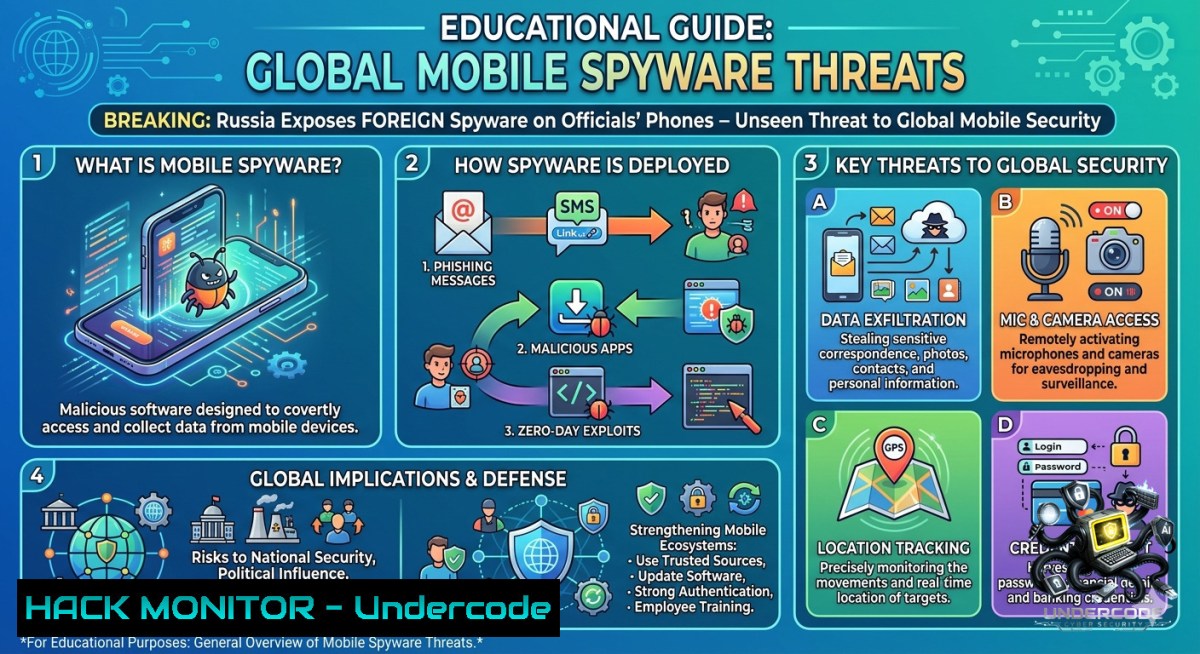
In a startling disclosure, Russian authorities have revealed a “large-scale operation” where foreign intelligence services planted advanced spyware on the mobile devices of senior government officials. This incident is part of a growing trend where nation-state actors weaponize zero-click exploits, kernel-level persistence, and supply-chain attacks to turn smartphones into silent surveillance bugs. This article dissects the technical nature of these threats, provides hands-on forensic methodologies, and explores defense strategies against a new generation of mobile cyber-espionage.
Learning Objectives:
– Understand the technical anatomy of nation-state mobile spyware, including zero-click vulnerabilities and kernel-level persistence.
– Analyze real-world attack vectors—from supply-chain abuse to commercial spyware toolkits—used against high-value targets.
– Master practical forensic detection using open-source tools (MVT, ISDi) and manual command-line checks on both Linux and Windows.
You Should Know:
1. Core Spyware Capabilities: From Data Exfiltration to Total Device Control
At the heart of this campaign lies spyware engineered to perform multiple intrusive functions. According to the FSB’s official statement, the malware was designed to: (1) extract existing stored data (e.g., contact lists, correspondence, and geolocation), (2) intercept active voice communications in real-time, and (3) trigger unauthorized audio and video recordings without any visible indicator of compromise. Experts note that such capabilities align closely with nation-state-grade tools like Pegasus and Predator—frameworks known for their stealth, modular architecture, and ability to bypass traditional security controls.
Step‑by‑step guide explaining what this does and how to use it:
Mobile verification is critical for high-risk individuals. Follow this forensic workflow using open-source tools to detect compromise:
1. Mobile Verification Toolkit (MVT) – Amnesty International’s Forensic Suite
MVT is a collection of utilities designed to identify traces of compromise on Android and iOS devices by analyzing backups and system logs.
– Installation (Linux): `pip3 install mvt` (requires Python 3.8+, `adb` for Android, and `libimobiledevice` for iOS)
– Installation (Windows using WSL2):
wsl --install -d Ubuntu
sudo apt update && sudo apt install python3 python3-pip adb
pip3 install mvt
– Forensic Workflow:
 Android: Check for spyware traces using indicators of compromise (IOCs)
mvt-android check-backup --iocs ~/stix2_iocs.json /path/to/backup/
 iOS: Extract and analyze device backup
mvt-ios decrypt-backup -p 'password' backup.tar
mvt-ios check-backup --iocs ~/stix2_iocs.json backup.tar/
– Interpreting Results: MVT cross-references artifacts (SMS, logs, app data) against known spyware IOCs. Any detection should prompt an immediate forensic image of the device and a full OS reinstallation.
2. ISDi (IPV Spyware Discovery) – Live Device Scan
ISDi checks Android or iOS devices for installed applications that are known to be used for surveillance (stalkerware/spyware).
– Linux:
pip3 install isdi-scanner
adb devices  Confirm device connection
isdi run
– Windows (WSL2): Install `adb.exe` within Windows (not WSL), then run `adb.exe devices` from PowerShell. From WSL, simply use `isdi run` once USB passthrough is confirmed.
– Access the local web interface at `http://localhost:6200` to view the app inventory and blacklist matches.
– Limitation: This tool focuses on known commercial stalkerware, not custom nation-state implants.
3. Manual Command-Line Checks for Persistence
– Linux (on a compromised host or forensics workstation):
`ps aux | grep -i “spyware”`
`lsof -i` (list active network connections)
`crontab -l` (check for hidden scheduled tasks)
– Windows (using PowerShell):
`Get-Process | Where-Object {$_.ProcessName -match “spyware\|malware”}`
`Get-ScheduledTask | Where-Object {$_.State -1e “Disabled”}`
`Get-1etTCPConnection -State Listen | Select-Object LocalPort, RemotePort, OwningProcess`
2. Attack Vectors: Zero-Day Exploits and Supply-Chain Infiltration
The FSB alleged that attackers leveraged the “technical capabilities of large international IT and mobile communications corporations,” pointing to sophisticated supply-chain or network-level access—methods far beyond simple phishing campaigns. In practice, advanced spyware often relies on zero-click exploits that do not require any user interaction, such as malicious iMessages that automatically execute code. Since 2021, commercial spyware vendors like Intellexa have accounted for 15 unique zero-day vulnerabilities across iOS, Android, and Chrome, including Remote Code Execution (RCE), Sandbox Escape, and Local Privilege Escalation chains.
Step‑by‑step guide explaining what this does and how to use it (APT Emulation & Supply-Chain Hardening):
Understanding the kill chain allows defenders to simulate and block these attacks.
1. Emulating a Zero-Click Attack Chain (for authorized red-team testing only):
Attackers typically target iMessage or WhatsApp vulnerabilities. A common proof-of-concept (for research) involves crafting a maliciously formatted message that triggers an RCE in the target application. For educational purposes, security researchers utilize tools like `Radamsa` to fuzz message parsers:
 On a Linux sandbox, fuzz a sample message file
radamsa --count 100 sample.msg > fuzzed_msgs/
for f in fuzzed_msgs/; do send_imessage_binary "$f"; done
Detection Strategy: Monitor for unusual outbound connections from messaging apps (`netstat -ano` on Windows, `ss -tunap` on Linux). Set up Suricata/Snort rules to detect exploitation attempts:
alert tcp $HOME_NET any -> $EXTERNAL_NET 443 (msg:"Potential iMessage exploit"; flow:established; content:"|00 01 02 03|"; within:4; sid:1000001;)
2. Hardening Against Supply-Chain Attacks:
– iOS: Enable Lockdown Mode (Settings > Privacy & Security > Lockdown Mode). Restricts attack surface by blocking JIT compilation and complex web technologies.
– Android: Disable sideloading (Settings > Security > Install unknown apps > set to “Not allowed”). Implement Google Play Protect’s real-time scanning.
– Network Level: Segment sensitive devices using VLANs. On Cisco IOS, configure a dedicated “secure enclave” VLAN with ACLs:
access-list 100 deny ip any any log
interface vlan 99
ip access-group 100 in
ip access-group 100 out
3. APT Attribution and Spyware Tool Proliferation
While the FSB did not publicly name a specific nation-state, the described tactics mirror those used by advanced persistent threat (APT) groups such as APT29 (Cozy Bear), which has been observed using exploits identical or strikingly similar to those of commercial surveillance vendors like Intellexa and NSO Group. This blurring of lines between state-sponsored hacking and mercenary spyware vendors represents a dangerous evolution in mobile cyber-espionage.
Step‑by‑step guide explaining what this does and how to use it (Threat Hunting with YARA and Sigma):
Proactive threat hunting can detect known spyware families.
1. Deploying YARA Rules:
Create a custom YARA rule (`mobile_spyware.yar`) to detect strings commonly found in Pegasus or Predator binaries:
rule Pegasus_Indicator {
strings:
$s1 = "PegasusCore" wide ascii
$s2 = "com.apple.MobileBackup" wide
condition:
$s1 or $s2
}
Run YARA scans on mobile backups:
yara -r mobile_spyware.yar /mnt/forensics/ios_backup/
2. Sigma Rules for SIEM Alerts:
Convert known spyware behavior into Sigma rules to trigger alerts in Splunk or ELK. Example rule detecting unusual camera access:
title: Suspicious Camera Access by Non-UI Process
status: experimental
logsource:
product: windows
service: sysmon
detection:
selection:
EventID: 10
TargetObject: '\Device\Video'
Image: '\.exe'
condition: selection
4. Cloud Hardening and API Security in a Mobile-First World
Modern spyware often exfiltrates data to cloud-based command-and-control (C2) infrastructure disguised as legitimate API calls to providers like Cloudflare and Fastly—which the FSB noted as having been “used” in the operation. Implementing proper cloud security controls can mitigate this.
Step‑by‑step guide explaining what this does and how to use it:
Secure your cloud APIs and monitor for data exfiltration.
1. Implement API Rate Limiting and Anomaly Detection (AWS WAF + Lambda):
– Deploy AWS WAF with a rate-based rule: `RateLimitRule: Limit = 1000 requests per 5 minutes` for sensitive endpoints.
– Use AWS Lambda to parse CloudTrail logs for anomalous API calls (e.g., unusual download volumes from a single IP).
2. Restrict Unnecessary Cloudflare/Fastly Usage:
For organizations using these CDNs, ensure all traffic is encrypted via mTLS. On Linux, test endpoint security:
openssl s_client -connect your-api.cloudflare.com:443 -tls1_3
Block known malicious C2 domains using DNS sinkholes: on Pi-hole or Windows Server DNS, add entries for potential C2 IPs:
192.168.1.100 evil-c2.example.com
5. Windows and Linux Security Hardening Against Mobile-Style Threats
While mobile devices are the primary target, the same techniques can pivot to traditional endpoints. Implementing OS-level security controls is essential.
Step‑by‑step guide explaining what this does and how to use it:
Linux Hardening:
– Disable unnecessary services: `systemctl list-unit-files –type=service –state=enabled` followed by `systemctl disable
– Implement AppArmor/SELinux: Enforce mandatory access control for all applications.
– Monitor for kernel module loading (a common persistence method): `lsmod | grep -v “Module”` and set up auditd rules: `auditctl -w /lib/modules/ -p wa -k kernel_module`.
Windows Hardening:
– Enable Windows Defender Application Guard and Controlled Folder Access.
– Use PowerShell to monitor for keyloggers:
Get-WinEvent -LogName Microsoft-Windows-Sysmon/Operational | Where-Object {$_.Id -eq 10 -and $_.Message -match "keylogger"}
– Enforce Windows Firewall rules to block outbound connections for non-essential apps.
– Implement LSA Protection to prevent credential dumping.
What Undercode Say:
– Key Takeaway 1: The Russian spyware disclosure underscores the reality that no mobile device—regardless of OS—is immune to state-sponsored compromise. Zero-click exploits have rendered traditional perimeter defenses obsolete, and supply-chain attacks now pose an existential threat to governmental and enterprise security.
– Key Takeaway 2: The proliferation of commercial spyware toolkits (e.g., ZeroDayRAT, Pegasus, Predator) and their adoption by nation-state actors signal a democratization of advanced persistent threats. Defenders must adopt proactive, forensic-driven strategies—including regular device audits, MVT/ISDi scans, and strict network segmentation.
+1 Analysis: This incident will likely accelerate the development of hardened mobile operating systems and hardware-level security features (e.g., Apple’s Lockdown Mode, Google’s Titan M2 chip). Expect increased investment in mobile threat defense (MTD) solutions and a shift toward air-gapped communication methods for classified discussions.
-1 Analysis: The lack of technical evidence from the FSB creates geopolitical ambiguity that could fuel misinformation campaigns. Furthermore, the continued exploitation of zero-days by both state and non-state actors will outpace patching efforts, leading to a widening gap between attackers and defenders. The normalization of spyware as a service may lead to an unprecedented wave of surveillance against civil society, journalists, and dissidents globally.
Prediction:
– +1 Increased global cooperation on spyware attribution and the establishment of an international treaty limiting commercial surveillance tools.
– -1 Rise of “spyware-as-a-service” markets on darknet forums, lowering the barrier to entry for cybercriminals and repressive regimes.
– -1 Escalation of zero-day stockpiling by intelligence agencies, leading to more unpatched vulnerabilities being weaponized against high-value targets.
– +1 Emergence of community-driven forensic tools (like MVT) as the first line of defense for at-risk individuals and organizations.
▶️ Related Video (78% Match):
🎯Let’s Practice For Free:
🎓 Live Courses & Certifications:
[Join Undercode Academy for Verified Certifications](https://undercode.co.uk/certifications/)
🚀 Request a Custom Project:
Secure, high-velocity infrastructure and disruptive technological engineering. Contact our engineering team for high-tier development and proprietary systems:
[[email protected]](mailto:[email protected])
💎 Smart Architecture | 🛡️ Secure by Design | ⭐ Trusted by Thousands
IT/Security Reporter URL:
Reported By: [Cybersecuritynews Cybersecuritytimes](https://www.linkedin.com/posts/cybersecuritynews-cybersecuritytimes-share-7467593388645797888-VPd-/) – Hackers Feeds
Extra Hub: Undercode MoN
Basic Verification: Pass ✅
🔐JOIN OUR CYBER WORLD [ CVE News • HackMonitor • UndercodeNews ]
[💬 Whatsapp](https://undercode.help/whatsapp) | [💬 Telegram](https://t.me/UndercodeCommunity)
📢 Follow UndercodeTesting & Stay Tuned:
[𝕏 formerly Twitter 🐦](https://x.com/undercodeupdate) | [@ Threads](https://www.threads.net/@undercodetesting) | [🔗 Linkedin](https://www.linkedin.com/company/undercodetesting/) | [🦋BlueSky](https://bsky.app/profile/undercode.bsky.social)


