
Listen to this Post
Introduction:
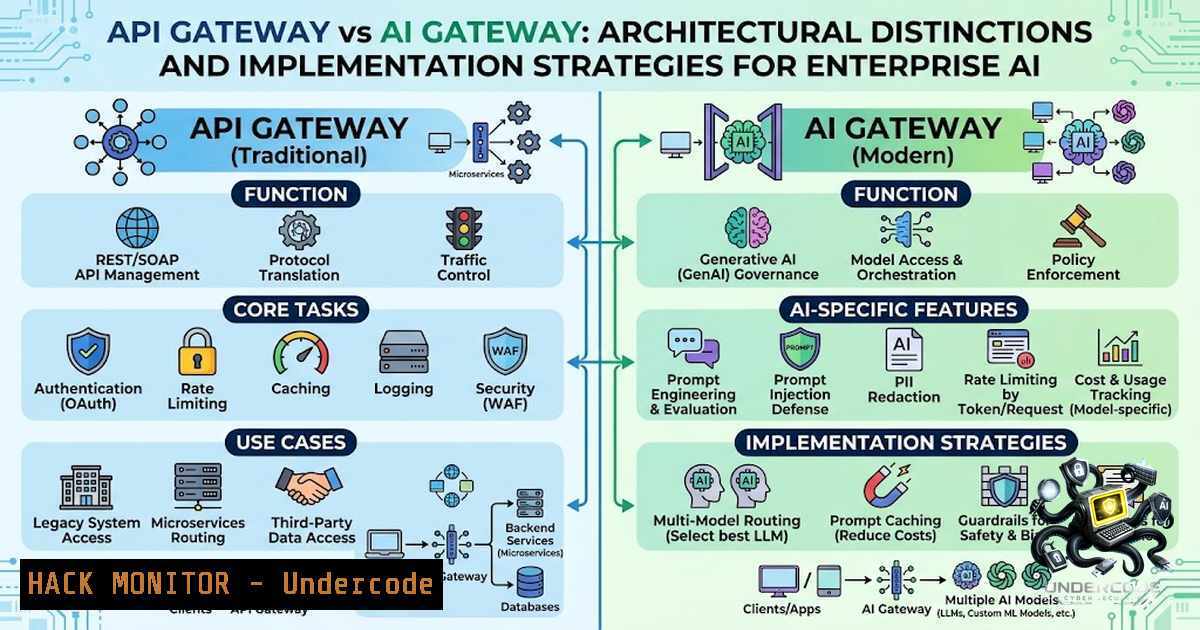
As enterprises scale their AI initiatives, the architectural debate between API Gateways and AI Gateways has become increasingly critical. While an API Gateway serves as the foundational traffic management and security layer for all backend services, an AI Gateway specifically addresses the unique challenges of managing large language model (LLM) interactions, including token cost optimization, model fallback, and prompt engineering controls. Understanding the distinct roles, implementation strategies, and security implications of each is essential for building robust, cost-effective, and secure AI applications in production environments.
Learning Objectives & Secrets:
- Objective 1: Distinguish Core Responsibilities – Learn to differentiate between API Gateway functions (authentication, rate limiting, routing) and AI Gateway functions (model selection, cost management, AI guardrails).
- Objective 2 Secret Tips: Implement a unified policy layer where the API Gateway handles user authentication and basic DDoS protection, while the AI Gateway manages model-specific rate limits and token budgets to prevent cost overruns.
- Objective 3 Secret Tips: Leverage the AI Gateway for A/B testing different LLMs by dynamically routing 10% of production traffic to a new model version without redeploying the application, using configuration-based routing rules.
You Should Know:
1. API Gateway: The Cornerstone of Service Architecture
An API Gateway acts as a reverse proxy that sits between client applications and backend services. It abstracts the internal microservice architecture, providing a single entry point for all API requests. Core capabilities include SSL termination, request/response transformation, and integration with identity providers for OAuth2/OIDC flows. For security, it enforces API keys, JWT validation, and IP whitelisting. Rate limiting is applied per client or per endpoint to prevent abuse, often using token bucket or sliding window algorithms.
Step‑by‑step guide to configure rate limiting on AWS API Gateway:
1. Navigate to the API Gateway console and select your REST API.
2. Under “Settings”, enable “Throttling” and set the default route rate limit (e.g., 1000 requests per second).
3. Define usage plans and associate them with API keys to enforce per-client limits.
4. For advanced control, implement a custom Lambda authorizer to check user-specific quotas before forwarding requests.
2. AI Gateway: Specialized Traffic Management for LLMs
An AI Gateway adds a semantic abstraction layer that translates universal API calls into provider-specific requests. It manages token consumption, retry policies for model timeouts, and content moderation via pre-request guardrails (e.g., regex filters, toxicity scoring). Advanced features include prompt caching to reduce latency and cost, and semantic routing that directs requests to the best-performing model based on the input’s domain or complexity.
Step‑by‑step guide to set up an AI Gateway using open-source tools like LiteLLM:
1. Install LiteLLM using pip: pip install litellm. Create a configuration file (config.yaml).
2. Define models with provider endpoints and authentication keys (e.g., model_list: - model_name: gpt-4, litellm_params: model: openai/gpt-4, api_key: os.environ/OPENAI_API_KEY).
3. Implement custom routing rules: `router_settings: routing_strategy: “usage-based”` to distribute requests based on token availability.
4. Launch the proxy server: litellm --config config.yaml --port 8000. Your application now sends requests to `http://localhost:8000/chat/completions`.
3. Securing AI-Specific Endpoints with Guardrails
AI systems introduce unique vulnerabilities such as prompt injection, data leakage, and model denial-of-service (MDoS) through excessive token requests. An AI Gateway can mitigate these by enforcing schema validation on user inputs, detecting disallowed keywords, and truncating overly long prompts. For production, implement a fallback chain: if the primary model fails or violates safety policies, the gateway can route to a smaller, safer model or return a canned response.
Step‑by‑step guide to implement prompt guardrails with the AI Gateway:
1. Define a regex-based blacklist for injection patterns (e.g., "ignore previous instructions", "system:").
2. Create a content filter function that checks each user message against this blacklist.
3. Configure the gateway to reject requests that trigger blacklist hits with a custom error message.
4. Log all rejected attempts for security auditing and threat hunting.
4. Optimizing Cost and Performance with Observability
Token costs can spiral without granular monitoring. An AI Gateway provides observability dashboards showing per-user, per-model, and per-session token usage. It can auto-generate alerts when daily costs exceed thresholds. Additionally, implement semantic caching: store embeddings of previous queries and responses; for exact or near-exact matches, return cached results without invoking the LLM.
Step‑by‑step guide to enable caching in your AI Gateway:
1. In LiteLLM, set `cache: true` in the `litellm_params` section of your config.
2. Use Redis as the backend cache: cache_params: type: "redis", host: "localhost", port: 6379, ttl: 3600.
3. For a custom Python solution, use `functools.lru_cache` with a TTL-based expiration decorator for deterministic queries.
5. Combining Both Gateways for Zero-Trust Architecture
In a zero-trust architecture, the API Gateway validates all incoming requests at the perimeter, ensuring that only authenticated users with proper roles pass through. It then forwards the request to the AI Gateway. The AI Gateway applies another layer of identity verification by checking the user’s entitlement to specific models (e.g., only premium users access GPT-4). This layered approach ensures that even if an API key leaks, the AI Gateway’s additional constraints limit damage.
Step‑by‑step guide to configure JWT relay from API Gateway to AI Gateway:
1. Configure your API Gateway to validate JWT tokens and inject the user’s “subscription_tier” claim into a custom header (e.g., X-User-Tier).
2. On the AI Gateway side, write middleware that reads this header and maps it to model availability.
3. If the tier does not match the requested model, the AI Gateway returns a 403 Forbidden response before any model API call is made.
6. Handling Failover and Model Rotation
Enterprises often require high availability for AI services. An AI Gateway can automate failover: if the primary model provider experiences an outage (HTTP 5xx), the gateway retries with exponential backoff and then switches to a secondary provider. It can also perform canary rollouts—sending a fraction of traffic to a newly deployed model to validate performance before full-scale migration.
Step‑by‑step guide to implement failover using Nginx as an AI Gateway:
1. Define upstream blocks for each model provider (e.g., upstream openai { server api.openai.com; }, upstream anthropic { server api.anthropic.com; }).
2. Use the `proxy_next_upstream` directive to automatically retry on connection errors.
3. To weight traffic, use `weight=3` for primary and `weight=1` for secondary.
What Undercode Say:
- Key Takeaway 1: An API Gateway is indispensable for general service management, but it lacks the semantic understanding required for AI operations—you need both layers for enterprise-grade resilience.
- Key Takeaway 2: The AI Gateway is not just a proxy; it is a strategic control plane for managing costs, security, and performance across multiple AI providers, enabling vendor lock-in avoidance.
Analysis: The convergence of API and AI gateways represents a paradigm shift in IT architecture. Traditional API gateways operate at the network and application layers, handling stateless request routing. In contrast, AI gateways operate at the data and intelligence layers, managing stateful interactions with probability-based services. The separation is crucial because the failure modes differ: API failures are typically connection or authentication issues, while AI failures include hallucination, bias, or token exhaustion—problems that require AI-specific heuristics and guardrails. Implementing a dual-gateway strategy also allows security teams to apply traditional WAF rules on the API gateway while applying AI-specific threat modeling on the AI gateway, ensuring comprehensive coverage. For DevOps teams, this means managing two distinct configurations, but the benefits of fine-tuned control over AI costs and safety far outweigh the operational overhead.
Prediction:
- +1: Standardization of AI Gateway protocols (similar to OAuth for APIs) will emerge in 12–18 months, enabling seamless interoperability between gateways and model providers, accelerating enterprise adoption.
- +1: Open-source AI gateway projects like LiteLLM and Portkey will gain enterprise-grade features, reducing reliance on proprietary cloud offerings and fostering a vibrant ecosystem.
- -1: The complexity of managing both gateways will increase the attack surface—misconfigurations in routing or fallback logic could expose sensitive prompts or lead to expensive, unintended model invocations.
- +1: AI Gateways will evolve to include “semantic firewalls” that can detect and neutralize prompt injection attacks in real-time, becoming a critical component of AI security stacks.
- -1: Without clear organizational ownership, teams may over-deploy AI gateways, creating redundant layers that add latency and cost, counteracting the efficiency gains.
▶️ Related Video (82% Match):
🎯Let’s Practice For Free:
🎓 Live Courses & Certifications:
Join Undercode Academy for Verified Certifications
🚀 Request a Custom Project:
Secure, high-velocity infrastructure and disruptive technological engineering. Contact our engineering team for high-tier development and proprietary systems:
[email protected]
💎 Smart Architecture | 🛡️ Secure by Design | ⭐ Trusted by Thousands
IT/Security Reporter URL:
Reported By: https://lnkd.in/p/ePTJCgbX – Hackers Feeds
Extra Hub: Undercode MoN
Basic Verification: Pass ✅


