Listen to this Post
Introduction:
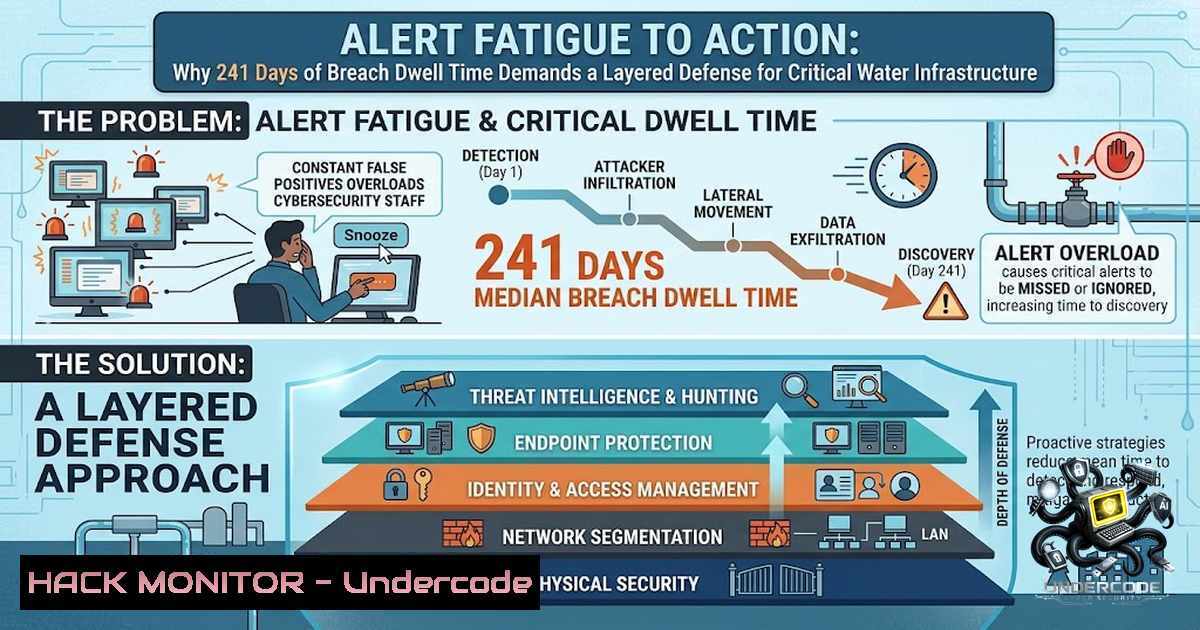
The average breach now goes undetected for 241 days—eight months of adversary freedom inside critical networks. For public sector agencies protecting water and wastewater infrastructure, this dwell time isn’t just a statistic; it’s a public health liability. As CAI Senior Client Executive Frank Ury recently warned the Southern California Water Utilities Association, alert fatigue has become the primary enabler of this detection gap, with SOC analysts drowning in noise while sophisticated threats move laterally across IT and OT environments. The solution isn’t more tools—it’s a layered defense that pairs AI-driven automation with human expertise, closing the loop from detection to response in seconds, not hours.
Learning Objectives:
- Understand the root causes and operational impact of alert fatigue in public sector security operations centers (SOCs)
- Master the architecture of a layered defense strategy integrating full forensics, continuous threat hunting, and automated response
- Implement practical MDR (Managed Detection and Response) configurations across Windows and Linux environments
- Deploy AI-driven threat hunting techniques aligned with MITRE ATT&CK frameworks
- Apply cloud hardening and vulnerability mitigation commands specific to water/wastewater OT/IT intersections
You Should Know:
- The 241-Day Problem: Alert Fatigue as a Force Multiplier for Adversaries
Alert fatigue isn’t merely an inconvenience—it’s an operational vulnerability that attackers actively exploit. When SOC analysts face an overwhelming, sustained volume of security alerts, they become desensitized, causing them to miss, delay, or ignore genuine threats. The IBM report confirms that mean time to identify and contain a breach now stands at 241 days, with dwell time at a nine-year high. During major incidents, alert volumes can spike to ten times normal levels, dramatically increasing the risk of missed detections.
The irony is that most breaches aren’t invisible—they’re missed because defenders close or deprioritize the signals that do exist. This is particularly acute in the water sector, where legacy OT systems generate noisy, uncontextualized alerts that overwhelm understaffed public sector SOCs. CISA has documented that Iranian-affiliated cyber actors have already demonstrated the ability to exploit OT devices at U.S. water and wastewater systems, forcing many to revert to manual operations.
Step-by-Step: Auditing Your Alert Pipeline
Linux – Analyze SIEM alert volume and false-positive rates:
 Check systemd journal for security alert volume (audit logs)
sudo journalctl -u auditd --since "24 hours ago" | grep -i "alert" | wc -l

Parse fail2ban logs to identify false-positive patterns
sudo grep "Ban" /var/log/fail2ban.log | awk '{print $NF}' | sort | uniq -c | sort -1r

Monitor SSH brute-force attempt volume (common noise source)
sudo grep "Failed password" /var/log/auth.log | wc -l
Windows – Evaluate Windows Event Log alert saturation:
 Count security events by EventID over last 24 hours (PowerShell as Admin)
Get-WinEvent -FilterHashtable @{LogName='Security'; StartTime=(Get-Date).AddDays(-1)} |
Group-Object Id | Sort-Object Count -Descending | Select-Object -First 20

Check for repeated failed logons (potential false-positive flood)
Get-WinEvent -FilterHashtable @{LogName='Security'; Id=4625; StartTime=(Get-Date).AddDays(-1)} | Measure-Object
Interpretation: If your team is processing more than 500 alerts per analyst per day, you’re in the fatigue danger zone. Implement alert tuning to suppress known false positives and prioritize based on MITRE ATT&CK technique severity.
2. Building the Layered Defense: Beyond Modernization Tools
Frank Ury’s message was clear: protecting water and wastewater infrastructure demands a layered approach, not just modernization tools. A genuine defense-in-depth strategy includes four critical pillars: full forensics capability, post-breach detection, continuous threat hunting, and automation that closes the loop in seconds instead of hours.
The American Water cyberattack of October 2024 serves as a stark case study. The largest publicly traded U.S. water utility was forced to disconnect key systems, including its customer billing platform, after unauthorized network access was detected. The incident underscored vulnerabilities at the IT-OT intersection—precisely where layered defense fails when alert fatigue dominates. With more than 640 water and wastewater systems now members of WaterISAC, and EPA eliminating 350 vulnerabilities in 2025 alone, the sector is waking up to the reality that perimeter security alone is insufficient.
Step-by-Step: Implementing a Layered Detection Stack
Deploy EDR with full forensic capture (Linux – using osquery and auditd):
 Install osquery for continuous system introspection
sudo apt-get install osquery -y  Debian/Ubuntu
sudo yum install osquery -y  RHEL/CentOS

Enable auditd rules for critical file integrity monitoring
sudo auditctl -w /etc/passwd -p wa -k identity_changes
sudo auditctl -w /etc/shadow -p wa -k identity_changes
sudo auditctl -w /etc/sudoers -p wa -k privilege_escalation

Monitor OT/SCADA process execution (example for Modbus-related processes)
sudo auditctl -a always,exit -F arch=b64 -S execve -F path=/usr/bin/modbus -k scada_exec
Windows – Enable advanced audit policies and PowerShell logging:
 Enable PowerShell script block logging (captures malicious scripts)
Set-ItemProperty -Path "HKLM:\SOFTWARE\Policies\Microsoft\Windows\PowerShell\ScriptBlockLogging" -1ame "EnableScriptBlockLogging" -Value 1 -Type DWord

Enable Sysmon for deep process and network visibility
 Download Sysmon from Microsoft Sysinternals
sysmon.exe -accepteula -i

Configure Windows Event Forwarding to central SIEM
wevtutil set-log Microsoft-Windows-Sysmon/Operational /enabled:true /retention:false /maxsize:1073741824
- AI and Automation: The Force Multiplier for Human Expertise
The message from the Southern California Water Utilities Association was unequivocal: pairing AI and automation with human expertise is the only path forward for critical infrastructure protection. CISA now uses AI to automatically detect and analyze potential threats, flag unusual network activity, and identify patterns in vast datasets that could indicate emerging risks to critical infrastructure. AI-driven threat hunting represents a paradigm shift—it replaces retrospective detection with continuous behavioral insight, using models trained on millions of patterns to identify anomalies practically invisible through human observation alone.
The UK’s Government Cyber Action Plan demonstrates how AI models trace vulnerabilities across service boundaries—something traditional scanners cannot achieve—linking business logic with technical detail. For water utilities, this means AI can correlate seemingly unrelated events across SCADA systems, billing platforms, and employee access logs to identify attack patterns that human analysts would miss.
Step-by-Step: Deploying AI-Assisted Threat Hunting
Integrate AI threat hunting with MITRE ATT&CK (Linux – using Sigma rules with elasticsearch):
 Install Elastic Stack for AI/ML-based anomaly detection
wget -qO - https://artifacts.elastic.co/GPG-KEY-elasticsearch | sudo apt-key add -
sudo apt-get install elasticsearch kibana logstash -y

Enable machine learning anomaly detection jobs (example for network throughput)
curl -X PUT "localhost:9200/_ml/anomaly_detectors/network_anomalies" -H 'Content-Type: application/json' -d'
{
"analysis_config": {
"bucket_span": "15m",
"detectors": [{"function": "mean", "field_name": "network.bytes_total"}]
},
"data_description": {"time_field": "@timestamp"}
}'
Windows – Deploy Azure Sentinel UEBA for AI-driven user behavior analytics:
 Enable Azure Sentinel UEBA (requires Azure CLI)
az security setting update --1ame "Sentinel" --setting-type "DataExportSettings" --enabled true

Configure Log Analytics workspace for AI threat detection
$workspace = Get-AzOperationalInsightsWorkspace -ResourceGroupName "security-rg" -1ame "sentinel-workspace"
Enable-AzOperationalInsightsIntelligencePack -ResourceGroupName "security-rg" -WorkspaceName $workspace.Name -IntelligencePackName "SecurityInsights"

Deploy AI-driven threat hunting playbooks via Logic Apps
 (Azure Portal: Automation > Playbooks > Create from template "AI Threat Hunter")
- Managed Detection and Response (MDR): Closing the Loop in Seconds
MDR represents the operationalization of layered defense—a service model that combines 24/7 threat monitoring, alert triage, and automated incident response. For public sector agencies with limited security staff, MDR provides the “human expertise” piece of the AI-human partnership. A successful MDR implementation relies on a solid operational foundation of people, process, and technology.
The five components that define a genuine MDR service include: continuous monitoring, advanced threat detection, proactive threat hunting, incident response, and reporting/forensics. For water utilities, this means having a team that understands both IT security and OT protocols like Modbus, DNP3, and OPC UA.
Step-by-Step: MDR Configuration and Integration
Configure MDR policy settings on Linux endpoints:
 Example: Deploy CrowdStrike Falcon or SentinelOne MDR agent
 Download and install agent (vendor-specific)
wget https://downloads.crowdstrike.com/falcon/linux/falcon-sensor.deb
sudo dpkg -i falcon-sensor.deb
sudo /opt/CrowdStrike/falconctl -s --cid=<YOUR_CID>

Verify MDR agent is reporting
sudo /opt/CrowdStrike/falconctl -g --aid

Configure auditd to forward logs to MDR SIEM
sudo auditd -f /etc/audit/auditd.conf
 Set "tcp_listen_port = 60" and "tcp_max_per_addr = 100" for remote forwarding
Windows – Deploy Microsoft Defender for Endpoint MDR integration:
 Onboard Windows endpoints to Defender for Endpoint MDR
Set-MpPreference -SubmitSamplesConsent 2
Set-MpPreference -EnableControlledFolderAccess Enabled
Set-MpPreference -DisableRealtimeMonitoring $false

Configure automated investigation and response (AIR)
Set-MpPreference -EnableAutomatedInvestigation Enabled
Set-MpPreference -AutomationLevel Full -AutomationScope Device

Verify MDR connectivity
Get-MpComputerStatus | Select-Object AntivirusEnabled, RealTimeProtectionEnabled, IoavProtectionEnabled
5. Threat Hunting: Proactive Discovery of Dormant Adversaries
Continuous threat hunting transforms security from reactive to proactive. AI Threat Hunter agents now run structured hunt packs to uncover threats and coverage gaps missed by traditional alerts, turning hunting into a routine, scheduled SOC function. These autonomous agents can generate hypotheses aligned with MITRE ATT&CK, suggest necessary log sources to prove or disprove the hypothesis, and help pivot investigations when human analysts hit dead ends.
In beta testing, one AI threat hunting platform automated the equivalent of 200 years of hunting work. For the water sector, where OT systems are often air-gapped or poorly logged, this capability is transformative.
Step-by-Step: Implementing Proactive Threat Hunting
Linux – Use osquery for scheduled threat hunting queries:
 Create a pack file for MITRE ATT&CK techniques
cat > /etc/osquery/packs/mitre_attck.conf << 'EOF'
{
"queries": {
"persistence_cron": {
"query": "SELECT  FROM crontab WHERE command LIKE '%/etc/init%' OR command LIKE '%/bin/sh%';",
"interval": 3600,
"description": "Detect cron persistence (MITRE T1053)"
},
"lateral_movement_ssh": {
"query": "SELECT  FROM known_hosts WHERE hostname LIKE '%.%' AND hostname NOT LIKE '127.0.0.1%';",
"interval": 86400,
"description": "Identify SSH lateral movement potential (MITRE T1021)"
}
}
}
EOF

Load the pack and run continuous hunting
sudo osqueryctl restart --pack mitre_attck
Windows – Deploy KQL-based threat hunting queries in Microsoft Sentinel:
 Example KQL query for credential dumping (MITRE T1003)
 Run in Sentinel Log Analytics:
 SecurityEvent
 | where EventID == 4688  Process creation
 | where Process has "lsass.exe" and CommandLine has "procdump" or "rundll32"
 | project TimeGenerated, Computer, Account, Process, CommandLine

Deploy as a scheduled hunting query via Azure Resource Manager
az sentinel hunting-query create --resource-group "security-rg" --workspace-1ame "sentinel-workspace" --1ame "CredentialDumpHunt" --query "SecurityEvent | where EventID == 4688 | where Process has 'lsass.exe'" --display-1ame "LSASS Dump Detection"
6. Cloud and OT Hardening: Securing the Intersection
The IT-OT intersection remains the most vulnerable attack surface for water utilities. With EPA expanding cybersecurity guidance and technical support to help water systems defend against increasingly sophisticated cyberattacks, organizations must harden both cloud infrastructure and on-premises OT networks.
Step-by-Step: Cloud and OT Hardening Commands
Azure – Implement conditional access and zero-trust for OT management interfaces:
 Create Conditional Access Policy for OT admin access (Azure CLI)
az ad conditional-access policy create --1ame "OT-Admin-MFA" --conditions '{
"applications": {"includeApplications": ["all"]},
"users": {"includeGroups": ["OT-Admin-Group"]},
"locations": {"includeLocations": ["MFA-Trusted-IPs"]}
}' --grant-controls '{"operator": "OR", "builtInControls": ["mfa", "compliantDevice"]}'

Enable Azure Defender for IoT to monitor OT protocols
az security pricing create -1 "IoT" --tier "Standard" --resource-group "security-rg"
Network – Implement OT-specific firewall rules (using iptables on Linux gateway):
 Block unauthorized Modbus (port 502) access except from trusted SCADA
sudo iptables -A INPUT -p tcp --dport 502 -s 10.0.0.0/24 -j ACCEPT  Trusted SCADA subnet
sudo iptables -A INPUT -p tcp --dport 502 -j DROP

Block DNP3 (port 20000) from all but authorized engineering workstations
sudo iptables -A INPUT -p tcp --dport 20000 -s 192.168.100.50 -j ACCEPT
sudo iptables -A INPUT -p tcp --dport 20000 -j DROP

Log all dropped OT traffic for threat hunting
sudo iptables -A INPUT -m limit --limit 5/min -j LOG --log-prefix "OT_DROP: " --log-level 7
7. Post-Breach Detection and Forensics: When Defense Fails
Despite best efforts, breaches will occur. Full forensics capability means having the data to answer: What happened? When? How? And who was responsible? The American Water incident forced the company to disconnect key systems and halt customer portals—a scenario that requires rapid forensic investigation to determine the scope of unauthorized access.
Step-by-Step: Forensic Data Collection
Linux – Capture volatile memory and disk images for post-breach analysis:
 Capture RAM using LiME (Linux Memory Extractor)
sudo modprobe lime "path=/tmp/memory.lime format=lime"

Create forensic disk image using dd (with hashing for chain of custody)
sudo dd if=/dev/sda of=/mnt/forensics/disk_image.dd bs=4M status=progress
sha256sum /mnt/forensics/disk_image.dd > /mnt/forensics/disk_image.sha256

Extract systemd journal for timeline analysis
sudo journalctl --since "2026-08-01" --until "2026-08-06" > /mnt/forensics/systemd_journal.txt
Windows – Collect Windows Event Logs and MFT for forensic timeline:
 Export all security logs for offline analysis
wevtutil epl Security C:\Forensics\Security.evtx

Extract MFT (Master File Table) for file system timeline
 Using MFTECmd from Eric Zimmerman's tools
MFTECmd.exe -f "C:\$MFT" --csv C:\Forensics\ --csvf MFT_Export.csv

Collect prefetch files for executed program history
copy C:\Windows\Prefetch.pf C:\Forensics\Prefetch\
What Undercode Say:
- Key Takeaway 1: Alert fatigue isn’t a people problem—it’s a signal-to-1oise problem. The 241-day average breach dwell time is a direct consequence of SOCs being overwhelmed by unprioritized, uncontextualized alerts. The solution lies in AI-driven triage that reduces noise by 80-90%, allowing human analysts to focus on the 10% of alerts that matter.
-
Key Takeaway 2: Layered defense for critical infrastructure must include MDR as an operational capability, not just a technology purchase. The human element—threat hunters who understand both IT and OT—remains irreplaceable. AI augments, but does not replace, the expertise required to interpret complex attack patterns across water utility environments.
Analysis: The water and wastewater sector faces a unique convergence of threats: nation-state actors targeting OT for geopolitical leverage, ransomware gangs exploiting legacy systems, and insider threats from disgruntled employees with OT access. The EPA’s expansion of oversight from a few hundred utilities to over 10,000 signals a regulatory shift that will force even small water systems to adopt MDR and AI-driven security. The $1 billion+ committed to water sector cybersecurity represents both an opportunity and a challenge—agencies must avoid the trap of buying more tools without addressing the fundamental alert fatigue problem. The most successful implementations will be those that integrate AI automation with continuous threat hunting, closing the detection-to-response gap from 241 days to minutes.
Prediction:
- +1 Water utilities that adopt AI-driven MDR will reduce average breach dwell time from 241 days to under 7 days within 24 months, driven by automated threat hunting and real-time alert contextualization.
-
+1 The EPA’s expansion of cybersecurity oversight to 10,000+ utilities will create a $2B+ market for specialized OT security providers, with MDR services becoming the default procurement model for public sector water agencies by 2028.
-
-1 Nation-state cyber actors will increasingly target water utilities’ OT networks using AI-powered reconnaissance tools, automating vulnerability discovery and exploitation at machine speed—outpacing traditional patching cycles that average 30-45 days for critical flaws.
-
-1 Alert fatigue will worsen before it improves, as agencies deploy new AI tools without corresponding investment in alert tuning and analyst training, potentially increasing false-positive rates and delaying breach detection during the transition period.
-
+1 The integration of AI threat hunting with MITRE ATT&CK frameworks will become standard practice, with autonomous agents automating 70% of routine hunting tasks by 2027, freeing human analysts to focus on complex, multi-stage attacks that require contextual understanding of water utility operations.
-
-1 Small and mid-sized water utilities—representing the majority of the sector—will remain vulnerable due to budget constraints, creating a two-tier security landscape where large utilities achieve resilience while smaller systems remain attractive targets for ransomware gangs.
-
+1 Cross-sector collaboration through organizations like WaterISAC and CISA will drive the development of sector-specific AI models trained on OT telemetry, dramatically improving detection of anomalies in SCADA and distributed control systems.
-
-1 The average cost of a water utility breach—currently estimated at $4-6M per incident—will escalate to $10M+ as attackers increasingly target both IT and OT systems simultaneously, disrupting physical water treatment and distribution operations.
-
+1 Regulatory frameworks will mandate MDR adoption and AI-assisted threat hunting for all critical water infrastructure by 2029, driving standardization of security operations and reducing the cybersecurity skills gap through automation.
-
-1 The convergence of IT and OT networks, accelerated by digital transformation initiatives, will expand the attack surface for water utilities, requiring continuous reassessment of security postures and potentially increasing breach risks in the short term.
▶️ Related Video (70% Match):
https://www.youtube.com/watch?v=60QOz1rzEIQ
🎯Let’s Practice For Free:
🎓 Live Courses & Certifications:
Join Undercode Academy for Verified Certifications
🚀 Request a Custom Project:
Secure, high-velocity infrastructure and disruptive technological engineering. Contact our engineering team for high-tier development and proprietary systems:
[email protected]
💎 Smart Architecture | 🛡️ Secure by Design | ⭐ Trusted by Thousands
IT/Security Reporter URL:
Reported By: Tiana M – Hackers Feeds
Extra Hub: Undercode MoN
Basic Verification: Pass ✅


