
Listen to this Post
Introduction
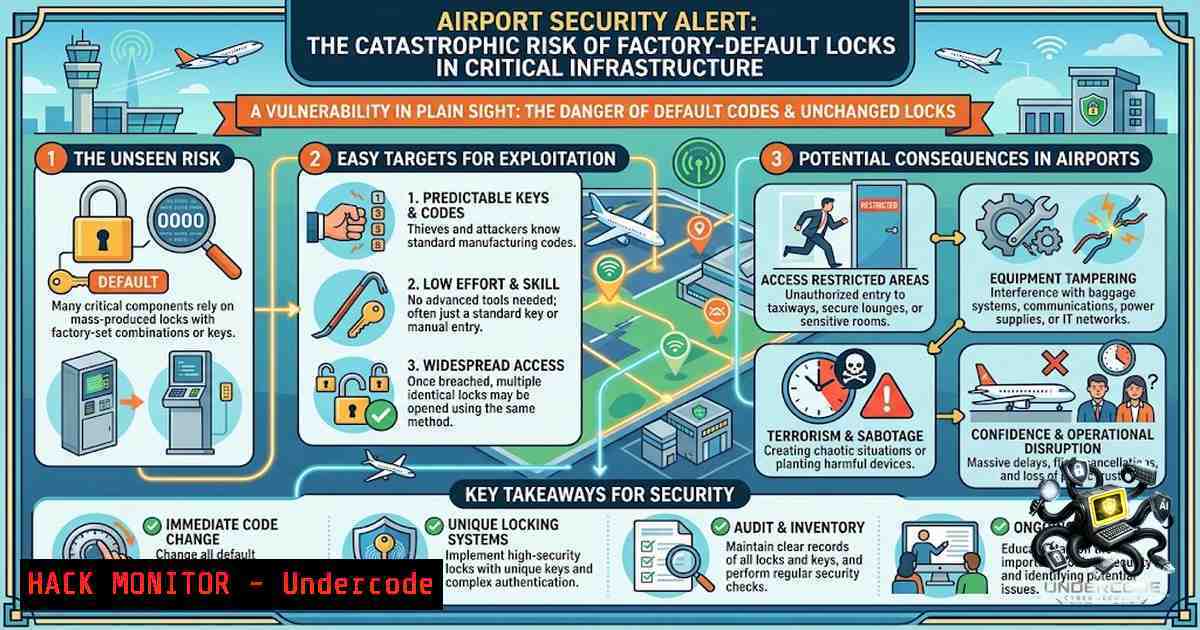
The intersection of physical security and cybersecurity has long been a blind spot in critical infrastructure protection, with mechanical and digital access control systems often operating on outdated assumptions about threat models. A recent revelation regarding a major international airport’s failure to change factory-default settings on door locks serves as a stark reminder that security hygiene remains the most fundamental yet frequently neglected layer of defense. This oversight—leaving mechanical Simplex locks on default combinations or digital locks with master codes unchanged—creates an attack vector so trivial that it effectively transforms these security devices into universal master keys accessible to anyone with basic internet search capabilities.
Learning Objectives & Secrets
- Objective 1: Understand the Multilayered Vulnerability Surface – Recognize that factory-default settings extend beyond simple mechanical combinations to include default SSH credentials on IoT door controllers, default SNMP community strings on network-connected locks, and hardcoded backdoor accounts in legacy access control systems.
-
Objective 2: Master Lock Forensics and Bypass Techniques – Learn to identify lock models visually, cross-reference default codes using OSINT techniques, and leverage physical bypass methods such as shimming, decoding, and electronic manipulation. Secret Tip: Many digital locks have a “maintenance mode” triggered by specific button sequences that resets the device to factory defaults—often documented only in service manuals available through manufacturer portals.
-
Objective 3: Implement Proactive Hardening Across Physical and Digital Domains – Deploy a comprehensive security hygiene framework that includes regular credential rotation, audit logging, and integration between physical access control systems (PACS) and SIEM platforms. Secret Tip: Use passive NFC scanners to detect unauthorized RFID cloning attempts near access points, and deploy vibration sensors on mechanical locks to detect tampering attempts.
You Should Know
1. Lock Default Database Reconnaissance & OSINT Gathering
The first step in securing—or testing—physical access controls is understanding exactly what defaults exist and where to find them. Attackers routinely compile databases of default lock codes, and security professionals must do the same to identify vulnerable assets.
Step-by-Step Guide:
- Inventory All Access Points – Conduct a physical walkthrough to document every lock type, manufacturer, and model number. Create a spreadsheet with columns for location, lock type (mechanical keypad, electronic, smart lock), model, and serial number.
-
Cross-Reference Default Codes – Use the following sources to identify default codes for documented models:
– Manufacturer instruction manuals (often available via PDF search using queries like "model XYZ" default code filetype:pdf)
– Online lockpicking forums and security researcher databases
– The Default Password List maintained by CIRT.net (extend to include lock combinations)
- Test Default Combinations in Controlled Environment – Before deploying any physical testing, obtain authorization from security leadership. Use a non-destructive approach by entering suspected default codes and documenting results.
-
Build an Internal Vulnerability Registry – Create a living document that tracks which locks have had their defaults changed, when changes occurred, and who performed them. This registry should be treated as sensitive security information.
Linux Command for OSINT Automation:
 Use recon-1g to scrape manufacturer sites for default credential documentation
recon-1g
marketplace install default-cred-scraper
workspace create lock_defaults
use recon/domains-hosts/brute_hosts
set source manufacturerdomain.com
run
Windows PowerShell Equivalent:
 Extract metadata from PDF manuals for default code strings
Get-ChildItem -Path .\manuals\ -Filter .pdf | ForEach-Object {
pdftotext $_.FullName - | Select-String -Pattern "default|factory|code|combination|master"
}
Pro Tip: Many digital locks respond to specific HTTP requests on their management interfaces. Use `nmap` to scan for open ports (commonly 80, 443, 8080, 8443) on network-connected lock controllers, then attempt default credentials like `admin:admin` or root:1234.
2. Hardening Procedures: Mechanical and Digital Lock Configuration
Once defaults are identified, immediate remediation is critical. This section provides step-by-step hardening procedures for both mechanical keypad locks and electronic access control systems.
Step-by-Step Mechanical Lock Hardening:
- Change the Combination on Simplex-Style Locks – Follow the manufacturer’s procedure (typically requiring the current combination to be entered, followed by a reset sequence using the internal reset button accessible via the battery compartment or backplate).
-
Enable Anti-Tamper Features – Many modern mechanical locks support features like “lockout after X failed attempts” or “duress codes.” Configure these according to organizational policy.
-
Install Lock Covers or Shields – Physical protection against shimming and decoding attacks prevents attackers from viewing button wear patterns or accessing internal components.
Step-by-Step Digital Lock Hardening:
-
Change Default Administrator Credentials – For network-connected locks, access the web interface or mobile app and change the admin username and password immediately. Use strong, unique passwords (16+ characters with mix of uppercase, lowercase, numbers, and symbols).
-
Disable Unused Services – Many smart locks expose unnecessary services like Telnet, FTP, or UPnP. Disable these via the configuration interface or through command-line access.
-
Implement Network Segmentation – Place all IoT access control devices on a dedicated VLAN with strict firewall rules preventing outbound internet access except to authorized management endpoints.
-
Enable Audit Logging – Configure the lock to log all access attempts (successful and failed) to a centralized syslog server or SIEM platform.
Sample Firewall Configuration for Network Segmentation (Linux iptables):
 Create a dedicated VLAN for access control devices
ip link add link eth0 name eth0.100 type vlan id 100
ip addr add 192.168.100.1/24 dev eth0.100
ip link set up dev eth0.100

Restrict outbound access from VLAN 100
iptables -A FORWARD -i eth0.100 -o eth0 -j DROP
iptables -A FORWARD -i eth0.100 -o eth0.100 -j ACCEPT

Allow only specific management IP to access lock controllers
iptables -A FORWARD -s 192.168.100.0/24 -d 10.10.10.0/24 -p tcp --dport 443 -j ACCEPT
Windows Server Configuration for PACS Integration:
 Configure Windows Firewall to restrict access to lock management console
New-1etFirewallRule -DisplayName "Restrict Lock Management" -Direction Inbound -LocalPort 8443 -Protocol TCP -Action Block -RemoteAddress "192.168.100.0/24"
 Allow only specific authorized admin IPs
New-1etFirewallRule -DisplayName "Allow Lock Management" -Direction Inbound -LocalPort 8443 -Protocol TCP -Action Allow -RemoteAddress "192.168.10.50"
3. Audit Trail Implementation and SIEM Integration
The absence of audit trails in mechanical locks represents a critical detection gap. For electronic systems, proper logging and monitoring are essential for detecting unauthorized access and investigating breaches.
Step-by-Step Guide:
- Configure Syslog Forwarding – On each network-connected lock or its controller, configure syslog to forward logs to a central server. The standard port is UDP 514, but secure variants like TCP 6514 with TLS are recommended.
-
Parse Logs for Key Events – Use log parsing tools to extract relevant events: failed authentication attempts, access granted, tamper alerts, and configuration changes.
-
Create Correlation Rules in SIEM – Implement rules that alert on:
– More than 3 failed attempts on a single lock within 5 minutes
– Access granted outside of normal operating hours (e.g., 10 PM to 5 AM)
– Sequential access attempts on multiple locks in a short period (potential tailgating or credential replay)
- Retain Logs for Incident Response – Maintain logs for at least 12 months, with active analysis for 30 days. Store logs in an immutable format (WORM storage) to prevent tampering.
Log Parsing Example with Elastic Stack (ELK):
 Filebeat input configuration for lock logs
filebeat.inputs:
- type: log
paths:
- /var/log/locklogs/.log
fields:
log_type: access_control
fields_under_root: true

Logstash filter for extracting lock events
filter {
if [bash] == "access_control" {
grok {
match => { "message" => "%{TIMESTAMP_ISO8601:timestamp} %{DATA:lock_id} %{DATA:event_type} %{DATA:user_id} %{DATA:status}" }
}
}
}
4. Physical Bypass Mitigation and Red Team Testing
Understanding how attackers physically bypass locks is essential for implementing effective countermeasures. Red team exercises should include physical access testing alongside network penetration tests.
Common Bypass Techniques to Mitigate:
- Shimming – Inserting a thin metal tool to depress the latch mechanism. Mitigation: Install latch guards or anti-shim plates.
-
Decoding – Using a decoder tool to read the combination from button wear or internal components. Mitigation: Rotate buttons periodically and apply wear-resistant coatings.
-
Electronic Cloning – For RFID-based locks, attackers can clone credentials using devices like the Proxmark3. Mitigation: Implement rolling codes and challenge-response authentication.
-
Magnetic Spoofing – Using strong neodymium magnets to override electronic locks. Mitigation: Install magnetic shielding and use fail-secure locking mechanisms.
Red Team Testing Script for RFID Cloning Detection:
!/usr/bin/env python3
 RFID cloning detection script using Proxmark3
import subprocess
import hashlib

def capture_rfid_data():
 Capture UID and other data from a legitimate tag
proc = subprocess.run(['proxmark3', 'com4', 'hf', '14a', 'read'], capture_output=True, text=True)
return proc.stdout

def check_for_cloned_tags(original_uid):
 Monitor for duplicate UIDs appearing at different access points
 This would integrate with your PACS logs
pass

def analyze_tamper_patterns():
 Look for unusual access patterns like multiple UIDs appearing in rapid succession
 Or UIDs that appear at geographically distant points in unrealistic timeframes
pass
- Cloud Integration and API Security for Smart Lock Ecosystems
Modern airport access control systems increasingly integrate with cloud-based management platforms, introducing API security risks that can be exploited remotely.
Step-by-Step API Security Hardening:
- Review API Documentation – Identify all exposed endpoints for lock management, including those for remote unlocking, credential provisioning, and audit log retrieval.
-
Implement OAuth 2.0 with PKCE – Ensure that all API calls require proper authentication and that access tokens are short-lived (15-30 minutes).
-
Validate Inputs Rigorously – Prevent injection attacks by sanitizing all inputs to API endpoints, including lock IDs, user identifiers, and timestamp fields.
-
Rate Limiting – Implement rate limiting at the API gateway level to prevent brute-force attacks on credentials or enumeration of lock resources.
-
Use Mutual TLS (mTLS) – For machine-to-machine communication between the cloud platform and on-premise lock controllers.
API Security Example (Node.js with Express Rate Limiting):
const rateLimit = require('express-rate-limit');
const helmet = require('helmet');

// Apply rate limiting to lock API endpoints
const lockApiLimiter = rateLimit({
windowMs: 15  60  1000, // 15 minutes
max: 100, // limit each IP to 100 requests per window
message: 'Too many lock API requests from this IP',
standardHeaders: true,
legacyHeaders: false,
});

app.use('/api/lock', lockApiLimiter);
app.use(helmet()); // Set various HTTP security headers
6. Incident Response Playbook for Lock Compromise
When a lock compromise is detected—whether through log analysis, physical inspection, or an alert from your SIEM—a structured incident response process is essential.
Step-by-Step Incident Response:
- Immediate Containment – If a physical lock is compromised, deploy a physical guard or install a temporary secondary lock. For digital locks, disconnect them from the network (physically or via firewall rule) while preserving forensic evidence.
-
Forensic Collection – Capture all logs from the lock, including volatile memory if accessible. Photograph the lock and surrounding area. Collect the lock itself if necessary (with chain of custody documentation).
-
Root Cause Analysis – Determine whether the compromise occurred through default credentials, physical bypass, credential theft, or insider threat. Review all access logs for the period before and after detection.
-
Remediation – Change all affected lock credentials. If the compromise was due to a software vulnerability, apply patches or replace the device. Update your vulnerability registry.
-
Lessons Learned – Document the incident and update your security hygiene procedures, training materials, and detection capabilities.
Linux Forensics Commands for Lock Controller Analysis:
 Capture memory image of Linux-based lock controller
dd if=/dev/mem of=lock_controller_mem.img

Extract logs from systemd journal
journalctl -u lockd --since "2026-08-20" --until "2026-08-23" > lock_logs.txt

Check for unauthorized user accounts
cat /etc/passwd | grep -v "/nologin|/false"

List network connections
ss -tunap | grep LISTEN
What Undercode Say
- Key Takeaway 1: The failure to change factory-default settings on physical access controls is not merely a theoretical risk—it represents a tangible, exploitable vulnerability that has been documented in aviation security bulletins and physical penetration testing reports. Organizations often invest heavily in cybersecurity while neglecting the physical layer, creating a fragile security posture where a simple default code can bypass millions in digital defenses.
-
Key Takeaway 2: The convergence of physical and cybersecurity demands integrated risk management strategies. Network-connected locks introduce API security risks, credential replay attacks, and supply chain vulnerabilities that require the same rigorous attention as traditional IT assets. The absence of audit trails on mechanical locks further compounds the problem, as security teams may remain unaware of a breach for months or years.
Analysis: The aviation security sector operates under intense regulatory scrutiny, yet the fundamental hygiene of changing default credentials remains inconsistently enforced. This oversight reflects a broader cultural challenge—security professionals often prioritize complex, headline-grabbing threats over basic security practices. However, the reality is that attackers consistently exploit low-hanging fruit, and default credentials are among the easiest avenues to compromise. The recommendation to implement multilayered physical, procedural, and technological controls is sound, but execution requires ongoing vigilance, regular audits, and a culture of security awareness that extends from executives to frontline staff. Organizations should treat physical access controls as critical assets, subjecting them to the same change management, patching, and monitoring procedures applied to servers and network infrastructure. The integration of PACS with SIEM platforms represents a best practice that provides visibility into physical access events, enabling security teams to correlate physical and cyber incidents. Finally, the aviation industry must advocate for clearer regulatory mandates regarding default credential management, ensuring that lock manufacturers provide tamper-evident mechanisms and enforceable policies for initial configuration.
Prediction
- -1: Airports and critical infrastructure facilities that fail to address default credential vulnerabilities will continue to experience physical security breaches, potentially leading to unauthorized access to secure areas, theft, or even terrorism-related incidents. The lack of audit trails on legacy mechanical locks will obscure the extent of these breaches, allowing attackers to operate undetected for extended periods.
-
-1: Regulatory bodies such as TSA, EASA, and ICAO will increasingly mandate stricter physical security controls, including mandatory default code changes, audit logging requirements, and integration between PACS and cybersecurity monitoring systems. Organizations that delay compliance will face fines, operational restrictions, and reputational damage.
-
+1: The growing adoption of smart locks with built-in tamper detection, audit logging, and remote management capabilities will enable airports to gain unprecedented visibility into physical access events, facilitating faster incident detection and response.
-
-1: The convergence of physical and cybersecurity will lead to new attack vectors, including the exploitation of API vulnerabilities in cloud-managed lock systems, ransomware attacks that lock doors remotely, and supply chain attacks targeting lock firmware updates.
-
-1: The human factor remains the weakest link—social engineering attacks targeting airport staff to extract lock credentials or facilitate tailgating will become increasingly sophisticated, requiring ongoing security awareness training and behavioral analytics.
-
+1: Advances in AI-powered video analytics, combined with access control data, will enable predictive security models that identify anomalous behavior patterns and potential threats before they materialize, reducing the reliance on static credentials and default settings.
-
-1: The cost of retrofitting legacy mechanical locks with audit-capable electronic systems will be prohibitively expensive for many airports, leading to prolonged exposure to default credential risks and creating uneven security standards across facilities.
-
+1: Open-source intelligence (OSINT) tools and community-driven databases of default credentials will empower security professionals to identify and remediate vulnerabilities more efficiently, transforming a threat vector into a proactive defense mechanism.
▶️ Related Video (84% Match):
https://www.youtube.com/watch?v=6-L9znBFc_s
🎯Let’s Practice For Free:
🎓 Live Courses & Certifications:
Join Undercode Academy for Verified Certifications
🚀 Request a Custom Project:
Secure, high-velocity infrastructure and disruptive technological engineering. Contact our engineering team for high-tier development and proprietary systems:
[email protected]
💎 Smart Architecture | 🛡️ Secure by Design | ⭐ Trusted by Thousands
IT/Security Reporter URL:
Reported By: https://lnkd.in/p/en4-kFsh – Hackers Feeds
Extra Hub: Undercode MoN
Basic Verification: Pass ✅


