
Listen to this Post
Introduction
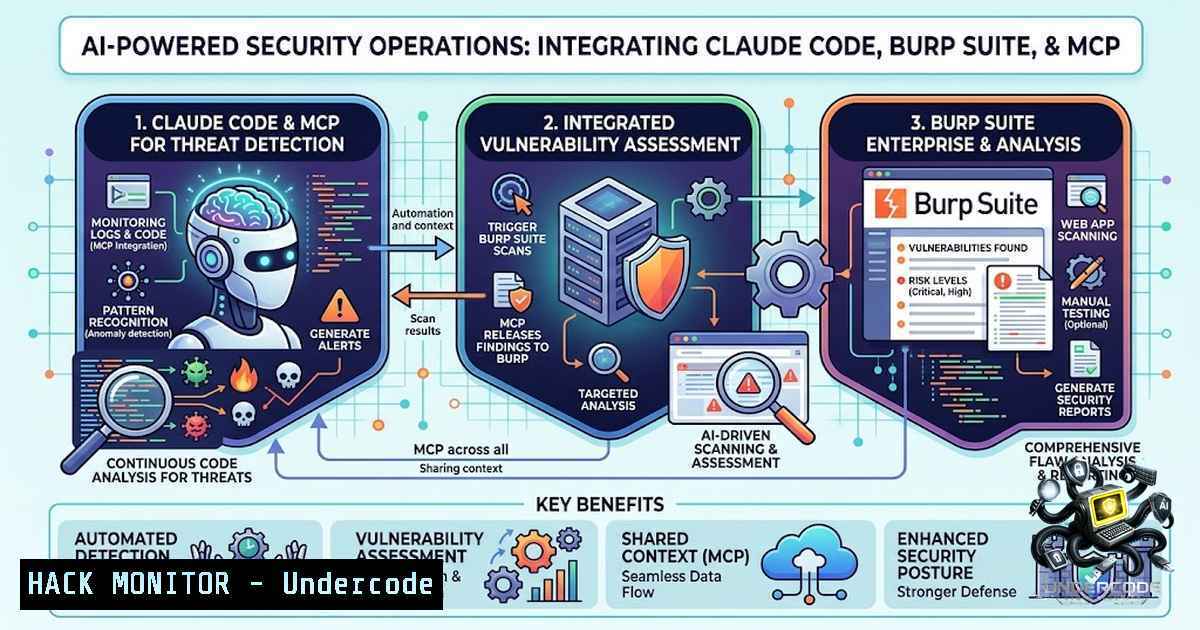
The integration of Large Language Models (LLMs) with security testing tools is rapidly transforming how cybersecurity professionals conduct penetration testing and security operations. The Model Context Protocol (MCP)—an open standard backed by Anthropic, OpenAI, Google, and Microsoft—provides a standardized infrastructure for AI agents to interact securely with external tools, APIs, and environments. By combining Claude Code with Burp Suite through MCP, security teams can automate repetitive testing tasks, correlate disparate security signals, and generate actionable intelligence—reducing manual effort while increasing analytical depth. According to security practitioners, this integration can cut penetration testing time from eight hours to four hours.
Learning Objectives & Secrets
- Objective 1: Automated Vulnerability Discovery — Learn to configure Claude Code with Burp Suite’s MCP extension to automate endpoint triage, injection testing, and vulnerability scanning using skill-based methodology files rather than ad-hoc prompts.
-
Objective 2 Secret Tip: Traffic-Context Correlation — Claude Code can analyze your codebase while simultaneously inspecting live HTTP traffic flowing through Burp’s proxy, correlating source code with runtime behavior to craft highly targeted security tests that traditional scanners miss.
-
Objective 3 Secret Tip: Evidence-Required Analysis — Enforce a strict “no finding without proof” policy by configuring the toolkit to require actual HTTP traffic evidence before any vulnerability is reported, eliminating false positives that plague purely AI-driven approaches.
You Should Know
1. Installing the Burp MCP Server Extension
The foundation of this integration is the MCP Server extension available in Burp Suite’s BApp Store.
Step‑by‑step guide:
- Open Burp Suite and navigate to the Extender tab.
- Select the BApp Store tab and search for “MCP Server”.
3. Click Install to add the extension.
- After installation, go to the MCP tab in Burp Suite and toggle Enabled (default endpoint:
127.0.0.1:9876). - Optional security: Uncheck “Require approval” only in dedicated, authorized testing environments.
Verification command (Linux/macOS):
curl -i --max-time 3 http://127.0.0.1:9876
Expected response confirms the MCP server is listening.
Windows PowerShell (if scripts are blocked):
Set-ExecutionPolicy -Scope CurrentUser -ExecutionPolicy RemoteSigned
2. Configuring Claude Code for Burp Integration
Claude Code must be configured to communicate with Burp’s MCP server via the Model Context Protocol.
Step‑by‑step guide:
- Install Claude Code (CLI application, not the browser version) from https://claude.ai/download.
- Add the Burp MCP server to Claude Code:
claude mcp add burp --transport sse http://127.0.0.1:9876
-
Verify the connection by typing `/mcp` inside Claude Code to see registered servers.
- Alternative configuration using `.mcp.json` in your project directory:
{
"mcpServers": {
"burp": {
"command": "node",
"args": ["/path/to/mcp-server/dist/index.js"],
"env": { "BURP_MCP_URL": "http://127.0.0.1:9876" }
}
}
}
Troubleshooting WSL: If running Claude Code from Windows Subsystem for Linux, ensure Burp’s MCP tab shows the correct endpoint and that WSL can reach 127.0.0.1:9876.
3. Deploying the Burp MCP Security Analysis Toolkit
The SnailSploit Burp MCP Security Analysis Toolkit encodes expert penetration testing methodology into reusable skill files.
Step‑by‑step guide (macOS/Linux):
 Clone the repository
git clone https://github.com/SnailSploit/Burp-MCP-Security-Analysis-Toolkit.git
cd Burp-MCP-Security-Analysis-Toolkit

Install Python dependencies
pip install -r requirements.txt

Run the installer
chmod +x install.sh
./install.sh

Configure your scope
cp templates/scope-template.yaml scope.yaml
 Edit scope.yaml with your target information

Launch the toolkit
./launch.sh
Windows installation:
git clone https://github.com/zalakamal08/Burp-MCP-Security-Analysis-Toolkit.git
cd Burp-MCP-Security-Analysis-Toolkit
pip install -r requirements.txt
.\install.ps1
Copy-Item templates\scope-template.yaml scope.yaml
 Edit scope.yaml with your target information
.\launch.ps1
CLI Usage:
 Validate scope configuration
python -m lib validate scope.yaml

Generate report from findings
python -m lib report ./output

Run interactive demo
python -m lib demo
4. Claude Code Commands for Security Testing
Once Burp Suite is running with MCP enabled, Claude Code accepts the following commands:
| Command | Purpose |
|||
| `”load scope”` | Validate configuration and load target scope |
| `”triage”` | Classify endpoints by priority and risk |
| `”analyze all”` | Run all indicator tests across endpoints |
| `”report”` | Generate consolidated findings report |
Available skill files in the toolkit:
– `SKILL-idor-testing.md` — IDOR detection methodology
– `SKILL-bola-testing.md` — Broken Object Level Authorization
– `SKILL-auth-analysis.md` — Authentication bypass testing
– `SKILL-ssrf-testing.md` — SSRF detection
– `SKILL-injection-points.md` — SQLi/XSS vector identification
5. Advanced Workflows: Recon, Hunting, and Reporting
For comprehensive bug bounty workflows, the Claude-BugHunter plugin provides structured reconnaissance and vulnerability hunting commands.
Install the plugin:
/plugin marketplace add elementalsouls/Claude-BugHunter
/plugin install claude-bughunter@elementalsouls
Core commands:
– `/recon` — Lists assets found on the target site and suggests next commands
– `/hunt-xss` — Tests for Cross-Site Scripting vulnerabilities
– `/hunt-sqli` — Identifies SQL injection vulnerabilities
– Generate report — Automates the reporting process
Workflow tip: When a payload is found, ask Claude to send the request to Burp Suite’s Repeater for manual validation.
- Extending to SOC Operations: Sentinel and Defender Correlation
The same MCP integration pattern extends beyond penetration testing to Security Operations Centers (SOCs). AI agents can correlate Microsoft Sentinel incidents, Defender alerts, email headers, and logs to automatically generate MITRE ATT&CK mappings and incident reports.
Key capabilities:
- AI-driven correlation of Microsoft Defender XDR and Sentinel signals
- Detection of threats that bypass existing rules by linking seemingly unrelated events
- Correlation of native Microsoft signals with third-party data ingested into Sentinel
Security Copilot integration: AI agents grounded in Security Copilot can automate triage, correlate alerts, reason about attack paths, and initiate response actions while maintaining human oversight.
Graph-powered context: With Sentinel’s graph-based context, agents can correlate alerts, prioritize by impact, and automate common workflows, reducing false positives and mean time to response.
7. Security Considerations and Best Practices
Critical security warnings:
- Scope enforcement: Scope files contain tokens—always add `scope.yaml` to
.gitignore. - Authorization only: Use only on authorized targets for legitimate security testing.
- Shell access: The Burp MCP extension has shell command execution disabled by default. Set `BURP_MCP_SHELL_ENABLED=true` only if absolutely necessary (runs arbitrary commands as the Burp user).
- Dangerously skip permissions: If using `–dangerously-skip-permissions` in Claude Code, use it only in a dedicated workspace for authorized security testing.
- DNS rebinding protection: The transport enforces a DNS-rebinding guard (Origin/Host allowlist).
- Bearer token authentication: Optional bearer token authentication is available for additional security.
False positive management: AI produces many false positives—it can suggest security issues that are nonsensical or have no real impact. Always validate findings manually before reporting.
What Undercode Say
- Key Takeaway 1: The MCP integration between Claude Code and Burp Suite represents a paradigm shift in security testing—moving from ad-hoc, manual workflows to structured, AI-assisted methodology that encodes expert knowledge into reusable skill files. This isn’t about replacing human analysts but augmenting their capabilities to focus on complex reasoning rather than repetitive tasks.
-
Key Takeaway 2: The same architectural pattern—MCP as a standardized interface for AI agents to interact with security tools—scales from individual penetration testing to enterprise SOC operations. By applying this framework to Sentinel, Defender, and other security data sources, organizations can achieve automated incident correlation, threat mapping, and response coordination that dramatically reduces mean time to detection and response.
Analysis: The convergence of LLMs with security tooling via MCP is still in its early stages, but the trajectory is clear. Security professionals who adopt these workflows today are gaining a significant productivity advantage—reducing testing time by 50% or more while maintaining rigorous evidence standards. However, the technology demands discipline: AI-generated findings must be validated, scope must be strictly enforced, and the human analyst remains ultimately accountable for every reported vulnerability. The most successful practitioners will treat AI as a force multiplier, not a replacement for security expertise.
Prediction
- +1 MCP will become the de facto standard for AI-tool integration in cybersecurity within 18-24 months, with major vendors (Microsoft, AWS, Cisco) already building MCP-compatible security agents.
-
+1 SOC analyst productivity will increase by 40-60% as AI agents handle tier-1 alert triage, correlation, and initial investigation, allowing human analysts to focus on complex threat hunting and incident response.
-
-1 Organizations that deploy AI security agents without proper scope controls, rate limiting, and human validation will experience increased false positive rates and potential unauthorized access to production systems.
-
+1 The NSA’s recent formal MCP cybersecurity guidance signals regulatory acceptance and will accelerate enterprise adoption of MCP-based security workflows.
-
-1 Attackers will increasingly target MCP server implementations themselves—exploiting misconfigured endpoints, weak authentication, and insufficient permission controls to pivot from AI agents into production environments.
-
+1 Open-source MCP security toolkits (like the Burp MCP Security Analysis Toolkit) will democratize AI-assisted penetration testing, lowering barriers for smaller security teams and independent researchers.
-
-1 The skill-file approach, while powerful, creates a dependency on maintained methodology files—outdated or poorly maintained skills may miss emerging vulnerability classes.
-
+1 Integration of MCP with cloud security posture management (CSPM) and cloud infrastructure entitlement management (CIEM) tools will enable automated cloud misconfiguration detection and remediation at scale.
-
+1 The agentic security operations model—where AI agents operate semi-autonomously within defined guardrails—will become the dominant SOC architecture by 2027.
-
+1 Security professionals who master MCP-based workflows will command premium compensation as organizations race to adopt AI-augmented security operations.
This article is based on the integration of Claude Code, Burp Suite, and the Model Context Protocol (MCP) as documented in community toolkits and security research. Always ensure you have proper authorization before testing any target.
▶️ Related Video (74% Match):
🎯Let’s Practice For Free:
🎓 Live Courses & Certifications:
Join Undercode Academy for Verified Certifications
🚀 Request a Custom Project:
Secure, high-velocity infrastructure and disruptive technological engineering. Contact our engineering team for high-tier development and proprietary systems:
[email protected]
💎 Smart Architecture | 🛡️ Secure by Design | ⭐ Trusted by Thousands
IT/Security Reporter URL:
Reported By: https://lnkd.in/p/dgVazyX3 – Hackers Feeds
Extra Hub: Undercode MoN
Basic Verification: Pass ✅


