
Listen to this Post
Introduction
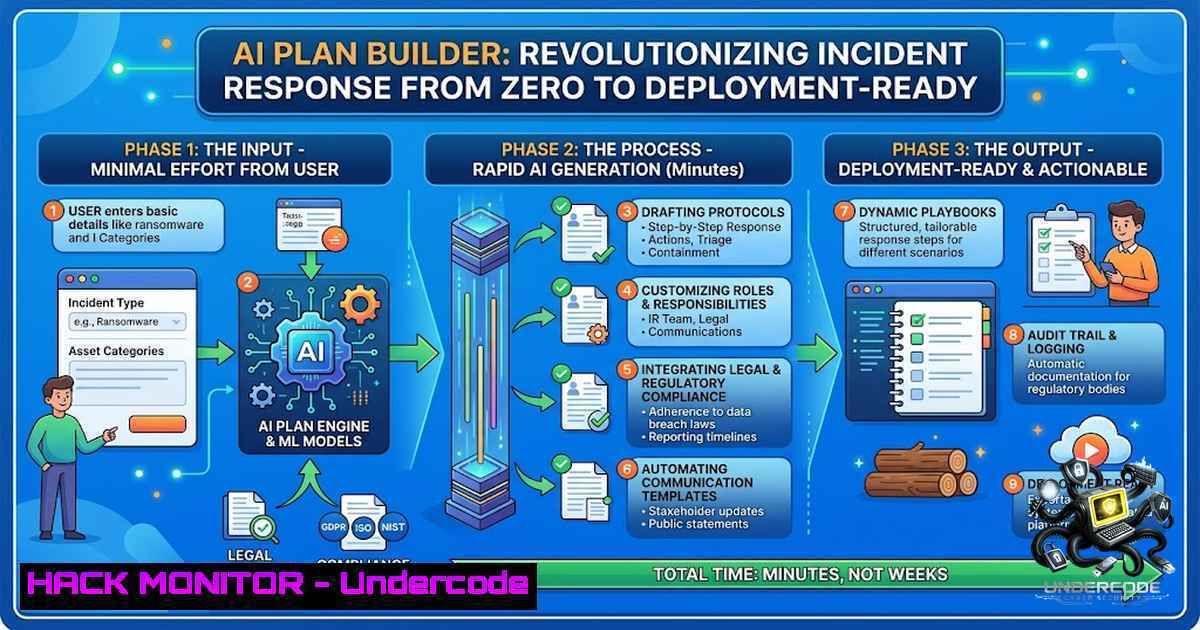
For decades, incident response planning has been a manual, time-consuming process where security and emergency management teams stare at a blank page, struggling to translate organizational risks into actionable procedures. AlertMedia’s new AI Plan Builder—a generative AI capability embedded directly within its Incident Response solution—changes this paradigm entirely, enabling teams to generate complete, deployment-ready response plans from natural-language prompts in minutes rather than weeks. This represents a fundamental shift from reactive documentation to proactive preparedness, where AI assists in creating, refining, and maintaining plans that reflect real organizational structures, locations, and risks.
Learning Objectives
- Understand how generative AI can automate the creation of incident response plans across severe weather, cyber incidents, workplace violence, and travel disruptions
- Learn to leverage natural-language prompting to generate tailored response templates with assigned tasks, owners, and location-specific procedures
- Master the integration of AI-generated plans into existing incident management workflows with real-time collaboration and task tracking
- Explore practical command-line and API-based approaches to supplement AI-driven incident response planning
You Should Know
- From Blank Page to Deployment-Ready Plan: How AI Plan Builder Works
AI Plan Builder eliminates the single biggest barrier to preparedness: the overwhelming task of creating comprehensive response plans from scratch. Organizations often inherit outdated templates, struggle with evolving personnel and facilities, or simply don’t know where to begin. The AI assistant addresses this by offering two primary workflows:
Workflow One: Sample Plan Customization. Teams can select from AlertMedia’s library of pre-built sample plans covering scenarios such as building evacuations, civil unrest, cybersecurity incidents, flooding, hurricanes, lockdowns, travel incidents, and wildfires. From there, the AI assistant adapts the template to the organization’s specific context.
Workflow Two: Natural-Language Generation. Teams describe their scenario in plain English, and the AI generates a customized plan from the ground up. For example:
“Create a hurricane response plan for our manufacturing facility in Tampa, Florida. Include preparation, employee communication, facility shutdown, evacuation, and post-storm recovery tasks.”
The assistant doesn’t return generic advice—it creates an editable response template directly inside AlertMedia, populating incident descriptions, recommending response tasks, suggesting owners, and tailoring the plan to the specific location, industry, and team structure.
Extending the Capability: API Integration and Automation
For organizations looking to integrate AI-generated plans into existing security orchestration, automation, and response (SOAR) workflows, AlertMedia provides API access for customization. Below are practical approaches to supplement AI-driven planning with technical automation:
Linux Command: Automated Plan Backup and Versioning
!/bin/bash
 Automated backup script for incident response plans
 Usage: ./backup_ir_plans.sh /path/to/plans

PLAN_DIR="${1:-/var/alertmedia/plans}"
BACKUP_DIR="/var/backups/ir_plans"
TIMESTAMP=$(date +%Y%m%d_%H%M%S)

mkdir -p "$BACKUP_DIR"
tar -czf "$BACKUP_DIR/plans_$TIMESTAMP.tar.gz" -C "$PLAN_DIR" .

Keep only last 30 days of backups
find "$BACKUP_DIR" -1ame "plans_.tar.gz" -mtime +30 -delete

echo "Backup completed: $BACKUP_DIR/plans_$TIMESTAMP.tar.gz"
Windows PowerShell: Plan Validation and Compliance Checking
 PowerShell script to validate incident response plan completeness
 Checks for required sections: Detection, Containment, Eradication, Recovery

param(
[bash]$PlanPath = "C:\AlertMedia\Plans\"
)

$requiredSections = @("Detection", "Containment", "Eradication", "Recovery", "Communication")
$planFiles = Get-ChildItem -Path $PlanPath -Filter ".json"

foreach ($plan in $planFiles) {
$content = Get-Content $plan.FullName | ConvertFrom-Json
$missing = @()

foreach ($section in $requiredSections) {
if (-1ot ($content.PSObject.Properties.Name -contains $section)) {
$missing += $section
}
}

if ($missing.Count -gt 0) {
Write-Warning "Plan $($plan.Name) missing sections: $($missing -join ', ')"
} else {
Write-Host "Plan $($plan.Name) validated successfully." -ForegroundColor Green
}
}
API Integration: Programmatic Plan Generation
 Using cURL to interact with AlertMedia's API for plan generation
 Replace with actual API endpoint and authentication

curl -X POST "https://api.alertmedia.com/v1/plans/generate" \
-H "Authorization: Bearer YOUR_API_TOKEN" \
-H "Content-Type: application/json" \
-d '{
"scenario": "cybersecurity_incident",
"location": "Chicago_DC",
"industry": "healthcare",
"custom_prompt": "Ransomware response plan including isolation, forensic acquisition, and regulatory notification"
}'
2. Refining and Maintaining Existing Plans with AI
Many organizations already have response plans, but these documents are often incomplete, outdated, or too generic to guide an effective response. A plan written for one facility may not account for the risks at another. A template created before a reorganization may still assign critical tasks to former employees.
AI Plan Builder addresses this through targeted refinement capabilities:
Example Refinement
“Adapt this response plan for our new regional headquarters. Update locations, response team assignments, task owners, and facility-specific procedures.”
The assistant can update the plan directly by refining descriptions, creating tasks, adding locations, suggesting missing steps, and assigning owners. Teams can also use precise instructions to make administrative changes that would otherwise require manual editing.
Compliance Alignment
The AI assistant helps align plans with evolving compliance requirements by searching current regulations and industry standards, ensuring audit-ready preparedness. This is particularly critical given frameworks like NIST SP 800-61r3, NIST AI 600-1, MITRE ATLAS, and OWASP LLM Top-10, which explicitly call for organizations to establish incident response plans for AI technologies.
Practical Implementation: Plan Validation Script
!/bin/bash
 Validate incident response plan against NIST 800-61 r3 requirements
 Checks for mandatory sections: Preparation, Detection & Analysis, Containment,
 Eradication & Recovery, Post-Incident Activity

validate_plan() {
local plan_file="$1"
local required=("Preparation" "Detection_Analysis" "Containment"
"Eradication_Recovery" "Post_Incident")

for section in "${required[@]}"; do
if ! grep -qi "$section" "$plan_file"; then
echo "WARNING: Missing $section section in $plan_file"
fi
done
}

for plan in /var/alertmedia/plans/.md; do
validate_plan "$plan"
done
3. Cross-Functional Collaboration and Real-Time Execution
AI Plan Builder doesn’t operate in isolation—it’s embedded within AlertMedia’s broader Incident Response solution, which provides a unified operating picture for security, IT, legal, and operations teams. Once a plan is generated and refined, teams can:
- Launch responses in seconds with pre-built, customizable templates
- Assign tasks and responsibilities to ensure nothing gets missed
- Coordinate from anywhere with mobile-ready access to plans and task lists
- Monitor people and assets at risk using geofencing and impact zones
- Track progress with real-time visibility into incident response and resolution
Task Management Automation
 Python script to automate task assignment from AI-generated plan
 Uses AlertMedia API to push tasks to response team members

import requests
import json

API_URL = "https://api.alertmedia.com/v1/incidents"
API_KEY = "your_api_key_here"

def assign_tasks(incident_id, plan_data):
headers = {
"Authorization": f"Bearer {API_KEY}",
"Content-Type": "application/json"
}

tasks = plan_data.get("tasks", [])
for task in tasks:
payload = {
"incident_id": incident_id,
"title": task["title"],
"assigned_to": task["owner"],
"priority": task.get("priority", "medium"),
"deadline": task.get("deadline", "")
}
response = requests.post(f"{API_URL}/{incident_id}/tasks",
headers=headers,
json=payload)
if response.status_code == 201:
print(f"Task '{task['title']}' assigned to {task['owner']}")
else:
print(f"Failed to assign task: {response.text}")

Example usage with generated plan data
plan_data = {
"tasks": [
{"title": "Isolate affected systems", "owner": "[email protected]"},
{"title": "Notify legal department", "owner": "[email protected]"},
{"title": "Initiate forensic acquisition", "owner": "[email protected]"}
]
}
assign_tasks("INC-2026-08-07-001", plan_data)
4. Security and Compliance Considerations
AlertMedia maintains enterprise-grade security certifications including SOC2 Type 2, ISO 27001, GDPR, and CCPA compliance, with enterprise-level data encryption and in-platform data masking capabilities. The platform supports Single Sign-On with automated user provisioning through Azure AD or Okta, and simplifies data syncing with HRIS via Active Directory, CSV files, or SFTP.
Security Audit Command
 Linux: Check for unauthorized access attempts to incident response plans
 Monitor authentication logs for suspicious patterns

grep "Failed password" /var/log/auth.log | \
awk '{print $1, $2, $3, $9, $11}' | \
sort | uniq -c | sort -1r | head -20

Windows PowerShell: Check for unauthorized plan access attempts
Get-WinEvent -LogName Security | Where-Object { $<em>.Id -eq 4625 } |
Select-Object TimeCreated, @{Name="User";Expression={$</em>.Properties[bash].Value}},
@{Name="SourceIP";Expression={$_.Properties[bash].Value}} |
Group-Object SourceIP | Sort-Object Count -Descending | Select-Object -First 10
5. The Broader AI Incident Response Landscape
AlertMedia’s AI Plan Builder is part of a larger trend where generative AI and large language models are being deployed to accelerate incident response. Research from the Ponemon Institute shows that organizations using AI and automation extensively save approximately $1.9 million per breach and shorten the breach lifecycle by 80 days. Academic work has demonstrated that lightweight LLMs (14-billion parameter models) can be effectively used for incident response planning, integrating perception, reasoning, planning, and action into a single agentic solution.
Open-source tools like AttackGen leverage LLMs and the MITRE ATT&CK framework to generate tailored incident response scenarios based on user-selected threat actor groups. These developments suggest a future where AI-assisted planning becomes the standard, not the exception.
Integration with Threat Intelligence
AlertMedia’s Risk Intelligence platform combines AI-powered early signals, agentic social intelligence, and analyst-verified insights in a single connected platform. This integration enables organizations to move from reactive incident response to proactive risk monitoring.
 Example: Fetch threat intelligence feed and correlate with incident plans
 This script checks if current threats match any existing response plans

curl -s "https://api.alertmedia.com/v1/threats/active" \
-H "Authorization: Bearer $API_TOKEN" | \
jq -r '.threats[] | select(.severity >= "high") | .type' | \
while read threat_type; do
if grep -q "$threat_type" /var/alertmedia/plans/.md; then
echo "ALERT: Active $threat_type threat matches existing response plan"
else
echo "WARNING: No response plan found for $threat_type threat"
fi
done
What Undercode Say
- Preparedness is no longer a luxury—it’s an operational necessity. Organizations that fail to maintain current, actionable response plans face exponentially higher risks during critical events. AI Plan Builder democratizes preparedness by making plan creation accessible to organizations of all sizes.
-
AI doesn’t replace human judgment—it amplifies it. The assistant generates drafts and recommendations, but practitioners retain full control to review, refine, and approve all AI-generated content. The platform supports both draft and published plans and allows users to review or revert AI-generated updates.
-
The shift from execution to planning represents a maturity milestone. AlertMedia’s expansion from incident execution into planning and preparedness signals that the industry is recognizing that effective response depends on preparation done well before the crisis hits.
The integration of generative AI into incident response planning marks a pivotal moment for security operations. What once required days of cross-functional meetings, document reviews, and manual updates can now be accomplished in minutes through natural-language interaction. However, this capability must be paired with rigorous validation, regular testing through tabletop exercises, and continuous improvement based on post-incident insights. The organizations that embrace AI-assisted planning while maintaining human oversight will be best positioned to navigate the increasingly complex threat landscape of 2026 and beyond.
Expected Output
Prediction:
- +1 Organizations adopting AI-driven incident response planning will reduce plan development time by 80-90%, enabling faster deployment of response capabilities across multiple locations and scenarios simultaneously.
-
+1 The integration of AI-generated plans with real-time threat intelligence will enable dynamic plan adaptation during active incidents, moving from static documents to living response frameworks that evolve as situations develop.
-
-1 Organizations that treat AI-generated plans as “set and forget” documents without regular review, tabletop testing, and human validation will introduce new risks through outdated or hallucinated content that may not reflect actual operational realities.
-
+1 By 2028, AI-assisted incident response planning will become a standard feature across major critical event management platforms, with regulatory frameworks beginning to mandate AI-generated plan maintenance as part of compliance requirements.
-
-1 The reliance on AI for plan generation may create a skills gap where practitioners lose the ability to manually construct comprehensive response plans, potentially degrading organizational resilience if AI systems become unavailable or compromised.
-
+1 The $1.9 million average savings per breach for organizations using AI and automation will accelerate as AI planning capabilities mature, potentially reducing the global economic impact of cyber incidents by billions annually.
▶️ Related Video (84% Match):
https://www.youtube.com/watch?v=2zFQqP4JDKE
🎯Let’s Practice For Free:
🎓 Live Courses & Certifications:
Join Undercode Academy for Verified Certifications
🚀 Request a Custom Project:
Secure, high-velocity infrastructure and disruptive technological engineering. Contact our engineering team for high-tier development and proprietary systems:
[email protected]
💎 Smart Architecture | 🛡️ Secure by Design | ⭐ Trusted by Thousands
IT/Security Reporter URL:
Reported By: Build Incidence – Hackers Feeds
Extra Hub: Undercode MoN
Basic Verification: Pass ✅


