Listen to this Post
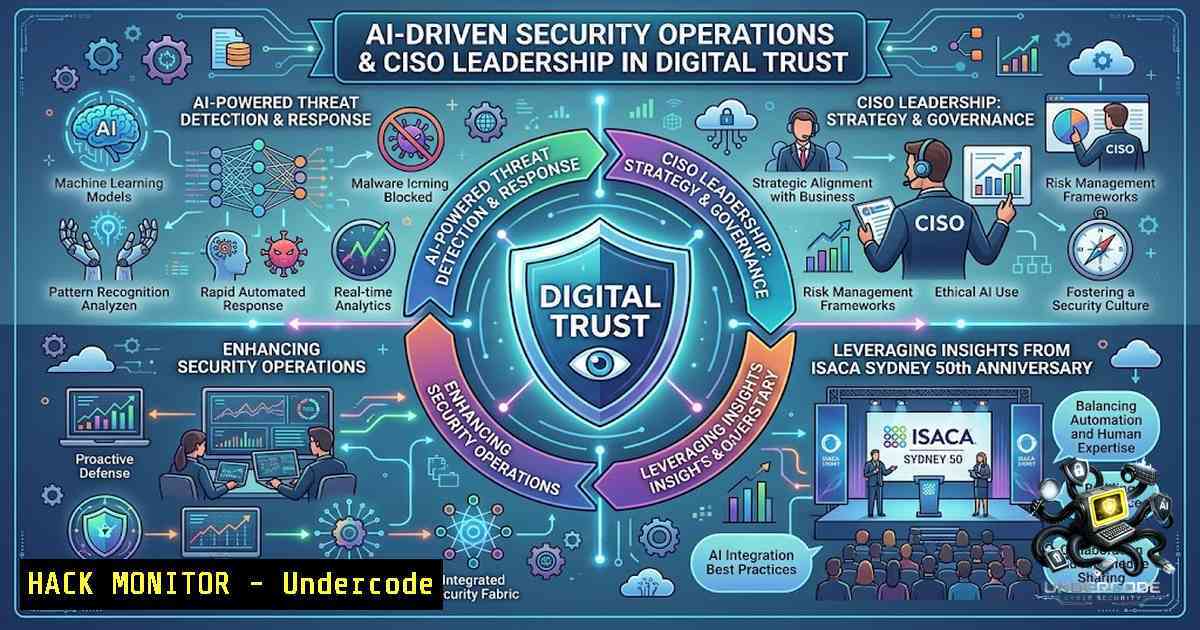
Introduction:
The modern security landscape demands more than just technical proficiency—it requires a fundamental shift in how organizations approach digital trust, AI governance, and resilient leadership. As ISACA Sydney celebrated its 50th anniversary with a landmark conference bringing together over 420 professionals, the message was clear: security is now an organisation-wide responsibility, not just a CISO or IT problem. This article distills the technical insights, hands-on methodologies, and leadership frameworks from the conference’s key streams—Cyber Security and Resilience, AI Governance, and Enterprise Risk—providing actionable commands, configurations, and step-by-step guides for security practitioners.
Learning Objectives:
- Master AI-driven security operations frameworks and understand where LLMs succeed and fail in production SOC environments
- Implement cloud and infrastructure hardening commands across Linux, Windows, and AWS environments
- Identify and mitigate OWASP API Security Top 10 vulnerabilities with practical exploitation and remediation techniques
- Establish programmatic vulnerability management workflows aligned with NIST, DISA STIGs, and CIS Benchmarks
- Deploy DevSecOps automation tools for shift-left security in CI/CD pipelines
You Should Know:
- AI-Driven Security Operations: From Hype to Production Reality
The conference’s highlight—Chathura Abeydeera GAICD’s presentation on “AI-Driven Security Operations: Lessons from the Frontline”—underscored a critical truth: AI is reshaping both our daily lives and the way we practice security. However, moving from proof-of-concept to production reveals challenges that vendor demonstrations rarely address.
Security leaders are discovering that data quality, organizational readiness, and stakeholder buy-in often present bigger challenges than the AI technology itself. Real-world deployments are delivering value beyond traditional security functions, but successful AI initiatives start with clearly defined business problems and measurable outcomes—not the technology itself.
Step-by-Step Guide: Implementing AI Security Controls
Step 1: Establish an AI Governance Framework
Organizations should begin establishing AI governance frameworks now, defining clear responsibilities across security, privacy, legal, compliance, IT, and business teams. Shadow AI creates new visibility and governance challenges as employees adopt unapproved tools that may expose sensitive data or introduce compliance risks.
Step 2: Map AI Risks to Established Frameworks
Frameworks such as MITRE ATT&CK and ATLAS continue to evolve to stay relevant and useful in the AI security environment. Build resilient AI security controls using a practical six-tier model for imagining security in the age of AI.
Step 3: Deploy the “Surgeon Model” for Human-AI Collaboration
In this model, AI accelerates repeatable work so human defenders can focus on context and risk management. Red teams define the target and attack strategy while AI agents handle reconnaissance and automate execution—proving valuable for both red teaming and purple teaming exercises.
Step 4: Address the OWASP LLM Top 10
Critical security guardrails must be implemented for protecting sensitive data in AI workflows. Priority risks include:
– Prompt Injection — Attackers manipulate LLM inputs to bypass safety measures
– Insecure Output Handling — LLM-generated content can introduce XSS, CSRF, or SSRF vulnerabilities
– Sensitive Data Disclosure — LLMs may inadvertently reveal training data or conversation history
Step 5: Monitor AI Attack Surface Expansion
The AI attack surface is expanding faster than most organizations are tracking it. The question most teams are asking is how to use AI; the question they’re not asking (but need to) is how to secure it. Implement continuous monitoring for unmanaged AI applications, employee-built tools, and rapidly evolving AI agents.
- Infrastructure Hardening: Linux, Windows, and Cloud Security Commands
Infrastructure security remains the foundation of any secure computing environment. The following verified commands provide a practical arsenal for system reconnaissance and hardening across enterprise environments.
Linux System Hardening and Audit
 System reconnaissance - understand your environment
uname -a  Display kernel version and architecture
ps aux  List all running processes
ss -tuln  Show all listening ports and services

Essential hardening steps
sudo apt update && sudo apt upgrade -y  Update system packages
sudo dpkg-reconfigure -plow unattended-upgrades  Configure automatic security updates

Disable unnecessary services
sudo systemctl disable telnet
sudo systemctl disable rsh
sudo systemctl disable rlogin

Configure SSH security
sudo sed -i 's/PermitRootLogin yes/PermitRootLogin no/' /etc/ssh/sshd_config
sudo sed -i 's/PasswordAuthentication yes/PasswordAuthentication no/' /etc/ssh/sshd_config
sudo systemctl restart ssh

Configure firewall
sudo ufw enable
sudo ufw default deny incoming
sudo ufw default allow outgoing
sudo ufw allow ssh

Remove unnecessary read permissions from sensitive files
chmod 600 /path/to/sensitive/file
Step-by-Step Guide: Begin any security assessment by understanding the system. `uname -a` reveals potential kernel vulnerabilities. `ps aux` identifies suspicious activity. `ss -tuln` is crucial for identifying unauthorized open ports. Harden the system by disabling unnecessary services, configuring SSH to prohibit root login and password authentication, and enabling UFW to enforce basic network traffic rules.
Windows Server Security Hardening
 System reconnaissance
systeminfo  Comprehensive OS build, hotfixes, and hardware overview

Enumerate listening ports
Get-1etTCPConnection -State Listen

Audit installed features
Get-WindowsOptionalFeature -Online | Where-Object {$_.State -eq "Enabled"}

Enable Windows Defender real-time protection
Set-MpPreference -DisableRealtimeMonitoring $false

Configure Windows Update
Set-ItemProperty -Path "HKLM:\SOFTWARE\Policies\Microsoft\Windows\WindowsUpdate\AU" -1ame "AUOptions" -Value 4

Disable unnecessary services
$services = @('Telnet', 'RemoteRegistry', 'Messenger')
foreach ($service in $services) {
Set-Service -1ame $service -StartupType Disabled -ErrorAction SilentlyContinue
}

Configure account policies
net accounts /maxpwage:90 /minpwage:1 /minpwlen:12 /uniquepw:5

Enable audit policies
auditpol /set /category:"Logon/Logoff" /success:enable /failure:enable
auditpol /set /category:"Account Management" /success:enable /failure:enable
Step-by-Step Guide: On Windows, start with `systeminfo` to get a comprehensive overview. Use `Get-1etTCPConnection -State Listen` to enumerate listening ports. Audit installed features with `Get-WindowsOptionalFeature` to disable unnecessary services that expand the attack surface. Ensure Windows Defender real-time protection is active using Set-MpPreference.
AWS Cloud Security Hardening
 Audit S3 bucket policies
aws s3api get-bucket-policy --bucket my-bucket --query Policy --output text

Apply restrictive bucket policy
aws s3api put-bucket-policy --bucket my-bucket --policy file://new-policy.json
Step-by-Step Guide: Misconfigured cloud storage is a top attack vector. Use the AWS CLI to audit your S3 bucket policies. The `get-bucket-policy` command retrieves the current policy for inspection. Create a JSON file with a restrictive policy that denies all actions unless from a specific IP range or VPC, then apply it using the `put-bucket-policy` command to prevent public read/write access.
- API Security: Exploitation and Mitigation of OWASP Top 10 Vulnerabilities
APIs are core building blocks of modern applications and represent a high-value attack surface. Major breaches—LinkedIn exposing 700M users, Twitter leaking 5.4M users, PIXLR losing 1.9M records—all originated from API vulnerabilities.
BOLA (Broken Object Level Authorization) — OWASP API 1
Exploitation Steps:
 Step 1: Hit vulnerable endpoint without auth check
GET /apirule1_v/user/1  Returns user data without authorization

Step 2: ID Enumeration - increment ID to access other users
GET /apirule1_v/user/2
GET /apirule1_v/user/3

Step 3: Extract data from predictable IDs
 Total employees → 3
 Flag (ID=2) → {838123}
 Username (ID=3) → Bob
Why Vulnerable: No authorization check, predictable IDs, direct object reference.
Mitigation:
- Implement authorization tokens with role validation
- Use UUIDs instead of sequential numeric IDs
- Always verify the authenticated user owns the requested resource
Secure Code Pattern:
if actual_user_id != target_id:
 Reject request if the user does not own the resource
return jsonify({"error": "Forbidden"}), 403
This demonstrates a transition from vulnerable to secure architecture by implementing server-side authorization claims. Instead of trusting the request body, the server extracts the `actual_user_id` from a secure, signed authorization token.
Broken User Authentication (BUA) — OWASP API 2
Exploitation Steps:
 Login with only email - password not validated
POST /apirule2/user/login_v
[email protected]&password=anything  Login works even with wrong password

Token issued without proper authentication
 Use token for full account takeover
GET /apirule2/user/details
Authorization-Token: <token>
Why Vulnerable: SQL checks only email, password ignored, token issued blindly.
Mitigation:
- Validate password properly using hashing (bcrypt)
- Implement MFA + JWT with proper validation
Excessive Data Exposure — OWASP API 3
Exploitation Steps:
 Fetch comment - API returns too much information
GET /apirule3/comment_v/2  Returns full dataset including hidden fields

Extract sensitive data from raw response
 Device ID → iOS15.411
 Username → hacker!
Why Vulnerable: Backend sends everything, no filtering, trusting frontend.
Mitigation:
- Return minimal data only
- Avoid generic serializers
- Validate API responses at the server level
4. Programmatic Vulnerability Management
Automated vulnerability remediation is essential for scaling security operations. The following scripts align with industry standards such as NIST, DISA STIGs, and CIS Benchmarks.
Linux Vulnerability Remediation Script (Bash):
!/bin/bash
 Automated remediation for common CVEs

Update package lists and upgrade
apt-get update && apt-get upgrade -y

Remove vulnerable packages
apt-get remove --purge vulnerable-package-1ame

Apply security patches
apt-get install --only-upgrade package-1ame

Restart services after patching
systemctl restart affected-service

Verify remediation
dpkg -l | grep package-1ame
Windows Vulnerability Remediation Script (PowerShell):
 Programmatic vulnerability remediation

Install critical updates
Install-WindowsUpdate -MicrosoftUpdate -AcceptAll -AutoReboot

Remove vulnerable software
Uninstall-Package -1ame "VulnerableSoftware" -Force

Apply registry-based mitigations
Set-ItemProperty -Path "HKLM:\SOFTWARE\Microsoft\Windows\CurrentVersion\Policies\System" -1ame "EnableLUA" -Value 1

Restart services
Restart-Service -1ame "affected-service" -Force

Verify patch status
Get-HotFix | Where-Object {$_.InstalledOn -gt (Get-Date).AddDays(-30)}
Step-by-Step Vulnerability Management Workflow:
- Discovery: Scan assets using tools like Nessus to identify vulnerabilities and misconfigurations
- Prioritization: Focus on exploitable vulnerabilities based on CVSS scores and business context
- Remediation: Apply automated patches or configuration changes using PowerShell/Bash scripts
4. Validation: Rescan to confirm remediation effectiveness
- Monitoring: Establish continuous security monitoring to detect new vulnerabilities
5. DevSecOps Automation and Shift-Left Security
Modern DevSecOps principles demand shift-left security—catching vulnerabilities before code reaches production.
Automated Security Scanning with DevSec Tools:
 Install devsec-tools CLI
 Check supported TLS versions and cipher suites
devsec-tools tls google.com

Check HTTP security headers
devsec-tools http apple.com

Run security scanners for your stack
npx secsuite scan .  One command runs the right security scanners and merges reports
CI/CD Pipeline Security Integration:
 GitHub Actions security scanning workflow
name: Security Scan
on: [push, pull_request]
jobs:
security:
runs-on: ubuntu-latest
steps:
- uses: actions/checkout@v3
- name: Run SAST
run: |
 Static Application Security Testing
trivy fs --severity HIGH,CRITICAL .
- name: Run SCA
run: |
 Software Composition Analysis
npm audit --production
- name: Run DAST
run: |
 Dynamic Application Security Testing
zap-full-scan.py -t https://staging-app.com
Step-by-Step DevSecOps Implementation:
- Establish a security baseline by executing automated scans across all repositories
2. Integrate SAST/DAST/SCA tools into existing CI/CD pipelines
- Automate vulnerability tracking and dynamic risk scoring before code hits production
4. Implement security monitoring and compliance validation
- Use AI autofixes to accelerate remediation—tools can trigger scans, triage findings, and open pull requests
What Undercode Say:
- Key Takeaway 1: The future of security leadership demands that CISOs operate as business risk leaders, not just technical security experts. Cybersecurity decisions increasingly need to be connected to operational resilience, regulatory obligations, customer trust, financial impact, and the organization’s ability to grow.
-
Key Takeaway 2: AI is not a silver bullet—it’s a force multiplier that requires disciplined governance. Organizations must move beyond AI experimentation toward stronger governance and disciplined risk management. The systemic risk created by third-party and cloud concentration means a single outage or security incident can have widespread consequences.
Analysis: The ISACA Sydney 50th Anniversary Conference revealed a profession at an inflection point. The convergence of AI, cloud-1ative architectures, and sophisticated threat actors demands a new breed of security leader—one who can translate complex technical risks into clear business language while building practical, continuous defenses. The 8 CPE hours delivered across cyber security, privacy, AI governance, and audit streams reflect the expanding scope of the CISO role. As security becomes an organisation-wide responsibility, the technical commands and frameworks outlined above provide the foundation, but leadership, governance, and communication will ultimately determine success. The conference’s emphasis on real-world experiences over vendor hype signals a maturation of the industry—one where practitioners demand evidence, not promises.
Prediction:
- +1 AI-powered security operations will become the default within 24 months, with human analysts transitioning from alert triage to strategic threat hunting and risk management. The “surgeon model” of human-AI collaboration will dominate SOC architecture.
-
+1 API security will emerge as the single most critical application security domain, driven by the proliferation of microservices and AI agent integrations. Organizations that fail to implement proper BOLA and authentication controls will face catastrophic breaches.
-
-1 The concentration of cloud and third-party dependencies creates systemic risk that most organizations are ill-prepared to manage. A major cloud provider outage or supply chain compromise could trigger cascading failures across multiple enterprises simultaneously.
-
+1 Programmatic vulnerability management and DevSecOps automation will become mandatory for compliance frameworks, with regulators demanding evidence of continuous security validation rather than periodic assessments.
-
-1 The AI attack surface is expanding faster than most organizations can secure it. Shadow AI and unmanaged AI agents will create unprecedented visibility and governance challenges, potentially outpacing the security industry’s ability to respond.
▶️ Related Video (72% Match):
https://www.youtube.com/watch?v=1PWtgZ-Lfxg
🎯Let’s Practice For Free:
🎓 Live Courses & Certifications:
Join Undercode Academy for Verified Certifications
🚀 Request a Custom Project:
Secure, high-velocity infrastructure and disruptive technological engineering. Contact our engineering team for high-tier development and proprietary systems:
[email protected]
💎 Smart Architecture | 🛡️ Secure by Design | ⭐ Trusted by Thousands
IT/Security Reporter URL:
Reported By: Nivedita Newar – Hackers Feeds
Extra Hub: Undercode MoN
Basic Verification: Pass ✅


