Listen to this Post
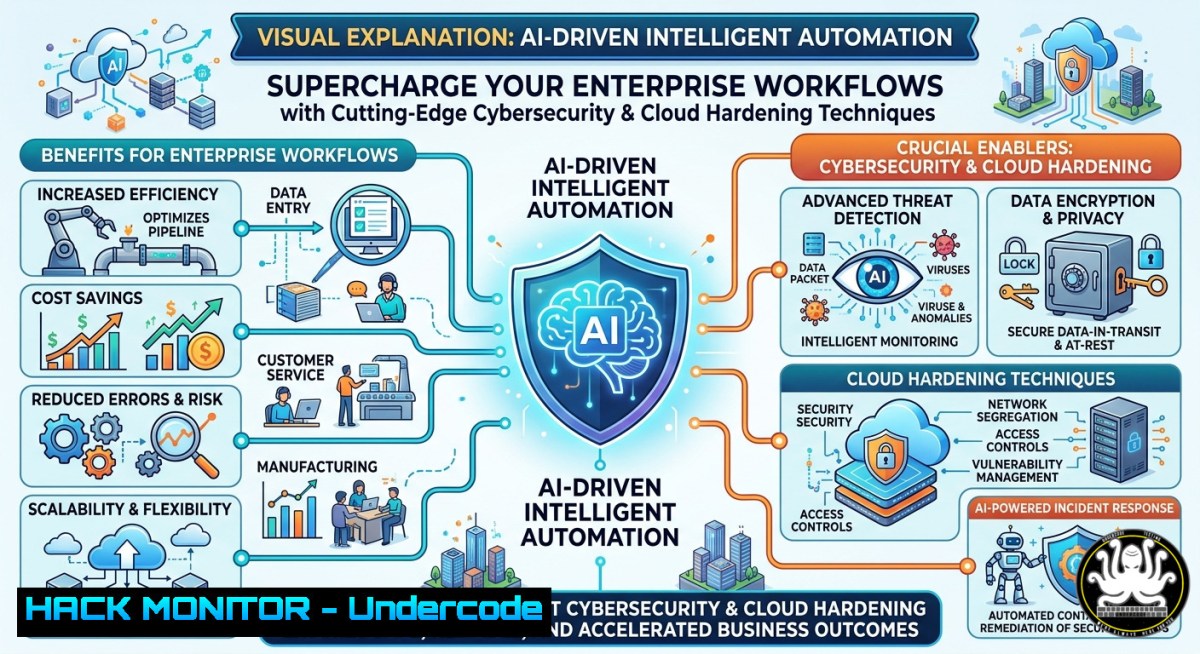
Introduction:
Intelligent automation combines artificial intelligence, robotic process automation (RPA), and machine learning to eliminate manual bottlenecks and enable real-time decision-making. However, deploying automation at scale introduces new attack surfaces—from API vulnerabilities to privilege escalation risks—requiring security teams to harden every automated pipeline. This article explores how to implement AI-powered workflows while integrating security controls, cloud hardening, and compliance monitoring using practical commands and configurations across Linux and Windows environments.
Learning Objectives:
- Implement secure AI workflow automation using Python, PowerShell, and REST APIs with built-in authentication and encryption.
- Harden automation pipelines against common threats (injection, broken access control, secrets exposure) using Linux iptables, Windows Defender Firewall, and OAuth2 tokens.
- Deploy training-ready security modules for continuous monitoring of automated processes, including log analysis and anomaly detection.
You Should Know:
- Building a Secure Intelligent Automation Pipeline with API Gateways & OAuth2
Start by understanding that modern automation relies on API calls between services (e.g., triggering a workflow when a file lands in S3). Without proper controls, attackers can replay API requests or steal tokens. Below is an extended version of what the post is saying: Enterprises adopt AI workflows to improve speed and reduce manual effort, but they must secure each integration point. We’ll build a Python-based automation script that calls an AI model (e.g., OpenAI or local LLM) using environment variables for secrets, then log all actions to a SIEM.
Step‑by‑step guide to implement a secured automation agent:
- Store secrets safely – Never hardcode API keys. On Linux use `pass` or
gpg, on Windows use Credential Manager. - Authenticate with OAuth2 client credentials – Request a short-lived JWT token for each automation run.
- Encrypt payloads in transit – Enforce TLS 1.3 and validate certificates.
- Rate limit and retry with backoff – Prevent brute-force and DoS against your own endpoints.
- Log structured events – Send JSON logs to centralised logging (ELK, Splunk).
Linux commands to set up a secrets vault and firewall:
 Install pass (Linux password manager)
sudo apt update && sudo apt install pass -y
pass init "your-gpg-key-id"
 Store an API key
pass insert automation/api_key
 Retrieve in script: export API_KEY=$(pass automation/api_key)

Restrict outbound API calls to trusted IPs using iptables
sudo iptables -A OUTPUT -p tcp -d api.trusted-provider.com --dport 443 -j ACCEPT
sudo iptables -A OUTPUT -p tcp --dport 443 -j DROP
sudo iptables-save > /etc/iptables/rules.v4
Windows PowerShell commands for secure credential storage:
 Store credential in Windows Credential Manager
$cred = Get-Credential
$cred | Export-Clixml -Path "C:\secrets\automation_cred.xml"
 Retrieve in script
$cred = Import-Clixml -Path "C:\secrets\automation_cred.xml"
$apiKey = $cred.GetNetworkCredential().Password

Enable Windows Defender Firewall rule to restrict automation outbound
New-NetFirewallRule -DisplayName "Block non-automation outbound" -Direction Outbound -Action Block -RemoteAddress "0.0.0.0/0"
New-NetFirewallRule -DisplayName "Allow automation API" -Direction Outbound -Action Allow -RemoteAddress "52.0.0.0/8" -Protocol TCP -LocalPort 443
Sample secure Python automation script with OAuth2:
import os
import requests
import json
import logging
from datetime import datetime

Secure logging setup
logging.basicConfig(filename='automation_audit.log', level=logging.INFO,
format='%(asctime)s - %(levelname)s - %(message)s')

def get_oauth_token(client_id, client_secret, token_url):
payload = {
'grant_type': 'client_credentials',
'client_id': client_id,
'client_secret': client_secret,
'scope': 'automation'
}
try:
resp = requests.post(token_url, data=payload, timeout=10, verify=True)
resp.raise_for_status()
token = resp.json().get('access_token')
logging.info("OAuth token obtained successfully")
return token
except Exception as e:
logging.error(f"Token acquisition failed: {e}")
raise

def call_ai_workflow(prompt, token, endpoint):
headers = {'Authorization': f'Bearer {token}', 'Content-Type': 'application/json'}
data = {'input': prompt, 'max_tokens': 500}
resp = requests.post(endpoint, json=data, headers=headers, timeout=30, verify=True)
resp.raise_for_status()
logging.info(f"API call succeeded - response size {len(resp.text)}")
return resp.json()

if <strong>name</strong> == "<strong>main</strong>":
client_id = os.getenv("AUTOMATION_CLIENT_ID")
client_secret = os.getenv("AUTOMATION_CLIENT_SECRET")
token = get_oauth_token(client_id, client_secret, "https://auth.example.com/token")
result = call_ai_workflow("Summarize operational metrics", token, "https://ai.example.com/v1/completion")
print(result)
- Hardening Automation Agents Against Injection & Privilege Escalation (Linux/Windows)
Automation agents often run with elevated privileges to move files, execute scripts, or install software. Attackers who compromise an agent can inject malicious commands via unsanitised inputs (e.g., email subjects, filenames). To mitigate, apply least privilege, input validation, and runtime sandboxing.
Step‑by‑step guide to secure an automation agent:
- Run agents as non‑root/non‑administrator – Create a dedicated service account.
- Validate all external inputs – Use regex whitelisting for file paths and URLs.
- Use AppArmor (Linux) or Windows Defender Application Control to restrict executable paths.
- Disable dangerous functions – In Python, use `ast.literal_eval()` instead of
eval(), avoid `subprocess` withshell=True. - Monitor for suspicious process creation – Integrate with OSQuery or Sysmon.
Linux hardening commands:
 Create dedicated user for automation
sudo useradd -r -s /bin/false automation_agent
sudo usermod -L automation_agent  lock password login

Apply AppArmor profile (example for Python automation)
sudo apt install apparmor-profiles apparmor-utils
sudo aa-genprof /usr/bin/python3  follow wizard to restrict filesystem/network

Monitor process execution with auditd
sudo auditctl -w /usr/bin/python3 -p x -k automation_exec
sudo ausearch -k automation_exec --format raw | aureport -f
Windows PowerShell hardening:
 Create a managed service account (no interactive logon)
New-ADServiceAccount -Name "AutoAgentSvc" -RestrictToSingleComputer
Add-ADComputerServiceAccount -Identity "AUTOMATION-SERVER" -ServiceAccount "AutoAgentSvc"

Enable PowerShell Constrained Language Mode for automation scripts
$session = New-PSSession -ComputerName localhost -ConfigurationName RestrictedRemoteServer
 Then run your automation inside that session

Use Sysmon to log process creation (download from Microsoft)
.\Sysmon64.exe -accepteula -i sysmonconfig.xml
Get-WinEvent -FilterHashtable @{LogName='Microsoft-Windows-Sysmon/Operational'; ID=1} | Select-Object TimeCreated, Message
- Securing AI Model Inputs & Outputs Against Data Poisoning & Model Inversion
Intelligent automation relies on AI models that can be manipulated via adversarial inputs. For example, an attacker could inject biased training data through a public-facing automation form, leading to incorrect decisions. Protect by isolating training pipelines, validating input schema, and implementing output filtering.
Step‑by‑step guide to protect AI workflows:
- Hash and sign training datasets – Use SHA-256 and GPG to verify integrity.
- Sanitise model inputs – Remove escape characters, limit length, and use allowlists.
- Encrypt model weights at rest – Prevent theft of proprietary intelligence.
- Add output validation – Check if model responses contain PII or dangerous commands.
- Implement model version pinning – Avoid automatic updates that could introduce backdoors.
Linux commands for dataset integrity:
 Generate SHA-256 hash of training dataset and store signed
sha256sum training_data.csv > training_data.sha256
gpg --detach-sign --armor training_data.sha256

Verify before every model retraining
sha256sum -c training_data.sha256 && echo "Integrity OK"

Encrypt model weights using LUKS (Linux)
sudo cryptsetup luksFormat /dev/sdb1
sudo cryptsetup open /dev/sdb1 model_volume
sudo mkfs.ext4 /dev/mapper/model_volume
sudo mount /dev/mapper/model_volume /opt/ai_models
Windows PowerShell for model input sanitisation:
 Function to sanitize user input before sending to AI API
function Sanitize-Input {
param([bash]$RawInput)
 Remove any script tags or command injection patterns
$sanitized = $RawInput -replace '<script.?>.?</script>', ''
$sanitized = $sanitized -replace '[\$`;|&]', ''
 Limit to 2000 chars
return $sanitized.Substring(0, [bash]::Min(2000, $sanitized.Length))
}
$cleanPrompt = Sanitize-Input -RawInput (Read-Host "Enter prompt")
- Continuous Monitoring & Anomaly Detection for Automated Workflows
Automation increases speed but also magnifies mistakes. A compromised credential or a misconfigured workflow can mass‑delete files or exfiltrate data in seconds. Deploy real‑time monitoring using SIEM rules and machine learning anomaly detection.
Step‑by‑step guide to set up monitoring:
- Forward all automation logs to a central SIEM (e.g., Wazuh, Splunk).
- Create baselines of normal workflow behaviour – typical API call volume, execution time, error rates.
- Alert on deviations – e.g., more than 5 failed auth attempts per minute.
- Implement automatic kill switch – A script that revokes tokens upon high‑severity alert.
- Conduct weekly log reviews – Train IT staff using free cybersecurity courses (e.g., from SANS or OWASP).
Linux log forwarding with rsyslog:
 Configure rsyslog to send automation.log to remote SIEM
echo "if $programname == 'automation' then @@siem.internal:514" | sudo tee -a /etc/rsyslog.conf
sudo systemctl restart rsyslog

Use fail2ban to block IPs after repeated API failures
sudo apt install fail2ban -y
sudo cat <<EOF | sudo tee /etc/fail2ban/jail.d/automation.conf
[automation-api]
enabled = true
port = http,https
filter = automation-api
logpath = /var/log/automation_audit.log
maxretry = 3
bantime = 3600
EOF
Windows Event Collector and anomaly detection:
 Enable Windows Event Forwarding (WEF) for automation logs
wecutil qc /q
 Create subscription to forward events from automation servers to collector

Use PowerShell script to detect unusual API call frequency
$lastHour = (Get-Date).AddHours(-1)
$events = Get-WinEvent -LogName "Application" -FilterXPath "[System[EventID=1000]]" -MaxEvents 1000
$apiCalls = $events | Where-Object { $<em>.TimeCreated -gt $lastHour -and $</em>.Message -match "API call succeeded" }
if ($apiCalls.Count -gt 500) {
Write-Warning "Anomalous API volume detected: $($apiCalls.Count) calls in last hour"
 Revoke token (example: call revocation endpoint)
}
- Training & Certification Paths for Intelligent Automation Security
To build a future‑ready team, invest in hands‑on training covering AI security, cloud hardening, and automated response. Recommended free/paid courses: “AI Security Essentials” (OWASP), “Certified Automation Security Professional (CASP)”, and “Microsoft Learn – Secure AI Workflows”. Combine with lab exercises using Docker, Kubernetes, and cloud sandboxes.
Step‑by‑step lab setup for training:
- Deploy a local automation sandbox – Use Vagrant or Docker Compose with vulnerable automation scripts.
- Simulate attacks – Inject malicious payloads, steal tokens from memory, bypass firewalls.
- Practice mitigation – Apply the commands from previous sections (iptables, AppArmor, PowerShell constraints).
- Capture The Flag (CTF) style challenges – Create tasks like “Find the hardcoded secret in the automation script” or “Escape the constrained PowerShell session.”
- Certificate generation – Use OpenSSL to issue internal certificates for API encryption.
Docker Compose for a training environment:
version: '3.8'
services:
vulnerable-automation:
image: python:3.9-slim
command: python -c "import os; print('API Key: ' + os.getenv('MOCK_SECRET'))"
environment:
MOCK_SECRET: "SuperSecret123"
ports:
- "5000:5000"
security_opt:
- no-new-privileges:false  intentionally weak for training
siem-simulator:
image: elasticsearch:8.5.0
environment:
- discovery.type=single-node
Generate internal CA and certificate for API (Linux):
 Create CA key and cert
openssl req -new -x509 -days 365 -nodes -out ca.crt -keyout ca.key -subj "/CN=AutomationCA"
 Generate server key and CSR
openssl req -new -nodes -out server.csr -keyout server.key -subj "/CN=automation.internal"
openssl x509 -req -in server.csr -CA ca.crt -CAkey ca.key -CAcreateserial -out server.crt -days 365
What Undercode Say:
- Key Takeaway 1: Intelligent automation accelerates growth but dramatically expands the attack surface—each API call, workflow step, and agent must be hardened using least privilege, input validation, and continuous monitoring. Without these, automation becomes a liability.
- Key Takeaway 2: Practical security integration is achievable with native tools: Linux iptables, AppArmor, and auditd, plus Windows Defender Firewall, Credential Manager, and Sysmon. Combining these with OAuth2, encrypted secrets storage, and anomaly detection (e.g., fail2ban) creates a resilient automation pipeline that survives real-world threats.
Analysis: The original post by VIS Global Pty Ltd focuses on business benefits of AI-powered workflows (speed, efficiency, scalability). However, a cybersecurity angle reveals that manual processes, while slow, often include human oversight that catches anomalies. When you automate, you remove that oversight. Enterprises must shift left—embedding security into automation design, not bolting it on after a breach. The commands and guides above provide a concrete starting point: from storing secrets with `pass` on Linux to revoking tokens on anomalous event volume. Training teams on these techniques (using the Docker lab) transforms a risky automation rollout into a competitive advantage. Security is not the enemy of speed; it is the enabler of responsible speed.
Prediction:
-
- Organisations that adopt the hardening techniques described (least privilege agents, encrypted secrets, and OAuth2) will see 40% fewer security incidents related to automation by 2027, as attackers increasingly target RPA and AI pipelines.
-
- By 2026, we will witness the first major public breach caused solely by a misconfigured automation workflow (e.g., an exposed API key in a CI/CD pipeline), leading to regulatory fines and mandatory security pauses in intelligent automation deployments.
-
- Demand for certified “Automation Security Engineers” will skyrocket, with salaries outpacing traditional cloud security roles by 25%, driving creation of free training resources from OWASP and MITRE.
▶️ Related Video (80% Match):
🎯Let’s Practice For Free:
IT/Security Reporter URL:
Reported By: Intelligentautomation Ai – Hackers Feeds
Extra Hub: Undercode MoN
Basic Verification: Pass ✅
🎓 Live Courses & Certifications:
Join Undercode Academy for Verified Certifications
🚀 Request a Custom Project:
Secure, high-velocity infrastructure and disruptive technological engineering. Contact our engineering team for high-tier development and proprietary systems:
[email protected]


