
Listen to this Post
Introduction:
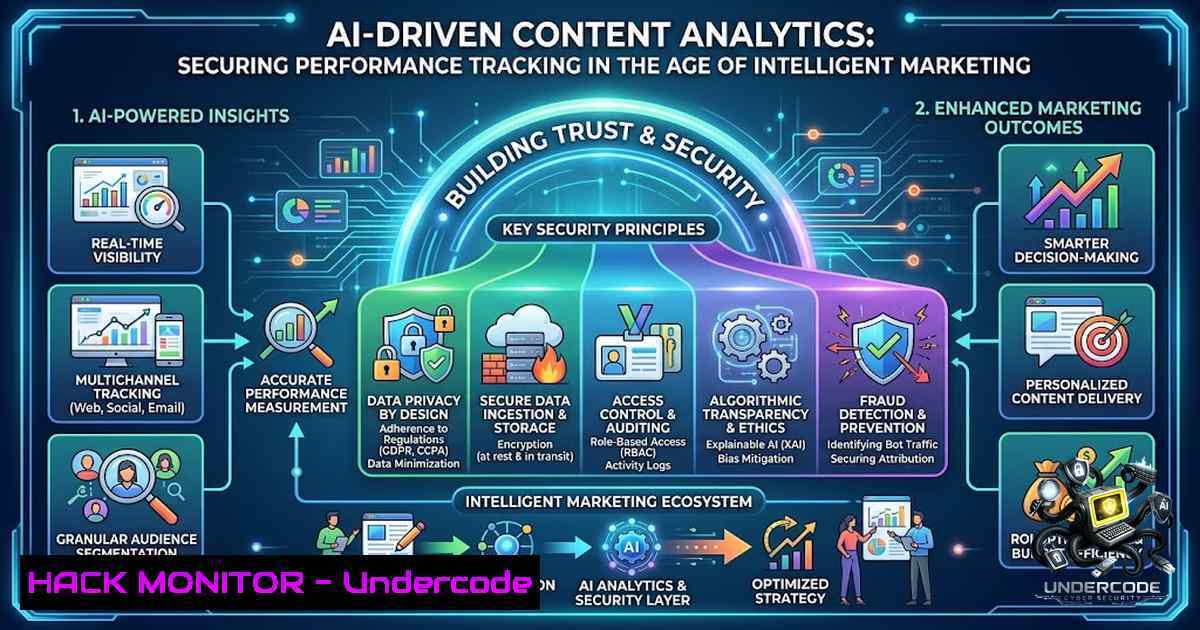
The convergence of artificial intelligence and marketing analytics has transformed how organizations measure content performance, but this integration introduces critical security considerations. As marketing teams deploy AI-powered analytics tools to track tailored content engagement, they must simultaneously safeguard the vast streams of user data, API endpoints, and cloud infrastructure that power these insights. This article explores the technical underpinnings of modern content analytics platforms—from data collection pipelines to AI model integration—while providing actionable security configurations and commands to protect your analytics ecosystem.
Learning Objectives & Secrets:
- Objective 1: Master Secure API Integration for Analytics Data Ingestion — Learn to authenticate and encrypt data flows between content delivery networks, analytics platforms, and AI processing engines using OAuth 2.0, API keys, and mutual TLS.
- Objective 2: Secret Tip — Implement Real-Time Anomaly Detection on Analytics Traffic — Deploy behavioral baselining to identify unusual data exfiltration patterns or API abuse before they compromise user privacy or skew performance metrics.
- Objective 3: Secret Tip — Harden Cloud-1ative Analytics Dashboards Against Injection Attacks — Apply input sanitization, parameterized queries, and role-based access controls (RBAC) to prevent SQL/NoSQL injection and privilege escalation via dashboard widgets.
You Should Know:
- Securing the Analytics Data Pipeline: From Click to Cloud
Modern content analytics begins at the moment a user interacts with your tailored content—whether through email links, social posts, or embedded widgets. Each interaction generates a payload containing user agent, IP address, referrer, timestamp, and custom event parameters. This data traverses multiple hops: client-side JavaScript beacons → edge CDN logs → API gateways → cloud storage → AI processing pipelines.
To protect this pipeline, start by enforcing HTTPS with HSTS (Strict-Transport-Security) on all data collection endpoints. For Linux-based analytics servers, configure Nginx to require TLS 1.3 and disable weak ciphers:
 /etc/nginx/conf.d/analytics.conf
server {
listen 443 ssl http2;
ssl_protocols TLSv1.3;
ssl_ciphers TLS_AES_256_GCM_SHA384:TLS_CHACHA20_POLY1305_SHA256;
ssl_prefer_server_ciphers off;
add_header Strict-Transport-Security "max-age=31536000; includeSubDomains" always;
}
For Windows Server with IIS, use PowerShell to enforce TLS 1.3 and disable older protocols:
 Disable TLS 1.0 and 1.1
New-Item 'HKLM:\SYSTEM\CurrentControlSet\Control\SecurityProviders\SCHANNEL\Protocols\TLS 1.0\Server' -Force | Out-1ull
New-ItemProperty -Path 'HKLM:\SYSTEM\CurrentControlSet\Control\SecurityProviders\SCHANNEL\Protocols\TLS 1.0\Server' -1ame 'Enabled' -Value 0 -PropertyType 'DWord' -Force
New-ItemProperty -Path 'HKLM:\SYSTEM\CurrentControlSet\Control\SecurityProviders\SCHANNEL\Protocols\TLS 1.0\Server' -1ame 'DisabledByDefault' -Value 1 -PropertyType 'DWord' -Force
Implement API request validation using JSON Web Tokens (JWT) with short expiration windows (e.g., 5 minutes) to prevent replay attacks. Each analytics beacon should include a nonce and timestamp, verified server-side before processing.
2. AI Model Security: Protecting the Intelligence Layer
When analytics platforms incorporate AI for pattern recognition, predictive scoring, or content recommendation, the model itself becomes an attack surface. Adversarial inputs—crafted to misclassify or bias model outputs—can corrupt performance dashboards and lead to flawed business decisions.
To mitigate, implement input sanitization at the API gateway using a allowlist approach. For Python-based AI services (e.g., Flask/FastAPI serving TensorFlow or PyTorch models), validate all incoming JSON fields against a strict schema:
from jsonschema import validate, ValidationError
import re

schema = {
"type": "object",
"properties": {
"event_type": {"type": "string", "pattern": "^(click|view|conversion|scroll)$"},
"user_id": {"type": "string", "maxLength": 64},
"content_id": {"type": "string", "maxLength": 128},
"timestamp": {"type": "integer", "minimum": 1600000000},
"metadata": {"type": "object", "additionalProperties": {"type": "string"}}
},
"required": ["event_type", "user_id", "content_id", "timestamp"]
}

def validate_payload(payload):
try:
validate(instance=payload, schema=schema)
 Additional regex sanitization for free-text fields
if 'metadata' in payload:
for key, value in payload['metadata'].items():
if not re.match(r'^[a-zA-Z0-9_-\s]+$', value):
raise ValidationError(f"Invalid characters in metadata field: {key}")
return True
except ValidationError as e:
print(f"Validation failed: {e.message}")
return False
For model inference endpoints, enforce rate limiting to prevent denial-of-service via excessive API calls. On Linux, use `iptables` with hashlimit:
 Limit to 100 requests per minute per IP
iptables -A INPUT -p tcp --dport 5000 -m hashlimit --hashlimit-1ame ai-api --hashlimit 100/min --hashlimit-burst 150 --hashlimit-mode srcip -j ACCEPT
iptables -A INPUT -p tcp --dport 5000 -j DROP
3. Cloud Hardening for Analytics Dashboards
Analytics dashboards (e.g., Grafana, Tableau, or custom React/Vue frontends) often expose real-time metrics via WebSocket or REST APIs. Misconfigured cloud permissions have led to numerous data breaches. Adopt a least-privilege approach for both IAM roles and database access.
For AWS deployments, restrict S3 buckets containing raw analytics logs with bucket policies that deny public access and enforce encryption:
{
"Version": "2012-10-17",
"Statement": [
{
"Sid": "DenyPublicRead",
"Effect": "Deny",
"Principal": "",
"Action": "s3:GetObject",
"Resource": "arn:aws:s3:::analytics-logs-company/",
"Condition": {
"StringNotEquals": {
"aws:PrincipalArn": "arn:aws:iam::123456789012:role/AnalyticsProcessor"
}
}
},
{
"Sid": "EnforceEncryption",
"Effect": "Deny",
"Principal": "",
"Action": "s3:PutObject",
"Resource": "arn:aws:s3:::analytics-logs-company/",
"Condition": {
"Null": {
"s3:x-amz-server-side-encryption": "true"
}
}
}
]
}
For database security (e.g., PostgreSQL storing aggregated metrics), enable SSL/TLS connections and use parameterized queries to prevent SQL injection in dashboard filter fields. Example using `psycopg2` in Python:
import psycopg2
from psycopg2 import sql

def get_metrics(date_range, content_id):
conn = psycopg2.connect("host=analytics-db.company.com dbname=metrics user=reader password= sslmode=require")
cur = conn.cursor()
query = sql.SQL("SELECT date, clicks, views FROM daily_metrics WHERE date BETWEEN %s AND %s AND content_id = %s")
cur.execute(query, (date_range['start'], date_range['end'], content_id))
return cur.fetchall()
4. Monitoring and Anomaly Detection in Analytics Traffic
Continuous monitoring of analytics data flow is essential to detect exfiltration attempts, compromised API keys, or malfunctioning AI models. Deploy a SIEM-like pipeline using the ELK stack (Elasticsearch, Logstash, Kibana) or a cloud-1ative solution.
On Linux, configure `auditd` to monitor access to analytics configuration files and log directories:
 /etc/audit/rules.d/analytics.rules
-w /etc/nginx/conf.d/analytics.conf -p wa -k analytics_config
-w /var/log/analytics/ -p rwxa -k analytics_logs
-w /opt/ai_model/ -p rwxa -k ai_model
Set up a cron job to parse logs for suspicious patterns (e.g., repeated API failures, unexpected IP ranges):
!/bin/bash
 /usr/local/bin/check_analytics_anomalies.sh
FAILURES=$(grep "401 Unauthorized" /var/log/nginx/analytics_access.log | wc -l)
if [ $FAILURES -gt 100 ]; then
echo "Alert: High API auth failures detected" | mail -s "Analytics Security Alert" [email protected]
fi
 Check for data volume spikes (potential exfiltration)
VOLUME=$(du -m /var/log/analytics/ | cut -f1)
if [ $VOLUME -gt 5000 ]; then
echo "Alert: Analytics log volume exceeds 5GB" | mail -s "Analytics Volume Alert" [email protected]
fi
For Windows, use PowerShell with scheduled tasks to monitor Event Logs for failed logins or unusual file access:
$events = Get-WinEvent -FilterHashtable @{LogName='Security'; ID=4625; StartTime=(Get-Date).AddHours(-1)}
if ($events.Count -gt 50) {
Send-MailMessage -To "[email protected]" -Subject "Alert: High Login Failures" -Body "Total failures: $($events.Count)" -SmtpServer smtp.company.com
}
5. Privacy-Preserving Analytics with Differential Privacy
As privacy regulations (GDPR, CCPA) tighten, integrating differential privacy into your analytics pipeline ensures you can track content performance without exposing individual user behavior. Add Laplace or Gaussian noise to aggregated metrics before storage or visualization.
Python implementation using the `diffprivlib` library:
from diffprivlib.mechanisms import Laplace
import numpy as np

def private_count(true_count, epsilon=1.0, sensitivity=1.0):
mech = Laplace(epsilon=epsilon, sensitivity=sensitivity)
return mech.randomise(true_count)

Example: report clicks with privacy noise
actual_clicks = 1542
private_clicks = private_count(actual_clicks)
print(f"Reported clicks: {private_clicks}")  Outputs ~1542 ± noise
For databases, consider using PostgreSQL’s `anon` extension to anonymize query results for dashboard users who don’t need raw data.
6. Securing Third-Party Analytics Integrations
Many analytics platforms integrate with CDNs, tag managers, and ad networks via JavaScript snippets. These third-party scripts run in the browser and can introduce supply-chain vulnerabilities. Implement Subresource Integrity (SRI) to verify script integrity:
<script src="https://analytics-vendor.com/collector.js"
integrity="sha384-oqVuAfXRKap7fdgcCY5uykM6+R9GqQ8K/uxy9rx7HNQlGYl1kPzQho1wx4JwY8wC"
crossorigin="anonymous"></script>
Additionally, use Content Security Policy (CSP) headers to restrict which domains can execute scripts and send data:
add_header Content-Security-Policy "default-src 'self'; script-src 'self' https://analytics-vendor.com; connect-src 'self' https://api.analytics.com; img-src 'self' data:;"
- Training and Simulation: Building a Security-Aware Analytics Team
Technical controls are only half the battle. Conduct regular red-team exercises where security teams simulate attacks on your analytics infrastructure—API abuse, model poisoning, dashboard injection—while analytics engineers practice detection and response. Use open-source tools like `OWASP ZAP` for API fuzzing and `Metasploit` for payload testing in isolated staging environments.
Example ZAP API scan command:
zap-api-scan.py -t https://staging-analytics.company.com/api/v1/events -f openapi -r report.html
What Undercode Say:
- Key Takeaway 1: AI-powered content analytics is a double-edged sword—it unlocks unprecedented performance insights but exponentially expands the attack surface unless every layer (data ingestion, model inference, dashboard visualization) is secured with defense-in-depth.
- Key Takeaway 2: Automation in monitoring and anomaly detection is non-1egotiable; manual log reviews cannot keep pace with the volume and velocity of modern analytics data, making SIEM integration and custom alerting scripts essential for early breach detection.
Prediction:
- +1 By 2027, AI-driven analytics platforms will incorporate built-in differential privacy and homomorphic encryption as standard features, enabling secure multi-party computation across organizations without exposing raw user data.
- +1 The rise of “security-as-code” for analytics pipelines will see Infrastructure-as-Code (IaC) templates (Terraform, CloudFormation) include security baselines by default, reducing misconfiguration risks.
- -1 Organizations that fail to implement API rate limiting and input validation on their analytics endpoints will face increasing data breach costs, with average remediation expenses projected to exceed $5 million per incident by 2026.
- -1 The proliferation of third-party analytics scripts without SRI and CSP enforcement will lead to a surge in supply-chain attacks, targeting marketing analytics as a vector into corporate networks.
- +1 Security training specifically tailored for analytics and marketing engineers will become a certified discipline, bridging the gap between growth hacking and cybersecurity.
▶️ Related Video (84% Match):
🎯Let’s Practice For Free:
🎓 Live Courses & Certifications:
Join Undercode Academy for Verified Certifications
🚀 Request a Custom Project:
Secure, high-velocity infrastructure and disruptive technological engineering. Contact our engineering team for high-tier development and proprietary systems:
[email protected]
💎 Smart Architecture | 🛡️ Secure by Design | ⭐ Trusted by Thousands
IT/Security Reporter URL:
Reported By: https://lnkd.in/p/eusKqMG9 – Hackers Feeds
Extra Hub: Undercode MoN
Basic Verification: Pass ✅


