
Listen to this Post
Introduction:
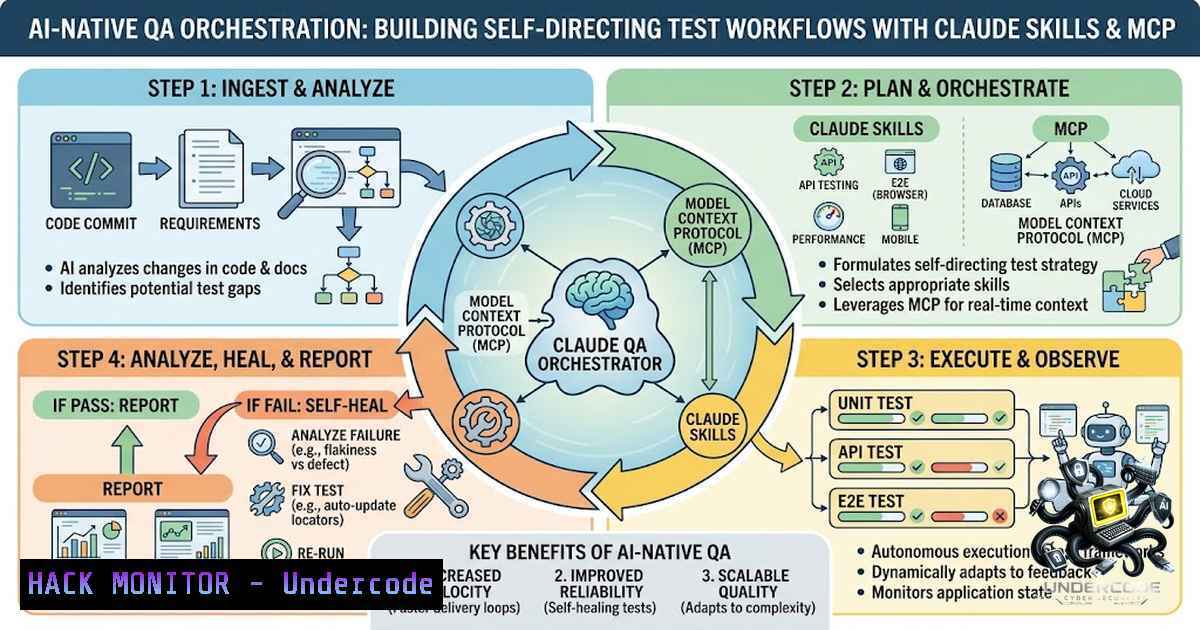
Quality Assurance is undergoing a fundamental transformation as AI-1ative workflows replace traditional manual test chains. The Model Context Protocol (MCP)—an open standard for connecting AI applications to external systems—combined with Claude Skills, enables QA teams to build self-directing systems where browser automation, test generation, and reporting happen autonomously. This shift from task-based manual testing to orchestrated AI-driven workflows represents a new operating model where requirements convert instantly to automation-ready tests, execution flows continuously across tools, and results push directly into team communication channels.
Learning Objectives & Secrets:
- Objective 1: Build an End-to-End MCP-Orchestrated QA Pipeline – Learn to connect Playwright browser automation, JIRA requirement tracking, and Slack reporting through a unified MCP orchestration layer that eliminates manual handoffs between tools.
-
Objective 2 Secret Tip: Leverage “Code Mode” for Complex Workflows – MCP Orchestrator’s Code Mode lets LLMs write and execute TypeScript code using your tools as an API, chaining multiple operations without LLM round-trips and achieving 60-75% token reduction for multi-step tasks. This is the hidden efficiency multiplier most QA teams overlook.
-
Objective 3 Secret Tip: Cache Selectors for Zero-Token Replay – Browser automation skills can cache learned selectors per `(site, page-archetype, intent)` so repeat actions dispatch at zero LLM tokens—transforming expensive one-off automations into cheap, repeatable daily jobs.
You Should Know:
1. Setting Up the MCP Orchestration Foundation
The MCP orchestrator acts as the brain of your AI-1ative QA system, coordinating multiple MCP servers into domain-specific “experts”. Start by installing the orchestrator and configuring your LLM provider:
 Install the MCP Orchestrator
npm install mcp-orchestrator

Install required MCP servers
npx -y @modelcontextprotocol/server-filesystem
npx -y @modelcontextprotocol/server-github
Configuration (TypeScript):
import { MCPOrchestrator } from 'mcp-orchestrator';
import { OpenAIProvider } from 'mcp-orchestrator/llm';

const orchestrator = new MCPOrchestrator({
servers: {
filesystem: {
command: 'npx',
args: ['-y', '@modelcontextprotocol/server-filesystem', './']
},
github: {
command: 'npx',
args: ['-y', '@modelcontextprotocol/server-github']
}
},
llm: new OpenAIProvider({
apiKey: process.env.OPENAI_API_KEY
})
});

await orchestrator.connect();

// Code Mode: Let LLM write and execute complex workflows
const result = await orchestrator.generateAndExecute(
'Find all TypeScript files, count lines in each, and return the top 5 largest'
);
console.log(result.code); // Inspect generated code
console.log(result.result); // View results
The orchestrator supports flexible execution patterns: Code Mode for complex workflows, Tool Calling for simple single-step operations, and LLM Sampling for dual-level orchestration. Composition patterns include sequential, parallel, retry, and conditional execution.
2. Browser Automation with Playwright + MCP
Claude Playwright adds browser automation capabilities through MCP, providing 26+ tools for controlling browsers, managing sessions, and automating web interactions.
Installation and Quick Setup:
 Install globally
npm install -g claude-playwright

Or add to project
npm install --save-dev claude-playwright

Initialize MCP configuration
npx claude-playwright mcp init --base-url http://localhost:3000
MCP Client Configuration (`claude_desktop_config.json`):
{
"mcpServers": {
"playwright": {
"command": "npx",
"args": ["@modelcontextprotocol/server-playwright"],
"env": {
"PLAYWRIGHT_BROWSER": "chromium"
}
}
}
}
Session Management (Critical for Authentication):
 Save authenticated session after manual login
npx claude-playwright session save my-app --url http://localhost:3000/login

List saved sessions
npx claude-playwright session list

Load session in Claude: "Load the my-app session"
Sessions include cookies, localStorage, and authentication state, remaining valid for 8 hours with auto-extension.
Natural Language Test Definition:
Using @probility/mcp-playwright-automation, teams define test scenarios in natural language or structured JSON:
{
"baseUrl": "https://example.com",
"scenarios": [
{
"name": "User Login Flow",
"steps": [
"Navigate to /login",
"Fill field 'Username' with 'testuser'",
"Fill field 'Password' with 'password123'",
"Click the 'Sign In' button"
],
"assertions": [
"URL should contain '/dashboard'",
"Page should show text 'Welcome back'"
]
}
]
}
Self-Healing Capability: When used with an LLM, the agent can inspect page state and find alternative ways to complete a step if a selector fails.
3. JIRA Integration for Requirements-to-Test Automation
The JIRA MCP server provides 32 tools for managing tickets, sprints, boards, worklogs, and Confluence pages.
Configuration:
Create a `.env` file or set environment variables directly:
JIRA_HOST=https://your-domain.atlassian.net
[email protected]
JIRA_API_TOKEN=your-api-token
Generate API Token:
1. Go to Atlassian API Tokens
2. Click “Create API token”
3. Copy the token and set as `JIRA_API_TOKEN`
MCP Client Configuration:
{
"mcpServers": {
"jira": {
"command": "npx",
"args": ["-y", "@tarasrushchak/jira-mcp-server"],
"env": {
"JIRA_HOST": "https://your-domain.atlassian.net",
"JIRA_EMAIL": "[email protected]",
"JIRA_API_TOKEN": "your-api-token"
}
}
}
}
Key Tools for QA Automation:
| Tool | Description |
||-|
| `list_tickets` | List tickets assigned to you with optional JQL filter |
| `create_ticket` | Create a new ticket with custom fields support |
| `update_status` | Change ticket status via transitions |
| `add_worklog` | Log time spent on a ticket |
| `get_sprint_issues` | Get issues in a sprint |
Python Alternative:
pip install mcp-jira

export JIRA_BASE_URL="https://your-instance.atlassian.net"
export JIRA_USERNAME="[email protected]"
export JIRA_API_TOKEN="your_api_token"
Then run: `mcp-jira`
4. Slack Integration for Real-Time Reporting
The Slack MCP server connects AI agents directly to Slack workspaces, enabling automated messaging, channel management, and team notifications.
Quick Setup with Claude Code:
claude mcp add slack-mcp -- npx -y @aaronsb/slack-mcp
Then ask Claude to run the `auth-setup` tool—it will guide you through browser selection and automatic token extraction.
Standalone Binary Setup:
 Extract tokens from your browser (interactive)
./slack-mcp setup

Run as MCP server (stdio)
./slack-mcp

Run as MCP server (SSE for remote/shared access)
./slack-mcp --transport sse
Environment Variables (Manual Token Setup):
export SLACK_MCP_XOXC_TOKEN="xoxc-..."
export SLACK_MCP_XOXD_TOKEN="xoxd-..."
./slack-mcp
Key Tools:
| Tool | What it does |
||-|
| `check-unreads` | Check unread messages |
| `send-message` | Send messages to channels |
| `add-reaction` | Add emoji reactions to messages |
| `archive-channel` | Archive inactive channels |
5. Security Hardening for MCP Deployments
MCP adoption has reached 97 million monthly SDK downloads, but rapid deployment creates significant security exposure. Every AI agent connecting to internal databases represents a potential attack vector.
Critical Security Practices:
Containerize Every MCP Server:
Run servers in containers (not on the host) with CPU/memory caps and a read-only filesystem where possible.
 Example Docker run for MCP server
docker run --rm \
--read-only \
--memory="512m" \
--cpus="0.5" \
-e JIRA_HOST="https://your-domain.atlassian.net" \
-e JIRA_API_TOKEN="${JIRA_API_TOKEN}" \
your-mcp-server-image
Replace .env Files with Runtime Secret Injection:
Never check keys into Git. Prefer dynamic secret injection over static configuration files.
Enforce Least-Privilege RBAC:
Tool-level permissions determine which MCP servers each role can invoke. Per-agent identity with scoped credentials enables audit attribution.
OAuth 2.1 with PKCE:
Prioritize user-scoped OAuth 2.1 authentication with PKCE over broad service-scoped credentials to reduce confused-deputy risk.
MCP Gateway Implementation:
MCP gateways act as a single “pinch point” where all AI agent traffic flows through centralized authentication, authorization, and audit logging.
6. Vulnerability Exploitation and Mitigation in MCP Orchestration
Threat Vectors to Know:
- Tool Poisoning: Attacks that modify a tool’s behavior or trick the model into using a malicious tool
- Orchestration Injection: Complex attacks utilizing multiple tools across different servers or agents
- Credential Aggregation: A single MCP server holding concurrent credentials for GitHub, Jira, AWS, and internal databases—compromising it compromises the user’s entire digital work environment
Mitigation Strategies:
Implement Zero-Trust for AI Agents:
Treat every tool call as potentially unauthorized until proven otherwise. Mandatory authentication and authorization per request with no default access assumptions.
Build a Curated, Approved MCP Server Registry:
Apply least-privilege tool access and maintain an allowlist of approved tools.
Complete Audit Trails:
Ensure audit trails support compliance investigations across HIPAA, SOC 2, and GDPR frameworks. Log all prompts, tool calls, responses, and context with per-user attribution.
Monitor for Shadow AI:
Detect off-gateway MCP usage in developer tools like Cursor and Claude Code.
What Undercode Say:
- Key Takeaway 1: Automation Is Now Automating Itself – The AI-1ative QA model eliminates the manual chain of tasks. Requirements flow from JIRA directly into test automation, execution runs autonomously through Playwright MCP, and results push to Slack—all orchestrated through a single MCP layer. What once took days now happens in minutes.
-
Key Takeaway 2: “Shift-Left” Extends to Test Creation – With natural language test definitions and AI-powered translation, test creation moves earlier in the development cycle. QA teams can generate automation-ready tests directly from requirements without writing a single line of Playwright code. Early adopters will redefine speed and quality benchmarks.
Analysis: The convergence of MCP orchestration, Claude Skills, and browser automation represents a fundamental shift in QA operating models. For QA leaders, three strategic imperatives emerge: First, invest in MCP infrastructure now—the protocol is transitioning to Linux Foundation governance, signaling enterprise-grade maturity. Second, prioritize security governance alongside automation—the credential aggregation problem and orchestration injection vectors demand zero-trust architectures. Third, the window for competitive advantage is narrow; organizations that deploy AI-1ative QA workflows in the next 6-12 months will establish quality benchmarks that laggards will struggle to match. The technology is production-ready, the security frameworks are emerging, and the efficiency gains are undeniable.
Prediction:
- +1 Early adopters of MCP-orchestrated QA will achieve 3-5x faster test creation cycles and 60-75% reduction in token costs for complex automation workflows, establishing insurmountable quality velocity advantages.
-
+1 MCP will become the de facto standard for AI-tool integration across enterprise QA by 2027, driven by Linux Foundation governance and growing ecosystem of MCP servers.
-
-1 Organizations that delay MCP adoption face shadow AI security risks as developers deploy unauthorized MCP servers without governance—creating unmanaged attack surfaces that security teams cannot monitor.
-
-1 The credential aggregation problem will produce high-profile breaches in 2026-2027 as MCP servers become prime targets. Enterprises must implement MCP gateways and per-agent identity before widespread deployment.
-
+1 Self-healing test automation through MCP will reduce test maintenance effort by 40-60%, as AI agents adapt to UI changes automatically without manual selector updates.
-
+1 The MCP gateway market will exceed $500M by 2028 as enterprises seek centralized control over AI agent tool access.
-
-1 The NSA’s May 2026 security guidance signals that regulatory scrutiny of MCP deployments is imminent—organizations without audit trails and access controls face compliance exposure.
▶️ Related Video (84% Match):
https://www.youtube.com/watch?v=-wt29usaPlc
🎯Let’s Practice For Free:
🎓 Live Courses & Certifications:
Join Undercode Academy for Verified Certifications
🚀 Request a Custom Project:
Secure, high-velocity infrastructure and disruptive technological engineering. Contact our engineering team for high-tier development and proprietary systems:
[email protected]
💎 Smart Architecture | 🛡️ Secure by Design | ⭐ Trusted by Thousands
IT/Security Reporter URL:
Reported By: https://lnkd.in/p/eB9J_Qqb – Hackers Feeds
Extra Hub: Undercode MoN
Basic Verification: Pass ✅


