Listen to this Post
Introduction
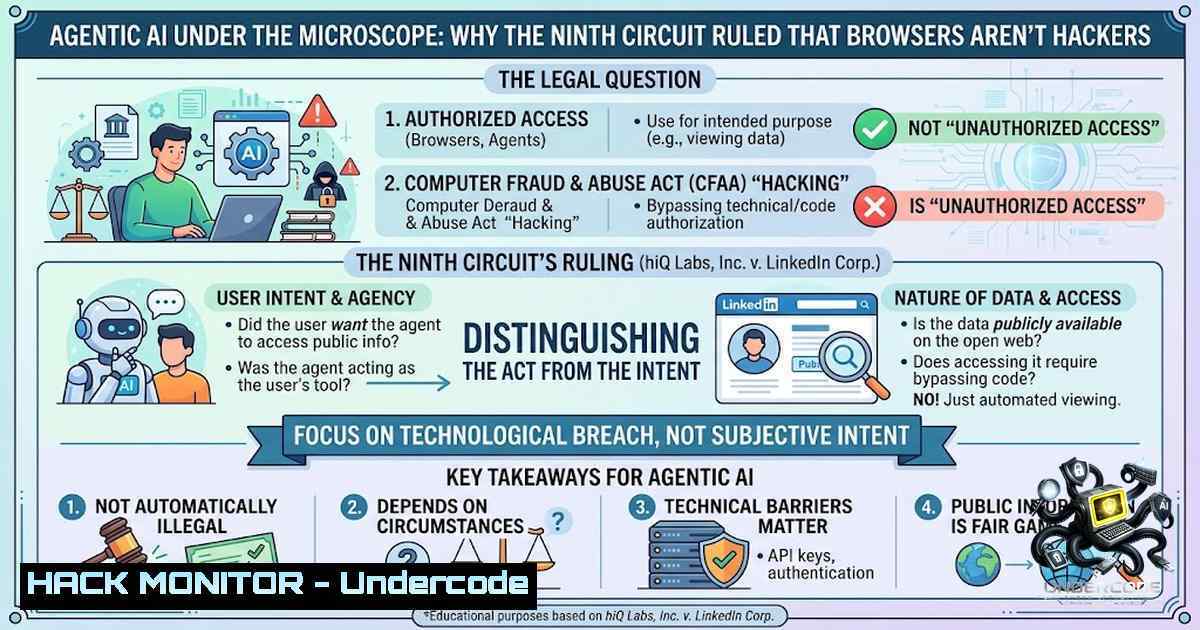
On August 4, 2026, the U.S. Court of Appeals for the Ninth Circuit issued a landmark decision in Amazon.com Services, LLC v. Perplexity AI, Inc., vacating a preliminary injunction that had barred Perplexity’s AI-powered Comet browser from interacting with Amazon’s platform. The ruling represents the first federal appellate decision to address whether an AI “agent” that assists a user in navigating a website constitutes unauthorized “access” under the Computer Fraud and Abuse Act (CFAA). By holding that the user—not the AI tool—is the party that “accesses” a protected computer system, the court established a technical-architecture-dependent framework for AI liability that has profound implications for developers, platform operators, and cybersecurity professionals alike.
Learning Objectives
- Understand the technical architecture of agentic AI browsers and how they interact with third-party platforms
- Analyze the Ninth Circuit’s interpretation of “access” under the CFAA and its application to AI agents
- Identify practical security measures and compliance strategies for AI tool deployment
You Should Know
1. Technical Architecture: How Comet Actually Works
The court’s decision hinged critically on the specific technical architecture of Perplexity’s Comet browser. Understanding this architecture is essential for any security professional evaluating AI agent liability.
Comet is not a monolithic application but a complex system spanning multiple components:
- Perplexity API Backend: Where the AI model resides, plans tasks, and issues commands
- The Sidecar UI: A pane that opens on the right-hand side of the browser, loaded from `https://www.perplexity.ai/sidecar`, which manages communication between the AI backend and browser extensions
– Three Custom Chrome Extensions: These extensions actually control the browser and perform user tasks
– The Browser Itself: Chromium-based, with the extensions communicating via the Chrome Extensions APIWhen a user directs the Assistant to perform a task on Amazon.com—such as finding a product—the following flow occurs:
1. The Assistant takes screenshots of the user’s browser view
2. These screenshots are sent from the user’s computer to Perplexity’s servers
3. Perplexity’s servers analyze the screenshots and return navigation instructions
4. The user’s browser (not Perplexity’s servers) communicates directly with Amazon’s servers at all timesCritical distinction: Perplexity’s servers never directly access Amazon’s systems. The AI provider receives visual data from the user’s device and sends back instructions—but the actual HTTP requests to Amazon originate from the user’s browser.
To verify this architecture in your own environment, you can inspect the network traffic:
Linux/macOS – Monitor outgoing connections from your browser:
 Use tcpdump to monitor traffic to a specific domain
sudo tcpdump -i any -1 host amazon.com

 Use lsof to see which processes are making connections
lsof -i -P | grep -E "chrome|firefox"

 Use ss to view active connections
ss -tunap | grep -E "chrome|amazon"
Windows – Monitor browser connections:
 View active network connections with associated processes
netstat -ano | findstr "ESTABLISHED"

 Get process details for a specific PID
Get-Process -Id <PID>

 Use Resource Monitor (resmon.exe) to view network activity by process
resmon
Browser DevTools – Inspect network requests:
1. Open Chrome DevTools (F12 or Ctrl+Shift+I)
2. Navigate to the Network tab
3. Perform actions with the AI Assistant
4. Observe that all requests to Amazon originate from your browser’s IP, not from Perplexity’s servers
Chrome Extension Inspection:
 On Linux/macOS, locate Chrome extension directories
~/.config/google-chrome/Default/Extensions/
~/Library/Application Support/Google/Chrome/Default/Extensions/

 On Windows
%LOCALAPPDATA%\Google\Chrome\User Data\Default\Extensions\
2. The Legal Framework: CFAA and the “Access” Question
The CFAA, enacted in 1986, is the primary federal anti-hacking statute. It prohibits “intentionally accessing” a protected computer without authorization or in excess of authorized access. The Ninth Circuit’s analysis rested on a textual interpretation: the CFAA punishes “whoever . . . intentionally accesses” a protected computer, and “whoever” means a person.
The court reached three central conclusions:
First, technical architecture and imputation: Because the agent functions locally in the user’s browser—taking screenshots and sending them to Perplexity’s servers for instructions—and because Perplexity’s servers never directly enter Amazon’s systems, the court determined that the party who “accesses” the system is the user, assisted by the AI. For purposes of the law, the AI is a tool, not a legal subject.
Second, avoiding mass criminalization of users: The court warned that extending the CFAA to these cases would expose end users themselves to criminal liability (for complicity or conspiracy) simply for browsing with AI assistants. Because the CFAA is a criminal statute, the court applied the rule of lenity—a principle requiring strict construction of penal laws.
Third, Terms of Service vs. Criminal Law: The ruling expressly clarifies that Amazon retains the freedom to restrict or block agents through its contractual Terms of Service. What the court rejects is equating a Terms of Service violation with a criminal hacking offense.
Judge John Hinderaker noted that the 1986 CFAA was not designed for AI-agent circumstances and warned of potential unintended consequences in extending the statute into a new domain.
Technical commands to understand CFAA-relevant access patterns:
Analyze HTTP request headers to identify automated agents:
 Using curl to inspect headers your browser sends
curl -I https://www.amazon.com

 Using Python to inspect user-agent strings
python3 -c "import requests; print(requests.get('https://www.amazon.com').request.headers)"
Detect bot traffic on a web server (Nginx):
 In nginx.conf - log user-agent for analysis
log_format main '$remote_addr - $remote_user [$time_local] "$request" '
'$status $body_bytes_sent "$http_referer" '
'"$http_user_agent"';

 Block known bot user-agents (caution: may block legitimate AI agents)
if ($http_user_agent ~ (perplexity|comet|ai-agent|bot|crawler|spider)) {
return 403;
}
Apache – Detect and block automated agents:
 .htaccess or httpd.conf
SetEnvIf User-Agent "perplexity|comet|ai-agent" block_agent
Order Allow,Deny
Allow from all
Deny from env=block_agent
3. Agent Detection and Bot Mitigation: Technical Countermeasures
Platform operators seeking to control AI agent access must rely on technical measures rather than criminal statutes. The court explicitly noted that Amazon could restrict agents through contractual Terms of Service and technical blocking mechanisms.
User-Agent String Spoofing Detection:
Perplexity’s Comet reportedly spoofed a standard Chrome browser to bypass bot mitigation. This raises important detection challenges:
// JavaScript detection of headless/automated browsers
function detectAutomation() {
const checks = {
// Check for headless Chrome features
headless: !navigator.webdriver === false,
// Check for missing plugins
plugins: navigator.plugins.length === 0,
// Check for language inconsistencies
language: navigator.language !== navigator.languages[bash],
// Check for Chrome runtime missing
chrome: typeof window.chrome === 'undefined'
};
return Object.values(checks).filter(Boolean).length;
}

// WebGL fingerprinting to detect headless rendering
function detectHeadlessGL() {
const canvas = document.createElement('canvas');
const gl = canvas.getContext('webgl');
if (!gl) return false;
const debugInfo = gl.getExtension('WEBGL_debug_renderer_info');
if (debugInfo) {
const renderer = gl.getParameter(debugInfo.UNMASKED_RENDERER_WEBGL);
// Headless browsers often use software renderers
return renderer.includes('SwiftShader') || renderer.includes('LLVM');
}
return false;
}
Server-Side Bot Detection (Python with Flask):
from flask import Flask, request, jsonify
import re

app = Flask(__name__)

 Known AI agent patterns
AI_AGENT_PATTERNS = [
r'perplexity',
r'comet',
r'anthropic',
r'claude',
r'chatgpt',
r'openai',
r'ai-agent',
r'browser-automation'
]

def detect_ai_agent(user_agent):
for pattern in AI_AGENT_PATTERNS:
if re.search(pattern, user_agent, re.IGNORECASE):
return True
return False

@app.route('/api/protected')
def protected_endpoint():
user_agent = request.headers.get('User-Agent', '')

if detect_ai_agent(user_agent):
 Option 1: Block outright
return jsonify({'error': 'Access denied'}), 403

 Option 2: Serve alternate content
 return jsonify({'data': 'This content is not available to automated agents'}), 200

 Serve normal content
return jsonify({'data': 'Protected content'}), 200
4. API Security and Access Control for AI Agents
The ruling emphasizes that platforms retain contractual rights to restrict access. For security professionals, this translates into implementing robust API security measures:
API Key Rotation and Management:
 Generate secure API keys
openssl rand -base64 32

 Linux - rotate API keys using AWS CLI
aws secretsmanager rotate-secret --secret-id my-api-key

 Check for exposed API keys in code repositories
grep -r "API_KEY\|SECRET_KEY\|TOKEN" --include=".py" --include=".js" .
Rate Limiting Implementation (Nginx):
 nginx.conf - rate limit by IP
limit_req_zone $binary_remote_addr zone=api_limit:10m rate=10r/s;

server {
location /api/ {
limit_req zone=api_limit burst=20 nodelay;
proxy_pass http://backend;
}
}
OAuth 2.0 Token Validation (Python):
import jwt
from functools import wraps
from flask import request, jsonify

def token_required(f):
@wraps(f)
def decorated(args, kwargs):
token = request.headers.get('Authorization')
if not token:
return jsonify({'error': 'Token missing'}), 401

try:
 Verify JWT token
data = jwt.decode(
token.split(' ')[bash],
'your-secret-key',
algorithms=['HS256']
)
 Check if token was issued to an AI agent
if data.get('agent_type') in ['ai', 'automated']:
 Apply stricter rate limits or additional checks
pass
except:
return jsonify({'error': 'Invalid token'}), 401

return f(args, kwargs)
return decorated
5. Compliance and Privacy Considerations for AI Tool Developers
The court’s decision does not grant AI providers blanket immunity. As the ruling notes, Amazon may pursue other claims including contract and tort claims. Developers must consider:
Data Privacy – Screenshot Handling:
The Assistant takes screenshots of the user’s browser view and sends them to Perplexity’s servers. This raises significant privacy concerns:
 Example: Implementing screenshot data minimization
import hashlib
import base64

def process_screenshot(raw_screenshot):
 Option 1: Hash identifiable data
hash_object = hashlib.sha256(raw_screenshot)
hex_dig = hash_object.hexdigest()

 Option 2: Extract only necessary DOM elements instead of full screenshot
 This reduces PII exposure

 Option 3: Implement differential privacy
 Add noise to sensitive data points

 Log access for audit purposes
audit_log = {
'timestamp': datetime.utcnow(),
'screenshot_hash': hex_dig,
'user_id': anonymize_user_id(user_id),
'purpose': 'product_search'
}
return processed_data
Data Residency and Sovereignty:
 Example: Terraform configuration for data residency
resource "aws_s3_bucket" "user_data" {
bucket = "perplexity-user-data"
region = "us-west-2"

 Ensure data stays within jurisdiction
lifecycle {
prevent_destroy = true
}
}

 Enforce encryption at rest
resource "aws_s3_bucket_server_side_encryption_configuration" "encryption" {
bucket = aws_s3_bucket.user_data.id

rule {
apply_server_side_encryption_by_default {
sse_algorithm = "AES256"
}
}
}
Audit Logging for Compliance (Linux):
 Set up comprehensive audit logging
sudo auditctl -w /var/log/perplexity/ -p wa -k perplexity_agent

 Monitor file access patterns
sudo auditctl -w /etc/nginx/nginx.conf -p wa -k nginx_config

 View audit logs
sudo ausearch -k perplexity_agent
6. Practical Security Hardening for AI Agent Deployments
For organizations deploying or defending against AI agents, the following measures are recommended:
Browser Security Hardening:
// Content Security Policy to restrict AI agent capabilities
// Add to HTTP response headers
Content-Security-Policy:
default-src 'self';
script-src 'self' 'unsafe-inline';
connect-src 'self' https://api.perplexity.ai;
img-src 'self' data: https://.amazon.com;
frame-ancestors 'none';
Network Segmentation for AI Services:
 iptables rules to restrict AI backend access
 Allow only necessary outbound connections
sudo iptables -A OUTPUT -d 192.168.1.0/24 -j ACCEPT
sudo iptables -A OUTPUT -d 10.0.0.0/8 -j ACCEPT
sudo iptables -A OUTPUT -m state --state ESTABLISHED,RELATED -j ACCEPT
sudo iptables -A OUTPUT -j DROP

 Log all denied connections
sudo iptables -A INPUT -j LOG --log-prefix "IPTables-Dropped: "
Container Security for AI Backend:
 Dockerfile for secure AI agent deployment
FROM python:3.11-slim

 Run as non-root user
RUN useradd -m -u 1000 agent
USER agent

 Drop unnecessary capabilities
RUN apt-get update && apt-get install -y --1o-install-recommends \
libcap2-bin && \
setcap 'cap_net_bind_service=ep' /usr/bin/python3

 Mount secrets as volumes, not environment variables
VOLUME /run/secrets

 Use read-only root filesystem
 In docker run: --read-only --tmpfs /tmp
Windows Security Configuration for AI Agents:
 Restrict AI agent processes via AppLocker
New-AppLockerPolicy -RuleType Exe -User Everyone -Action Deny `
-Path "C:\Program Files\Perplexity\" -Description "Block AI agents"

Enable Windows Defender Application Guard for isolation
Enable-WindowsOptionalFeature -Online -FeatureName Windows-Defender-ApplicationGuard

Configure Windows Firewall to restrict AI agent outbound traffic
New-1etFirewallRule -DisplayName "Block Perplexity Outbound" `
-Direction Outbound -Program "C:\Program Files\Perplexity\comet.exe" -Action Block
What Undercode Say
-
The architecture is the liability: The Ninth Circuit established that legal responsibility for AI agents depends fundamentally on technical architecture. If an AI provider’s servers never directly touch the target system, the provider is treated as a tool-maker, not an accessor. This creates a strong incentive for AI developers to design systems that route all traffic through the user’s device.
-
CFAA is not a Terms of Service enforcement tool: The ruling makes clear that the CFAA—a criminal anti-hacking statute—cannot be weaponized to enforce website Terms of Service. Platforms retain contractual remedies, but they cannot convert ToS violations into federal crimes. This is a significant victory for innovation and user agency, preventing the criminalization of routine web browsing with AI assistance.
-
The future is architecture-dependent: As the court itself acknowledged, this ruling does not establish a general liability regime for agentic AI. Future cases will be decided based on the specific technical architecture of each AI tool. Developers building AI agents should ensure their systems follow the Comet model—with all traffic originating from the user’s device—to minimize CFAA exposure.
-
Platforms must adapt, not just block: The ruling signals that AI agents are here to stay. Rather than attempting to block them through legal threats, platforms should develop AI recognition mechanisms,合规访问接口, and transaction confirmation rules. The future of e-commerce will involve AI agents acting on behalf of users, and platforms that adapt will thrive.
Prediction
-
+1 Increased innovation in agentic AI: The ruling provides legal clarity that will encourage investment in AI agent technologies, particularly in e-commerce, research, and personal assistance domains.
-
+1 Emergence of “AI agent compliance” as a new security discipline: Organizations will develop specialized frameworks for auditing AI agent architectures, ensuring they maintain the user-centric model that avoids CFAA liability.
-
-1 Rise in ToS litigation: With CFAA off the table, platforms will increasingly enforce their Terms of Service through contract law, leading to a wave of civil litigation over AI agent access.
-
-1 Potential legislative response: The ruling may prompt Congress to update the CFAA or enact new legislation specifically addressing AI agents, creating regulatory uncertainty in the short term.
-
+1 Development of standardized AI agent identification protocols: Industry may converge on standardized user-agent strings and identification mechanisms, enabling platforms to distinguish between beneficial AI agents and malicious bots.
-
-1 Platform fragmentation: Major platforms may implement aggressive technical barriers that inadvertently block legitimate AI agents, creating a fragmented web experience where some sites are accessible only through specific browsers.
-
+1 Growth of browser-based AI: The ruling validates the browser-extension model for AI agents, potentially accelerating the development of AI-powered browsers and browser extensions.
▶️ Related Video (80% Match):
https://www.youtube.com/watch?v=2QttZ3nvSjg
🎯Let’s Practice For Free:
🎓 Live Courses & Certifications:
Join Undercode Academy for Verified Certifications
🚀 Request a Custom Project:
Secure, high-velocity infrastructure and disruptive technological engineering. Contact our engineering team for high-tier development and proprietary systems:
[email protected]
💎 Smart Architecture | 🛡️ Secure by Design | ⭐ Trusted by Thousands
IT/Security Reporter URL:
Reported By: https://lnkd.in/p/e_Rrj_tC – Hackers Feeds
Extra Hub: Undercode MoN
Basic Verification: Pass ✅


