Listen to this Post
Introduction:
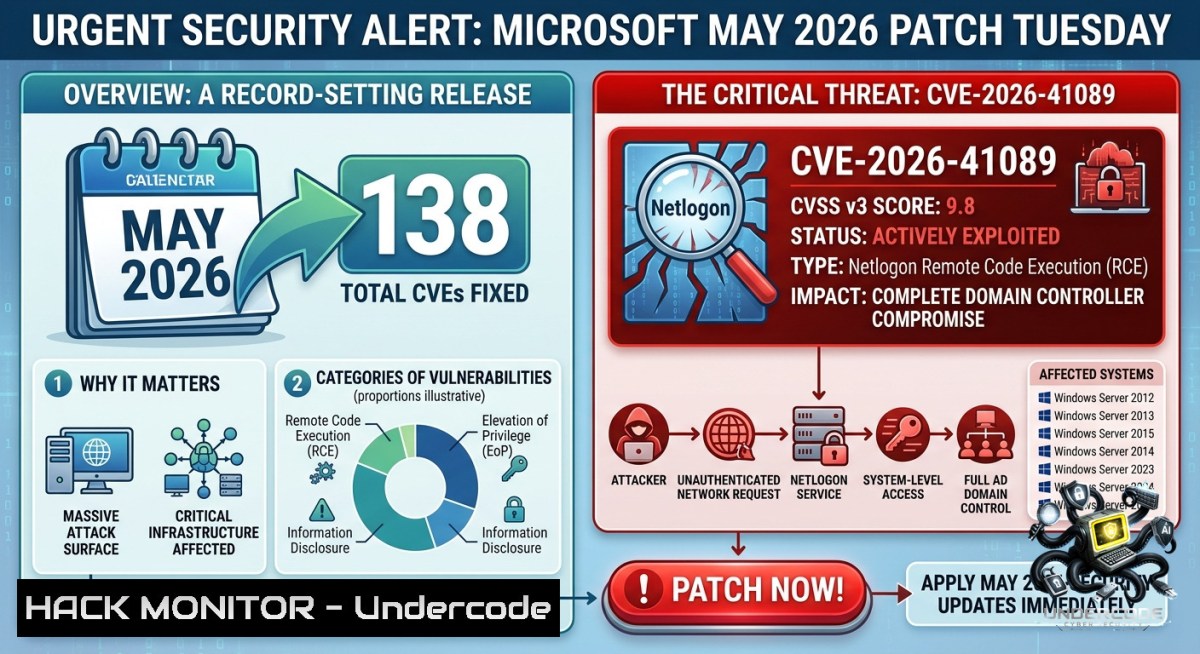
Microsoft’s May 2026 security update is one of the largest in the company’s history, addressing 138 new CVEs including a rare CVSS 10 vulnerability in Azure DevOps and a confirmed actively exploited zero-day in Windows Netlogon (CVE-2026-41089). The Belgian Cyber Security Centre (CCB) has verified in-the-wild exploitation of this pre-authentication remote code execution flaw, making immediate patching not just recommended but mandatory for every domain controller.
Learning Objectives:
– Understand the mechanics and impact of CVE-2026-41089 (Netlogon RCE) and CVE-2026-41096 (DNS Client RCE) with CVSS 9.8 scores
– Implement emergency patch prioritization and temporary mitigations for unpatched systems
– Apply hardening commands and detection scripts across Windows, Linux, and network infrastructure to block exploitation paths
You Should Know:
1. CVE-2026-41089 – Windows Netlogon Remote Code Execution (Stack Buffer Overflow, CVSS 9.8, Active Exploit)
This vulnerability allows an unauthenticated attacker to send a specially crafted network packet to a domain controller, triggering a stack-based buffer overflow in the Netlogon service. No user interaction is required, and successful compromise gives the attacker full domain control – wormable across the network.
Step‑by‑step guide to detect and mitigate:
Detection (Check if patch is installed):
 On Windows Server (Domain Controller)
Get-HotFix | Where-Object {$_.HotFixID -like "KB"} | Sort-Object InstalledOn -Descending
 Look for May 2026 security update KB (specific KB numbers depend on Windows version)
 Alternative: Use wmic
wmic qfe list brief /format:texttable

 Check Netlogon service status and recent errors
Get-Service Netlogon | Select-Object Name, Status, StartType
Get-WinEvent -LogName System | Where-Object {$_.ProviderName -eq "NETLOGON"} | Select-Object TimeCreated, Message -First 20
Temporary Mitigation (if patching is delayed):
– Block RPC over port 445 (SMB) and 135 (RPC Endpoint Mapper) from untrusted network segments using Windows Firewall or edge ACLs.
– Enforce SMB signing and disable NTLMv1 via Group Policy (Computer Configuration → Windows Settings → Security Settings → Local Policies → Security Options → “Network security: LAN Manager authentication level” → Send NTLMv2 response only. Refuse LM & NTLM).
– Monitor for suspicious Netlogon events: Event ID 5827, 5828, 5829 indicating malformed RPC calls.
Patching:
– Immediately apply the May 2026 Cumulative Update from Microsoft Update Catalog or WSUS.
– After patching, verify Netlogon registry key: `HKLM\SYSTEM\CurrentControlSet\Services\Netlogon\Parameters` – the `FullSecureChannelProtection` value should be `1` (default after patch).
2. CVE-2026-41096 – Windows DNS Client Remote Code Execution (Heap Buffer Overflow, CVSS 9.8)
A heap-based buffer overflow triggered by malicious DNS responses. Because the DNS Client service runs on almost all Windows systems, the attack surface is massive. Man-in-the-Middle (MitM) or a rogue DNS server can exploit this without authentication.
Step‑by‑step mitigation:
Disable DNS Client service (only if absolutely necessary for isolated systems):
sc stop dnscache
sc config dnscache start= disabled
Implement network-level protections:
– Enable DNSSEC validation on internal DNS resolvers to prevent spoofed responses.
– Configure firewall rules to allow DNS only from authorized recursive resolvers (TCP/UDP 53).
– Use DHCP Snooping and ARP inspection to prevent MitM attacks on local networks.
Detection (look for DNS response anomalies):
 Enable DNS Client diagnostic logging (Windows)
netsh dnsclient set log level=verbose
 Logs stored in %windir%\system32\dns\dnscache.log

 Monitor for repeated DNS query timeouts or malformed response events
Get-WinEvent -FilterHashtable @{LogName='Microsoft-Windows-DNS-Client/Operational'; ID=3006,3010}
Hardening registry (mitigates but does not replace patch):
[HKEY_LOCAL_MACHINE\SYSTEM\CurrentControlSet\Services\Dnscache\Parameters]
"MaxResponseSize"=dword:00001000 (limits response buffer)
Apply the May 2026 cumulative update first – this vulnerability is wormable.
3. CVE-2026-42898 – Microsoft Dynamics 365 On-Premises RCE (CVSS 9.9, Code Injection with Scope Change)
Any authenticated user can execute code injection that escalates beyond the Dynamics environment into the underlying server operating system. This rare “scope change” classification means a low-privileged Dynamics user can become Domain Admin.
Immediate actions for Dynamics 365 On-Prem administrators:
– Apply the security update for Dynamics 365 Server (version-specific patch from Microsoft).
– If patching impossible, disable the vulnerable plugin assembly registration temporarily:
-- Connect to Dynamics Organization Database
UPDATE PluginAssembly SET IsEnabled = 0 WHERE Name LIKE '%[vulnerable assembly]%'
– Restrict who can register or modify plugin assemblies using role-based access (only allow System Administrator).
– Monitor Event Viewer for Dynamics plugin execution events: Event ID 1000-1010 under `Applications and Services Logs/Microsoft/Dynamics`.
4. CVE-2026-40415 – Windows TCP/IP Remote Code Execution (Use-After-Free, CVSS 8.1)
This vulnerability requires low-memory conditions, making exploitation non-trivial but not impossible. Unauthenticated, remote RCE via crafted network packets.
Mitigation steps:
– Disable IPv6 if not needed (exploitation possible over IPv4 and IPv6). Use PowerShell:
Get-1etAdapterBinding -ComponentID ms_tcpip6 | Disable-1etAdapterBinding -ComponentID ms_tcpip6
– Enable TCP timestamps and window scaling hardening (registry):
[HKEY_LOCAL_MACHINE\SYSTEM\CurrentControlSet\Services\Tcpip\Parameters]
"EnableICMPRedirect"=dword:00000000
"DisableIPSourceRouting"=dword:00000002
– Apply patch – no workaround fully prevents the Use-After-Free condition.
5. Microsoft Office & SharePoint Preview Pane RCE (CVE-2026-40363/40358, CVSS 8.4)
Simply viewing a malicious file in the Preview Pane (without opening) triggers the exploit. This bypasses many user awareness controls.
Hardening steps:
– Disable Preview Pane in Windows File Explorer (View → Preview Pane → Off). Push via GPO:
– User Configuration → Administrative Templates → Windows Components → File Explorer → Turn off Preview Pane → Enabled.
– Use Group Policy to disable ActiveX and OLE objects in Office:
Computer Configuration → Policies → Administrative Templates → Microsoft Office 2016/2019 → Security Settings → Disable All ActiveX → Enabled
– Deploy the May 2026 Office updates via Microsoft Update or `cscript ospp.vbs` for volume-licensed versions.
6. GitHub Copilot & VS Code Security Bypass (CVE-2026-41109, CVSS 8.8) and Privilege Escalation (CVE-2026-41613)
The Copilot vulnerability disables path validation, allowing the AI assistant to modify arbitrary files on the developer’s machine. The VS Code MCP Server flaw allows escalation to managed identity permissions.
Enterprise mitigation (Windows/Linux/macOS):
 Linux/macOS: Force update VS Code and Copilot extension
code --list-extensions --show-versions | grep github.copilot
code --uninstall-extension github.copilot
code --install-extension github.copilot --force

 Windows PowerShell (admin)
code --list-extensions | Select-String "copilot"
 Then update via VS Code's built-in updater or winget
winget upgrade Microsoft.VisualStudioCode
– Enforce automatic updates for VS Code via enterprise policy: set `”update.mode”: “auto”` in `%APPDATA%\Code\User\settings.json` (Windows) or `~/.config/Code/User/settings.json` (Linux).
– Restrict Copilot’s file access using OS-level permissions: on Linux, run VS Code in a Firejail profile limiting write access to only project directories.
– Monitor for suspicious MCP server token requests (Event ID 4624 for managed identity logins).
What Undercode Say:
– Key Takeaway 1: The Netlogon RCE (CVE-2026-41089) is already under active exploitation – treat every unpatched domain controller as compromised. The CCB confirmation means attack chains are likely being weaponized in ransomware campaigns right now.
– Key Takeaway 2: The DNS Client vulnerability’s massive attack surface (every Windows machine with DNS) makes it as dangerous as EternalBlue. Combined with the Office Preview Pane flaw, even email filtering won’t protect against initial access.
– Analysis: Microsoft’s May 2026 release signals a shift in threat landscape: vulnerabilities are becoming more wormable, require no authentication, and increasingly target core OS components (Netlogon, DNS, TCP/IP). The inclusion of AI tools (Copilot, VS Code) shows supply chain expansion. Organizations must move from monthly “patch Tuesday” to continuous vulnerability management with automated detection. The Azure DevOps CVSS 10, though mitigated, indicates cloud configuration gaps remain high-value targets. Expect nation-state actors to reverse-engineer these patches within 72 hours, creating a zero-day window for unpatched systems. Prioritize Netlogon, then DNS Client, then Office – and assume breach if you haven’t patched by now.
Prediction:
– -1 Over the next 30 days, attackers will deploy automated scanners for CVE-2026-41089 and CVE-2026-41096, leading to a surge in domain-wide ransomware attacks similar to ZeroLogon but more destructive due to the wormable nature of both flaws.
– -1 Small to medium enterprises without dedicated patching teams will see compromise rates exceeding 40% for unpatched DCs, as exploit code becomes public within 2 weeks.
– +1 The forced acceleration of DNSSEC adoption and SMB signing enforcement as mitigations for these CVEs will permanently harden enterprise networks against a whole class of MITM attacks.
– -1 AI-assisted development tools like GitHub Copilot will face increased scrutiny and potential supply chain attacks following the CVE-2026-41109 bypass, leading to temporary enterprise bans unless Microsoft releases a complete architectural fix.
▶️ Related Video (72% Match):
🎯Let’s Practice For Free:
🎓 Live Courses & Certifications:
[Join Undercode Academy for Verified Certifications](https://undercode.co.uk/certifications/)
🚀 Request a Custom Project:
Secure, high-velocity infrastructure and disruptive technological engineering. Contact our engineering team for high-tier development and proprietary systems:
[[email protected]](mailto:[email protected])
💎 Smart Architecture | 🛡️ Secure by Design | ⭐ Trusted by Thousands
IT/Security Reporter URL:
Reported By: [Patchtuesday Microsoft](https://www.linkedin.com/posts/patchtuesday-microsoft-netlogon-share-7467537116642766848-fCPZ/) – Hackers Feeds
Extra Hub: Undercode MoN
Basic Verification: Pass ✅
🔐JOIN OUR CYBER WORLD [ CVE News • HackMonitor • UndercodeNews ]
[💬 Whatsapp](https://undercode.help/whatsapp) | [💬 Telegram](https://t.me/UndercodeCommunity)
📢 Follow UndercodeTesting & Stay Tuned:
[𝕏 formerly Twitter 🐦](https://x.com/undercodeupdate) | [@ Threads](https://www.threads.net/@undercodetesting) | [🔗 Linkedin](https://www.linkedin.com/company/undercodetesting/) | [🦋BlueSky](https://bsky.app/profile/undercode.bsky.social)


