Listen to this Post
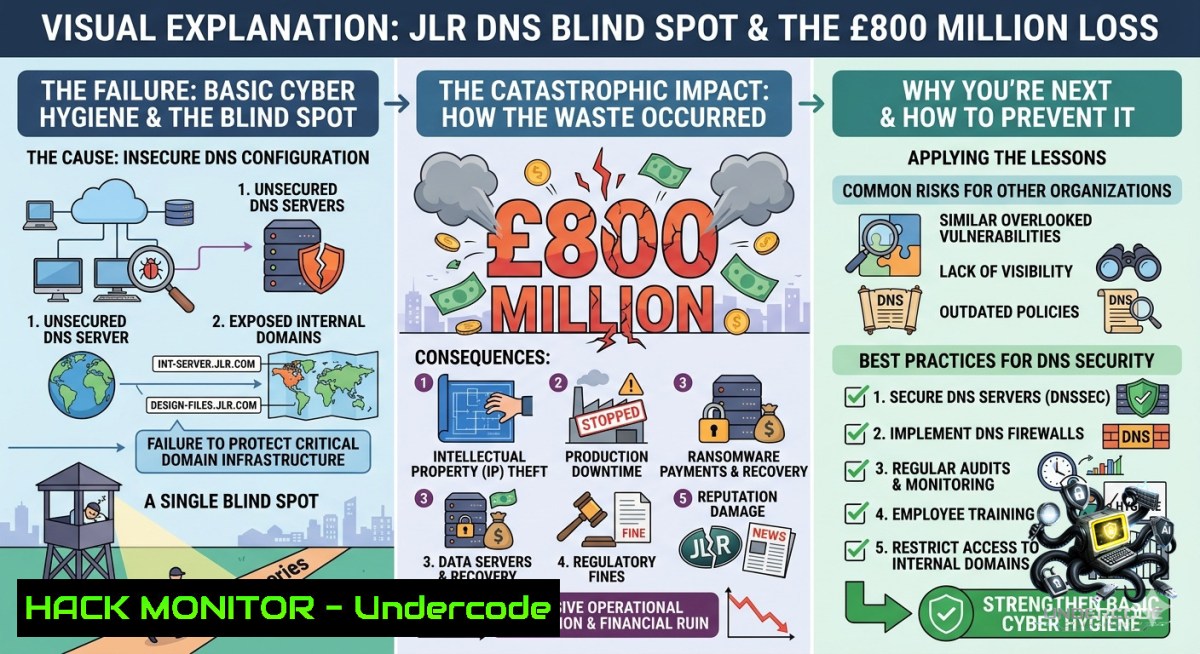
Introduction:
When a global automotive giant like Jaguar Land Rover (JLR) reportedly spends £800 million on IT and security yet still “cannot do the basics,” it signals a systemic failure in internet asset governance. Industry experts, including Andy Jenkinson of Whitethorn Shield (a named expert in Internet Asset & DNS vulnerabilities and threat intelligence), highlight that even massive budgets become useless if organisations neglect foundational controls—like DNS hygiene, attack surface reduction, and continuous threat intelligence. This article dissects the technical gaps behind such failures, provides actionable commands for asset discovery and DNS hardening, and offers a step-by-step roadmap to avoid becoming the next headline.
Learning Objectives:
– Identify and map all internet-facing DNS assets using open-source and enterprise-grade threat intelligence tools.
– Implement Linux and Windows commands to detect dangling DNS records, subdomain takeovers, and misconfigured cloud assets.
– Apply mitigation strategies including DNSSEC, CAA records, and automated asset discovery pipelines to prevent exploitation.
You Should Know:
1. Passive DNS Reconnaissance – Finding What JLR’s Team Missed
What this does:
Attackers and defenders alike use passive DNS replication to discover subdomains, historical IP mappings, and cloud assets that no longer exist but still have live DNS pointers—a primary vector for subdomain takeover and supply chain compromise.
Step‑by‑step guide for defenders:
Linux (using `dnsrecon`, `assetfinder`, and `shuffledns`):
 Install tools
sudo apt install dnsrecon
go install github.com/tomnomnom/assetfinder@latest
go install github.com/projectdiscovery/shuffledns/cmd/shuffledns@latest

 Basic subdomain enumeration
assetfinder --subs-only jaguarlandrover.com | tee jlr_subs.txt

 Brute-force common subdomains with resolution
shuffledns -d jaguarlandrover.com -w /usr/share/wordlists/seclists/Discovery/DNS/subdomains-top1million-5000.txt -r resolved.txt

 Check for dangling CNAME records (takeover candidates)
dnsrecon -d jaguarlandrover.com -t axfr  test for zone transfer misconfig
dnsrecon -d jaguarlandrover.com -t brt -D subdomains.txt
Windows (PowerShell – using `Resolve-DnsName` and `Invoke-SubdomainEnum`):
 Load custom DNS enumeration module (if available)
Import-Module ./DNSEnum.ps1

 Enumerate subdomains using public APIs
$domain = "jaguarlandrover.com"
$subs = (Invoke-RestMethod "https://api.securitytrails.com/v1/domain/$domain/subdomains?apikey=YOUR_KEY").subdomains
$subs | ForEach-Object { Resolve-DnsName "$_.$domain" -ErrorAction SilentlyContinue }

 Check for dangling DNS records
$records = Get-DnsRecord -Zone $domain -Type CNAME
foreach ($rec in $records) {
try { Resolve-DnsName $rec.RecordData -ErrorAction Stop }
catch { Write-Warning "Potential takeover: $($rec.Name) -> $($rec.RecordData) (unresolvable)" }
}
What the expert says: Andy Jenkinson warns that “if I reach out to you, chances are you have a problem.” That problem often starts with orphaned DNS entries pointing to decommissioned AWS S3 buckets, Azure Storage, or Heroku apps. Attackers register the vanished resource and gain trust, cookies, and possibly remote code execution.
2. Threat Intelligence Integration – Moving from Reactive to Predictive
What this does:
Threat intelligence platforms (TIPs) ingest indicators of compromise (IOCs), DNS sinkhole data, and dark web chatter to alert you before an attacker uses your misconfigured asset. This is what separates “spoon‑fed” organisations from resilient ones.
Step‑by‑step setup using MISP and TheHive:
Deploy MISP on Ubuntu 22.04:
 Install dependencies
sudo apt update && sudo apt install -y mariadb-server apache2 php php-mysql php-cli php-gnupg redis-server

 Download MISP installer
git clone https://github.com/MISP/MISP.git /var/www/MISP
cd /var/www/MISP
bash INSTALL/ubuntuInstall.sh

 Add DNS-specific feed (e.g., Bambenek DNS feed for DGA domains)
 In MISP UI: Sync Actions -> Add Feed -> URL: https://osint.bambenekconsulting.com/feeds/dga-feed.txt
Automated DNS lookups against intelligence feeds (Linux cron job):
!/bin/bash
 /etc/cron.daily/dns_threat_hunt
curl -s https://raw.githubusercontent.com/StevenBlack/hosts/master/alternates/fakenews-gambling-porn/hosts | grep "^0.0.0.0" | awk '{print $2}' > /tmp/blacklist.txt
for sub in $(cat /tmp/observed_assets.txt); do
if grep -q $sub /tmp/blacklist.txt; then
echo "ALERT: $sub matches threat feed" | mail -s "DNS Threat Match" [email protected]
fi
done
Windows PowerShell threat feed integration:
 Fetch and parse AlienVault OTX pulses for DNS IOCs
$otx_key = "YOUR_API_KEY"
$pulses = Invoke-RestMethod "https://otx.alienvault.com/api/v1/pulses/subscribed?limit=20" -Headers @{"X-OTX-API-KEY"=$otx_key}
$dns_iocs = $pulses.results.indicators | Where-Object {$_.type -eq "domain"} | Select-Object -ExpandProperty indicator

 Check your internal asset list
$my_assets = Get-Content C:\DNS\internal_domains.txt
foreach ($ioc in $dns_iocs) {
if ($my_assets -contains $ioc) {
Write-EventLog -LogName Security -Source "ThreatIntel" -EntryType Warning -EventId 5001 -Message "Asset $ioc found in threat feed"
}
}
3. Internet Asset Discovery – The Missing First Step
What this does:
Before you can secure what you own, you must know every IP, domain, certificate, and cloud load balancer tied to your organisation. Most breaches start with an unknown asset (shadow IT) that lacks logging or patching.
Automated discovery using Shodan and Censys (API‑based):
Python script (Linux/Windows):
import shodan
import censys.certificates
import socket

 Shodan search for JLR’s netblocks (example – replace with your own ASN)
api = shodan.Shodan("YOUR_SHODAN_API_KEY")
results = api.search("hostname:jaguarlandrover.com")
for service in results['matches']:
print(f"IP: {service['ip_str']} | Port: {service['port']} | Banner: {service['data'][:100]}")

 Censys certificate transparency logs
c = censys.certificates.CensysCertificates(api_id="ID", api_secret="SECRET")
certs = c.search("parsed.names: jaguarlandrover.com", max_records=50)
for cert in certs:
for name in cert['parsed']['names']:
print(f"Found asset: {name}")
Command‑line alternative (Linux):
 Use amass for passive & active enumeration
amass enum -passive -d jaguarlandrover.com -o all_assets.txt
amass intel -whois -d jaguarlandrover.com

 Use subfinder with multiple sources
subfinder -d jaguarlandrover.com -silent | httpx -status-code -title -tech-detect
Mitigation: After discovery, immediately deprecate any asset not in your official CMDB. For cloud assets, implement Azure Policy or AWS Config rules that auto‑remediate orphaned DNS records.
4. DNS Hardening – Stop the Most Basic Exploits
What this does:
Misconfigured DNS (open resolvers, missing DNSSEC, overly permissive zone transfers) enables cache poisoning, amplification DDoS, and man‑in‑the‑middle attacks. The ICO (Information Commissioner’s Office) would classify these as 32 GDPR failures—negligent technical measures.
Step‑by‑step hardening (BIND9 on Linux + Windows Server DNS):
Linux (BIND9):
 Restrict zone transfers
 Edit /etc/bind/named.conf.options:
 allow-transfer { 192.168.1.2; };  only secondary DNS
 also-1otify { 192.168.1.2; };

 Enable DNSSEC validation
dnssec-enable yes;
dnssec-validation yes;
dnssec-lookaside auto;

 Prevent recursion for external clients
allow-recursion { 10.0.0.0/8; 192.168.0.0/16; };

 Restart and test
sudo rndc reload
dig +dnssec jaguarlandrover.com  check AD flag for authenticated data
Windows Server DNS Manager:
– Open `dnsmgmt.msc` → Right‑click server → Properties
– Interfaces tab → Listen only on specific IPs (disable public‑facing recursion)
– Advanced tab → Enable DNSSEC validation for all responses
– Zone transfers → Only to secondary servers listed on Name Servers tab
Validate configuration:
 Test for open resolver (from external machine)
nslookup google.com YOUR_DNS_SERVER_IP
 Should return REFUSED or NXDOMAIN if not recursive for external clients

 Test DNSSEC
Resolve-DnsName -1ame jaguarlandrover.com -Type A -DnsOnly -Server 127.0.0.1 | fl
 Look for "IsDnsSecAuthenticated : True"
5. API Security in the Supply Chain – How Cloud Misconfigs Bypass Firewalls
What this does:
JLR’s £800 million likely included cloud APIs for telemetry, infotainment, and manufacturing. Attackers target API endpoints discovered via DNS (e.g., `api.jlr.com`, `telemetry.jlr.com`) using broken object level authorisation (BOLA) and excessive data exposure.
Testing for API misconfigurations (Linux + Burp Suite CLI):
Enumerate API subdomains and endpoints:
 Use ffuf to fuzz for API paths
ffuf -u https://api.jaguarlandrover.com/FUZZ -w /usr/share/wordlists/dirb/common.txt -ac -t 50 -o api_fuzz.json

 Check for cloud metadata endpoint exposure (AWS IMDSv1 vulnerability)
curl -H "Host: metadata.google.internal" http://169.254.169.254/computeMetadata/v1/instance/service-accounts/default/token
 If returns token on external subdomain -> critical cloud takeover
Windows command to detect exposed Swagger/OpenAPI docs:
$api_base = "https://api.jlr.com"
$paths = @("/swagger/v1/swagger.json", "/openapi.json", "/api-docs", "/v3/api-docs")
foreach ($path in $paths) {
try { $resp = Invoke-WebRequest -Uri "$api_base$path" -Method Get -TimeoutSec 5
if ($resp.StatusCode -eq 200) { Write-Host "INFO LEAK: $api_base$path" -ForegroundColor Red } }
catch { }
}
Mitigation: Deploy an API gateway (Kong, AWS API Gateway) with rate limiting, schema validation, and automatic blocking of requests to internal metadata endpoints.
6. The Human Factor – Why “Spoon‑Fed” Training Fails
What this does:
Andy Jenkinson’s frustration—”JLR have been spoon fed for 6 months, abused that and still cannot do the basics”—reflects a failed learning culture. Effective training must be role‑based, gamified, and continuously tested with simulated DNS‑based phishing (e.g., homoglyph attacks, subdomain spoofing).
Building a DNS phishing simulation (Linux):
 Using Evilginx2 for homoglyph domain (e.g., jaguar-landrover.com vs jaguarlandrover.com)
git clone https://github.com/kgretzky/evilginx2.git
cd evilginx2
sudo make install
sudo evilginx -p /etc/evilginx/

 Configure a phishing profile for JLR SSO
phishlet create jlr-sso
 In config: set domain jaguar-landrover.com, redirect to real login after capture
 Then launch tracker: phishlet get-url jlr-sso
Windows‑based training metric collection (PowerShell logging):
 Deploy via GPO to enable PowerShell transcription for all training VMs
Set-ItemProperty -Path "HKLM:\SOFTWARE\Policies\Microsoft\Windows\PowerShell\ScriptBlockLogging" -1ame "EnableScriptBlockLogging" -Value 1
 Then analyse logs for interactive sessions that fell for simulated phishing
What Undercode Say:
– Key Takeaway 1: Budget without asset visibility is theatre. The £800 million figure is meaningless if basic DNS hygiene (zone transfers, stale CNAMEs, open resolvers) remains unfixed for half a year.
– Key Takeaway 2: Outsourcing to cheaper labour pools introduces dangerous skill gaps. A £12K developer in India cannot replace a £50K UK expert in threat intelligence unless proper knowledge transfer and continuous validation are enforced.
Analysis (10 lines):
The JLR scenario is a textbook case of “cyber inertia”—spending that outpaces competency. Andy Jenkinson’s role as a threat intelligence expert suggests he likely identified exposed internal dashboards, misconfigured S3 buckets, or dangling DNS records pointing to decommissioned test environments. The fact that JLR “abused” 6 months of hand‑holding indicates either willful neglect or a governance model where security reports are filed but never actioned. The ICO’s involvement implies a personal data breach under GDPR, potentially involving customer telematics or employee PII. This underscores a hard truth: tools like Shodan, Censys, and even free passive DNS databases would have revealed the issues within hours. The failure is not technical—it’s procedural. Organisations must treat DNS as a critical control, not a commodity. Moreover, the salary comparison reveals a hidden risk: offshoring security operations without embedding threat intelligence into the SOC creates a “check‑box” mentality. Until boards mandate quarterly external asset discovery and red‑team DNS exercises, similar headlines will repeat.
Expected Output:
Prediction:
– -1: Within 12 months, regulators (ICO, GDPR supervisory authorities) will fine JLR at least £15 million for persistent technical failures under 32, using Jenkinson’s public criticism as evidence of prior knowledge.
– -1: The “spoon‑fed” disclosure model will backfire; independent researchers will stop reporting vulnerabilities to JLR, leading to zero‑day exploitation of the same DNS assets.
– +1: This incident will force the UK automotive sector to adopt mandatory Internet Asset Disclosure standards, similar to the US’s CISA BOD 23-01, reducing average discovery time for external assets from months to hours.
▶️ Related Video (66% Match):
🎯Let’s Practice For Free:
🎓 Live Courses & Certifications:
[Join Undercode Academy for Verified Certifications](https://undercode.co.uk/certifications/)
🚀 Request a Custom Project:
Secure, high-velocity infrastructure and disruptive technological engineering. Contact our engineering team for high-tier development and proprietary systems:
[[email protected]](mailto:[email protected])
💎 Smart Architecture | 🛡️ Secure by Design | ⭐ Trusted by Thousands
IT/Security Reporter URL:
Reported By: [Andy Jenkinson](https://www.linkedin.com/posts/andy-jenkinson-whitethorn-shield-96210727_800-million-just-doesnt-go-as-far-as-it-share-7469098166508875776-RLJB/) – Hackers Feeds
Extra Hub: Undercode MoN
Basic Verification: Pass ✅
🔐JOIN OUR CYBER WORLD [ CVE News • HackMonitor • UndercodeNews ]
[💬 Whatsapp](https://undercode.help/whatsapp) | [💬 Telegram](https://t.me/UndercodeCommunity)
📢 Follow UndercodeTesting & Stay Tuned:
[𝕏 formerly Twitter 🐦](https://x.com/undercodeupdate) | [@ Threads](https://www.threads.net/@undercodetesting) | [🔗 Linkedin](https://www.linkedin.com/company/undercodetesting/) | [🦋BlueSky](https://bsky.app/profile/undercode.bsky.social)


