Listen to this Post
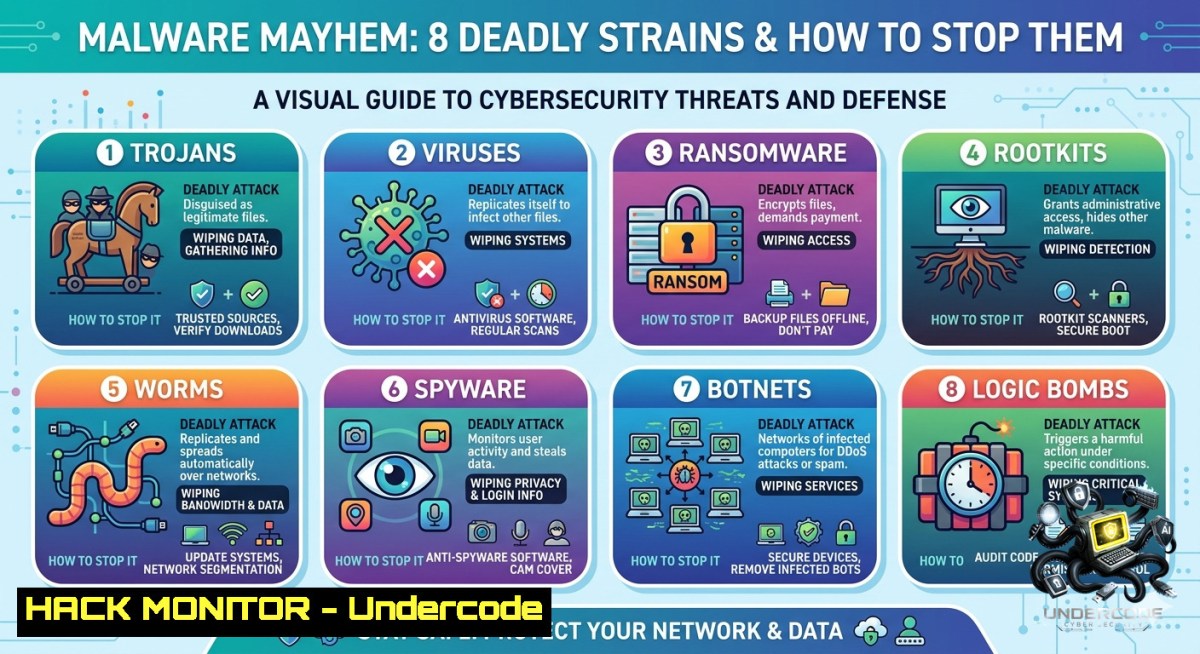
Introduction:
Malware remains the most persistent and polymorphic weapon in a cyber attacker’s arsenal. From adware that degrades user experience to rootkits that invisibly commandeer entire systems, each variant serves a distinct malicious purpose. Understanding these eight common malware types – adware, spyware, ransomware, Trojans, worms, rootkits, keyloggers, and bots – is not just academic; it is the foundation of proactive defense, enabling security teams to implement tailored detection, containment, and eradication strategies across endpoints and networks.
Learning Objectives:
– Identify and classify eight major malware families based on behavior and attack vectors.
– Apply operating‑system‑level commands (Linux/Windows) to detect, quarantine, and remove active infections.
– Implement preventive controls including patch management, endpoint monitoring, and user‑awareness training.
You Should Know:
1. Adware & Spyware – Unwanted Guests with Hidden Agendas
Adware bombards users with intrusive ads while spyware silently exfiltrates browsing habits, credentials, and personal data. Both often piggyback on free software or malicious browser extensions.
Step‑by‑step guide to detection and removal:
Linux:
– Check for suspicious browser extensions: `ls ~/.mozilla/firefox//extensions/` and `ls ~/.config/google-chrome/Default/Extensions/`
– Scan for adware processes: `ps aux | grep -iE “ad|spy|tracker”` (look for unknown names)
– Remove temporary tracking files: `rm -rf ~/.cache/ ~/.local/share/Trash/`
Windows (PowerShell as Admin):
– List running processes associated with adware: `Get-Process | Where-Object {$_.ProcessName -like “ad” -or $_.ProcessName -like “spy”}`
– Use MSRT (Malicious Software Removal Tool): `mrt /Q /F:Y`
– Clean browser cache for all users: `RunDll32.exe InetCpl.cpl,ClearMyTracksByProcess 8`
Hardening: Deploy browser extensions like uBlock Origin and disable third‑party cookies via Group Policy.
2. Ransomware – Data Hostage Crisis
Ransomware encrypts files or locks screens, demanding payment for decryption. Modern variants (e.g., LockBit, BlackCat) use hybrid encryption and double‑extortion tactics.
Step‑by‑step guide to mitigation and recovery:
Pre‑infection hardening (Windows):
– Enable Controlled Folder Access: `Set-MpPreference -EnableControlledFolderAccess Enabled`
– Block PowerShell from running scripts: `Set-ExecutionPolicy Restricted -Scope LocalMachine`
– Disable SMBv1 (common propagation vector): `Disable-WindowsOptionalFeature -Online -FeatureName SMB1Protocol`
Detection (Linux):
– Monitor for mass file renaming: `inotifywait -m ~/Documents -e modify,create,delete | grep -iE “encrypt|crypt|lock”` (install inotify‑tools first)
– Find recently changed files with suspicious extensions: `find /home -type f -mmin -10 | grep -iE “\.(encrypted|crypt|locked|ransom)”`
If infected: Isolate the host immediately (`ip link set
3. Trojans – Wolves in Sheep’s Clothing
Trojans masquerade as legitimate software (e.g., fake installers, email attachments) to drop backdoors, ransomware, or info‑stealers.
Step‑by‑step guide to detection and removal:
Linux:
– Verify package signatures: `rpm -Va` (RedHat) or `dpkg -V` (Debian) – look for “missing” or “changed” files
– Check listening ports for unknown services: `ss -tulpn | grep LISTEN | grep -vE “(ssh|http|https|mysql)”`
– Search for cron jobs added by trojans: `for user in $(getent passwd | cut -d: -f1); do crontab -u $user -l 2>/dev/null; done`
Windows:
– Run autoruns (Sysinternals) to check startup entries: `autoruns.exe -a` (download from Microsoft)
– Verify digital signatures: `Get-AuthenticodeSignature -FilePath C:\Windows\System32\.exe | Where-Object {$_.Status -1e “Valid”}`
– Use Sysmon to log process creation events (Event ID 1) and spot parent‑child anomalies.
Prevention: Enforce application allowlisting (AppLocker on Windows, `fapolicyd` on Linux). Train users to never run macros or executables from untrusted sources.
4. Worms – Self‑Propagating Network Wildfires
Worms exploit network vulnerabilities (e.g., EternalBlue, Log4Shell) to spread without user interaction, consuming bandwidth and dropping payloads.
Step‑by‑step guide to containment and patching:
Detection across the subnet (Linux):
– Scan for unusual outbound connection attempts: `sudo tcpdump -i eth0 -1 ‘tcp[bash] & (tcp-syn) != 0 and not (tcp[bash] & (tcp-ack))’ | head -100`
– List all listening SMB ports (445) – common worm vector: `nmap -p445 –open
– Check for rapid outbound email or IRC traffic: `iftop -i eth0 -P`
Windows mitigation:
– Enable Windows Firewall logging: `New-Item -Path “C:\Windows\System32\LogFiles\Firewall” -ItemType Directory` then enable via `netsh advfirewall set currentprofile logging filename %systemroot%\system32\LogFiles\Firewall\pfirewall.log`
– Block SMB inbound from untrusted networks: `Set-1etFirewallRule -DisplayName “File and Printer Sharing (SMB-In)” -Enabled True -Action Block`
Patch management: Automate critical patches using WSUS or `apt-get update && apt-get upgrade -y` on Debian/Ubuntu. For zero‑day worms, segment networks via VLANs and deploy virtual patching via WAF/IDS.
5. Rootkits – The Stealth Overlord
Rootkits modify kernel, bootloaders, or system binaries to hide processes, files, and network connections from standard tools.
Step‑by‑step guide to detection and eradication:
Linux (using rkhunter & chkrootkit):
– Install and run rkhunter: `sudo apt install rkhunter -y && sudo rkhunter –check –skip-keypress`
– Compare checksums of critical binaries: `rpm -Va | grep -E ‘^..5’` (checksum mismatch)
– Check for hidden kernel modules: `lsmod | grep -v $(cat /proc/modules | awk ‘{print $1}’ | paste -sd ‘|’)`
Windows (using GMER & TDSSKiller):
– Download GMER (from gmer.net) and run as admin – look for “hidden” or “hook” entries.
– Use Kaspersky TDSSKiller: `tdsskiller.exe -l C:\tdss_log.txt -dce` (detects TDSS, Alureon rootkits)
– Boot from a trusted rescue media (Windows Defender Offline) to scan offline.
Recovery: Rootkits often persist across OS reinstalls if the boot sector is infected. Secure boot + measured boot (TPM) is required. Wipe disk and restore from pre‑infection backups.
6. Keyloggers & Bots – Silent Credential Theft & Distributed Mayhem
Keyloggers capture every keystroke (passwords, credit cards). Bots enroll infected devices into botnets for DDoS, spam, or credential stuffing.
Step‑by‑step guide to detection and mitigation:
Detect keyloggers (Windows):
– List keyboard driver filters: `reg query HKLM\SYSTEM\CurrentControlSet\Control\Class\{4d36e96b-e325-11ce-bfc1-08002be10318} /s | findstr “UpperFilters”`
– Monitor for unexpected GetAsyncKeyState API calls using API Monitor tool (rohitab.com)
– Check for hidden windows using WinSpy++: look for windows with class “ConsoleWindowClass” running without console.
Bot detection (Linux):
– Show established connections to known C2 ports: `netstat -antp | grep -E ‘:(6667|8080|443|80) ‘ | grep ESTABLISHED`
– Identify CPU spikes from crypto‑miner bots: `top -b -1 1 | head -20` and `ps aux –sort=-%cpu | head -10`
– Use fail2ban to block repeated outbound connection attempts: `sudo fail2ban-client status sshd`
Prevention: Deploy EDR with behavioral analytics (e.g., Wazuh, Elastic Defend). Enforce multi‑factor authentication (MFA) to render stolen credentials useless.
7. API Security & Cloud Hardening – Modern Malware Vectors
Malware increasingly abuses cloud APIs (e.g., stolen OAuth tokens, misconfigured S3 buckets) to exfiltrate data or deploy cryptojackers on cloud workloads.
Step‑by‑step guide to API‑aware hardening:
Audit cloud permissions (AWS CLI):
– List all publicly accessible S3 buckets: `aws s3api list-buckets –query “Buckets[?Name!=’null’]” –output table` then check each: `aws s3api get-bucket-acl –bucket
– Detect unused IAM keys: `aws iam list-access-keys –user-1ame
Linux container hardening:
– Run containers as non‑root: `docker run –read-only –user 1000:1000 –security-opt=no-1ew-privileges:true nginx`
– Block privilege escalation via AppArmor: `sudo aa-genprof docker` and apply profile to container.
Windows cloud (Azure):
– Audit Azure Key Vault access logs: `az monitor activity-log list –resource-group
What Undercode Say:
– Key Takeaway 1: Malware classification is not just taxonomy – each type requires distinct detection logic. A single antivirus signature cannot stop a rootkit or a worm; layered defenses (network, host, behavior) are mandatory.
– Key Takeaway 2: Commands and tools alone are useless without continuous monitoring. The difference between a minor infection and a full breach is often the time between initial compromise and detection – which must shrink from weeks to minutes using SIEM, EDR, and threat intelligence feeds.
– Analysis (10 lines): The post correctly highlights that malware “comes in many forms” and that awareness is the first step. However, awareness without actionable technical defense leads to false confidence. Adware and spyware are often dismissed as low‑risk, but they frequently deliver Trojans or keyloggers. Ransomware has evolved from opportunistic spam to targeted, human‑operated attacks that disable backups and spread via legitimate admin tools. Rootkits remain the most under‑detected threat because they subvert the operating system’s own reporting. Bots form the backbone of modern cybercrime as a service – a single infected laptop can become a node in a 100,000‑strong DDoS swarm. The commands provided above (rkhunter, netsh, tcpdump, etc.) are battle‑tested, but they require regular execution and log review. Organizations should move beyond checklists and adopt continuous validation – for example, using Sysmon + Event Log forwarding or Osquery on Linux to baseline normal behavior. Finally, user training must be scenario‑based (e.g., “spot the phishing link in this email”) rather than generic slideshows. Cyber Threat Intelligence’s call to “patch regularly, monitor endpoints, train users” is simple but profound – execution is where most fail.
Prediction:
– +1 AI‑driven polymorphic malware will become the norm within 24 months, where each infection instance generates unique code signatures, rendering static detection obsolete. Defenders will shift entirely to behavioral analysis and hardware‑backed attestation.
– -1 Ransomware cartels will adopt zero‑trust evasion – targeting backup systems first, then rotating encryption keys every few minutes to block decryption even after ransom payment. Small and medium businesses without immutable offsite backups face existential risk.
– +1 Consumer‑grade rootkit detection will improve thanks to Microsoft Pluton and Linux’s kernel lockdown feature, making ring‑0 persistence dramatically harder. However, firmware (UEFI) rootkits will rise, requiring signed capsule updates.
– -1 Bots will exploit edge devices (routers, cameras, smart speakers) more aggressively as home and industrial IoT adoption grows, because these devices rarely receive patches and have ample bandwidth for DDoS reflection attacks.
▶️ Related Video (74% Match):
🎯Let’s Practice For Free:
🎓 Live Courses & Certifications:
[Join Undercode Academy for Verified Certifications](https://undercode.co.uk/certifications/)
🚀 Request a Custom Project:
Secure, high-velocity infrastructure and disruptive technological engineering. Contact our engineering team for high-tier development and proprietary systems:
[[email protected]](mailto:[email protected])
💎 Smart Architecture | 🛡️ Secure by Design | ⭐ Trusted by Thousands
IT/Security Reporter URL:
Reported By: [Cybersecurity Malware](https://www.linkedin.com/posts/cybersecurity-malware-threatintelligence-share-7468651794005397504-3eCK/) – Hackers Feeds
Extra Hub: Undercode MoN
Basic Verification: Pass ✅
🔐JOIN OUR CYBER WORLD [ CVE News • HackMonitor • UndercodeNews ]
[💬 Whatsapp](https://undercode.help/whatsapp) | [💬 Telegram](https://t.me/UndercodeCommunity)
📢 Follow UndercodeTesting & Stay Tuned:
[𝕏 formerly Twitter 🐦](https://x.com/undercodeupdate) | [@ Threads](https://www.threads.net/@undercodetesting) | [🔗 Linkedin](https://www.linkedin.com/company/undercodetesting/) | [🦋BlueSky](https://bsky.app/profile/undercode.bsky.social)


