
Listen to this Post
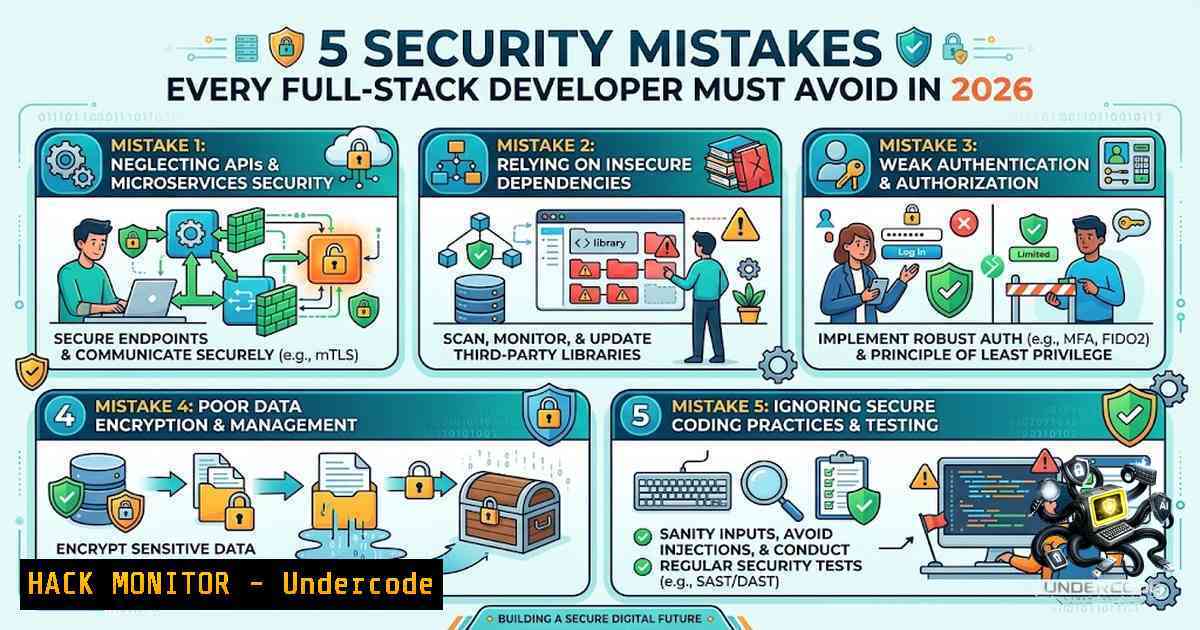
Introduction:
In the relentless pursuit of shipping features and meeting tight deadlines, application security is frequently relegated to a “sprint-zero” afterthought or a final-stage checklist. This reactive approach creates exploitable gaps, turning modern web applications into prime targets for threat actors leveraging automated vulnerability scanners and sophisticated social engineering. As development cycles accelerate with AI-assisted coding, the margin for security error narrows, demanding that foundational secure coding practices are integrated from the first line of code to the final deployment artifact.
Learning Objectives & Secrets:
- Objective 1: Master the secure management of secrets and credentials, understanding that client-side exposure is a critical failure.
- Secret Tip: Implement a dynamic secret rotation policy using HashiCorp Vault or AWS Secrets Manager instead of relying solely on static environment variables.
- Objective 2: Harden application authentication mechanisms against credential stuffing and brute-force attacks.
- Secret Tip: Implement multi-factor authentication (MFA) via TOTP (Time-Based One-Time Passwords) and utilize “fail2ban” or Web Application Firewall (WAF) rules to block malicious IPs after multiple failed attempts, reducing server load and preventing account enumeration.
- Objective 3: Proactively manage the software supply chain by auditing dependencies for known vulnerabilities (CVEs).
- Secret Tip: Integrate Software Composition Analysis (SCA) tools like Snyk or OWASP Dependency-Check directly into your CI/CD pipeline to fail builds if a critical vulnerability is detected in a new dependency.
You Should Know:
- Never Store Sensitive API Keys in Client-Side Code
Exposing API keys, database connection strings, or service account credentials in client-side JavaScript or mobile app bundles is akin to leaving the front door key under the mat. Attackers can easily extract these via browser developer tools or by intercepting network traffic. The secure approach is to keep these secrets server-side, accessing them via environment variables or a dedicated secrets management solution.
Step-by-Step Guide for Secure Secret Management:
- Audit: Scan your codebase for hardcoded secrets using tools like `trufflehog` or
git-secrets. - Isolate: Move all secrets to a secure backend service (e.g., a Node.js or Python API). Your frontend should only make authenticated API calls to this backend.
- Environment Variables: Use `.env` files locally but never commit them. In production, use the hosting platform’s (e.g., AWS, Heroku, Vercel) environment configuration feature.
Linux Command: `export DB_PASSWORD=”$(openssl rand -base64 32)”` to generate a secure password.
Windows Command (Powershell): `$env:API_KEY = “YourSecureKey”; dotnet run` to test locally. - Secrets Management: For enterprise-grade security, integrate a service like HashiCorp Vault. Your application retrieves secrets dynamically at runtime via an API call.
Example: Retrieving a secret from Vault via CLI
vault kv get secret/application/prod
-
Sanitize All User Inputs to Prevent SQL Injection and XSS
SQL Injection and Cross-Site Scripting (XSS) remain the OWASP Top 10 mainstays due to developers trusting unsanitized user inputs. An attacker can manipulate input fields to execute arbitrary SQL commands (exfiltrating entire databases) or inject malicious scripts (stealing session cookies). The principle is simple: never trust user-supplied data.
Step-by-Step Guide for Input Sanitization:
- Parameterized Queries: Always use parameterized queries or prepared statements. This separates the SQL logic from the data, preventing the database engine from interpreting user input as code.
Secure Code (Node.js/PostgreSQL):
const result = await client.query('SELECT FROM users WHERE email = $1', [bash]);
2. Output Encoding: Escape user-controlled data before rendering it in HTML, JavaScript, or CSS contexts. Use libraries like `DOMPurify` to sanitize HTML content on the client-side.
3. Input Validation: Implement strict allowlist validation. If a field expects a UUID, reject any input that doesn’t match the UUID format regex.
 Python Regex Validation Example
import re
if not re.match(r'^[a-f0-9-]{36}$', user_input):
raise ValueError("Invalid UUID format")
4. Automated Scanning: Use DAST tools like OWASP ZAP to automatically test your endpoints for injection vulnerabilities as part of your QA process.
3. Implement Secure Authentication with JWT and Rate-Limiting
JSON Web Tokens (JWT) are popular for stateless authentication, but misconfigurations can lead to session hijacking. An attacker intercepting a JWT can masquerade as the user. Furthermore, public login endpoints are prime targets for brute-force attacks. Rate-limiting mitigates this by throttling the number of login attempts from a single IP or user account.
Step-by-Step Guide for Hardening Authentication:
- HTTPS Enforce: Enforce HTTPS on all pages to protect JWT tokens from being intercepted over insecure connections. Use HSTS headers to enforce this browser-side.
.htaccess to enforce HTTPS RewriteEngine On RewriteCond %{HTTPS} off RewriteRule ^(.)$ https://%{HTTP_HOST}/$1 [R=301,L] - Secure JWT: Use strong signing algorithms (e.g., `HS256` or
RS256). Keep secret keys long (256-bit min) and store them securely. Set short expiration times for access tokens (e.g., 15 minutes) and use refresh tokens for long-lived sessions.
3. Rate-Limiting Implementation:
Express.js (Node.js): Use the `express-rate-limit` middleware.
const limiter = rateLimit({
windowMs: 15  60  1000, // 15 minutes
max: 100, // Limit each IP to 100 requests per windowMs
message: "Too many requests, please try again later."
});
app.post('/api/login', limiter, loginHandler);
Nginx Configuration: You can also set this at the web server level.
http {
limit_req_zone $binary_remote_addr zone=mylimit:10m rate=5r/m;
server {
location /login {
limit_req zone=mylimit burst=10 nodelay;
proxy_pass http://your_backend;
}
}
}
4. Keep Dependencies Updated to Prevent Known CVEs
Modern applications are built on hundreds of open-source libraries. Each library is a potential entry point for attackers who exploit publicly disclosed vulnerabilities (CVEs). Attackers actively scan for applications using outdated versions of popular packages like lodash, axios, or log4j. Proactive dependency management is no longer optional.
Step-by-Step Guide for Dependency Auditing:
- Inventory: List all your direct and transitive dependencies.
2. Auditing Tools:
NPM: Run `npm audit` to see a report of vulnerabilities. Use `npm audit fix` to attempt automatic upgrades to patched versions.
Python (Pip): Use `pip-audit` to scan your `requirements.txt` file. `safety check` is another popular tool.
GitHub Dependabot: Enable GitHub’s Dependabot to automatically create pull requests for security updates.
 Linux command to scan all Node.js projects in a directory
find . -1ame "package.json" -exec dirname {} \; | while read dir; do
echo "Scanning $dir"
(cd "$dir" && npm audit --json)
done
3. Monitoring: Integrate SCA tools like Snyk into your IDE to get real-time alerts as you code.
4. CI/CD Integration: Configure your pipeline to reject builds if a high or critical CVE is detected.
 .github/workflows/security-scan.yml
steps:
- name: Run Snyk Security Scan
uses: snyk/actions/node@master
env:
SNYK_TOKEN: ${{ secrets.SNYK_TOKEN }}
- Apply the Principle of Least Privilege in Database Management
The Principle of Least Privilege (PoLP) dictates that a user or process should only be granted the minimum permissions required to perform its function. Applying this to databases means preventing your application’s database user from being able to drop tables, alter schemas, or access unrelated data. If an attacker exploits your application, their capabilities are severely restricted.
Step-by-Step Guide for Database Hardening:
- Separation of Duties: Create separate database users for different operations (e.g., `app_reader` for SELECT queries, `app_writer` for INSERT/UPDATE, `app_admin` for migrations).
2. Restrict Permissions:
PostgreSQL Example:
-- Grant specific SELECT permissions to a reader role
GRANT SELECT ON TABLE users, orders TO app_reader;
-- Grant specific DML permissions to a writer role
GRANT INSERT, UPDATE ON TABLE users, orders TO app_writer;
-- Revoke all on public schema by default
REVOKE ALL ON SCHEMA public FROM PUBLIC;
MySQL Example:
CREATE USER 'app_writer'@'localhost' IDENTIFIED BY 'strongpassword';
GRANT SELECT, INSERT, UPDATE ON app_db. TO 'app_writer'@'localhost';
GRANT DROP, ALTER ON app_db. TO 'app_admin'@'localhost' WITH GRANT OPTION;
3. Connection Management: Use connection pooling to manage database connections efficiently but ensure each pool uses the correct, least-privileged credentials.
4. Regular Audits: Periodically review user roles and permissions to ensure no excessive grants exist, especially after team member changes.
What Undercode Say:
- Key Takeaway 1: Security is a continuous process, not a one-time setup. It requires integrating security checks (SAST, DAST, SCA) into every stage of the software development lifecycle (SDLC).
- Key Takeaway 2: The most effective security measures are often simple: adhering to the principle of least privilege, validating all inputs, and managing secrets properly can thwart the majority of common attacks.
Analysis: The landscape of web application security is shifting from reactive patching to proactive defense-in-depth. The post highlights a crucial cultural and technical gap: many full-stack developers, particularly those self-taught or in fast-paced environments, lack formal security training. This is exacerbated by the increasing speed of development powered by AI, which can generate functional but sometimes insecure code. The “secret tips” provided here are designed to bridge that gap by offering actionable, measurable steps that are directly implementable in any modern tech stack. By prioritizing these five areas, developers can dramatically reduce their application’s attack surface and build trust with their users. The inclusion of practical commands across both Linux and Windows systems ensures these hardening techniques are accessible to a wide audience, regardless of their local development environment.
Prediction:
- +1: Proactive integration of automated security scanning (SAST/DAST) into CI/CD pipelines will reduce the average time to patch critical vulnerabilities from weeks to hours, significantly lowering the window of opportunity for attackers.
- +1: The rise of AI-powered code completion will lead to a parallel increase in AI-driven security linters that can detect and automatically refactor insecure code snippets in real-time, making security a native feature of the coding experience.
- -1: Despite best practices, the complexity of modern supply chains will lead to more “zero-click” attacks targeting nested dependencies, forcing organizations to invest heavily in real-time threat detection and behavioral monitoring to mitigate the risk of previously unknown vulnerabilities.
- -1: The shift towards serverless and edge computing introduces new “attack surfaces” where traditional security models (like perimeter firewalls) are obsolete, creating a spike in configuration-related breaches due to misconfigured cloud IAM policies and public cloud storage buckets.
▶️ Related Video (88% Match):
🎯Let’s Practice For Free:
🎓 Live Courses & Certifications:
Join Undercode Academy for Verified Certifications
🚀 Request a Custom Project:
Secure, high-velocity infrastructure and disruptive technological engineering. Contact our engineering team for high-tier development and proprietary systems:
[email protected]
💎 Smart Architecture | 🛡️ Secure by Design | ⭐ Trusted by Thousands
IT/Security Reporter URL:
Reported By: https://lnkd.in/p/eYHSD8gi – Hackers Feeds
Extra Hub: Undercode MoN
Basic Verification: Pass ✅


