Listen to this Post
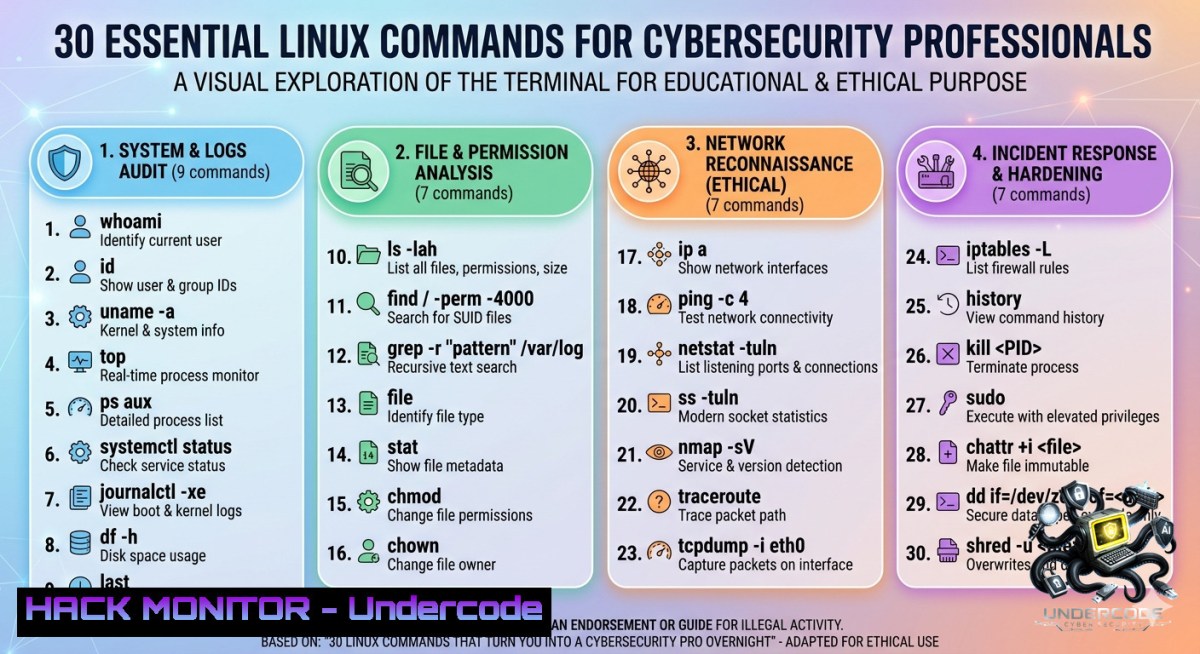
Introduction:
Linux proficiency is non‑negotiable for cybersecurity professionals, system administrators, and DevOps engineers. Whether you are hardening a cloud server, investigating a breach, or automating defense scripts, the command line is your primary weapon. This article transforms a simple cheat sheet of 30 everyday Linux commands into a practical, hands‑on guide for real‑world security and IT operations.
Learning Objectives:
- Execute essential file, permission, and process commands to detect and mitigate unauthorized activity.
- Apply network reconnaissance and remote access tools for secure system management and threat hunting.
- Utilize compression, log analysis, and automation techniques to streamline incident response and system hardening.
You Should Know:
1. File & Directory Mastery for Incident Response
Step‑by‑step guide: When investigating a potential compromise, start by navigating and inspecting the file system.
– `ls -la` – List all files including hidden ones (e.g., .bashrc, .ssh) with detailed permissions. Windows equivalent: dir /a.
– `find / -1ame “.php” -perm 777` – Locate world‑writable scripts that could be backdoors.
– `cd /var/log/ && ls -lt` – Jump to logs and sort by modification time.
– `cp suspicious_file /mnt/usb/evidence/` – Preserve evidence before analysis.
– `rm -rf /tmp/malware_temp` – Remove malicious temporary directories (use with caution).
Pro tip: Use `stat` to check file timestamps for anomalies (e.g., creation date after a known breach).
2. Permission Hardening: Lock Down Your System
Step‑by‑step guide: Misconfigured permissions are a leading attack vector. Harden them systematically.
– `chmod 600 /etc/shadow` – Allow only root to read/write password hashes.
– `chown root:root /etc/ssh/sshd_config` – Assign ownership to root.
– `umask 027` – Set default permissions for new files (owner: read/write, group: read, others: none). Add to /etc/profile.
– `sudo passwd -l suspicious_user` – Lock a compromised account.
– Check for SUID binaries: `find / -perm -4000 -type f 2>/dev/null` – These can be exploited for privilege escalation. Remove SUID from unnecessary files with chmod u-s.
Windows equivalent: `icacls C:\sensitive /deny Everyone:F`
3. Real‑Time Process Monitoring & Malware Detection
Step‑by‑step guide: Identify rogue processes that consume CPU or hide from the process list.
– `top` or `htop` – Press `P` to sort by CPU usage; look for unknown processes.
– `ps aux –sort=-%cpu | head -10` – Top 10 CPU‑hungry processes.
– `kill -9
– `lsof -i :4444` – Show which process listens on a suspicious port (common for reverse shells).
– For persistent malware: `systemctl list-units –type=service –state=running` and check `crontab -l` for unexpected scheduled tasks.
Pro tip: Use `strace -p
4. Network Recon & Secure Remote Access
Step‑by‑step guide: Manage remote servers and detect network anomalies.
– `ping -c 4 8.8.8.8` – Test connectivity; high latency might indicate data exfiltration.
– `ssh -i ~/.ssh/priv_key user@host -L 8080:localhost:80` – Create a local port forward for secure tunneling.
– `scp -r user@host:/var/log/apache2/ /local/forensics/` – Copy logs for offline analysis.
– `curl -X POST https://api.threatintel.com/check -d “hash=$(sha256sum suspicious.exe)”` – Submit file hash to threat intelligence API.
– `netstat -tulpn` (or ss -tulpn) – List all listening ports and associated programs. Look for unexpected services like nc -l -p 1337.
Windows equivalent: `Test-1etConnection -Port 80 google.com` (PowerShell).
5. Log Analysis & Disk Forensics
Step‑by‑step guide: Hunt for intrusions using system logs and disk usage anomalies.
– `df -h` – Check disk usage; sudden full partitions could indicate log tampering or data dumping.
– `du -sh /home/ | sort -rh` – Identify largest user directories, often hiding exfiltrated data.
– `journalctl -xe -p err -S “2025-05-01″` – View error logs after a specific date.
– `tail -f /var/log/auth.log | grep “Failed password”` – Monitor live authentication failures.
– Combine with grep: `grep “Accepted password” /var/log/auth.log | awk ‘{print $11}’ | sort | uniq -c` – List successful logins per IP.
Pro tip: Use `logwatch` or `auditd` to automate log reviews and alert on policy violations.
6. Compression & Archiving for Evidence Collection
Step‑by‑step guide: Package and protect forensic evidence while preserving metadata.
– `tar -czvf evidence.tar.gz /var/log/ /etc/passwd` – Create compressed archive.
– `zip -e encrypted.zip sensitive_data` – Encrypt with password (simpler than GPG for quick wins).
– `gzip -k disk_image.dd` – Compress a disk image while keeping original.
– To encrypt with GPG: `gpg –symmetric –cipher-algo AES256 evidence.tar.gz` – Then delete the plain archive.
– Extract: `tar -xzvf evidence.tar.gz -C /forensics/lab/`
Windows equivalent: `Compress-Archive -Path C:\Logs -DestinationPath C:\Evidence.zip`
7. Automation & Scripting for Proactive Defense
Step‑by‑step guide: Turn repetitive security tasks into automated scripts.
– Create a script /usr/local/bin/quick_audit.sh:
!/bin/bash
echo "=== Failed SSH attempts ==="
grep "Failed password" /var/log/auth.log | tail -5
echo "=== Listening ports ==="
ss -tulpn
echo "=== SUID binaries ==="
find / -perm -4000 2>/dev/null
– Make executable: `chmod +x /usr/local/bin/quick_audit.sh`
– Schedule with cron: `crontab -e` and add `0 9 /usr/local/bin/quick_audit.sh | mail -s “Daily Audit” [email protected]`
– Use `sudo` wisely: `sudo -l` list allowed commands; restrict NOPASSWD in `/etc/sudoers` for sensitive operations.
Pro tip: Integrate with `inotifywait` to monitor directories for file changes (e.g., inotifywait -m /etc/nginx -e modify).
What Undercode Say:
- Key Takeaway 1: Mastering these 30 commands is not just about memorization—it’s about building muscle memory for incident response. The difference between a junior admin and a senior security engineer is the ability to combine tools like
find,grep, and `netstat` to trace an attack in minutes. - Key Takeaway 2: Security is proactive. Commands like
chmod,umask, and `cron` are as critical as scanning tools. Hardening your environment daily with simple permission checks and log monitoring prevents 80% of common exploits (e.g., misconfigured SUID or world‑writable SSH keys).
Analysis: The original post provides a solid foundation but lacks the “why” and “how” for security contexts. By layering threat hunting, privilege escalation detection, and automation onto basic file management commands, we transform a routine cheat sheet into a proactive defense playbook. For instance, `ps aux` alone is basic; `ps aux –forest` visualizing parent‑child relationships can reveal injected processes. Similarly, `scp` becomes forensic when combined with `rsync` for incremental evidence backups. The missing piece in many tutorials is real‑world application—here we’ve added steps for log analysis, encryption, and scheduling, aligning with NIST incident response guidelines. Windows admins can adapt using PowerShell equivalents (e.g., Get-Process, Get-EventLog), but Linux remains the dominant OS for cloud and container security, making these commands timeless.
Prediction:
+1 Linux command‑line skills will become mandatory for entry‑level cybersecurity certifications (e.g., CompTIA Security+ revision by 2027), as infrastructure‑as‑code and immutable servers reduce GUI reliance.
+1 AI‑powered terminal assistants (like Warp or Fig) will auto‑suggest security commands based on context—e.g., “detect reverse shell” triggers `lsof -i` and `ss` pipelines, accelerating junior analysts.
-1 However, as Linux adoption grows in IoT and edge devices, attackers will increasingly target misconfigured default commands (e.g., `curl | bash` anti‑patterns), leading to a spike in supply‑chain attacks via malicious package installs.
-1 The shift to eBPF for monitoring may deprecate classic tools like `netstat` and `ifconfig` on modern kernels, forcing professionals to continuously retool while older systems remain unpatched.
▶️ Related Video (72% Match):
🎯Let’s Practice For Free:
🎓 Live Courses & Certifications:
Join Undercode Academy for Verified Certifications
🚀 Request a Custom Project:
Secure, high-velocity infrastructure and disruptive technological engineering. Contact our engineering team for high-tier development and proprietary systems:
[email protected]
💎 Smart Architecture | 🛡️ Secure by Design | ⭐ Trusted by Thousands
IT/Security Reporter URL:
Reported By: Linux Linuxcommands – Hackers Feeds
Extra Hub: Undercode MoN
Basic Verification: Pass ✅


