
Listen to this Post
Introduction
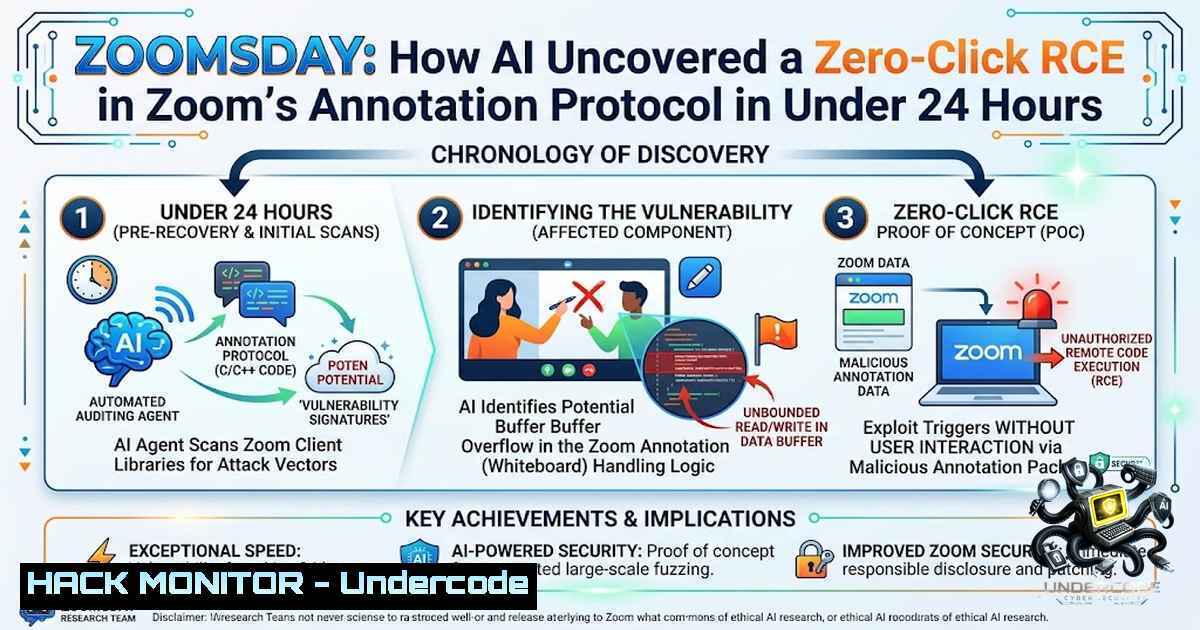
The democratization of offensive security capabilities has reached an inflection point. On August 11, 2026, researchers from A Security disclosed a critical vulnerability chain in Zoom’s screen-sharing annotation feature—dubbed “ZOOMSDAY”—that could have allowed any meeting participant to silently execute arbitrary code on another attendee’s device across Windows, macOS, Linux, iOS, and Android. What makes this disclosure particularly alarming is not just the zero-click nature of the attack, but the methodology behind its discovery: a single researcher used fewer than 20 prompts on publicly available AI models to uncover the vulnerabilities and develop a working exploit in less than 24 hours—a feat that previously would have required a team of five people roughly six months of effort.
Learning Objectives
- Understand the technical architecture of Zoom’s annotation protocol and the memory corruption vulnerabilities (CVE-2026-53413, CVE-2026-53414, CVE-2026-53415) that enabled zero-click remote code execution
- Learn how AI-powered vulnerability discovery is reshaping the offensive security landscape and lowering the barrier to entry for sophisticated exploits
- Master the patching strategies, verification commands, and defensive measures required to secure Zoom deployments across enterprise environments
You Should Know
1. Anatomy of the Annotation Protocol Vulnerability
Zoom’s annotation feature allows meeting participants to draw, highlight, or add text to a shared screen. Behind the scenes, this functionality relies on a proprietary protocol that opens a direct communication channel between the screen sharer and each viewer. When a user draws on a shared screen, the client does not transmit the drawing as an image. Instead, it serializes the drawing into a structured object—a run of counts followed by data—and sends it over the network.
The vulnerabilities stem from how Zoom clients parse these structured objects. The routine responsible for parsing text-annotation formatting data, identified as CAnnoFormatBlock::Deserialize, contains several fixed-size 128-byte buffers that blindly trust 32-bit character counts sent over the network. The client never validates that incoming data actually fits inside those buffers, enabling an attacker to transmit an oversized crafted message that overflows the buffer and corrupts adjacent memory.
The attack chain works as follows:
- The attacker joins or hosts a Zoom meeting where screen sharing is active
- The attacker crafts a malicious annotation message with an oversized count value
- The message is sent through the proprietary annotation protocol
- The victim’s client automatically parses the message without any user interaction
- The missing bounds check allows the oversized data to overflow the 128-byte buffer
- The overflow corrupts the return address on the stack, hijacking the program’s control flow
- Attacker-supplied code executes with the privileges of the Zoom application
What makes this particularly dangerous is the zero-click nature of the exploit. No click, no download, no prompt—and nothing on screen to indicate the compromise. A Security researchers demonstrated the exploit on macOS by using it to silently launch the Safari browser on a victim’s machine, proving that full code execution is achievable with no user interaction and no visible sign of compromise.
The vulnerabilities are tracked as:
| CVE | Description | CVSS (Zoom) | CVSS 4.0 (A Security) |
|–|-|-|-|
| CVE-2026-53413 | Buffer over-write in annotator function → RCE | 8.3 (High) | 9.0 (Critical) |
| CVE-2026-53414 | Buffer over-read → Denial of Service | 6.5 (Medium) | 9.0 (Critical) |
| CVE-2026-53415 | Use-after-free → Memory corruption/RCE | 8.3 (High) | 9.0 (Critical) |
2. AI-Powered Vulnerability Discovery: The New Reality
The most sobering aspect of the ZOOMSDAY disclosure is not the vulnerability itself, but how it was found. A Security’s researchers used publicly available AI models with fewer than 20 prompts to uncover the vulnerabilities and create a working exploit. The AI systems were specifically directed to examine Zoom’s annotation component because, like human bug hunters, they had been trained that convoluted and obscure functions in proprietary, closed-source software often contain overlooked vulnerabilities.
“Producing a working exploit against it has always been nation-state work: elite teams, months of effort, budgets that governments regulate as weapons,” wrote Idan Levcovich, a vulnerability researcher at A Security. “A
 did it in a single day, with an AI agent and models anyone can access today.”

A Security cofounder Omer Gull articulated the broader implications: “Before it would have taken a team of five people maybe six months with a lot of refining and iteration to find this. Now people can reach the same results with under 20 prompts”. He added: “Zoom is an important type of target because people assume trust when using it. They don’t see it as a threat”.

<h2 style="color: yellow;">Key technical observations about the AI-assisted discovery process:</h2>

<ul>
<li>The AI models were not proprietary or specialized—they were publicly available</li>
<li>The entire workflow—from initial reconnaissance to working exploit—took under 24 hours</li>
<li>The AI was able to reason about protocol structures and identify the `CAnnoFormatBlock::Deserialize` routine as a high-value target</li>
<li>The system generated and tested multiple attack vectors, iterating on failed attempts without human intervention</li>
</ul>

This represents a fundamental shift in the threat landscape. The barrier to producing sophisticated exploits has “collapsed, and it won’t come back,” according to A Security researchers. Organizations can no longer rely on the assumption that only well-funded nation-state actors possess the capability to discover and exploit zero-day vulnerabilities in widely used software.

<h2 style="color: yellow;">3. Patching and Mitigation Strategies</h2>

Zoom has released both client-side and server-side fixes for the ZOOMSDAY vulnerabilities. The patches were deployed in June and July 2026, roughly two months before the public disclosure, and no active exploitation has been reported in the wild.

<h2 style="color: yellow;">Affected and patched versions:</h2>

| Product | Vulnerable Versions | Patched Versions |

<h2 style="color: yellow;">||||</h2>

| Zoom Workplace (all platforms) | Before 7.1.5 and 7.0.6 | 7.1.5 / 7.0.6 |
| Zoom Rooms (all platforms) | Before 7.1.5 | 7.1.5 |
| Zoom Meeting SDK (all platforms) | Before 7.1.5 | 7.1.5 |
| Zoom Workplace VDI Client (Windows) | Before 7.0.11 and 6.6.16 | 7.0.11 / 6.6.16 |
| Zoom Workplace VDI Plugin (all platforms) | Before 7.0.11 and 6.6.15 | 7.0.11 / 6.6.15 |

<h2 style="color: yellow;">Verification commands for IT administrators:</h2>

To verify the installed Zoom version on different platforms:

<h2 style="color: yellow;">Windows (PowerShell):</h2>

[bash]
 Check Zoom Workplace version
Get-ItemProperty "C:\Program Files\Zoom\bin\Zoom.exe" | Select-Object -ExpandProperty VersionInfo | Select-Object FileVersion

Alternative: Check via registry
Get-ItemProperty "HKLM:\SOFTWARE\WOW6432Node\Zoom\Zoom\Product" | Select-Object -ExpandProperty Version
macOS (Terminal):
 Check Zoom Workplace version
defaults read /Applications/zoom.us.app/Contents/Info.plist CFBundleShortVersionString

Alternative
mdls /Applications/zoom.us.app | grep kMDItemVersion
Linux (Terminal):
 For .deb installations
dpkg -l | grep zoom

For .rpm installations
rpm -qa | grep zoom

For Snap installations
snap list | grep zoom
Enterprise deployment commands:
Windows (mass deployment via Group Policy or script):
 Download the latest installer
Invoke-WebRequest -Uri "https://zoom.us/client/7.1.5/ZoomInstallerFull.msi" -OutFile "C:\Temp\ZoomInstallerFull.msi"

Silent install
msiexec /i "C:\Temp\ZoomInstallerFull.msi" /quiet /norestart

Verify all clients are updated (requires PSRemoting)
$computers = Get-Content "C:\Temp\zoom_computers.txt"
foreach ($computer in $computers) {
Invoke-Command -ComputerName $computer -ScriptBlock {
(Get-ItemProperty "C:\Program Files\Zoom\bin\Zoom.exe").VersionInfo.FileVersion
}
}
macOS (mass deployment via MDM or script):
 Download the latest installer
curl -L -o /tmp/ZoomInstaller.pkg "https://zoom.us/client/7.1.5/ZoomInstaller.pkg"

Silent install
sudo installer -pkg /tmp/ZoomInstaller.pkg -target /

Verify all clients (requires SSH or remote execution tool)
for host in $(cat zoom_hosts.txt); do
ssh $host "defaults read /Applications/zoom.us.app/Contents/Info.plist CFBundleShortVersionString"
done
Organizational recommendations:
Organizations managing centralized Zoom deployments should push updated installer packages immediately rather than relying on individual users to update manually. This prevents vulnerable builds from silently reappearing on the next install cycle. Additionally, consider implementing the following defense-in-depth measures:
- Restrict meeting access to authenticated users within the organization
- Disable annotation features for external participants where business requirements allow
- Implement endpoint detection and response (EDR) solutions capable of detecting anomalous memory corruption patterns
- Monitor Zoom client processes for unusual network activity or child process creation
4. The Server-Side Mitigation Layer
Beyond client-side patches, Zoom implemented server-side fixes that add an additional layer of protection. The server-side mitigation works by filtering and sanitizing annotation protocol messages before they reach clients. This means that even if a client fails to update, the server can block malicious annotation payloads.
How the server-side mitigation works:
- Zoom’s servers now validate annotation message structures before relaying them to participants
- Messages with oversized count values or malformed structures are dropped
- The server maintains an allowlist of valid annotation message types
- Anomalous message patterns trigger alerts for Zoom’s security operations team
This dual-layer approach (server + client) is a best practice for mitigating vulnerabilities in widely deployed applications. It provides protection for users who may be slow to update while also giving organizations time to roll out client patches.
5. Defensive Hardening for Enterprise Zoom Deployments
For security teams looking to harden their Zoom environment against similar future vulnerabilities, consider the following configuration measures:
Zoom Admin Console Hardening Settings:
1. Disable annotation for external participants:
- Navigate to Admin → Account Management → Account Settings → Meeting
- Under “Annotation,” select “Only the user who is sharing can annotate”
- Alternatively, disable annotation entirely for meetings with external participants
2. Enforce minimum client version:
- Admin → Account Management → Account Settings → Meeting
- Under “Client Update,” set minimum required version to 7.1.5
- Enable “Block users from joining if using an unsupported version”
3. Enable security logging:
- Admin → Account Management → Account Settings → Security
- Enable “Meeting security logs” and forward to your SIEM
- Configure alerts for anomalous annotation activity
Network-level monitoring (for security operations):
 Monitor Zoom traffic for anomalous patterns (using tcpdump on Linux gateway)
sudo tcpdump -i eth0 -1 -vvv port 8801 or port 8802 or port 443 | grep -i "zoom"

Alternative: Use Zeek (formerly Bro) for deep packet inspection
 Custom Zeek script to detect malformed Zoom annotation messages
event udp_packet(c: connection, is_orig: bool, ip: count, len: count, contents: string) {
if (c$id$resp_p == 8801 || c$id$resp_p == 8802) {
 Analyze packet payload for annotation protocol anomalies
if (len > 1024) {
print fmt("Large Zoom annotation packet: %d bytes from %s", len, c$id$orig_h);
}
}
}
Windows endpoint monitoring (PowerShell script to detect suspicious Zoom activity):
 Monitor Zoom process for suspicious child processes
$zoomProcesses = Get-Process -1ame "Zoom" -ErrorAction SilentlyContinue
foreach ($proc in $zoomProcesses) {
$children = Get-CimInstance -ClassName Win32_Process | Where-Object { $_.ParentProcessId -eq $proc.Id }
foreach ($child in $children) {
if ($child.Name -1otin @("Zoom.exe", "ZoomPT.exe", "ZoomWebView.exe")) {
Write-Warning "Suspicious child process detected: $($child.Name) (PID: $($child.ProcessId)) from Zoom (PID: $($proc.Id))"
 Trigger alert to SIEM
}
}
}
6. The Broader Implications for AI-Assisted Security
The ZOOMSDAY disclosure raises profound questions about the future of vulnerability research and the security of widely used software. A Security’s findings demonstrate that AI models can now perform tasks previously requiring elite human expertise, specialized training, and months of effort.
Implications for defenders:
- The window for patch deployment is shrinking: With AI accelerating vulnerability discovery, the time between a vulnerability being introduced and being discovered is decreasing. Organizations must adopt faster patch management cycles.
- Zero-day exploits will become more common: The barrier to entry for discovering zero-day vulnerabilities has dropped significantly. Attackers with limited resources can now leverage AI to find vulnerabilities that previously required nation-state capabilities.
- Proprietary software is at greater risk: Closed-source applications like Zoom, where code is not publicly reviewable, are particularly vulnerable because they lack the benefit of open community scrutiny. AI can now fill that gap—for both defenders and attackers.
- Defensive AI is equally important: Organizations must invest in AI-powered security tools that can detect and respond to AI-generated attacks. The arms race between offensive and defensive AI is accelerating.
Implications for developers:
- Secure coding practices must evolve: Memory corruption vulnerabilities remain a persistent problem. Developers must adopt memory-safe languages where possible and implement rigorous input validation for all network-facing components.
- Fuzzing and automated testing are no longer optional: AI-assisted vulnerability discovery means that every code path—especially obscure features like annotation—will be subjected to automated scrutiny. Comprehensive fuzzing and static analysis must become standard practice.
- Assume breach: The ZOOMSDAY disclosure reinforces the zero-trust principle. Organizations should assume that vulnerabilities exist in all software and implement defense-in-depth measures accordingly.
What Undercode Say
- The democratization of offensive capabilities is irreversible. A Security demonstrated that what once required a nation-state budget and elite team can now be accomplished by a single researcher with publicly available AI tools in under a day. This fundamentally changes the threat model for every organization using widely deployed software.
-
Trust is the attack vector. Zoom users assume the platform is safe for sensitive discussions and confidential information. This trust makes Zoom—and other collaboration platforms—prime targets for attackers. The ZOOMSDAY vulnerability exploited not just a technical flaw but the psychological assumption that being on a Zoom call is inherently safe.
-
The AI arms race has begun. Defenders must now compete with AI-powered attackers. This means investing in AI-driven security operations, adopting memory-safe development practices, and fundamentally rethinking patch management cycles. The speed advantage now belongs to the attacker.
-
Proprietary software faces a new vulnerability discovery paradigm. Closed-source applications can no longer rely on obscurity as a security control. AI models can now reverse-engineer protocols and identify vulnerabilities at scale. Organizations must pressure vendors to adopt more transparent security practices, including bug bounties and coordinated disclosure.
-
Zero-click vulnerabilities are the new frontier. The most dangerous vulnerabilities are those that require no user interaction. As AI makes vulnerability discovery more accessible, we can expect to see more zero-click exploits across all categories of software. Endpoint detection and response (EDR) solutions must evolve to detect memory corruption attacks that leave no visual indicators.
Prediction
-1 The speed of AI-assisted vulnerability discovery will outpace the industry’s ability to patch and respond. Organizations that cannot deploy patches within days—not weeks or months—will face increasing risk of exploitation. The traditional 30-90 day patch cycle is no longer tenable in an era where vulnerabilities can be discovered and weaponized in under 24 hours.
-1 The ZOOMSDAY disclosure will trigger a wave of copycat AI-assisted vulnerability research targeting other widely used collaboration platforms—Microsoft Teams, Google Meet, Slack, and Cisco Webex. These platforms likely contain similar memory corruption vulnerabilities in their proprietary protocols, and AI models will be directed to find them.
+1 The democratization of vulnerability discovery will ultimately lead to more secure software. As AI tools become more accessible, the security research community will expand dramatically, uncovering vulnerabilities faster than ever before. This pressure will force software vendors to prioritize security in their development lifecycles.
-1 The barrier to entry for cybercriminals and state-sponsored actors will drop significantly. While legitimate researchers use AI to improve security, malicious actors will leverage the same tools to discover and weaponize vulnerabilities for espionage, ransomware, and other nefarious purposes. The asymmetry between attackers and defenders may widen before it narrows.
+1 The ZOOMSDAY disclosure may accelerate the adoption of memory-safe programming languages (Rust, Go, Swift) and formal verification methods. As AI makes memory corruption vulnerabilities easier to find, the cost of leaving memory-unsafe code in production will become unsustainable for major software vendors.
This article is based on technical disclosures from A Security, Zoom’s official security bulletins (ZSB-26015 through ZSB-26018), and reporting from Wired, The Verge, PCMag, SecurityWeek, and The Hacker News. All commands and configurations are provided for educational and defensive purposes only. Users should always verify commands in a test environment before deploying to production.
▶️ Related Video (78% Match):
🎯Let’s Practice For Free:
🎓 Live Courses & Certifications:
Join Undercode Academy for Verified Certifications
🚀 Request a Custom Project:
Secure, high-velocity infrastructure and disruptive technological engineering. Contact our engineering team for high-tier development and proprietary systems:
[email protected]
💎 Smart Architecture | 🛡️ Secure by Design | ⭐ Trusted by Thousands
IT/Security Reporter URL:
Reported By: A Zoom – Hackers Feeds
Extra Hub: Undercode MoN
Basic Verification: Pass ✅


