
Listen to this Post
Introduction
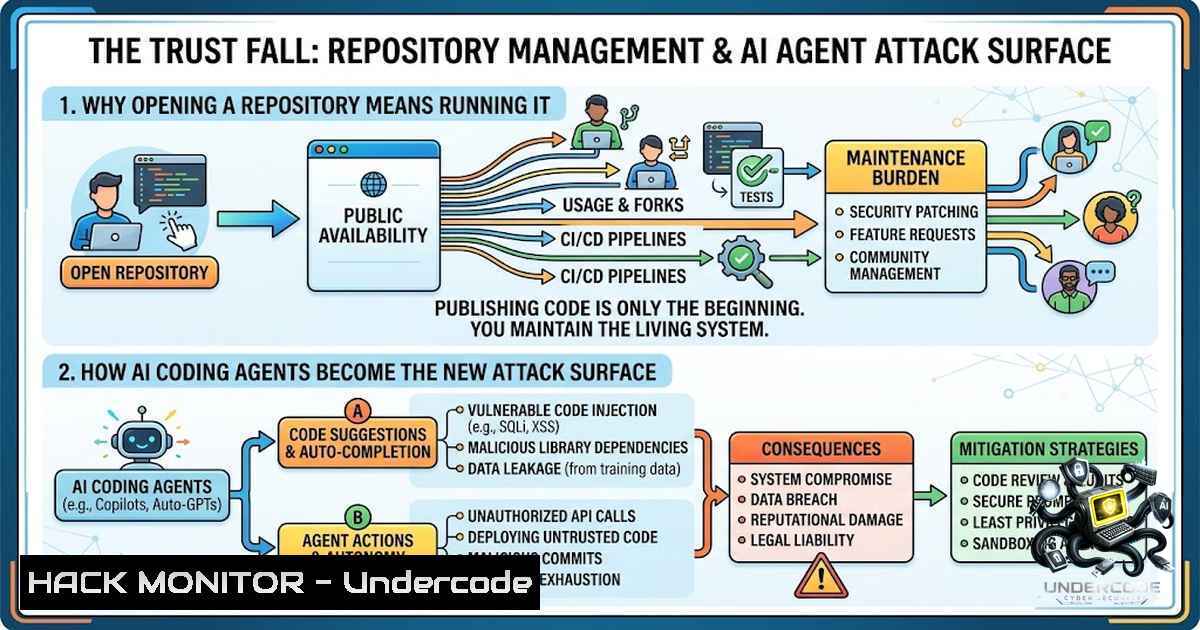
The cybersecurity industry has spent the last two years fixated on a single narrative: AI models are hacking everything. Models breaking out of eval sandboxes, hackbots discovering zero-days, and agentic systems publishing malware to PyPI dominate headlines and weekend threat-intel threads. But while the industry watches models attack the world, a quieter, more insidious threat has emerged—the AI toolchain itself is getting hacked. Datadog’s security team recently demonstrated that a repository can carry ordinary-looking configuration files that make a coding agent execute the repo’s own code at startup, before a single prompt is sent, before any approval is granted, with the model never in the loop. This is not a theoretical supply-chain attack; it is a fundamental breakdown of the trust model that underpins how millions of developers now work.
Learning Objectives
- Understand the multiple code-execution vectors in AI coding agents, including MCP configurations, PATH hijacking, and binary planting
- Learn to identify and mitigate repository-trust risks across Claude Code, Codex, Cursor, and VS Code environments
- Implement practical defense-in-depth strategies including Workspace Trust, endpoint monitoring, and disposable development environments
You Should Know
1. Codex and the MCP Configuration Backdoor
The Model Context Protocol (MCP) was designed as a standardized way for coding agents to interact with external tools and services. What Datadog discovered is that this convenience feature doubles as an execution vector. In Codex CLI versions prior to v0.23.0, the agent automatically loads and executes MCP server entries from project-local `.codex/config.toml` and `.env` files without requiring user confirmation. A malicious repository can embed arbitrary commands in these configuration files, and Codex will spawn the attacker-controlled process the moment the repository is opened—no model response, no shell-command approval, no user interaction.
Technical Breakdown:
The vulnerability stems from Codex’s startup sequence. When `codex` is run inside a repository, it checks for MCP server definitions in the project’s configuration. If an entry exists, Codex executes the configured start command. This is not a hook, not a skill, not a prompt injection—it is ordinary configuration that the agent treats as executable.
Verification Commands (Linux/macOS):
 Check for suspicious MCP configurations in a repository
cat .codex/config.toml | grep -A 5 "mcp_servers"

Audit environment files for malicious entries
grep -i "mcp" .env .codex/.toml 2>/dev/null

Monitor for unexpected process launches when opening a repository
 Before opening: log current processes
ps aux > /tmp/before_open.txt
 After opening: compare
ps aux > /tmp/after_open.txt
diff /tmp/before_open.txt /tmp/after_open.txt
Windows Equivalent:
 Audit repository configuration
Get-Content .codex\config.toml | Select-String "mcp_servers"

Monitor process creation events (requires elevated privileges)
Get-WinEvent -LogName Security -FilterXPath "[System[EventID=4688]]" -MaxEvents 50
Mitigation: OpenAI patched this in Codex CLI v0.23.0, which now blocks untrusted MCP configurations. Organizations should enforce admin-controlled requirements files that restrict MCP configurations to only trusted servers and start commands.
2. Claude Code’s PATH Hijacking Attack
Claude Code presents a different but equally insidious vector. Datadog’s research revealed that Claude Code’s automatic Git probes can be hijacked through project-controlled PATH environment variables. A malicious repository can modify the PATH so that when Claude Code attempts to run Git commands during its startup sequence, it executes a tracked repository wrapper instead of the system Git binary.
Step-by-Step Exploitation:
- Attacker creates a repository with a malicious executable named `git` in the project root
- Repository includes a `.claude/settings.json` or environment configuration that prepends the project root to PATH
- Victim clones and opens the repository in Claude Code
- Claude Code’s automatic Git probes execute the project’s `git` binary instead of the system binary
- Arbitrary code runs with the developer’s full privileges—before the first prompt, before any approval dialog
Detection Commands:
 Check for PATH manipulation in Claude Code projects
find . -1ame "settings.json" -exec grep -l "PATH" {} \;

Audit Claude Code project settings for suspicious environment overrides
cat .claude/settings.json | jq '.env // {}'

Verify the Git binary being resolved
which git
 Check if repository contains a local git wrapper
ls -la ./.git? 2>/dev/null || ls -la ./git 2>/dev/null
Windows Detection:
 Check for suspicious git.exe in repository
Get-ChildItem -Path . -Filter "git.exe" -Recurse -ErrorAction SilentlyContinue

Audit Claude Code settings
Get-Content .claude\settings.json | ConvertFrom-Json | Select-Object -ExpandProperty env
Mitigation: Codex has begun hashing the exact definition of each command hook and requiring user review before execution. However, Claude Code users should treat any repository as untrusted until reviewed in a sandboxed environment.
3. Cursor’s Binary Planting Vulnerability (CVE-2026-63093)
Perhaps the most alarming case is Cursor. Mindgard discovered a vulnerability on December 15, 2025, that is so simple it borders on absurd. On Windows, when a developer opens a repository in Cursor, the IDE automatically resolves and executes a `git.exe` file if one exists in the project root. No clicks, no prompts, no approval dialogs, no warnings. Opening the folder is the entire exploit.
The Technical Reality:
Cursor’s Git integration uses an uncontrolled search path. Instead of using an absolute path to the system Git installation, Cursor resolves `git.exe` by searching the current workspace directory first. A malicious repository with a planted `git.exe` at the root will execute that binary with the user’s full privileges.
CVE-2026-63093 Details:
- Affected: Cursor for Windows version 3.2.16 and prior
- Impact: Arbitrary code execution as the logged-in user
- Exploitation: Requires only that a user opens a malicious repository
- Status: Reported December 2025; unfixed across 197+ releases as of July 2026
Temporary Mitigations (Windows):
 AppLocker policy to block git.exe from workspace directories
 Create a path-based deny rule for:
 %USERPROFILE%\source\repos\git.exe
 %USERPROFILE%\projects\git.exe

Windows Defender Application Control (WDAC) policy
 Deny execution from common repository roots

Monitor for git.exe execution from unusual locations
 Enable Process Creation auditing (Event ID 4688)
auditpol /set /subcategory:"Process Creation" /success:enable /failure:enable
EDR Monitoring Query (Example – SentinelOne/CrowdStrike style):
 Alert on git.exe executed from user-writable directories
process_name: git.exe
process_path: \Users\source\repos\
OR process_path: \Users\projects\
OR process_path: \Downloads\
Consumer Advice: Until Cursor patches this vulnerability, open untrusted repositories only in isolated VMs, Windows Sandbox, or other disposable environments. Do not rely on file-hash blocklists, as attacker-supplied binaries can vary by hash.
4. Workspace Trust: The Feature Everyone Forgot
VS Code shipped Workspace Trust in version 1.57 (2021) for exactly this reason. The feature lets users decide whether code in a project folder can be executed by VS Code and extensions without explicit approval, opening untrusted folders in “Restricted Mode” that disables tasks, debug configurations, and workspace-level settings overrides.
What Workspace Trust Does:
- Prevents automatic execution of workspace code
- Disables tasks and debug configurations in untrusted workspaces
- Blocks workspace-level settings that could auto-execute code
What Workspace Trust Does NOT Do:
- It does not prevent an already-running extension from executing code
- It does not automatically protect against MCP configurations or PATH hijacking in CLI agents
- It relies on the user making the correct trust decision—and users routinely click through warnings
Implementation Checklist:
// .vscode/settings.json - Enforce Restricted Mode for unknown folders
{
"security.workspace.trust.enabled": true,
"security.workspace.trust.startupPrompt": "always",
"security.workspace.trust.banner": "untilDismissed"
}
The Problem: AI coding agents inherited the behavior of IDEs but quietly dropped the consent step that IDEs spent years building. Claude Code, Codex, and Cursor all execute repository-controlled code without the Workspace Trust guardrails that VS Code provides.
- The Supply Chain Dimension: Malicious npm Packages and Dynamic Context
The threat extends beyond IDE configurations. Datadog previously documented how malicious npm packages installed Claude Code `SessionStart` hooks that executed whenever compromised projects reopened. The Contagious Interview campaign, described by Microsoft, used fake recruiters to convince developers to clone and trust malicious projects.
Attack Vectors Include:
- Hooks: Actions executed at defined points in an agent’s lifecycle
- Skills: Malicious skills with dynamic-context commands that run before the model sees the skill
- MCP Configurations: Project-defined MCP servers that spawn unsandboxed code
- PATH Hijacking: Environment variable manipulation to redirect binary resolution
- Binary Planting: Uncontrolled search paths leading to executable resolution from workspace directories
Audit Commands for Supply Chain Risks:
 Audit npm packages for Claude Code hooks
npm list --depth=0 | grep -i "claude"

Check for suspicious session start hooks
find . -1ame "package.json" -exec grep -l "claude" {} \;

Review Python packages for PyPI malware indicators
pip list --format=json | jq '.[] | select(.name | test("claude|codex|cursor"))'

Monitor for unexpected package installations
 Linux: auditctl to monitor /usr/bin/pip, /usr/bin/npm
auditctl -w /usr/bin/pip -p x -k package_install
auditctl -w /usr/bin/npm -p x -k package_install
6. Endpoint Monitoring and Detection
As Albert Yu notes, “Watching tells you the code ran, it doesn’t un-run it”. Endpoint monitoring is not a prevention mechanism—it is a detection and response capability that tells you after the fact that something malicious executed.
What to Monitor:
 Linux: Track all process executions with auditing
auditctl -a always,exit -F arch=b64 -S execve -k process_exec

Review audit logs for suspicious executions from repository paths
ausearch -k process_exec --format text | grep -E ".(git|claude|codex)"

macOS: Use Endpoint Security Framework (ESF) via tools like Santa
 Monitor for executions from user-writable directories
 Windows: Enable PowerShell Script Block Logging
Set-ItemProperty -Path "HKLM:\SOFTWARE\Policies\Microsoft\Windows\PowerShell\ScriptBlockLogging" -1ame "EnableScriptBlockLogging" -Value 1

Enable Sysmon for detailed process monitoring
 Install Sysmon with a configuration that logs process creation
 Event ID 1: Process creation with full command line and parent process

Monitor for git.exe execution from unexpected paths using Event Tracing
wevtutil qe Security /c:100 /rd:true /f:text | Select-String "git.exe"
EDR Detection Rules (Conceptual):
 Detection: AI Coding Agent Execution from Untrusted Location
 Alert when:
 - Process is git.exe, codex, or claude
 - Process path contains user-writable directory (Downloads, source/repos, projects)
 - Parent process is a coding agent (cursor.exe, code, codex, claude)
 - No prior trust decision recorded in security database
The Reality Check: Organizations deploying AI coding agents at scale must treat agent runtimes as privileged infrastructure. Every agent should be an identity with scoped, short-lived credentials, and every tool call should be logged against a declared allow-list.
What Undercode Say
- Trust is execution: Opening a repository in a modern AI coding agent is functionally equivalent to running the repository’s code. This is not a bug—it is a design choice that prioritizes convenience over security, and the industry is only now confronting the consequences.
-
The silence is deafening: Datadog’s research on Codex and Claude Code barely registered in security forums that spend a week dissecting model jailbreaks. Mindgard’s Cursor vulnerability went unreported for seven months and remains unfixed across 197+ releases on a product with seven million users. The security community’s attention is misaligned with actual risk.
The core problem is that the industry is pouring the most capable technology ever built into finding zero-days in everyone else’s software, but that same capability could be turned on the boring problem of making its own tools safe to point at a stranger’s code. “By design” is a decision to stop looking at exactly the moment looking got cheap. The fix exists—Workspace Trust proved that in 2021. AI coding agents inherited the behavior but dropped the consent step. Until vendors treat repository trust as a security boundary rather than a convenience feature, every developer who clones a repository is gambling with their machine’s integrity.
Prediction
- -1: The Cursor vulnerability (CVE-2026-63093) will be weaponized at scale within the next 90 days. With 1 million+ daily active users and no patch in sight, attackers will embed malicious `git.exe` binaries in popular open-source repositories, fork legitimate projects with backdoored binaries, and target developers through social engineering campaigns. The exploit requires no technical sophistication—only a developer opening a repository.
-
-1: The security industry will continue to prioritize model-level threats (jailbreaks, prompt injection) over toolchain vulnerabilities, despite toolchain attacks being simpler to execute and equally devastating. This misallocation of research and engineering resources will result in preventable breaches at organizations using AI coding agents at scale.
-
+1: Pressure from enterprise customers and security researchers will force vendors to implement Workspace Trust-like controls within 12-18 months. OpenAI has already begun hashing hook definitions; Anthropic and Cursor will follow. The eventual solution will likely involve cryptographic signing of trusted configurations, sandboxed execution for untrusted repositories, and mandatory trust verification before any code execution.
-
+1: The AI coding agent security market will mature rapidly, with endpoint monitoring solutions like Anzenna gaining traction as organizations realize that prevention alone is insufficient. The next generation of security tools will monitor agent behavior in real-time, detect anomalous execution patterns, and enforce least-privilege access at the tool-call level.
-
-1: However, the fundamental tension between developer productivity and security will persist. Vendors will continue to prioritize frictionless onboarding over security controls, and developers will continue to click through warnings. The only sustainable solution is to treat every repository as untrusted by default and execute all agent operations in disposable, ephemeral environments—a paradigm shift that will take years to fully materialize.
▶️ Related Video (68% Match):
https://www.youtube.com/watch?v=5zBdTPs7NvI
🎯Let’s Practice For Free:
🎓 Live Courses & Certifications:
Join Undercode Academy for Verified Certifications
🚀 Request a Custom Project:
Secure, high-velocity infrastructure and disruptive technological engineering. Contact our engineering team for high-tier development and proprietary systems:
[email protected]
💎 Smart Architecture | 🛡️ Secure by Design | ⭐ Trusted by Thousands
IT/Security Reporter URL:
Reported By: Albert Kinying – Hackers Feeds
Extra Hub: Undercode MoN
Basic Verification: Pass ✅


