Listen to this Post
Introduction:
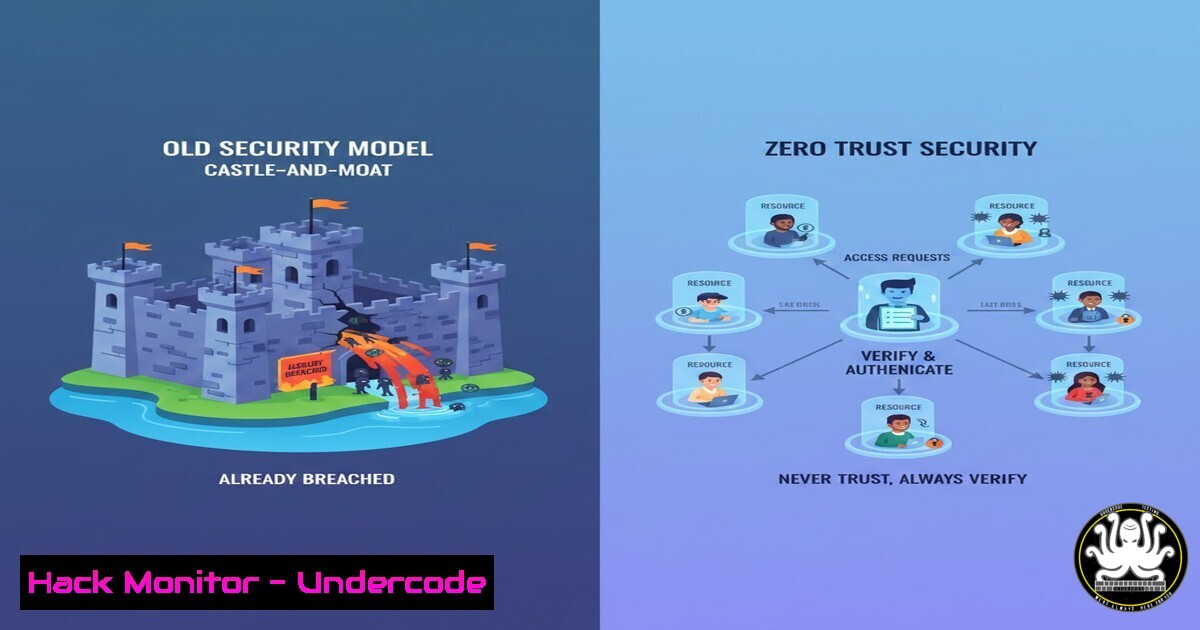
The traditional security model, often likened to a castle with a strong outer wall, is fundamentally obsolete in an era of cloud computing, remote work, and sophisticated phishing attacks. Zero Trust is the modern architectural paradigm that operates on the principle of “never trust, always verify,” assuming a breach has already occurred and enforcing strict access controls for every user, device, and application. This article deconstructs the core pillars of Zero Trust and provides a practical, technical guide for its implementation.
Learning Objectives:
- Understand the three core principles of Zero Trust: Verify Explicitly, Least Privilege Access, and Assume Breach.
- Learn to implement key technical controls for identity, device, and network security.
- Gain practical knowledge through command-line examples and configuration snippets for cloud and on-premises environments.
You Should Know:
- Verify Explicitly: Implementing Strong Identity and Device Posture Checks
The cornerstone of Zero Trust is the explicit verification of every access request. This moves beyond a simple username and password to a dynamic, risk-based assessment.
Step-by-step guide explaining what this does and how to use it.
Step 1: Enforce Multi-Factor Authentication (MFA): MFA is non-negotiable. For cloud environments like Azure AD, enable conditional access policies that require MFA for all users. For on-premises applications, use a solution like Duo Security.
Azure AD PowerShell Snippet (Check MFA status):
 Connect to MSOnline service
Connect-MsolService
 Get users and their MFA status
Get-MsolUser -All | Select-Object DisplayName, UserPrincipalName, StrongAuthenticationRequirements
Step 2: Implement Device Compliance Checks: Before granting access, verify the device is managed and compliant (e.g., encrypted, has antivirus running, OS is patched). In Microsoft Endpoint Manager (Intune), you create compliance policies that are then referenced in Conditional Access policies.
Conceptual Conditional Access Policy Logic: “Grant access to Salesforce only if the user is in the ‘Finance’ group, AND they are using a device that is Intune-enrolled AND compliant, AND the network location is not a high-risk country.”
Step 3: Leverage Risk-Based Conditional Access: Integrate with signals from your Identity Provider (e.g., Azure AD Identity Protection) to block sign-ins from anonymous IPs, unfamiliar locations, or when malware is detected on the user’s device.
2. Enforce Least Privilege with Just-in-Time (JIT) Access
Over-privileged service and user accounts are a primary attack vector. Least Privilege ensures users have only the permissions they need, and JIT access removes standing administrative privileges.
Step-by-step guide explaining what this does and how to use it.
Step 1: Identify Over-Privileged Accounts: Use tools to audit permissions. In AWS, use IAM Access Analyzer. In Azure, use Entra ID Permissions Management.
AWS CLI Command (List IAM users and their attached policies):
 List all IAM users
aws iam list-users
 Get policies attached to a specific user
aws iam list-attached-user-policies --user-name EXAMPLE_USER
Step 2: Implement Privileged Identity Management (PIM): Use solutions like Azure AD PIM or CyberArk. Instead of being a permanent global admin, a user must request time-bound elevation for a specific task.
Process: User requests `Exchange Administrator` role -> Provides a business justification -> Gets approval from a designated owner -> Role is active for 2 hours -> Permissions are automatically revoked.
Step 3: Apply the Principle to Servers and APIs: Use service principals with scoped permissions. A web app’s service account should only have read access to the specific database it needs, not the entire SQL server.
3. Assume Breach: Micro-segmentation to Contain Lateral Movement
When you assume a breach is inevitable, you focus on containing it. Micro-segmentation creates secure zones in data centers and clouds to isolate workloads and prevent east-west lateral movement.
Step-by-step guide explaining what this does and how to use it.
Step 1: Map Application Dependencies: Before creating segments, understand how your applications communicate. Use tools like Azure Network Watcher’s Connection Monitor or VMware NSX-T Flow Monitoring.
Step 2: Define Segmentation Policies: Start with a default-deny rule. Only allow explicitly required traffic.
Example AWS Security Group Rule (Deny all by default, allow only web traffic):
{
"IpProtocol": "tcp",
"FromPort": 80,
"ToPort": 80,
"IpRanges": [{"CidrIp": "0.0.0.0/0"}],
"Ipv6Ranges": [{"CidrIpv6": "::/0"}]
}
// Note: This is a permissive rule for demonstration. In practice, scope the source IP range.
Example Linux iptables Rule (Allow SSH only from a management subnet):
 Flush existing rules (be cautious!)
iptables -F
 Set default policy to DROP
iptables -P INPUT DROP
iptables -P FORWARD DROP
 Allow established connections
iptables -A INPUT -m state --state ESTABLISHED,RELATED -j ACCEPT
 Allow SSH only from 10.0.1.0/24
iptables -A INPUT -p tcp -s 10.0.1.0/24 --dport 22 -j ACCEPT
- Securing Workloads and APIs in a Cloud-Native World
Cloud environments are inherently dynamic, making traditional perimeter controls ineffective. Zero Trust secures the workloads and APIs themselves.
Step-by-step guide explaining what this does and how to use it.
Step 1: Use Managed Identities/Service Accounts: Never embed credentials in code or configuration files. Use Azure Managed Identities or AWS IAM Roles for EC2/Lambda to allow workloads to securely access other services.
Terraform Snippet (AWS IAM Role for EC2):
resource "aws_iam_role" "ec2_s3_read_role" {
name = "s3-read-only-role"
assume_role_policy = jsonencode({
Version = "2012-10-17"
Statement = [{
Effect = "Allow"
Principal = { Service = "ec2.amazonaws.com" }
Action = "sts:AssumeRole"
}]
})
}
resource "aws_iam_role_policy_attachment" "s3_read_only" {
role = aws_iam_role.ec2_s3_read_role.name
policy_arn = "arn:aws:iam::aws:policy/AmazonS3ReadOnlyAccess"
}
Step 2: Implement API Security Gateways: Use an API gateway (AWS API Gateway, Azure API Management) to enforce authentication, rate limiting, and schema validation for all API requests, acting as a policy enforcement point.
5. Continuous Validation and Monitoring for Anomalies
Trust is not granted once; it is continuously evaluated based on user behavior, device posture, and threat intelligence.
Step-by-step guide explaining what this does and how to use it.
Step 1: Centralize Logging: Aggregate logs from all sources (identity, network, endpoints) into a SIEM (Security Information and Event Management) like Microsoft Sentinel, Splunk, or Elasticsearch.
Linux Command to forward logs via rsyslog:
 Edit /etc/rsyslog.conf
. @your-siem-server-ip:514
 Restart the service
systemctl restart rsyslog
Step 2: Create Behavioral Analytics Rules: Build detections for anomalous activity.
Example SIEM Query (Microsoft Sentinel KQL – Detect Impossible Travel):
SigninLogs
| where ResultType == "0" // Successful sign-in
| project UserPrincipalName, IPAddress, Location, AppDisplayName, TimeGenerated
| sort by UserPrincipalName, TimeGenerated desc
| extend prevIP = next(IPAddress), prevTime = next(TimeGenerated), prevLocation = next(Location)
| where UserPrincipalName == next(UserPrincipalName)
| extend timeDiff = prevTime - TimeGenerated
| where timeDiff < 1h // Adjust threshold as needed
| extend distance = geo_distance_2points(Location, prevLocation)
| where distance > 1000000 // Meters, adjust for realistic travel
What Undercode Say:
- Zero Trust is a strategic architecture, not a single product. Success hinges on integrating identity, device, network, and application controls into a cohesive system.
- The most significant cultural and technical hurdle for organizations is shifting from a “trust but verify” mindset to the “never trust, always verify” principle, which requires re-architecting legacy access models.
The analysis reveals that while the concept is straightforward, implementation is complex. Many organizations fail by focusing on a single pillar, like identity, while neglecting others, like micro-segmentation. A successful Zero Trust rollout is iterative, starting with a strong identity foundation (MFA, Conditional Access) and progressively layering on device compliance, JIT access, and network segmentation. The ultimate goal is to drastically reduce the attack surface and contain any potential breach, making the attacker’s job exponentially more difficult.
Prediction:
The evolution of Zero Trust will be deeply intertwined with Artificial Intelligence. AI-powered security systems will move beyond static rules to dynamic, real-time risk scoring that analyzes thousands of behavioral signals simultaneously. We will see the rise of fully autonomous security perimeters that can automatically isolate compromised endpoints, revoke suspicious sessions, and reconfigure network segments in response to an active threat, all without human intervention. This will shift the security paradigm from reactive human-led response to proactive, machine-speed mitigation, making Zero Trust not just a model but a self-defending, intelligent infrastructure.
🎯Let’s Practice For Free:
IT/Security Reporter URL:
Reported By: Mojisola Iremide – Hackers Feeds
Extra Hub: Undercode MoN
Basic Verification: Pass ✅


