Listen to this Post
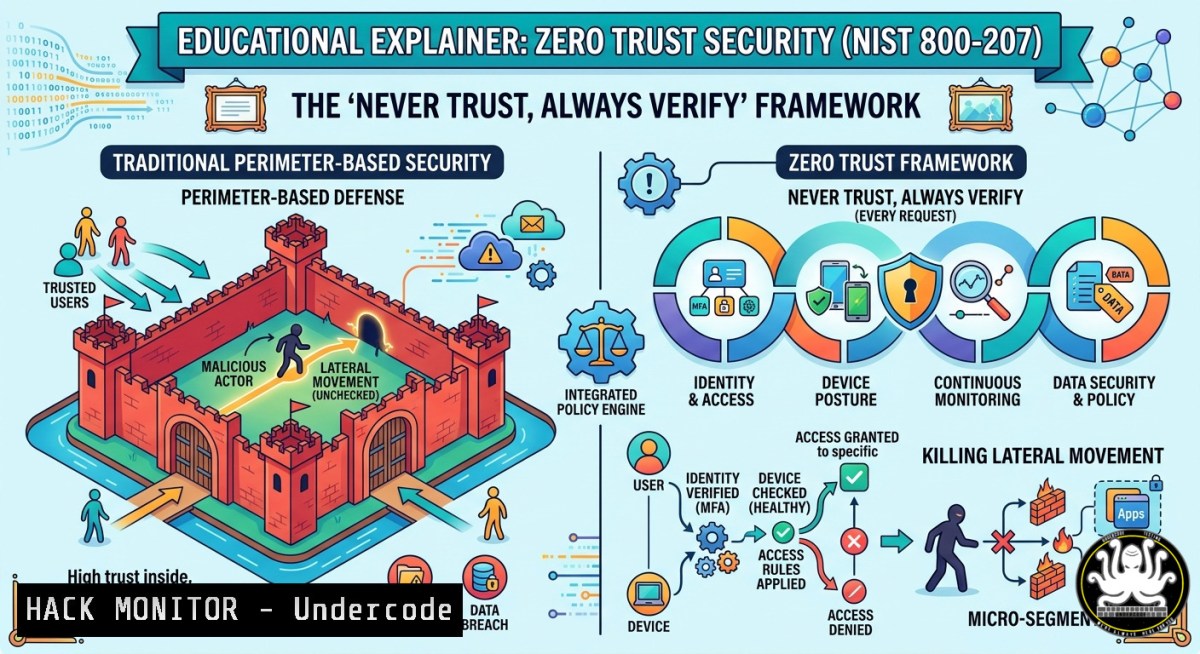
Introduction:
Traditional perimeter-based security assumed everything inside the network was safe—a fatal flaw that modern attackers exploit daily. Zero Trust Security dismantles this implicit trust model by requiring continuous authentication, authorization, and validation for every access request, regardless of whether it originates from inside or outside the corporate network. This article breaks down Zero Trust into actionable technical steps, including Linux/Windows commands, API security hardening, and real‑time monitoring techniques to enforce least‑privilege access and stop lateral movement.
Learning Objectives:
- Implement identity and device verification using multi‑factor authentication (MFA) and endpoint health checks.
- Enforce least‑privilege access with network segmentation and Just‑In‑Time (JIT) privileges.
- Set up continuous monitoring and anomaly detection to revoke access dynamically.
You Should Know:
- Identity & Device Verification – No More Implicit Trust
Zero Trust starts by verifying every entity before granting access. This means moving beyond static passwords to cryptographic proof of identity and device integrity.
Step‑by‑step guide – Enforcing MFA and device compliance:
- Linux – Set up MFA for SSH using Google Authenticator:
`sudo apt install libpam-google-authenticator`
`google-authenticator` (follow interactive setup)
Edit `/etc/pam.d/sshd`: add `auth required pam_google_authenticator.so`
Edit `/etc/ssh/sshd_config`: set `ChallengeResponseAuthentication yes` and `UsePAM yes`
`sudo systemctl restart sshd`
- Windows – Require Azure AD Conditional Access for device compliance:
PowerShell (admin): `Install-Module -Name MSOnline`
`Connect-MsolService`
`New-MsolConditionalAccessPolicy -Name “ZeroTrust_DeviceCompliance” -Conditions @{Applications=@{IncludeApplications=”All”}} -GrantControls @{Operator=”OR”; BuiltInControls=”CompliantDevice”}`
- API Security – Verify JWT tokens with strict claims validation (Python example):
import jwt
token = "eyJhbGciOiJIUzI1NiIs..."
try:
decoded = jwt.decode(token, options={"require": ["exp", "device_id", "location"]}, algorithms=["HS256"])
if not device_health_check(decoded["device_id"]):
raise Exception("Unhealthy device")
except jwt.InvalidTokenError:
revoke_access()
2. Least‑Privilege Access & Micro‑segmentation
Instead of broad network access, Zero Trust limits users to exactly the resources they need. This is enforced through network micro‑segmentation and Just‑In‑Time (JIT) privileges.
Step‑by‑step guide – Implementing micro‑segmentation with iptables (Linux) and PowerShell (Windows):
- Linux – Restrict access to a specific web server from a single IP only:
`sudo iptables -A INPUT -p tcp –dport 443 -s 10.0.1.100 -j ACCEPT`
`sudo iptables -A INPUT -p tcp –dport 443 -j DROP`
`sudo iptables-save > /etc/iptables/rules.v4`
- Windows – Block lateral movement using Windows Defender Firewall with Advanced Security:
`New-NetFirewallRule -DisplayName “Block_SMB_Lateral” -Direction Inbound -Protocol TCP -LocalPort 445 -Action Block`
`New-NetFirewallRule -DisplayName “Allow_RDP_Only_Jumpbox” -Direction Inbound -Protocol TCP -LocalPort 3389 -RemoteAddress 192.168.10.5 -Action Allow` - Just‑In‑Time (JIT) access for cloud (Azure CLI) – Elevate privileges for only 2 hours:
`az role assignment create –assignee [email protected] –role “Contributor” –scope /subscriptions/{sub-id}/resourceGroups/prod-rg –start-time “2026-05-25T10:00:00Z” –end-time “2026-05-25T12:00:00Z”`
3. Continuous Monitoring & Real‑Time Anomaly Detection
Zero Trust never stops verifying. Every request is scored for risk based on behavior, location, and time.
Step‑by‑step guide – Setting up real‑time analytics with Falco (runtime security) and Splunk queries:
- Install Falco on Linux to detect anomalous process execution:
`curl -s https://falco.org/repo/falco-archive-keyring.asc | sudo apt-key add -`
`echo “deb https://download.falco.org/packages/deb stable main” | sudo tee /etc/apt/sources.list.d/falco.list`
`sudo apt update && sudo apt install falco`
Start Falco: `sudo systemctl start falco`
Example rule – detect `wget` from a non‑authorized container:
- rule: Unauthorized Wget
desc: Detect wget from unusual process tree
condition: proc.name = "wget" and not container.image.repository startswith "trusted_registry/"
output: "Wget detected in untrusted container (user=%user.name command=%proc.cmdline)"
priority: CRITICAL
- Windows – Monitor unusual authentication patterns with PowerShell and event logs:
Query 4624 (successful logon) for multiple failures before success:Get-WinEvent -FilterHashtable @{LogName='Security'; ID=4624,4625} | Where-Object {$<em>.TimeCreated -gt (Get-Date).AddMinutes(-15)} | Group-Object @{Expression={$</em>.Properties[bash].Value}} | Where-Object {$<em>.Count -gt 10} | ForEach-Object { Send-Alert -User $</em>.Name -Reason "Potential password spray" }
- Cloud Hardening – Zero Trust for AWS/Azure Workloads
Cloud environments break the perimeter entirely. Use Identity‑Centric policies and workload isolation.
Step‑by‑step guide – Enforcing Zero Trust in AWS with IAM policies and VPC endpoints:
- AWS – Deny all access except from verified identities and devices:
{
"Version": "2012-10-17",
"Statement": [{
"Effect": "Deny",
"Action": "",
"Resource": "",
"Condition": {
"BoolIfExists": {"aws:MultiFactorAuthPresent": "false"},
"StringNotEquals": {"aws:SourceVpc": "vpc-0abcdef12345"}
}
}]
}
Attach this policy to all roles and users.
- Azure – Use Managed Identities and disable public endpoint access for storage accounts:
`az storage account update –name mystorageaccount –public-network-access Disabled`
`az role assignment create –assignee
5. Mitigating Lateral Movement – Attack Simulation & Hardening
To understand Zero Trust’s value, simulate a credential‑based lateral move and block it.
Step‑by‑step guide – Using Mimikatz (authorized test) and responding with restricted admin mode:
- Detection (Linux) – Monitor for Pass‑the‑Hash attempts using Zeek:
Install Zeek: `sudo apt install zeek`
Run Zeek on interface: `zeek -i eth0`
Use script to detect NTLM relay:
event ntlm_authentication(c: connection, username: string, hostname: string, domainname: string, result: string)
{ if ( result == "success" && c$id$resp_h ! in local_nets )
{ print fmt("Suspicious NTLM auth from %s", c$id$resp_h); } }
- Windows Hardening – Disable NTLMv1 and enforce SMB signing:
`Set-ItemProperty -Path “HKLM:\SYSTEM\CurrentControlSet\Control\Lsa” -Name “LmCompatibilityLevel” -Value 5` (Send NTLMv2 only)
`Set-SmbServerConfiguration -RequireSecuritySignature $true -EnableSMB2Protocol $true`
What Undercode Say:
- Key Takeaway 1: Zero Trust is not a product you buy—it’s a continuous, iterative strategy that demands identity, device, network, and workload pillars to be enforced together. Without real‑time monitoring, you revert to static perimeter thinking.
- Key Takeaway 2: Lateral movement is neutralized when micro‑segmentation and JIT privileges are combined. Attackers compromising one low‑privilege account cannot pivot because every subsequent request is re‑evaluated and denied.
Analysis (10 lines):
The shift to hybrid work and cloud services has rendered VPNs and firewall trust zones obsolete. Attackers now routinely use stolen credentials to access SaaS dashboards, then move sideways to databases. Zero Trust’s “verify every time” model forces authentication even for internal resource access, closing that gap. However, implementation complexity often fails—organizations either over‑segment (killing productivity) or under‑monitor (missing anomalies). The key is starting with identity and device health as the new perimeter, then gradually applying network controls. Open source tools like Falco, Zeek, and iptables provide low‑cost entry points. For Windows shops, PowerShell DSC and Conditional Access policies are essential. Continuous analytics must be automated—human‑reviewed logs are too slow. Finally, penetration testing should explicitly validate if an attacker can move from an initial beachhead to a crown jewel; any successful lateral step signals Zero Trust failure.
Prediction:
Within three years, Zero Trust will become a mandatory compliance baseline for insurance and regulatory frameworks (e.g., PCI DSS 5.0, HIPAA modernization). AI‑driven behavioral analytics will replace static rule‑based policies, allowing dynamic risk scoring that adapts in milliseconds. However, adversaries will pivot to targeting the verification infrastructure itself—MFA push fatigue, session token theft, and identity provider compromise. The next generation of Zero Trust will require hardware‑rooted identity (TPM 2.0, Apple Secure Enclave) and continuous real‑time re‑authentication without user friction. Organizations that delay adoption will face exponentially higher breach costs as attackers automate lateral movement across cloud‑native environments.
▶️ Related Video (80% Match):
🎯Let’s Practice For Free:
IT/Security Reporter URL:
Reported By: Traditional Security – Hackers Feeds
Extra Hub: Undercode MoN
Basic Verification: Pass ✅


