Listen to this Post
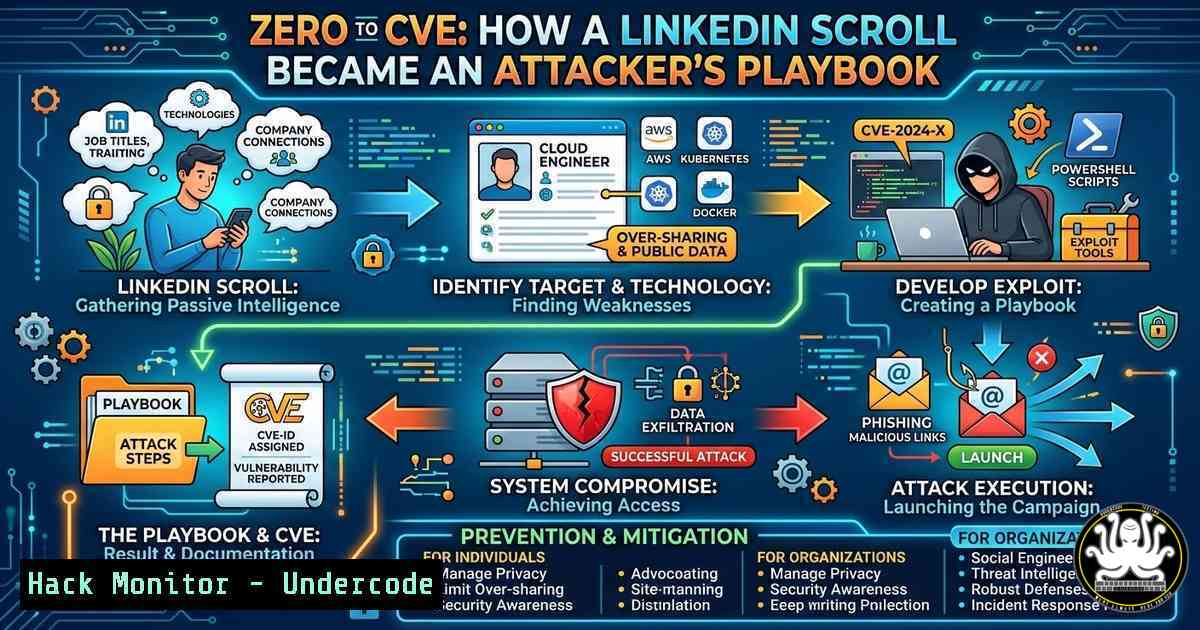
Introduction:
In an era where professional networking sites are treasure troves of personal and technical data, even a casual scroll through LinkedIn can unwittingly expose critical infrastructure details. Attackers no longer rely solely on port scans; they harvest certifications, job descriptions, and project mentions to build precise social engineering and exploitation campaigns. This article dissects how seemingly innocuous profile information—like the 57 certifications in cybersecurity, forensics, and AI displayed by a user—can be weaponized, and provides a hardened blueprint for defenders to lock down their digital footprint and validate their own security posture.
Learning Objectives:
- Understand the attack surface presented by professional networking profiles and technical resumes.
- Learn to perform Open Source Intelligence (OSINT) gathering on technical personnel using command-line tools.
- Implement defensive configurations across Windows, Linux, and cloud environments to mitigate information leakage.
- Master techniques to validate the security of systems mentioned in professional profiles (e.g., forensic workstations, AI models).
You Should Know:
1. Profiling the Target: OSINT Harvesting from LinkedIn
Attackers begin by extracting every technical keyword from a profile. In our scenario, the target mentions “Cyber Security Expert,” “IT & Ai Engineering,” “Forensics,” and “Programming.” This immediately flags the individual as a high-value asset, likely possessing administrative credentials, forensic tools, and access to sensitive AI models.
Step‑by‑step guide: Harvesting technical indicators
- Extract Certifications: Note all certifications (e.g., CEH, CISSP, OSCP). These indicate the tools and systems the target is trained on.
- Tool Identification: Forensics experts often mention tools like EnCase, FTK, or Wireshark. AI engineers reference frameworks (TensorFlow, PyTorch) and cloud ML services.
- Geolocation: The profile lists “Lebanon.” This can be used to tailor phishing emails with local context or to identify regional threat actors.
Linux Command for Initial Recon:
 Use theHarvester to gather emails and subdomains associated with the target's organization
theHarvester -d linkedin.com -l 100 -b google,linkedin

Use Amass to enumerate subdomains of any company mentioned in the profile
amass enum -d [bash]
Windows Command for WHOIS Lookup:
 If a personal website or blog is listed, perform a WHOIS lookup
whois.exe [targetdomain.com]
- Weaponizing AI & Certification Data: The Social Engineering Vector
Knowing the target holds 57 certifications, an attacker can craft a lure that appeals to their professional vanity. For example, a fake “Continuing Education” email from a certifying body, or a “Vulnerability Disclosure” message referencing a tool they use.
Step‑by‑step guide: Simulating a targeted phishing campaign
- Clone a Login Page: Use `setoolkit` (Social-Engineer Toolkit) on Kali Linux to clone the login page of a certification body (e.g., (ISC)²).
- Craft the Email: Mention a recent “breach” of their certification records, prompting them to “verify” their credentials.
- Deploy the Listener: Set up a Netcat listener to capture credentials.
Start a Netcat listener on Kali
nc -lvnp 4444
3. Hardening the Forensic Workstation (Windows Focus)
If a forensics expert’s machine is compromised, it could taint evidence or be used as a pivot to larger networks. Hardening these workstations is critical.
Step‑by‑step guide: Windows security configuration
- Disable Unnecessary Services:
Disable SMBv1 to prevent EternalBlue-style attacks
Disable-WindowsOptionalFeature -Online -FeatureName SMB1Protocol
- Configure Windows Firewall for Forensic Tools:
Block all inbound traffic except for specific forensic tool communications
New-NetFirewallRule -DisplayName "BlockAllInbound" -Direction Inbound -Action Block
- Enable BitLocker on Evidence Drives:
Encrypt the drive containing forensic images
Enable-BitLocker -MountPoint "E:" -EncryptionMethod Aes256 -UsedSpaceOnly -SkipHardwareTest
4. Securing AI Model Repositories and Pipelines
The profile mentions “AI Engineering.” This often implies access to Jupyter notebooks, model registries, and cloud ML endpoints. Misconfigurations here can leak training data or allow model poisoning.
Step‑by‑step guide: Securing an ML environment
- Jupyter Notebook Hardening:
Generate a secure configuration file with a hashed password
jupyter notebook --generate-config
Edit the config to set a strong password and disable remote access by default
nano ~/.jupyter/jupyter_notebook_config.py
Set: c.NotebookApp.allow_remote_access = False
- API Security for Model Endpoints:
Example: Implement rate limiting and authentication in a Flask API serving a model
from flask_limiter import Limiter
limiter = Limiter(app, key_func=get_remote_address)
@app.route('/predict')
@limiter.limit("5 per minute")
def predict():
Authentication logic here
api_key = request.headers.get('X-API-KEY')
if not is_valid_key(api_key):
return jsonify({"error": "Unauthorized"}), 401
5. Exploiting and Mitigating Cloud Misconfigurations
Professionals often list cloud certifications (AWS, Azure). Attackers will scan for public S3 buckets or Azure Blob Storage associated with the target’s projects.
Step‑by‑step guide: Auditing cloud storage
- Use `awscli` to enumerate buckets:
Attempt to list contents of a bucket named after the target's company
aws s3 ls s3://[target-company-assets] --no-sign-request
- Mitigation: Block Public Access at the Bucket Level:
Apply a bucket policy to deny all public access
aws s3api put-public-access-block --bucket [target-company-assets] --public-access-block-configuration BlockPublicAcls=true,IgnorePublicAcls=true,BlockPublicPolicy=true,RestrictPublicBuckets=true
6. Vulnerability Exploitation Simulation: From CVEs to Proof-of-Concept
Based on the certifications listed, an attacker might assume the target works with specific software versions. For example, a forensic analyst might use an older, vulnerable version of Wireshark or a specific Linux distribution.
Step‑by‑step guide: Simulating an exploit against a known CVE
– Scenario: The profile mentions “Electronics Dev.” An attacker might target a vulnerable IoT device used in the lab.
– Use Metasploit to exploit a known vulnerability (e.g., CVE-2021-44228 – Log4Shell):
msfconsole
use exploit/multi/http/log4shell_header_injection
set RHOSTS [bash]
set TARGETURI /
set HTTP_HEADER X-Api-Version
run
What Undercode Say:
- Key Takeaway 1: Your professional profile is a detailed attack map. Every certification, tool mention, and project description feeds an attacker’s reconnaissance phase. Strip non-essential technical details from public profiles.
- Key Takeaway 2: Defensive measures must be layered. Hardening a workstation is futile if cloud storage is public, and securing AI models is pointless if the developer falls for a phishing email crafted from their own profile data.
The analysis of this LinkedIn post reveals a critical blind spot in modern cybersecurity: the human element combined with data leakage. While professionals diligently secure servers and code, they often overlook the blueprint they publish about themselves. The 57 certifications listed are not just accolades; they are 57 potential entry points for an attacker to tailor a spear-phishing campaign or guess the technological stack in use. This underscores the necessity of integrating personal OSINT hygiene into corporate security policies. An organization is only as secure as the public information its employees inadvertently expose.
Prediction:
As AI-driven social engineering becomes more sophisticated, we will see a rise in “Professional Profile Scraping” attacks. Automated bots will scan LinkedIn, GitHub, and technical forums to build dynamic attacker personas. These bots will then generate highly personalized lures—such as fake job offers requiring specific exploits or malicious “CTF challenges” based on the target’s known skills. The future of defense will rely heavily on digital identity obfuscation and continuous OSINT monitoring of one’s own staff. The line between professional networking and personal attack surface will continue to blur, forcing a fundamental reevaluation of what we share online.
▶️ Related Video (86% Match):
🎯Let’s Practice For Free:
IT/Security Reporter URL:
Reported By: Sanchita Vaish – Hackers Feeds
Extra Hub: Undercode MoN
Basic Verification: Pass ✅


