Listen to this Post
Introduction:
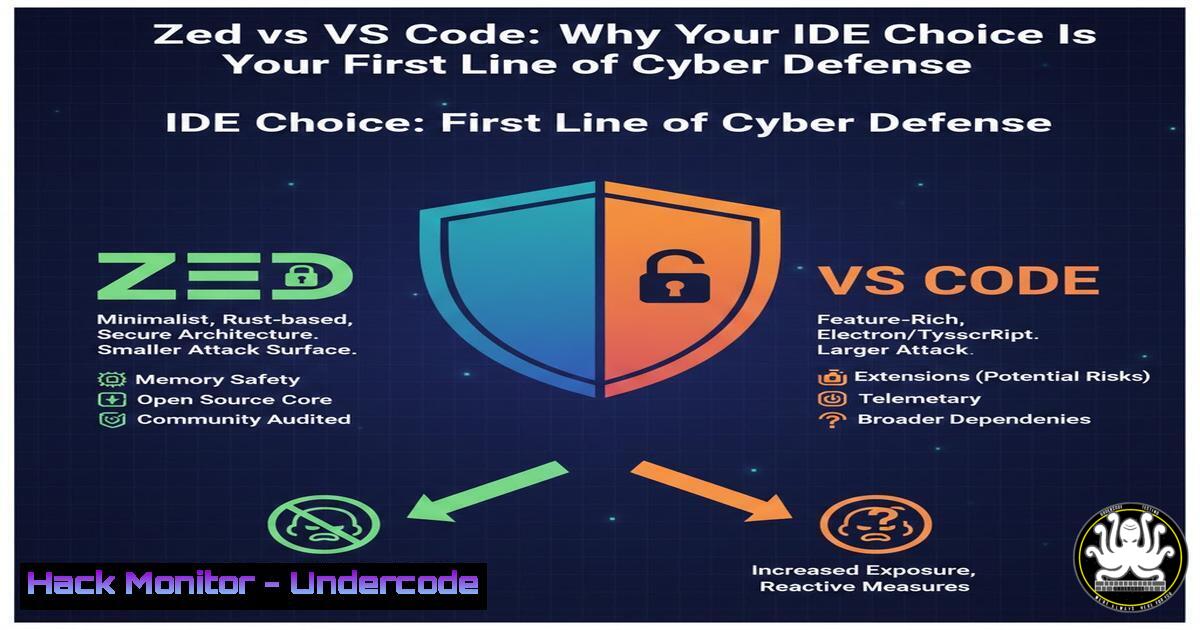
In the modern software development lifecycle, the Integrated Development Environment (IDE) is the cockpit from which code is built, tested, and deployed. This central role makes it a critical, yet often overlooked, component of an organization’s security posture. A bloated, extension-laden IDE can introduce vulnerabilities and slow incident response, while a performant, streamlined tool enhances developer focus and secure coding practices. The emergence of editors like Zed, which prioritize raw speed and a minimalist, collaborative architecture, signals a shift towards tooling that inherently supports secure and efficient development workflows, directly impacting application security.
Learning Objectives:
- Understand how IDE performance and design philosophy influence secure coding habits and developer productivity.
- Learn to configure and harden a modern, high-performance IDE like Zed for security-conscious development.
- Evaluate collaborative coding features through a cybersecurity lens to maintain security in pair programming and code review scenarios.
You Should Know:
1. The Security Implications of IDE Bloat
The post highlights a critical pain point: traditional IDEs like VS Code can become “heavy” through layers of extensions and configurations. From a security perspective, each extension is a potential attack vector—it may have vulnerabilities, excessive permissions, or be abandoned by its maintainer. A slower IDE also fragments developer focus, increasing the likelihood of missing security flaws during code review.
Step‑by‑step guide to auditing your current IDE:
- List Installed Extensions: In VS Code, open the terminal within the editor (
Ctrl+orCmd+) and run:
`code –list-extensions`
This outputs all installed extensions. Review each for necessity and reputation.
2. Check for Updates: Outdated extensions are a common risk. Ensure automatic updates are enabled (Settings > Extensions) or regularly run:
`code –update-extensions`
- Minimalist Profile: Create a new, clean profile for security-sensitive projects. In VS Code, use the `–user-data-dir` flag to launch with a separate configuration:
`code –user-data-dir=~/vscode-secure-profile`
- Switch Evaluation: For a natively lean experience, download and install Zed from its official site (`https://zed.dev`). Its Rust-based architecture and reduced reliance on third-party extensions for core functionality inherently minimize the attack surface.
2. Configuring Zed for Secure Development
Zed’s “sobriety” and speed aren’t just productivity features; they enable a more controlled environment. A faster, more responsive IDE allows developers to run security linters and static analysis tools in real-time without crippling lag.
Step‑by‑step guide to a secure Zed setup:
- Installation & Integrity Check: Always download Zed from the official source (
https://zed.dev`). On Linux, after downloading the `.deb` or.rpm`, verify the package signature if provided, or checksum. - Core Security Settings: Navigate to Zed’s settings ( `Ctrl+ ,` or `Cmd+ ,` ). Key configurations include:
Automatic Updates: Ensure they are enabled to receive security patches.
Telemetry: Review and disable any data collection not required for your compliance.
File Access: Zed’s project-centric model naturally limits file system scope. Be mindful of granting broad terminal access within the editor. - Integrate Security Tooling: Use Zed’s co-pilot and command palette to integrate security tools directly into your workflow. For example, bind a key to run a static analysis tool like `semgrep` or `gosec` on the current file.
Example Command Palette entry for a task: “Run Semgrep Scan”
Associated CLI command in task configuration: `semgrep scan –config auto .`
3. The Cybersecurity Advantage of Native Collaboration
The post praises Zed’s “modern vision of collaboration.” Built-in, low-latency multiplayer editing (like VS Code Live Share but integrated) is a security feature. It allows for real-time, secure pair programming and code reviews without relying on external, potentially unvetted screen-sharing or remote desktop tools that could leak credentials or sensitive data.
Step‑by‑step guide to secure collaborative sessions in Zed:
- Initiate a Secure Session: Use the “Share Project” function. Zed creates a peer-to-peer or relayed connection. Verify that session links are shared over secure channels (internal messaging, not public chats).
- Control Participant Permissions: When starting a session, you can set participants as “Editors” or “Viewers.” For security reviews, use “Viewer” mode to prevent unauthorized changes.
- Post-Session Hygiene: After the session, revoke the shared link from the collaboration panel. Session logs should be reviewed if auditing is required.
4. Hardening the Development Terminal
Whether in Zed, VS Code, or any IDE, the integrated terminal is a powerful but dangerous tool. It often runs with the user’s full privileges and can be a pivot point for attacks if the IDE is compromised.
Step‑by‑step guide to terminal hardening:
Linux/macOS (Zsh/Bash): Restrict sensitive command history and use secure shell configurations.
Add to `~/.zshrc` or `~/.bashrc`:
 Don't record commands starting with space or sensitive prefixes
export HISTCONTROL=ignorespace:ignoredups
alias mysql=' mysql -p'  Space before command avoids history
export HISTIGNORE="sudo -S:mysql:psql"  Ignore commands with passwords
Windows (PowerShell): Implement Transcript logging for auditing.
Enable in an Administrative PowerShell:
 Start transcript logging for all PS sessions
New-Item -ItemType Directory -Force -Path "$HOME\PSLogs"
Register-PSSessionConfiguration -Name "SecureIDE" -StartupScript {
Start-Transcript -Path "$HOME\PSLogs\PSLog_$(Get-Date -Format 'yyyyMMdd_HHmmss').txt" -Append
} -Force
- API Key and Secret Management in the IDE
Developers often inadvertently leak secrets through code committed from their IDE. Zed’s speed in opening large codebases can help in quickly searching for leaked secrets before commit.
Step‑by‑step guide for pre-commit secret scanning:
- Install a Secret Scanning Tool: Use `gitleaks` or
trufflehog.Install gitleaks (example for macOS with Homebrew) brew install gitleaks
- Create a Pre-commit Hook in Zed’s Terminal: Navigate to your project’s `.git` directory.
cd /path/to/your/repo
Create a pre-commit hook that runs gitleaks
echo '!/bin/sh
gitleaks protect --staged -v
if [ $? -eq 1 ]; then
echo "Gitleaks has found secrets in your staged code. Commit blocked."
exit 1
fi' > .git/hooks/pre-commit
chmod +x .git/hooks/pre-commit
- Use Zed’s Multi-Buffer Search: Perform a rapid project-wide search for common patterns like
api_key,password,secret_, etc., using Zed’s built-in search ( `Ctrl+Shift+F` ) before finalizing any commit.
What Undercode Say:
- Your IDE is Part of Your Security Stack. It is not a neutral tool. A performant, minimal, and intentionally configured IDE like Zed reduces cognitive load and attack surface, allowing developers to maintain a security-focused mindset without friction. The quest for raw speed directly translates to more frequent security linting and faster vulnerability discovery.
- Native Collaboration is an Operational Security Win. Built-in, secure multiplayer coding reduces dependency on external tools, keeps sensitive code within a controlled environment, and streamlines secure peer review processes, making security a collaborative default rather than a bureaucratic afterthought.
Prediction:
The trajectory towards high-performance, developer-centric tools like Zed will accelerate. We will see a convergence where the next generation of IDEs will bake in security features as core components—think integrated, real-time secret detection, software composition analysis (SCA) without plugins, and AI-powered security suggestion engines that run locally for privacy. The “battle” will shift from mere features to which tool can provide the most secure and fluent development environment by default, forcing all players to prioritize both performance and security hygiene. This will raise the baseline for secure software development, making vulnerabilities introduced by tooling inefficiency or misconfiguration increasingly rare.
▶️ Related Video (78% Match):
🎯Let’s Practice For Free:
IT/Security Reporter URL:
Reported By: Antoninhily Zed – Hackers Feeds
Extra Hub: Undercode MoN
Basic Verification: Pass ✅


