Listen to this Post
Introduction:
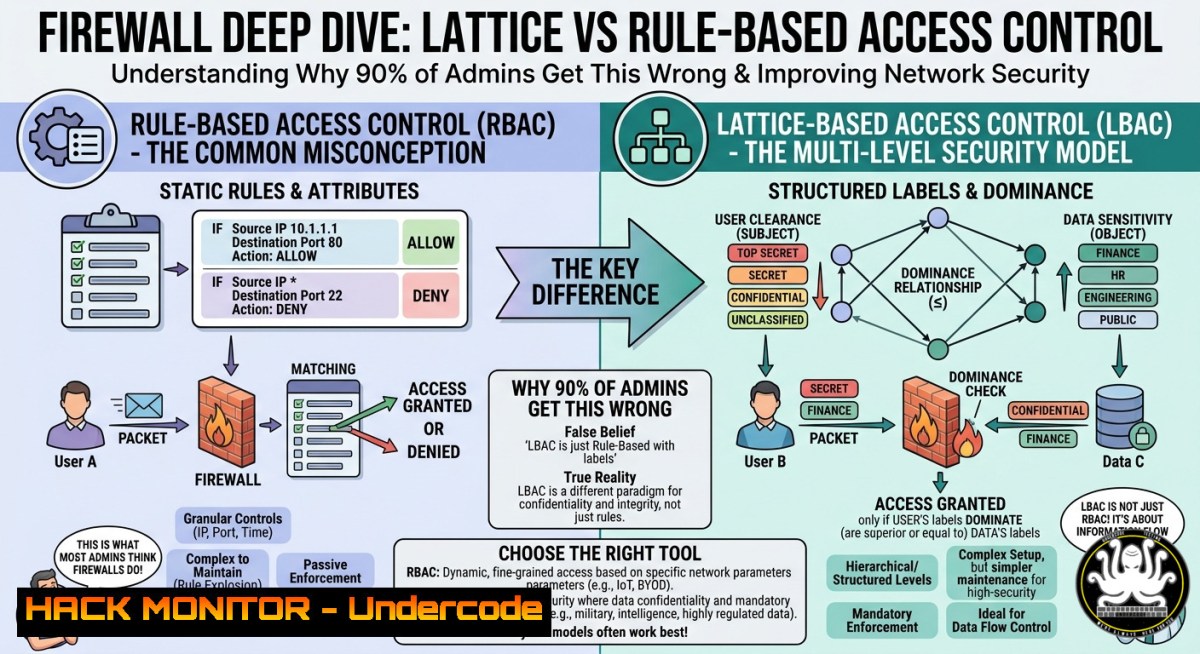
Firewalls are the first line of defense in network security, yet many professionals misunderstand how they are fundamentally classified. A recent poll on Hacking Articles asked “A firewall can be classified as a:” with options including Lattice based, Rule based, Directory based, and ID based access control – revealing widespread confusion. In reality, traditional firewalls operate primarily on rule-based access control (RBAC) , where packet filtering decisions depend on a ordered set of “if-then” rules, while lattice-based models apply to multilevel security contexts like mandatory access control (MAC) in SELinux.
Learning Objectives:
- Differentiate between rule-based, lattice-based, directory-based, and ID-based access control models as they apply to firewalls and security policies.
- Implement and verify firewall rules on Linux (iptables/nftables) and Windows (netsh/New-NetFirewallRule) using real-world commands.
- Identify common misconceptions in firewall classification and apply the correct model when designing network access controls.
You Should Know:
- Rule-Based Access Control: The Backbone of Traditional Firewalls
Rule-based access control (RBAC) evaluates each packet against a sequentially ordered list of criteria – source/destination IP, port, protocol, and flags. The first matching rule determines the action (ACCEPT, DROP, REJECT). This is how iptables, nftables, and most commercial firewalls operate.
Step‑by‑step guide: Creating a rule‑based firewall policy on Linux (iptables)
 View existing rules with line numbers
sudo iptables -L INPUT -n --line-numbers

Add a rule to allow SSH from a specific subnet (example: 192.168.1.0/24)
sudo iptables -A INPUT -p tcp --dport 22 -s 192.168.1.0/24 -j ACCEPT

Add a rule to drop all other incoming traffic (default deny)
sudo iptables -A INPUT -j DROP

Insert a rate-limiting rule for ICMP (block more than 5 pings/sec)
sudo iptables -A INPUT -p icmp --icmp-type echo-request -m limit --limit 5/second -j ACCEPT
sudo iptables -A INPUT -p icmp --icmp-type echo-request -j DROP

Save rules persistently (Debian/Ubuntu)
sudo apt install iptables-persistent -y
sudo netfilter-persistent save
Windows equivalent (PowerShell as Administrator):
 Show existing inbound rules
Get-NetFirewallRule | Where-Object {$_.Direction -eq "Inbound"} | Format-Table DisplayName, Action

Allow SSH (port 22) from a specific IP range
New-NetFirewallRule -DisplayName "Allow SSH from 192.168.1.0/24" -Direction Inbound -Protocol TCP -LocalPort 22 -RemoteAddress 192.168.1.0/24 -Action Allow

Block all other inbound ICMP (ping)
New-NetFirewallRule -DisplayName "Block ICMPv4" -Direction Inbound -Protocol ICMPv4 -Action Block
What this does: The Linux iptables rules process sequentially – SSH from the trusted subnet is accepted, then all other traffic is dropped. The ICMP rate limiter prevents ping floods. Windows Firewall uses similar ordered rule evaluation but with a graphical or PowerShell interface. Always test rules with `ping` or `nmap` from a test host before deploying to production.
- Lattice‑Based Access Control: Not for Firewalls but Essential for MLS
Lattice-based access control (LBAC) assigns every subject and object a security level (e.g., Unclassified, Confidential, Secret, Top Secret) and enforces that a subject can only access objects at or below their level (no read up, no write down in Bell‑LaPadula). This model is not used in conventional firewalls because firewalls do not enforce data classification – they enforce network flow rules. However, LBAC appears in operating system MAC (SELinux, AppArmor) and database row-level security.
Step‑by‑step guide: Inspecting SELinux lattice (MLS) on RHEL/CentOS
 Check if SELinux is running in MLS mode
sestatus | grep "Current mode"
getenforce

List file contexts and their MLS ranges
ls -Z /etc/shadow
 Example output: system_u:object_r:shadow_t:s0

Change a file's MLS range (requires appropriate clearance)
sudo chcon -l s0:c0.c10 /var/www/html/index.html

View current subject (process) clearance
id -Z
ps -Z -C bash
What this does: SELinux adds a lattice (s0, s0:c0.c10, etc.) to traditional discretionary access control. A process running at `s0` cannot read a file labeled `s0:c0.c10` unless the policy explicitly allows it. This prevents a compromised web server from leaking classified data, whereas a packet-filtering firewall would not stop such a data exfiltration over an allowed port (e.g., 443). Thus, firewalls and LBAC are complementary, not interchangeable.
3. Directory‑Based Access Control: A Misleading Term
“Directory‑based access control” is not a standard classification in firewall literature. It likely confuses directory services (LDAP, Active Directory) with access control decisions. Modern next‑generation firewalls (NGFWs) can query an LDAP/AD directory to enforce policies based on user identity, but the underlying firewall engine remains rule‑based.
Step‑by‑step: Configure user‑aware firewall rule using Windows Defender Firewall with AD group
 Install RSAT tools to query AD
Install-WindowsFeature -Name RSAT-AD-PowerShell

Create a firewall rule that allows RDP only for members of "RemoteUsers" group
 (Note: Windows Firewall itself does not natively filter by AD group – requires IPsec or third-party)
 Alternative: Use Group Policy to deploy restricted RDP access
New-NetFirewallRule -DisplayName "RDP for IT Dept" -Direction Inbound -Protocol TCP -LocalPort 3389 -RemoteAddress (Get-ADGroupMember -Identity "RemoteUsers" | ForEach-Object {Get-ADUser $_.distinguishedName -Properties msRTCSIP-UserRoutingGroupId}) -Action Allow
What this actually does: The command attempts to resolve AD group members to IP addresses (impractical for dynamic environments). Real directory‑based firewall integration uses RADIUS or LDAP authentication with user‑based rules after VPN authentication. For example, Palo Alto Networks Firewall can map AD user to a rule: “Allow user=jsmith to 10.0.0.5/32 tcp/443”. The classification remains rule‑based – the condition simply includes user identity.
- ID‑Based Access Control: The Rise of Identity‑Aware Firewalling
ID‑based access control (IBAC) uses a unique identifier (user ID, session ID, certificate thumbprint) as the primary decision factor. While traditional firewalls ignore identity, zero‑trust architectures and micro‑segmentation tools (e.g., Zscaler, Illumio) implement IBAC by tying rules to authenticated workload identities rather than IP addresses.
Step‑by‑step: Create an identity‑aware firewall rule with nftables and 802.1X (advanced)
 Install nftables (modern replacement for iptables)
sudo apt install nftables -y

Create a table and chain for identity-based filtering (using fwmark set by authenticator)
sudo nft add table inet identity_fw
sudo nft add chain inet identity_fw forward { type filter hook forward priority 0\; policy drop\; }

Mark packets from authenticated users (assuming RADIUS server marks them with --set-mark 100)
sudo nft add rule inet identity_fw forward mark 100 accept

Log and drop unauthenticated traffic
sudo nft add rule inet identity_fw forward log prefix "Unauthenticated: " drop

List all rules
sudo nft list ruleset
What this does: This configuration delegates identity verification to an external authenticator (e.g., WPA2‑Enterprise with RADIUS). The authenticator sets a packet mark (fwmark) on traffic from successfully authenticated users. The nftables rule then accepts only marked packets – effectively enforcing an ID‑based policy. This is the closest a Linux firewall can get to IBAC without a full zero‑trust proxy.
5. Hardening Firewalls Against Misclassification: Avoiding Common Pitfalls
Many security breaches result from assuming a firewall’s classification model includes features it does not. For instance, a rule‑based firewall cannot prevent a data leak via a permitted port just because the user lacks a security clearance – that requires LBAC at the OS level. Likewise, an ID‑based firewall without proper authentication spoofing protection is trivial to bypass.
Step‑by‑step: Audit your existing firewall classification
- Linux: `sudo iptables -L -v -n` – look for default DROP/REJECT at the end, confirm rule order.
- Windows: `Get-NetFirewallRule | Where-Object {$_.Enabled -eq “True”}` – check for overly permissive Allow rules.
- Test misclassification: Try to bypass a “user‑only” rule by spoofing an allowed IP (use `hping3` or
Scapy).
 Spoof a packet from a trusted source (e.g., 192.168.1.100) to test rule-based firewall
sudo hping3 -S -p 22 -a 192.168.1.100 10.0.0.5 -c 1
If the firewall accepts the spoofed packet, it lacks anti‑spoofing (often missing in pure rule‑based models). Add anti‑spoofing with `rp_filter` or explicit rules.
What Undercode Say:
- Key Takeaway 1: Firewalls are fundamentally rule‑based access control engines; lattice, directory, and ID‑based models describe different security domains (OS-level MLS, identity management, zero‑trust) – conflating them leads to design flaws.
- Key Takeaway 2: The poll on Hacking Articles with 7 votes shows that even experienced admins confuse access control models. Correct answer: Rule based access control for traditional firewalls. Lattice‑based is for multilevel security, directory‑based is not a standard firewall classification, and ID‑based applies to NGFWs with user identification.
Analysis (10 lines):
The confusion highlighted by the poll stems from overlapping terminology. “Rule‑based” refers to the evaluation mechanism – a list of ordered conditions. “Lattice‑based” describes a mathematical structure for comparing security labels, rarely implemented in network firewalls except in high‑assurance guards (e.g., Trusted Solaris). “Directory‑based” conflates the data store (LDAP) with the enforcement model; it’s a data source, not a decision logic. “ID‑based” is emerging with zero‑trust but still relies on rule engines – the ID is just another field in the rule. Real‑world firewalls, from iptables to Palo Alto, all use rule tables. Misclassifying a firewall can lead to false security expectations, like assuming a firewall enforces user clearance levels. The correct answer is Rule based access control – a fundamental concept every cybersecurity professional must know. Train your teams using practical labs (e.g., building a rule‑based firewall in AWS Security Groups or Azure NSGs) to cement this distinction.
Prediction:
In the next 3–5 years, traditional rule‑based firewalls will evolve into adaptive, AI‑driven policy engines that automatically generate and reorder rules based on observed traffic patterns and identity context. However, the underlying classification will remain rule‑based – the rules will simply be machine‑learned. Lattice‑based models will see a resurgence in confidential computing environments (e.g., enclave‑to‑enclave communication), but network firewalls at the perimeter will stay rule‑based. The poll’s real lesson is that security education must move beyond multiple‑choice memorization to hands‑on firewall configuration. Expect certification exams (CompTIA Security+, CCSP) to add scenario‑based questions that expose this confusion, driving training courses to include live firewall labs on both Linux and Windows.
▶️ Related Video (68% Match):
🎯Let’s Practice For Free:
IT/Security Reporter URL:
Reported By: UgcPost 7464860210008862720 – Hackers Feeds
Extra Hub: Undercode MoN
Basic Verification: Pass ✅


