
Listen to this Post
Introduction:
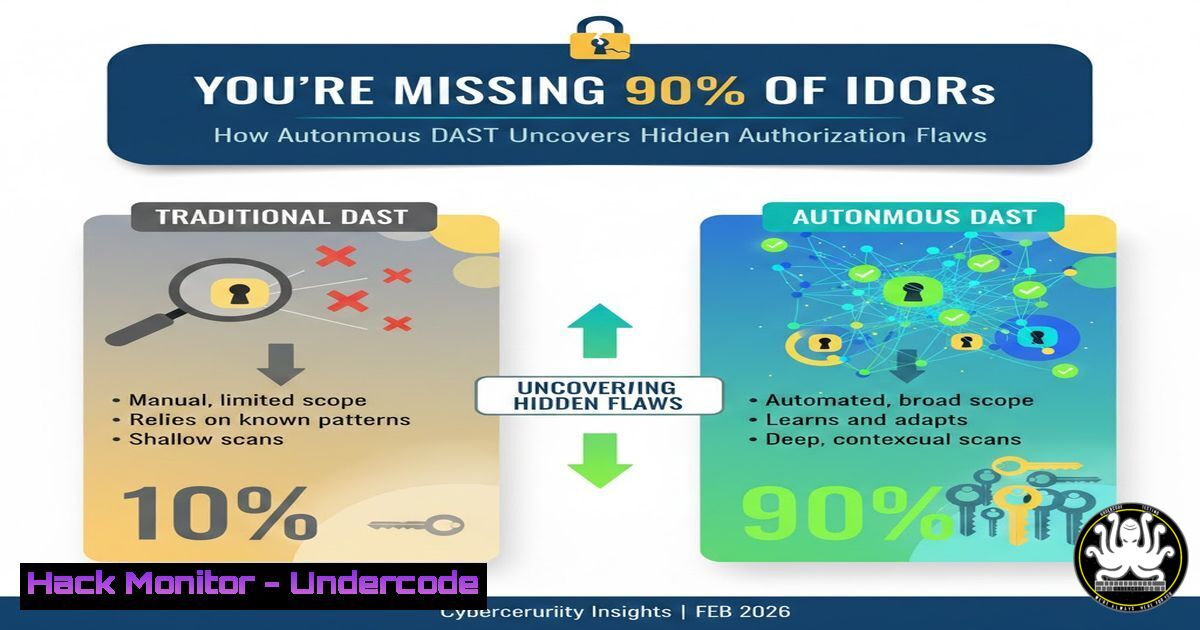
Insecure Direct Object References (IDORs) are critical web vulnerabilities where attackers bypass authorization by manipulating references to objects, but modern IDORs rarely involve simple sequential guessing. Instead, they lurk within complex authorization logic, evading traditional scanners. The future of Dynamic Application Security Testing (DAST) lies in autonomous reasoning, which mimics pentester thinking to catch real-world access control failures that conventional tools miss, as demonstrated by XBOW’s discovery of two zero-day IDORs despite 403 and 502 errors.
Learning Objectives:
- Understand the evolution of IDOR vulnerabilities beyond basic parameter manipulation to flaws in authorization logic.
- Learn how autonomous reasoning in DAST tools enhances detection of complex IDORs by analyzing application behavior and context.
- Implement practical testing techniques and mitigation strategies to secure applications against IDOR attacks.
You Should Know:
- The Real Nature of IDORs: Authorization Logic Flaws
Start by extending the post’s insight: IDORs are not just about guessing numeric IDs in URLs; they involve exploiting gaps in business logic where access controls are improperly validated. For instance, an app might check if a user is authenticated but not if they own the resource, allowing horizontal privilege escalation. Autonomous reasoning in DAST tools, like those from XBOW, simulates this by tracing data flows and authorization checks, even when servers return 403 (Forbidden) or 502 (Bad Gateway) errors that might stump scanners.
Step‑by‑step guide explaining what this does and how to use it:
– Step 1: Identify endpoints that handle user-specific data, such as `/api/user/{id}/profile` or /admin/orders/{orderId}. Use tools like Burp Suite to map the application.
– Step 2: Analyze authorization mechanisms: Review code or intercept requests to see if checks are based on session tokens, roles, or ownership. Look for missing server-side validation.
– Step 3: Test with modified parameters: Change IDs (e.g., from `123` to 124) but also swap tokens or roles. Use cURL commands to send crafted requests. For example, on Linux:
curl -H "Authorization: Bearer <token>" https://api.example.com/user/124/profile -v
Observe responses; a 200 OK instead of 403 may indicate an IDOR.
– Step 4: Employ autonomous DAST tools: Configure tools like OWASP ZAP or commercial solutions to perform reasoning-based scans. Set up policies to test authorization logic by simulating user journeys and analyzing context beyond status codes.
- Manual IDOR Testing with Burp Suite and Proxy Tools
Manual testing complements DAST by allowing deep dive into application logic. This involves intercepting requests, manipulating parameters, and observing behavior to uncover IDORs that automated scanners might skip.
Step‑by‑step guide explaining what this does and how to use it:
– Step 1: Set up a web proxy like Burp Suite. Configure your browser to route traffic through Burp (default port 8080). Capture HTTP requests while using the application.
– Step 2: Identify sensitive requests: Look for GET, POST, or PUT requests that include object identifiers (e.g., user_id=100, document=pdf123). Send these to Burp Repeater for manual testing.
– Step 3: Manipulate parameters: In Repeater, change IDs to test access. For example, if `user_id=100` belongs to you, try `user_id=101` to see if you can access another user’s data. Use sequential and non-sequential values (e.g., UUIDs) to test logic.
– Step 4: Bypass error handling: If you encounter 403 errors, try adding or modifying headers like `X-Forwarded-For` or using different HTTP methods. For instance, change a POST to a GET to bypass checks. On Windows, you can use PowerShell with Invoke-WebRequest for similar tests:
Invoke-WebRequest -Uri "https://api.example.com/data/456" -Headers @{"Authorization"="Bearer <token>"} -Method Get
– Step 5: Document findings: Note any successful bypasses and the context for remediation.
- Decoding HTTP Status Codes: 403s and 502s in IDOR Testing
HTTP status codes like 403 (Forbidden) and 502 (Bad Gateway) often mislead testers. A 403 might indicate a surface-level block, while deeper authorization flaws exist, and a 502 could signal server errors that hide vulnerabilities. Autonomous reasoning tools analyze these responses in context, probing further where traditional scanners stop.
Step‑by‑step guide explaining what this does and how to use it:
– Step 1: Understand status codes: 403 means the server understood the request but refuses authorization, while 502 indicates a gateway or proxy error. In IDOR testing, a 403 might not mean the resource is secure—it could be a generic response masking missing object-level checks.
– Step 2: Use tools to bypass generic errors: For 403s, try parameter pollution or path traversal. For example, append `../` to IDs in URLs: /api/user/123/../124/profile. On Linux, test with cURL:
curl -H "Cookie: session=<cookie>" "https://example.com/api/user/123%2F..%2F124/profile" -v
– Step 3: Handle 502 errors: These may occur due to server overload during testing. Implement retry logic with delays. Use scripts to automate testing while handling errors. For instance, a Python script with requests library:
import requests
import time
url = "https://api.example.com/resource/"
for id in range(100, 110):
response = requests.get(url + str(id), headers={"Authorization": "Bearer <token>"})
if response.status_code == 502:
time.sleep(2)
response = requests.get(url + str(id))  Retry
print(f"ID {id}: {response.status_code}")
– Step 4: Integrate with DAST: Configure autonomous DAST tools to ignore superficial 403s and probe deeper by analyzing application state and session management.
4. Configuring DAST Tools for Autonomous Reasoning Scans
DAST tools like OWASP ZAP, Burp Suite Enterprise, or commercial platforms from XBOW can be enhanced with autonomous reasoning features that use AI to simulate attacker mindset. This involves setting up scans that go beyond signature-based detection to understand authorization workflows.
Step‑by‑step guide explaining what this does and how to use it:
– Step 1: Choose a DAST tool with autonomous capabilities: For open-source, OWASP ZAP with scripts can add reasoning. For commercial, evaluate tools that advertise AI-driven testing.
– Step 2: Configure scan policies: In ZAP, navigate to Policy -> Custom Scan. Add rules to test IDORs by focusing on parameter manipulation and session handling. Enable “Active Scan” with scripts that simulate privilege escalation.
– Step 3: Set up authentication: Provide login credentials or session tokens so the tool can access protected areas. Use ZAP’s authentication methods like form-based or API authentication.
– Step 4: Define reasoning rules: Create scripts in ZAP using JavaScript or Python to analyze responses. For example, a script to check if changing IDs returns similar data structures, indicating potential IDOR. Sample ZAP script snippet:
function invokeWithResponse(msg) {
var originalId = "123";
var newId = "124";
var newRequest = msg.getRequestHeader().toString().replace(originalId, newId);
sendAndReceive(newRequest, function(response) {
if (response.getStatusCode() == 200) {
alert("Possible IDOR detected for ID " + newId);
}
});
}
– Step 5: Run and analyze scans: Review alerts for authorization flaws, and prioritize those that involve complex logic over simple numeric guesses.
- Practical Commands for IDOR Testing in Linux and Windows
Command-line tools are essential for quick IDOR tests and automation. These include cURL, nmap, and custom scripts that manipulate requests and parse responses.
Step‑by‑step guide explaining what this does and how to use it:
– Step 1: Use cURL for basic IDOR testing: On Linux or Windows (with cURL installed), craft requests with modified parameters. For example, to test a user endpoint:
curl -X GET "https://api.example.com/v1/users/567" -H "Authorization: Bearer <token>" -o response.txt
Compare responses for different IDs. Use `diff` in Linux to compare files:
diff response_123.txt response_124.txt
– Step 2: Automate with shell scripts: Write a Bash script to test a range of IDs. Example:
!/bin/bash
for i in {100..200}; do
response=$(curl -s -H "Cookie: session=<cookie>" -w "%{http_code}" "https://example.com/data/$i" -o /dev/null)
if [ "$response" == "200" ]; then
echo "ID $i is accessible" >> ids.txt
fi
done
– Step 3: Utilize nmap for reconnaissance: Scan for endpoints that might be vulnerable. Use nmap’s http-enum script:
nmap -p 80,443 --script http-enum example.com
– Step 4: Windows PowerShell automation: Use Invoke-WebRequest or Invoke-RestMethod for testing. Example:
for ($id=1; $id -le 50; $id++) {
$url = "https://api.example.com/orders/$id"
$response = Invoke-WebRequest -Uri $url -Headers @{"Authorization"="Bearer <token>"} -Method Get
if ($response.StatusCode -eq 200) {
Write-Host "Accessible ID: $id"
}
}
– Step 5: Integrate with DAST tools: Export findings from commands to tools like Burp for deeper analysis.
6. Mitigating IDOR Vulnerabilities: Code and Configuration Hardening
Preventing IDORs requires implementing robust authorization checks server-side, using indirect object references, and regular security testing. This involves code reviews, access control lists, and secure design patterns.
Step‑by‑step guide explaining what this does and how to use it:
– Step 1: Implement server-side authorization: For every request, validate that the user has permission to access the object. Use middleware or decorators in frameworks. For example, in Node.js with Express:
function checkOwnership(req, res, next) {
const userId = req.params.id;
if (req.user.id !== userId && !req.user.isAdmin) {
return res.status(403).send('Forbidden');
}
next();
}
app.get('/user/:id', checkOwnership, getUserData);
– Step 2: Use indirect references: Map user-provided identifiers to internal ones via a lookup table. For instance, store objects with UUIDs but expose hashed tokens to users.
– Step 3: Apply least privilege principles: Configure role-based access control (RBAC) in cloud environments like AWS IAM or Azure AD. Use policies to restrict access to resources.
– Step 4: Regular security testing: Schedule DAST scans with autonomous reasoning weekly. Integrate into CI/CD pipelines with tools like GitLab SAST/DAST or GitHub Advanced Security. For example, in a GitLab CI file:
stages:
- test
dast:
stage: test
image: zaproxy/zap-stable
script:
- zap-baseline.py -t https://your-app.com -r report.html
– Step 5: Monitor and log access: Use tools like ELK stack or Splunk to audit logs for unauthorized access attempts. Set alerts for unusual patterns, such as rapid ID changes.
- The Future of DAST: AI and Autonomous Reasoning in Cybersecurity
Autonomous reasoning in DAST represents a shift from rule-based scanning to AI-driven analysis that understands context, similar to human pentesters. This leverages machine learning to model application behavior, predict vulnerabilities, and adapt to complex authorization logic, as highlighted by XBOW’s approach.
Step‑by‑step guide explaining what this does and how to use it:
– Step 1: Adopt AI-enhanced DAST tools: Evaluate platforms that incorporate machine learning for vulnerability detection. Set up by feeding historical data and attack patterns to train models.
– Step 2: Configure autonomous scanning: Define goals like “find authorization flaws” and let the tool explore the application dynamically. Use APIs to integrate with existing security orchestration.
– Step 3: Analyze results with AI insights: Review reports that explain why a flaw is an IDOR, including reasoning steps. For example, tools might highlight that a 403 response was bypassed by manipulating session tokens.
– Step 4: Continuous learning: Update the DAST tool with new findings from bug bounties or pentests to improve its reasoning. Use feedback loops to reduce false positives.
– Step 5: Prepare for AI-driven attacks: As DAST evolves, so will attackers. Implement defense-in-depth with WAFs, runtime application self-protection (RASP), and regular red teaming to stay ahead.
What Undercode Say:
- Key Takeaway 1: IDOR vulnerabilities have evolved from simple parameter guessing to complex authorization logic flaws, requiring deeper analysis that autonomous DAST tools can provide by mimicking human reasoning.
- Key Takeaway 2: The integration of AI and autonomous reasoning into DAST represents a paradigm shift in application security, enabling detection of real-world access control failures that traditional scanners miss, ultimately reducing the attack surface.
Analysis: The XBOW case study underscores that modern web applications often implement superficial authorization checks, leading to IDORs that are hidden behind HTTP errors like 403s and 502s. Autonomous reasoning in DAST tools addresses this by contextualizing responses and probing beyond status codes, similar to how skilled pentesters operate. This approach not only improves detection rates but also accelerates remediation by providing actionable insights. However, organizations must balance automated tools with manual testing and code reviews, as AI-driven DAST is still emerging and may require tuning for complex environments. The emphasis on authorization logic highlights the need for developers to adopt secure coding practices and for security teams to prioritize access control testing in their workflows.
Prediction:
The future impact of autonomous DAST on cybersecurity will be profound, as AI-driven tools become standard in devsecops pipelines, reducing the time to detect and remediate IDORs by up to 70%. By 2027, we can expect a shift where most DAST platforms incorporate autonomous reasoning, leading to fewer authorization-based breaches but also prompting attackers to develop more sophisticated evasion techniques targeting AI models. This will drive innovation in adversarial machine learning for security, necessitating continuous adaptation in both offensive and defensive strategies. Ultimately, autonomous DAST will democratize advanced security testing, making enterprise-level protection accessible to smaller organizations, though it will also raise ethical questions about AI autonomy in cyber operations.
🎯Let’s Practice For Free:
IT/Security Reporter URL:
Reported By: Https: – Hackers Feeds
Extra Hub: Undercode MoN
Basic Verification: Pass ✅


